Building React Apps with Claude Code

React code that Claude Code writes in different situations and environments usually works, but each file can end up following a different React pattern.
Some components may be declared with React.FC, while others are written as function declarations.
Data fetching code may go directly inside useEffect, and derived values may be synced with useEffect and setState.useMemo and useCallback may be added where they are not needed, and forwardRef, which modern React no longer uses, may show up.
Routing, data fetching, global state, styling, and form handling rely on external libraries, and the code pattern changes with each choice.
Let's look at where to put these decisions when you build React apps with Claude Code, how to verify them, and how to carry them through to bugs, refactoring, reviews, performance, and more.
# Project setup
This post is based on an example that searches for movies and shows them in a list.
It starts from a project already set up with Vite, TypeScript, React, ESLint, Prettier, Tailwind CSS, and more, so see the installation parts of Starting a React Project with Vite and Tailwind CSS Core Patterns.
First, run Claude Code in the project root and enter the /init command.
It analyzes the current project and creates a draft CLAUDE.md file.
1/init
/init records facts such as the project structure and the tools in use.
It provides basic information so Claude does not have to review the whole project every time it works.
Next, set up verification commands.
Even well-organized rules cannot filter out code that goes off track if you have no way to check the results.
12345678910{ "scripts": { "dev": "vite", "build": "tsc -b && vite build", "preview": "vite preview", "typecheck": "tsc -b", "lint": "eslint .", "test:unit": "vitest run" } }
TypeScript understands React JSX syntax directly, so tsc alone checks it, without a separate type-checking tool.-b is short for --build, an option that checks the projects listed in references in tsconfig.json in order.
The Vite template groups tsconfig.app.json and tsconfig.node.json as project references, so a single tsc -b checks both the source and the config files, and because of the noEmit setting, it produces no output.
The build script already includes tsc -b, but typecheck is kept separate so you can check without building.
In React, however, type checking alone is not enough.
Hooks called inside conditions, values missing from dependency arrays, and setState called directly inside effects all pass as long as the types are correct.
ESLint checks for these problems, and starting with v7, the eslint-plugin-react-hooks plugin includes React Compiler-based rules in its recommended preset.
If you chose ESLint for Which linter to use? when creating the Vite project, v7 of this plugin is already installed.
For a project created before that, check the installed version and update it if it is below 7.
1npm i -D eslint-plugin-react-hooks@^7
12345678910import { defineConfig } from 'eslint/config' import reactHooks from 'eslint-plugin-react-hooks' // ... export default defineConfig([ { files: ['**/*.{ts,tsx}'], extends: [reactHooks.configs.flat.recommended] } ])
Register these commands in the project settings so Claude can run them without approval.
If it asks for permission every time, the flow of the verification loop breaks.
1234567891011121314{ "permissions": { "allow": [ "Bash(npm run typecheck)", "Bash(npm run lint)", "Bash(npm run test:unit)" ], "deny": [ "Read(.env)", "Read(.env.local)", "Read(.env.*.local)" ] } }
Claude cannot read the paths registered in deny.
If you restrict the files that contain API keys, their values do not end up in the conversation history or logs.
Deny rules block not only reading but also editing and creating new files at the same paths.
If you write a broad rule like Read(.env*), Claude cannot even create the .env.example sample file that contains only names, so restrict only the names that actually hold values.
# Defining React rules
CLAUDE.md is a project instruction file that is read automatically at the start of every session.
What you add here is not an introduction to the project, but what to choose in situations with several options.
The situations in React that need a decision are as follows.
The first half is about how to write React itself, and the second half is about ecosystem choices that React does not make for you.
| What varies | Options | Without instructions |
|---|---|---|
| Component declaration | Function declaration / arrow function + React.FC |
Mixed across files, and React.FC shows up |
| Props types | interface / type / inline |
Props of the same kind are declared differently |
| Derived values | Compute during render / useEffect + setState |
Code that syncs state with effects appears |
| Memoization | React Compiler / manual useMemo, useCallback, memo |
Memoization is added even where it is not needed |
| Data fetching | TanStack Query / useEffect + fetch |
Loading, error, and race condition handling differs per component |
| Global state | Zustand / Context / Redux | Server data gets copied into Context |
| Routing | React Router Data mode / declarative <Routes> |
Both approaches are mixed in one project |
| Error handling | Route ErrorBoundary / isError branch per component / one global boundary |
Some places have error screens and some do not |
| Loading indicators | State branches on useQuery / useSuspenseQuery + Suspense |
isPending branches and Suspense boundaries are mixed |
| Styling | Tailwind utilities / CSS Modules / CSS-in-JS | Utility classes, inline styles, and separate CSS files are mixed |
| Forms | Uncontrolled + FormData / controlled components / form library |
Each form uses a different approach |
| Path references | Relative paths / aliases | ../../../ keeps growing |
Decide each item one by one and write it as a rule sentence.
Rather than explaining the reasons at length, it is better to write briefly what to use and what not to use.
1234567891011121314151617181920## React coding rules - Write for React 19. Do not use `forwardRef`, `defaultProps`, `PropTypes`, or class components, and receive `ref` as a regular prop. - Write components as function declarations in the form `export default function Name()`. Do not use `React.FC`. - Declare the Props type as `interface NameProps` right above the component, and destructure it in the parameter. - Prefix event callback props with `on`, and handler functions inside components with `handle`. - Compute derived values during render. Do not create state from other state with `useEffect` and `setState`. - Use `useEffect` only to sync with external systems, such as event subscriptions, timers, and browser APIs, and always write a cleanup function. - Leave memoization to React Compiler. Do not write `useMemo`, `useCallback`, or `memo` yourself. - Fetch server data with TanStack Query. Do not call `fetch` inside `useEffect`. - Define queries with `queryOptions` in `/src/queries/domain.ts`, and split data fetching and reusable logic into custom hooks in `/src/hooks/useXxx.ts`. - Branch on loading and errors for server data with `isPending` and `isError` from `useQuery`. Do not use `useSuspenseQuery` or `Suspense` boundaries for data loading. - Define API response types in `/src/types/`, and do not redeclare them inside component files. - Use the data's unique ID as the `key` of list items. Do not use array indexes. - Do not render conditionally with `&&` on values that can be numbers, as in `count && <List />`. Use the ternary operator. - Use `<button>` for click actions and `<Link>` for navigation. Do not use `<div onClick>`, and write `alt` for every `<img>`. - Submit forms with `<form onSubmit>`, and control input values with `useState`. Handle changes sent to the server with TanStack Query's `useMutation`, and do not use `useActionState` or form libraries. - Write styles with Tailwind CSS utility classes. Do not use CSS Modules, inline styles, or separate CSS files. - Name component files in PascalCase, and keep a component and its test file in the same folder with the same name. - Use the `@/` alias for `import`. Allow relative paths only within the same folder.
The derived value rule is one that goes wrong especially often.
If you create a value that keeps only highly rated movies from the search results with useEffect and setState, an extra render happens whenever the source changes, and in between, a screen drawn with the previous value shows briefly.
The responsibility for keeping the two states in sync also stays with people.
If you compute it during render, there is only one state and nothing to sync.
You Might Not Need an Effect in the React docs is the basis for this rule.
The memoization rule assumes a project with React Compiler installed.
You must have chosen TypeScript + React Compiler in the Vite template, or added it to an existing project by following React Compiler Essentials.
With the compiler, manual memoization only adds reading cost, and without the compiler and without instructions, it can be added in a mix of places that need it and places that do not.
Either way, you have to write the decision as a rule so it does not vary from file to file.
For a project without the compiler, change the memoization rule as follows.
12- Apply memoization only where the request explicitly says so. Do not add `useMemo`, `useCallback`, or `memo` on your own judgment. - Limit it to sorting and filtering large lists (`useMemo`), callbacks passed to children wrapped in `memo` (`useCallback`), and item components of large lists (`memo`).
If you require the request to say where to apply it instead of leaving that to Claude's judgment, memoization does not spread differently from file to file, even without the compiler.
The form and loading indicator rules cover areas where the options grew around React 19.
Handling submission with <form action> and useActionState, or handling loading with useSuspenseQuery and Suspense boundaries, also works.
However, in this example TanStack Query owns the server data, so changes are also handled with the same library's useMutation, which keeps everything up to cache invalidation in one place.
Loading and errors also use only one approach: branching on the state that useQuery returns.
You can choose another approach, but write which one you chose in the rules so the two do not mix within one project.
To check whether the rules actually change the results, I sent the same request to a project without rules and to a project with the rules above.
Both projects are in the same state, with TanStack Query, React Router, Zustand, and Tailwind CSS installed, and only the Movie type in /src/types/movie.ts.
1234Create a movie search screen. Include a search input, a loading indicator, a results list, movie cards, and empty result handling, and also add a filter toggle that shows only highly rated movies. Use the OMDb API (https://omdbapi.com?apikey=KEY&s=SEARCH_TERM, and &i=imdbID for details, which provides imdbRating). Create the components under src/components/ and connect them in App.tsx.
In the project without rules, Claude created the request function in /src/api/omdb.ts and wrote the query key and request function directly in useQuery inside the component.
The OMDb response types were declared inside the request function file.
1234567891011121314151617181920212223242526import { useState } from 'react' import { useQuery } from '@tanstack/react-query' import { HIGH_RATING, searchMovies } from '@/api/omdb' import EmptyResult from '@/components/EmptyResult' import Loader from '@/components/Loader' import MovieList from '@/components/MovieList' import RatingFilterToggle from '@/components/RatingFilterToggle' import SearchInput from '@/components/SearchInput' export default function MovieSearch() { const [title, setTitle] = useState('') const [highRatedOnly, setHighRatedOnly] = useState(false) const { data, isFetching, isError, error } = useQuery({ queryKey: ['movies', title], queryFn: ({ signal }) => searchMovies(title, signal), enabled: title !== '', staleTime: 1000 * 60 * 5 }) const movies = data ?? [] const visibleMovies = highRatedOnly ? movies.filter(movie => movie.imdbRating !== null && movie.imdbRating >= HIGH_RATING) : movies // ... }
In the project with rules, the query definition was split into queryOptions in /src/queries/movies.ts, data fetching into custom hooks in /src/hooks/, and the response types were added to /src/types/movie.ts.
The component receives the values the hooks return and only builds the screen.
1234567891011121314151617181920import { queryOptions } from '@tanstack/react-query' import type { Movie, MovieDetail, MovieDetailResponse, MovieSearchResponse } from '@/types/movie' // ... export function moviesSearchQueryOptions(title: string) { return queryOptions({ queryKey: ['movies', 'search', title], queryFn: async ({ signal }): Promise<Movie[]> => { const data = await requestOmdb<MovieSearchResponse>({ s: title }, signal) if (data.Response === 'False') { if (data.Error === NOT_FOUND_ERROR) return [] throw new Error(data.Error) } return data.Search }, enabled: title.length > 0, staleTime: 1000 * 60 * 5 }) } // ...
12345678910111213import { useQuery } from '@tanstack/react-query' import { moviesSearchQueryOptions } from '@/queries/movies' export function useMovieSearch(title: string) { const { data, isFetching, isError, error } = useQuery(moviesSearchQueryOptions(title)) return { movies: data ?? [], isFetching, isError, errorMessage: error?.message ?? '' } }
12345678910111213141516171819202122232425import { useState } from 'react' import { useDebouncedValue } from '@/hooks/useDebouncedValue' import { useMovieRatings } from '@/hooks/useMovieRatings' import { useMovieSearch } from '@/hooks/useMovieSearch' // ... const HIGH_RATING_THRESHOLD = 7 export default function MovieSearchScreen() { const [keyword, setKeyword] = useState('') const [highRatedOnly, setHighRatedOnly] = useState(false) const searchTerm = useDebouncedValue(keyword.trim(), 400) const { movies, isFetching, isError, errorMessage } = useMovieSearch(searchTerm) const { ratings, isFetching: isRatingFetching } = useMovieRatings(movies) const visibleMovies = highRatedOnly ? movies.filter(movie => (ratings.get(movie.imdbID) ?? -1) >= HIGH_RATING_THRESHOLD) : movies function handleKeywordChange(value: string) { setKeyword(value) } // ... }
The differences between the two results are as follows.
| Item | Without rules | With rules |
|---|---|---|
| Query definition | Key and request function written directly in useQuery inside the component |
queryOptions in /src/queries/movies.ts |
| Request function location | /src/api/omdb.ts |
Inside the query definition file |
| Data hooks | None, the component calls it directly | /src/hooks/useMovieSearch.ts, useMovieRatings.ts |
| Response types | Declared inside the request function file | /src/types/movie.ts |
| Handlers | Inline arrow functions | Functions with the handle prefix |
| Conditional rendering | && |
Ternary operator |
| Effects | None | Used only for the debounce timer, with a cleanup function |
In this run, even the project without rules followed the component declaration, derived value, and memoization rules.
The differences appeared in parts about project structure, such as where data fetching code lives and how it is split, where types live, and naming conventions.
What goes off track without rules varies from run to run, depending on the model and the project state, but with rules, the code comes out in the same place and the same form in every run.
These results are the files Claude refers to in the next task, so the structure of the first result becomes the structure of the project.
When rules pile up and CLAUDE.md gets long, split groups of different kinds, such as React rules, state rules, and routing rules, into the .claude/rules/ folder.
Markdown files in this folder are loaded automatically as project-level instructions, just like CLAUDE.md, so you do not need to reference them separately from CLAUDE.md with @path.
1234567├─.claude/ │ ├─rules/ │ │ ├─react.md │ │ ├─store.md │ │ └─router.md │ └─settings.json └─CLAUDE.md
Leave only the project overview and commands in CLAUDE.md.
1234567891011# Movie Search App A movie search application built with Vite + React 19 + TypeScript. React, state, and routing rules are in the `.claude/rules/` folder. ## Common commands - `npm run dev`: Run the development server - `npm run typecheck`: Type check - `npm run lint`: ESLint check (including hooks rules and compiler rules) - `npm run test:unit`: Unit tests
You can narrow the scope of a rule file with paths frontmatter.
React rules are needed only when working on components and hooks, so if you set a condition, they are not loaded for other tasks.
12345678910--- paths: - "src/**/*.tsx" - "src/hooks/**/*.ts" --- # React coding rules - Write components as function declarations in the form `export default function Name()`. - Compute derived values during render.
A rule file without paths is loaded unconditionally every session and has the same priority as .claude/CLAUDE.md.
Do not write formatting rules in CLAUDE.md.
Semicolons and quote styles are already decided by Prettier, so writing them again only uses more tokens and creates room for conflicts.
For the same reason, do not write rules such as banning any or using type-only import type either.
The no-explicit-any rule in the typescript-eslint recommended preset and the verbatimModuleSyntax setting in the Vite template already check them.
Leave what tools can enforce to the tools, and write in the instructions only the design decisions that tools cannot judge.
In React, you can apply this principle much more broadly than to formatting.
Because the ESLint ecosystem is large, you can move many of the rules written above into lint rules.
Rules that ban forwardRef and React.FC are typical examples.
1234567891011121314151617181920212223export default defineConfig([ { files: ['**/*.{ts,tsx}'], extends: [reactHooks.configs.flat.recommended], rules: { 'no-restricted-imports': [ 'error', { paths: [{ name: 'react', importNames: ['forwardRef'], message: 'Receive ref as a regular prop.' }] } ], '@typescript-eslint/no-restricted-types': [ 'error', { types: { FC: 'Write components as function declarations.', 'React.FC': 'Write components as function declarations.' } } ] } } ])
forwardRef is a function, so no-restricted-imports blocks importing it at all.FC is a type, so it is blocked with typescript-eslint's no-restricted-types rule, which is part of the Vite template's ESLint configuration, and you register both FC imported with import { FC } and React.FC accessed through the namespace.
You can see code caught by these rules right in the editor.
If the ESLint extension is installed, the sentence you wrote in message appears as is in the Problems panel.
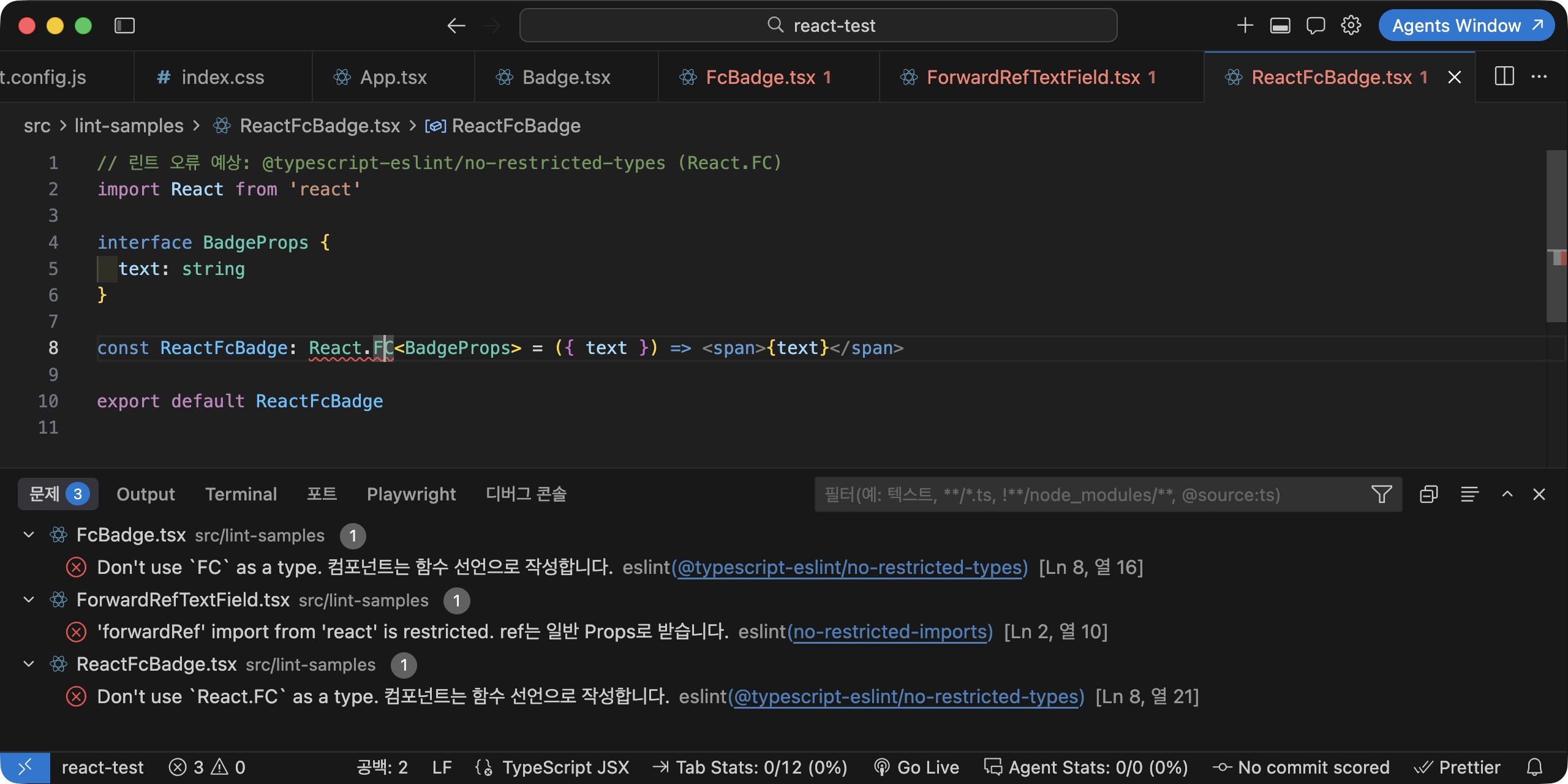
Delete the rules you moved this way from the instructions.
If the same content exists in two places, it becomes a contradiction the moment only one of them is changed.
Write in message not why something is blocked but what to use instead, so Claude reads the error and fixes it right away.
The means of locking in decisions fall into three levels.
| Means | Enforcement level | Rules to put there |
|---|---|---|
Instructions (CLAUDE.md, .claude/rules/) |
Advisory, can be broken | Design decisions such as where to put state |
| Lint (ESLint) | Caught by checks, fed back immediately through hooks | Banned APIs, hooks rules, effect usage |
| Types (TypeScript) | Does not compile | Props shapes, path constants, query return types |
Higher rows are easier to apply, and lower rows cannot be broken.
Start new rules as instructions, but move whatever can go into lint or types there and delete it from the instructions.
The path constants and query definitions covered later are examples of the type level.
# Directing component work
A React component does not fit in a single file.
The context of one component is split across MovieCard.tsx, a type file, custom hooks, and query definitions.
If you do not specify how far to read and how far to edit, Claude may explore more widely than needed, or rewrite hooks and type files for a request that only needs one class changed.
A rule that keeps related files in the same folder with the same name reduces this cost.
Knowing just the name MovieCard tells you where the test file is, and the styles are in the same file as Tailwind classes, so Claude does not need to search the whole folder.
12345678910111213141516├─src/ │ ├─components/ │ │ ├─MovieCard.test.tsx │ │ └─MovieCard.tsx │ ├─hooks/ │ │ └─useMovieSearch.ts │ ├─index.css │ ├─queries/ │ │ └─movies.ts │ ├─routes/ │ ├─stores/ │ ├─test/ │ │ ├─render.tsx │ │ └─setup.ts │ └─types/ │ └─movie.ts
In your request, write both the files to edit and the files Claude does not need to read.
1Show the release year in the MovieCard component.
12Edit only the JSX in @/components/MovieCard.tsx to show the release year below the title. Leave the Tailwind classes and Props type as they are, and you don't need to read any other files.
When you create a new component, it is good to decide the interface first and pass it along.
When the shape of the Props is fixed, there is less freedom in the implementation, and later edits to match the parent component are kept to a minimum.
React has no syntax for declaring events separately, and callback props play that role, so also write the names and signatures of the callback props.
12345678910111213Create @/components/MovieCard.tsx. ```ts interface MovieCardProps { movie: { imdbID: string; Title: string; Poster: string; Year: string } onSelect: (imdbID: string) => void } ``` - Show the poster image, title, and year. - When the card is clicked, pass the imdbID to onSelect. - If the Poster value is 'N/A', show a fallback image. - Follow the React coding rules in CLAUDE.md.
If you describe styles such as colors and spacing in the prompt every time, each component may end up with different values, and the design stops looking consistent as screens pile up.
In Tailwind, the class names themselves fix the values, but the default color palette is wide, so similar colors such as bg-blue-500 and bg-sky-600 may be chosen differently for each component.
If you define the colors the project uses in one place as @theme tokens and write a rule to use only those tokens, most of the styling is locked in too.--color-* variables defined in @theme can be used directly as utility classes such as bg-primary and text-ink; for the syntax, see Tailwind CSS Core Patterns.
12345678@import 'tailwindcss'; @theme { --color-canvas: #ffffff; --color-ink: #1f2328; --color-primary: #087ea4; --color-line: #d0d7de; }
12345678- Write styles only with Tailwind utility classes. Do not use CSS Modules, inline `style`, or `@apply`. - Use only the color tokens defined in `@theme` in `/src/index.css` (`bg-canvas`, `text-ink`, `bg-primary`, `border-line`). Do not use the default palette, such as `bg-blue-500`, or arbitrary values, such as `bg-[#087ea4]`. - If a color you need is missing, add a token to `@theme` first and then use it. - Use only the default scale for spacing and corners (`p-2`, `gap-4`, `rounded-lg`). Do not use arbitrary values such as `p-[13px]`. - Combine conditional classes with `twJoin` from `tailwind-merge`. Do not build class names at runtime, as in `w-[${width}px]`. - Components used on several screens take a `className` prop and merge it with their base classes using `twMerge`. - Do not use outer margins (`m-*`) inside components. The parent sets the spacing between components with `gap`. - Write responsive styles mobile-first and widen them with the `md:` and `lg:` prefixes. Do not use reverse prefixes such as `max-md:`.
You can also enforce the default palette ban with tools.
If you write --color-*: initial; first in @theme, all default color utilities are removed, so classes such as bg-blue-500 produce no styles at all.
Do not write class order in the rules; leave it to the prettier-plugin-tailwindcss plugin.
With these rules, even a short request like Create a movie card component keeps the same style as the rest of the screens.
If you have design mockups, rather than attaching them every time, it is better to define the values extracted from them (design tokens) in @theme first.
Start tasks that change several files together in Plan mode.
When you enter Plan mode with Shift + Tab or the /plan command, Claude checks files and only makes a plan, without editing anything.
For a task that creates the search input, list, cards, and custom hooks all at once, it is safer to check the file list and data flow first.
123I want to build a movie search screen. Including the search input, loading indicator, results list, and empty result handling, just make a plan for which files to create and what role each one plays.
What to check in the plan is not the code but the boundaries.
As long as it is right about which component owns the search term state and whether data fetching lives in a component or a hook, the rest of the implementation usually comes out according to the rules.
In React, where you put state determines the re-render scope, so if you lift state too high, the whole screen re-renders, and if you put it too low, sibling components cannot share it.
This judgment is hard to lock in as a rule, so a person checks it at the planning stage.
If you add a rule to split data fetching logic into query definitions and custom hooks, you can keep components from getting bloated.
Write query definitions with TanStack Query's queryOptions.
The query key, request function, and return type are bundled in one place, and the same definition can be reused in the router loaders and prefetching covered later.
1234567891011121314import { queryOptions } from '@tanstack/react-query' import type { Movie } from '@/types/movie' export function movieSearchOptions(searchText: string) { return queryOptions({ queryKey: ['movies', searchText], queryFn: async () => { const res = await fetch(`https://omdbapi.com?apikey=7035c60c&s=${searchText}`) const { Search: movies = [] } = await res.json() return movies as Movie[] }, enabled: !!searchText }) }
1234567891011121314import { useState } from 'react' import { useQuery } from '@tanstack/react-query' import { movieSearchOptions } from '@/queries/movies' export function useMovieSearch() { const [searchText, setSearchText] = useState('') const { data: movies = [], isFetching } = useQuery(movieSearchOptions(searchText)) function search(text: string) { setSearchText(text.trim()) } return { movies, isFetching, search } }
You do not need to make the query options reactive separately.
When the search term changes, the hook runs again and queryKey changes, so a new request starts.
Even if the response for a previous search term arrives late, its key is different, so it does not overwrite the current screen.
If you write it yourself with useEffect and fetch, you have to handle this race condition with an AbortController or a cancel flag every time.
For hook patterns, see React Hooks Essentials, and for query options, see TanStack Query Essentials.
# State and router rules
In React, the first decision about state is not which library to use but where to put the state.
If the same data is in both the TanStack Query cache and a Zustand store, you have to decide which one is up to date, and without instructions, code that copies responses into a store may appear.
| State | Location | Examples |
|---|---|---|
| Data fetched from the server | TanStack Query cache | Movie list, movie details |
| Screen state that must be shared or restored | URL search parameters | Search term, page number, sorting |
| Client state shared by several screens | Zustand store | Login token, theme, recently viewed movies |
| State within one screen | useState |
Text being typed, open/closed |
Move this table into a rule file.
For the syntax of each, see Zustand Essentials and React Context API Essentials.
12345678910# State rules - TanStack Query owns server data. Do not copy responses into Zustand stores or Context. - Put screen state that must persist after a refresh or a link share (search term, page, sorting) in URL search parameters. - Create Zustand stores only for client state shared by several screens. Keep state used on only one screen in `useState`. - Define stores in `/src/stores/name.ts` in the form `create<State>()(...)`, and name the hook `useNameStore`. - Define functions that change state as actions inside the store. Do not call `setState` directly from components. - Apply the `persist` middleware only to state that must persist after a refresh (theme, recently viewed movies). - Components subscribe only to the values they need with selectors, and group multiple values with `useShallow`. Do not subscribe to the whole store, as in `useAuthStore()`. - Use Context only for values that rarely change (theme, dependency injection). Do not put frequently changing state in Context.
The last two lines are rules about re-render scope.
If you subscribe to the whole store, the component re-renders whenever any value changes, and with Context, every consuming component re-renders when the value changes.
Both work fine functionally, so without instructions they do not get filtered out.
With the URL rule applied, the search hook created earlier reads the search term from the router's search parameters instead of useState.
The results persist after a refresh, and you can share the URL as is.
123456789101112131415import { useSearchParams } from 'react-router' import { useQuery } from '@tanstack/react-query' import { movieSearchOptions } from '@/queries/movies' export function useMovieSearch() { const [searchParams, setSearchParams] = useSearchParams() const searchText = searchParams.get('q') ?? '' const { data: movies = [], isFetching } = useQuery(movieSearchOptions(searchText)) function search(text: string) { setSearchParams({ q: text.trim() }) } return { movies, isFetching, search } }
You can create stores with a slash command.
If you create a folder under .claude/skills/ and write a SKILL.md in it, you can call it with /skill-name.
123456789101112131415161718--- name: new-store description: | Creates a Zustand store file that follows the project rules. Use it when adding a new store or when global client state is needed. zustand, store, state. argument-hint: Store name (e.g. auth) disable-model-invocation: true --- # Create a Zustand store Use `$ARGUMENTS` as the store name and do the following. 1. Create the `/src/stores/$ARGUMENTS.ts` file. 1. Follow the rules in `.claude/rules/store.md` exactly. 1. Create only the skeleton of the state interface and actions, and leave the business logic empty. 1. Import the types you need from `/src/types/`, and define new ones if they do not exist. 1. After creating it, run `npm run typecheck` and confirm that it passes.
1/new-store auth
$ARGUMENTS is replaced with the value typed after the command as is, so in the example above, auth goes in.argument-hint is only the hint text shown when you type the slash command and does not pass any value.
disable-model-invocation: true is an option that turns off automatic invocation so the skill runs only as a slash command.
It suits tasks that should run only when the user chooses to run them, such as creating a store.
Write rules for the router in the same way.
This project uses the Data mode of React Router 8; for the syntax, see React Router Essentials (Data Mode).
The linked post was written for version 7.5, but Data mode APIs such as route definitions, loader, and lazy are the same in version 8.
Training data contains far more declarative code written with <Routes> and <Route> and the react-router-dom package, so without instructions, the two approaches may be mixed in one project.
In particular, the react-router-dom package was removed in version 8, released in June 2026, so code that imports from this package fails to build because the module cannot be found.
If you then install react-router-dom, version 7 is installed together with its own separate react-router, and you get an error that the router context cannot be found when the screen renders.
Only RouterProvider is imported from react-router/dom, and everything else is imported from react-router.
123456789101112# Routing rules - Import from the `react-router` package, and import only `RouterProvider` from `react-router/dom`. Do not use `react-router-dom`. - Define routes only in the `createBrowserRouter` array in `/src/routes/index.tsx`. Do not use `<BrowserRouter>`, `<Routes>`, or `<Route>`. - Put page components in `/src/routes/pages/` and layouts in `/src/routes/layouts/`, and load them with the route object's `lazy` property. Do not use `React.lazy` or `Suspense`. - Specify route components with the `Component` property instead of `element`. - Set `ErrorBoundary` and `HydrateFallback` on the root route, and handle undefined paths with a `path: '*'` route. - Connect `requiresAuth` to the `loader` of routes that require authentication. Do not redirect with `useEffect` and `navigate` inside components. - Import path strings only from the `paths` object in `/src/routes/paths.ts`. Do not write strings directly, as in `<Link to="/movies">`. - Navigate with `<Link>`, and use `useNavigate` only when navigating inside event handlers. Do not use `<a href>` or `window.location`. - Read route parameters with `useParams` and search parameters with `useSearchParams`. - When tests need router context, use `createRoutesStub`. Do not use `<MemoryRouter>`.
The Component and lazy rules lock in a single way of writing Data mode.
The Data mode docs specify route components with the Component property and use the route object's lazy property for lazy loading instead of React.lazy.React.lazy loads the module during rendering, so the Suspense fallback shows first, but a route's lazy loads the module when navigation starts and switches the screen once it has fully loaded.
The previous screen stays in place during navigation and the progress is read with useNavigation, so you do not need Suspense or a fallback screen.
Without instructions, code written with React.lazy, Suspense, and element may end up mixed in.
1234567891011121314151617181920212223242526272829303132333435363738394041import { createBrowserRouter } from 'react-router' import { paths } from '@/routes/paths' import { requiresAuth } from '@/routes/loaders/requiresAuth' import RouteError from '@/routes/RouteError' import NotFound from '@/routes/pages/NotFound' export const router = createBrowserRouter([ { path: paths.home, ErrorBoundary: RouteError, HydrateFallback: () => null, lazy: { Component: async () => (await import('@/routes/layouts/Default')).default }, children: [ { index: true, lazy: { Component: async () => (await import('@/routes/pages/Home')).default } }, { path: paths.movies, lazy: { Component: async () => (await import('@/routes/pages/Movies')).default } }, { path: paths.movie(':imdbID'), loader: requiresAuth, lazy: { Component: async () => (await import('@/routes/pages/Movie')).default } }, { path: '*', Component: NotFound } ] } ])
lazy comes in a function form and an object form.
The function form, such as lazy: () => import('@/routes/pages/Movies'), is shorter, but the module must export with route property names such as Component or loader, and the default export is ignored.
The object form specifies an import function for each property, so you can connect a file that exports the page component with export default as is, and it does not conflict with the component rules.RouteError, set as the ErrorBoundary, is a component that reads and displays loader and rendering errors with useRouteError, and the path: '*' route handles undefined URLs.HydrateFallback is used only on the first visit.
On the first load there is no previous screen to keep, so if you do not set a screen on the root route to show while the layout and page modules load, a warning is printed in the browser console.
Returning null shows nothing, and you can set a loading indicator component if needed.
When you build, pages and layouts are split into separate chunks.
1234567npm run build ## dist/assets/Movie-CboR9MYG.js 0.22 kB ## dist/assets/Home-BZI4tka8.js 0.34 kB ## dist/assets/Default-Ds2XrfV-.js 0.77 kB ## dist/assets/Movies-BBG-RfvI.js 10.48 kB ## dist/assets/index-DHixG5Y1.js 310.41 kB
The loader rule locks in when authentication is checked.
If you check the token with useEffect inside a component and call navigate, the protected screen renders once before navigating away.
A loader runs before rendering, so the screen is never briefly exposed, and the authentication logic is gathered in one place, the route definition.
A loader is not a component and cannot call hooks, so read the accessToken of the store created with /new-store auth with getState().
12345678import { redirect, type LoaderFunctionArgs } from 'react-router' import { paths } from '@/routes/paths' import { useAuthStore } from '@/stores/auth' export function requiresAuth({ request }: LoaderFunctionArgs) { if (useAuthStore.getState().accessToken) return null return redirect(`${paths.signIn}?redirectTo=${new URL(request.url).pathname}`) }
The rule against writing path strings directly is especially effective.
If paths like /movies/:imdbID are scattered as strings across <Link>, navigate, and loaders, you have to find all of them every time you change a path.
If you gather them as constants in one place, there is only one place to change.
123456export const paths = { home: '/', signIn: '/signin', movies: '/movies', movie: (imdbID: string) => `/movies/${imdbID}` } as const
These constants enforce the rule through types, not instructions.
If you use a name that does not exist, such as paths.movieDetail, or leave out the parameter for paths.movie(), npm run typecheck catches it.
1234npm run typecheck ## src/components/MovieCard.tsx:12:26 - error TS2339: ## Property 'movieDetail' does not exist on type '{ readonly home: "/"; ... }'.
Unlike rules written only as instructions, types cannot be broken.
The queryOptions definitions created earlier play the same role.
If you write query keys directly as string arrays, a typo shows up only as a cache miss, but if you use a definition function, the return type comes along with it.
# Verification loop
So far we have looked at giving instructions; now let's look at checking the results.
You can verify the types, rules, and behavior of AI-generated React code as follows.
| Check | Command | What it catches |
|---|---|---|
| Types | npm run typecheck |
Props shapes, JSX expressions, path constants, query return types |
| Rules | npm run lint |
Hook call order, missing dependencies, setState inside effects, accessing ref during render, banned APIs |
| Behavior | npm run test:unit |
Rendered output, user events, state changes |
In React, linting matters as much as type checking.
Code that breaks the hooks rules shows up only at runtime, even when all the types are correct.
Hooks called conditionally, setState called directly inside effects, and ref.current read during render are all caught here.
1234567npm run lint ## src/components/MovieList.tsx ## 14:19 error React Hook "useQuery" is called conditionally. React Hooks must be ## called in the exact same order in every component render react-hooks/rules-of-hooks ## 22:5 error Calling setState synchronously within an effect can trigger ## cascading renders react-hooks/set-state-in-effect
Write unit tests with Vitest and Testing Library.render needs a DOM, so you need to set the test environment along with installing the packages.
For the full setup, see React Unit/E2E Test Automation with Vite/Next.
1npm i -D vitest jsdom @testing-library/react @testing-library/dom @testing-library/user-event @testing-library/jest-dom
123456789101112131415/// <reference types="vitest/config" /> import { defineConfig } from 'vite' import react from '@vitejs/plugin-react' export default defineConfig({ plugins: [react()], resolve: { alias: [{ find: '@', replacement: '/src' }] }, test: { globals: true, environment: 'jsdom', setupFiles: ['src/test/setup.ts'] } })
1import '@testing-library/jest-dom/vitest'
globals: true is needed for Testing Library's automatic cleanup.
Testing Library cleans up the DOM rendered in each test only when a global afterEach exists, so without this option, from the second test in the same file onward, elements from the previous test remain and getByRole fails with an error saying it found multiple elements.
The setup file goes under src/ because of type checking.tsconfig.app.json includes only src, so if you put it in the project root, the types of matchers such as toBeInTheDocument are not registered and npm run typecheck fails on the test files.
Checking a component's rendered output and callback calls is enough, and at this level, the results are fairly stable even when you leave the work to AI.
123456789101112131415161718192021import { render, screen } from '@testing-library/react' import userEvent from '@testing-library/user-event' import { describe, it, expect, vi } from 'vitest' import MovieCard from './MovieCard' const movie = { imdbID: 'tt0111161', Title: 'The Shawshank Redemption', Poster: 'N/A', Year: '1994' } describe('MovieCard', () => { it('shows the title and year', () => { render(<MovieCard movie={movie} onSelect={() => {}} />) expect(screen.getByRole('heading', { name: 'The Shawshank Redemption' })).toBeInTheDocument() expect(screen.getByText('1994')).toBeInTheDocument() }) it('calls onSelect with the imdbID when clicked', async () => { const onSelect = vi.fn() render(<MovieCard movie={movie} onSelect={onSelect} />) await userEvent.click(screen.getByRole('button', { name: /The Shawshank Redemption/ })) expect(onSelect).toHaveBeenCalledWith('tt0111161') }) })
Hooks or components that use TanStack Query throw an error if rendered without QueryClientProvider, and components that use router hooks need router context.
Create the router context with createRoutesStub, the testing API for Data mode.
It takes an array of route objects, can replace even loader and action, and sets the starting URL with initialEntries.
To avoid rewriting this wrapping code in every test, put it in a single helper file.
1234567891011121314151617import type { ReactElement, ReactNode } from 'react' import { render } from '@testing-library/react' import { QueryClient, QueryClientProvider } from '@tanstack/react-query' import { createRoutesStub } from 'react-router' export function renderWithProviders(ui: ReactElement, { route = '/' } = {}) { const queryClient = new QueryClient({ defaultOptions: { queries: { retry: false } } }) const Stub = createRoutesStub([{ path: '*', Component: () => ui }]) function Wrapper({ children }: { children: ReactNode }) { return <QueryClientProvider client={queryClient}>{children}</QueryClientProvider> } return render(<Stub initialEntries={[route]} />, { wrapper: Wrapper }) }
retry: false keeps failed requests from being retried, so tests that check the error state do not wait for the retry time.
If you set the starting URL with the route option, you can test a hook that reads the search term with useSearchParams with the URL already set, as in /?q=matrix.
For an MSW setup that mocks responses instead of making real requests, see React Unit/E2E Test Automation with Vite/Next.
Write the helper's location and when to use it in a rule file, along with the criteria for what to verify, so Claude does not wrap providers anew in each test or verify implementation details.
12345- Tests verify what users see, not the implementation. Do not check state values or whether internal functions were called. - Prefer finding elements with `getByRole`, and use `getByTestId` only when there is no other way. - Trigger user actions with `userEvent` instead of `fireEvent`. - Render components that use TanStack Query or router hooks with `renderWithProviders` from `@/test/render`. Do not create `QueryClientProvider` or `createRoutesStub` directly inside tests. - Mock network requests with MSW. Do not replace `fetch` with `vi.fn()`.
You can automate verification with hooks so a person does not have to request it every time.
A PostToolUse hook runs after a tool call succeeds, so it is well suited to running checks right after Claude edits a component file.
12345678910111213141516{ "hooks": { "PostToolUse": [ { "matcher": "Edit|Write", "hooks": [ { "type": "command", "command": "node", "args": ["${CLAUDE_PROJECT_DIR}/.claude/hooks/check-react.mjs"] } ] } ] } }
CLAUDE_PROJECT_DIR is an environment variable that Claude Code fills with the root path of the project where the session started when it runs the hook, so you do not set it yourself.
If you write only the executable in command and list the arguments as an array in args, the executable is called directly without going through a shell.
Hooks receive JSON on stdin.
The script below extracts the edited file path from that JSON, runs ESLint depending on the extension, and if there are rule violations, writes the output to stderr and exits with code 2.
In a PostToolUse hook, the only thing Claude reads is stderr when the exit code is 2.
Other exit codes such as 1 show only a one-line error to the user and are not passed to Claude, so if you pass ESLint's exit code through as is, the check results never reach the conversation.
The forwardRef and React.FC ban rules moved into lint earlier, along with the hooks rules, are applied every time a file is edited.
12345678910111213141516import { spawnSync } from 'node:child_process' let raw = '' for await (const chunk of process.stdin) raw += chunk const filePath = JSON.parse(raw).tool_input?.file_path ?? '' if (!/\.tsx?$/.test(filePath)) process.exit(0) const { status, stdout, stderr } = spawnSync(`npx eslint "${filePath}"`, { shell: true, encoding: 'utf8' }) if (status === 0) process.exit(0) process.stderr.write(stdout + stderr) process.exit(2)
I used a Node.js script rather than a shell script (.sh).
Node.js works the same way on different operating systems, so you can use it as is even if your team members use a mix of operating systems.
To check screen behavior too, connect a browser.
Whether the list updates when you type a search term, or whether a notice appears for empty results, is hard to judge from the code alone.
There are two ways to connect a browser.
Claude in Chrome is a Chrome extension that controls your own browser directly, so it sees the screen under development exactly as a person does and shares your login state.
Install the extension and start with claude --chrome; for setup and requirements, see Claude Code Essentials.
1claude --chrome
If you need an isolated browser, use an MCP server.
Use Playwright MCP for headless automation and Chrome DevTools MCP for performance metrics or network diagnostics.
Both are available as plugins in the official Anthropic marketplace, so you can install them with slash commands.
12/plugin install playwright@claude-plugins-official /plugin install chrome-devtools-mcp@claude-plugins-official
To specify the package name or run options yourself, use the claude mcp add command.
Write the command to run after --; if you leave out the separator, the options that follow are interpreted as Claude Code's own options and registration fails.
12claude mcp add playwright -- npx @playwright/mcp@latest claude mcp add chrome-devtools -- npx chrome-devtools-mcp@latest
You can check the registration with the /mcp command, and MCP does not run the development server for you, so run npm run dev beforehand.
123The development server is running on port 5173. Open it in a browser, type "matrix" in the search box, and check that the list renders and that there are no console errors.
You can also request the same check with the built-in /verify command.
It operates the screen where the current changes show up, collects screenshots and output as evidence, and decides whether the check passes; for usage, see Claude Code Built-in Slash Commands Essentials.
# Official skills
Before making skills yourself, check whether the libraries you use publish official skills.
APIs are described most accurately by the people who made them, and when the docs change, the skills are updated with them.
In the React ecosystem, as of November 2026, React Router is the only library that publishes its own skill.
The React team, TanStack Query, and Zustand have no official skills, and the TanStack/query and pmndrs/zustand repositories have no SKILL.md files.
The skills in .claude/skills/ of the react/react repository are for contributors who develop React itself, so you don't use them for app development.
Instead, Vercel publishes a collection of React and Next.js best practice skills in the vercel-labs/agent-skills repository, and this blog also publishes library usage skills based on its posts.
# React Router skill
React Router keeps its skill in the .agents/skills/react-router/ folder of its repository and manages it together with the package.
The separate remix-run/agent-skills repository has been archived, so instead of mode-specific skills such as react-router-data-mode that show up in search results, install the skill in the main repository.
1npx skills add remix-run/react-router --skill react-router
npx skills add creates skills-lock.json in the project root and records the source and hash of the installed skills.
Commit this file to Git so everyone on the team uses the same skills.
The body of this skill is short.
It tells Claude to determine from the project code which mode is in use, Framework, Data, or Declarative, read the reference file for that mode, and then read the docs installed with the package in node_modules/react-router/docs/.
Each doc has a marker such as [MODES: data], so descriptions for other modes are not applied, and because it reads the docs for the installed version, there is no version mismatch like there can be with the web docs.
This project, which has createBrowserRouter and RouterProvider, is identified as Data mode, and the routing rules written earlier lock in this identification.
The Data mode reference file also contains content that conflicts with the rule files.
It recommends fetching server data with loader and submitting search forms with <Form method="get">, but in this project TanStack Query owns the server data and the search term is handled with useSearchParams.
Which one to follow is written in CLAUDE.md later, together with the other conflicts.
# Vercel skills
Vercel skills cover best practices from a performance and design perspective, not how to use a framework.
| Skill | Content |
|---|---|
vercel-react-best-practices |
70 React and Next.js performance rules from Vercel Engineering, organized into 8 categories by impact |
vercel-composition-patterns |
Composition instead of boolean props, compound components, migration patterns to React 19 APIs |
web-design-guidelines |
Reviews UI code against about 100 web interface guidelines |
12npx skills add vercel-labs/agent-skills --list npx skills add vercel-labs/agent-skills --skill vercel-react-best-practices --skill vercel-composition-patterns --skill web-design-guidelines
--list only shows the list of skills in the repository without installing them, and --skill can be specified multiple times.
For --skill, give the names shown by --list.
These names can differ from the folder names in the repository, and a name that doesn't match is skipped without an error.
The vercel-react-view-transitions skill in the same repository covers how to build screen transition animations with the <ViewTransition> component, available in React 19.3 and later; install it as well when you need animations for page navigation or list changes.
React Router's viewTransition option has been replaced by this component and is now deprecated.
The vercel-react-best-practices skill has one Markdown file per rule and contrasts bad and good examples in code.
The difference between having the skill and not having it shows right away in data fetching code.
1On the movie details screen, fetch the movie information and a list of similar movies together.
In this request, the skill's role is to steer Claude toward starting the two requests at the same time with Promise.all or parallel queries, instead of handling them one after another with await.
The skill puts sequential requests like this in the first category under the name 'waterfall' and classifies them as the highest impact.
However, this skill also targets Next.js projects.
The server-side category, which covers Server Components, React.cache(), and after(), does not apply to Vite projects, the client data fetching category assumes SWR, and the re-render category has items that recommend manual memoization, which conflict with the rules set earlier.
External skills can conflict with project rules like this, so after installing one, read the skill body once and write in CLAUDE.md what to follow.
Write the items found in the React Router skill there too.
123456## External skill priority - Fetch server data with TanStack Query, as the state rules say. Do not apply `loader` data loading or `<Form method="get">` search from the `react-router` skill, or the SWR rule (`client-swr-dedup`) from `vercel-react-best-practices`. Use `loader` only for authentication checks and prefetching. - Do not apply the Server Components and Next.js-only rules in `vercel-react-best-practices` (`server-*`, `next/dynamic` in `bundle-dynamic-imports`). Do lazy loading with the route object's `lazy`. - Ignore items that recommend manual memoization (`rerender-memo`). This project uses React Compiler. - Follow the waterfall removal (`async-*`), bundle size (`bundle-*`), and re-render categories, such as computing derived values during render and `useDeferredValue`, as they are.
The vercel-composition-patterns skill is about component design.
Instead of piling up boolean props that change behavior, such as isCompact and showFooter, it steers Claude toward composing with children and turning components that work together into compound components.
It also includes React 19 migration rules, such as replacing forwardRef with a ref prop and useContext with use, so it points in the same direction as the rules set earlier.
The web-design-guidelines skill is for reviews.
When you call it with a file path, it fetches the latest guidelines, checks items such as accessibility, focus states, forms, and image sizes, and reports violations in file:line format.
1/web-design-guidelines src/components
An earlier version of the same best-practices skill is also included in the vercel plugin in the official marketplace, under the name react-best-practices.
However, that plugin also installs 37 skills focused on Next.js and Vercel deployment, so in a Vite project, installing only the skills you need with npx skills add saves context.
# Library usage skills
For TanStack Query and Zustand, which have no official skills, use the skills built from this blog's posts.
They follow the same patterns as the examples in the posts, so they do not stray far from rules you wrote after reading those posts.
| Skill | Based on | Content |
|---|---|---|
tanstack-react-query-use |
TanStack Query Essentials | Choosing hooks by situation, staleTime and gcTime, mutations and optimistic updates, infinite scrolling |
zustand-use |
Zustand Essentials | Store definition patterns, selectors and useShallow, middleware order, steps for creating store files |
react-router-use |
React Router Essentials (Data Mode) | Adding a Data mode router to an existing Vite project, layouts, protected routes, lazy loading |
1npx skills add ParkYoungWoong/skills --skill tanstack-react-query-use --skill zustand-use
react-router-use plays a different role from the official skill.
While the official skill is a guide that has Claude read the docs and decide, this skill is a step-by-step skill that actually creates router files, layouts, and protected routes, so you can install both.
However, zustand-use considers a combine middleware template by default for new stores, so to keep the create<State>() form set earlier, add a line to the priority section of CLAUDE.md.
Libraries without official skills can also be supplemented with a documentation MCP.
If you connect a server such as Context7, Claude can answer by referring to the latest TanStack Query and Zustand docs.
For APIs whose recommended usage changes between versions, answers based on the docs are more accurate than answers from memory.
1/plugin install context7@claude-plugins-official
# Writing skills
Make your own skills for the project-specific rules and procedures that official skills cannot cover.
A skill is made of one folder and one SKILL.md file.
It works with just name and description in the frontmatter, and the body describes the procedure to perform.
123456789101112--- name: check description: Runs type checking, linting, and unit tests in order. --- # Run verification Run the following commands in order, and if any command fails, report its output as is. 1. `npm run typecheck` 1. `npm run lint` 1. `npm run test:unit`
Once you save the file, the folder name becomes a slash command as is.
1/check
Instead of saying "verify it" and checking the results every time, you can run the same procedure in the same order.
As rules and commands grow, you need to decide what goes where.
The following three locations differ in nature.
| Location | When it loads | What to put there |
|---|---|---|
CLAUDE.md |
Always | Short decisions that apply to the whole project |
.claude/rules/ |
Always, or only when working on matching files if paths is set |
Groups of rules by area |
.claude/skills/ |
Name and description always, body only when used | Tasks with procedures, slash commands |
CLAUDE.md and rule files take up context every session, so keep them short.
Skills, on the other hand, load their body only when actually used, so they cost little even when they are long.
Split tasks that have several steps or need reference documents into skills.
Good candidates for skills in a React project are as follows.
- Initial project setup: everything from creating a Vite project to ESLint, Prettier, Tailwind CSS, path aliases, and folder structure at once, like the
react-vite-scaffoldskill in Starting a React Project with Vite - Adding a page: creating the page component, adding a
pathsconstant, registering the route, and connectinglazyas one bundle - Component review: only reading and pointing out rule violations
Of these, the review skill can restrict the tools it uses so files do not change during the review.
123456789101112131415161718192021222324252627--- name: react-review description: | Reviews whether React components and hooks follow the project rules, without editing files. Use it when a component review is requested or when checking for rule violations. react review, hooks, code review. argument-hint: Path to review (e.g. src/components) allowed-tools: Read, Grep, Glob disallowed-tools: Edit, Write --- # React component review If a path is given as an argument, review only the `*.tsx` and `*.ts` files under that path; if there is no argument, review all of `/src`. Only read files and do not edit them. Check the following items in order and report only the violations. 1. Does the code avoid calling `fetch` inside `useEffect` and syncing values derived from other state with `setState`? 1. Is there no `useEffect` used for anything other than syncing with external systems? 1. Does the code avoid writing `useMemo`, `useCallback`, or `memo` directly? 1. Does the code avoid copying server data into stores or Context? 1. Are there no `useXxxStore()` calls that subscribe to the whole store? 1. Does the code use the `paths` constants instead of writing path strings directly? 1. Does the code avoid using array indexes as list `key`s? 1. Are there no places where a `div` takes the role of a button or link, as in `<div onClick>`? 1. Does the code avoid inline `style`, arbitrary values such as `bg-[#087ea4]`, and default palette color classes? 1. Does the code avoid relative paths to parent folders in `import` instead of the `@/` alias? Report the location of each violation in `file:line` format.
Items that lint already catches are left out of the review list.
The forwardRef and React.FC bans and the hooks rules are caught by npm run lint, so only the design rules that tools cannot judge remain in the review skill.
When you move any item on the list into a lint rule, delete it from here at that point.
For tasks that read many files, such as reviews, you can also hand them to a subagent.
A subagent runs in a separate context and passes only the result to the main session, so even if it checks 20 components, only a summary remains in the main conversation.
In this case, write the items to check directly in the prompt.
123456789Use the Explore agent to go through all components under src/components. Check the following four items. - Files that call fetch inside useEffect - Files that create derived values with useEffect and setState - Files that subscribe to the whole store - Files that write path strings directly List only the violating files in `file:line` format.
# Finding the cause of bugs
If you only say Search doesn't work, Claude checks the code and guesses the cause.
Sometimes it is right, but when it is wrong, code that had no problem gets changed too, and nothing is left to show what the cause was.
To narrow down the cause, you need to pass along the facts you observed as they are.
There are four things to pass along.
| Item | Content |
|---|---|
| Steps to reproduce | On which screen and after doing what the problem happens |
| Expected vs actual | What you expected and what actually happened |
| Raw output | Console errors, terminal output, and network responses as they are, without summarizing |
| Scope | Related file paths and recently changed parts |
Of these, it is especially important not to summarize the original error message.
React warnings print the name of the component where they occurred, so the original text pinpoints the problem far more precisely than I'm getting a key warning.
1Search doesn't work. Fix it.
12345678When I type "matrix" in the search box in @/routes/pages/Movies.tsx and press Enter, the list does not update and the previous results stay as they are. The console prints the following warning. Each child in a list should have a unique "key" prop. Check the render method of `MovieList`. In the Network tab, the omdbapi.com request succeeded with 200 and the response includes the Search array. The related files are @/hooks/useMovieSearch.ts and @/components/MovieList.tsx.
Symptoms that come up repeatedly in React have a known set of likely causes.
If you write this list in a rule file, the search scope narrows without your having to explain it every time.
| Symptom | Where to check |
|---|---|
| The screen does not update after changing a value | Mutating an array or object directly and then calling setState with the same reference |
| An old value is used in an event or effect | Stale closures, values missing from the dependency array |
| Requests are sent twice on the development server | StrictMode running effects twice, which is normal |
Maximum update depth exceeded |
setState during render, an object created anew on every render in the dependency array |
| Input values get mixed up when you sort or delete list items | Using array indexes as key |
| Previous search results show up later when you search quickly | Race condition with useEffect and fetch, response order is not guaranteed |
Cannot update a component while rendering a different component |
Changing the parent's state during render |
| The screen stays the same after moving to another item | Relying only on the useState initial value in a route that reuses the same component |
It is better to ask for a diagnosis before a fix.
If you ask Claude to narrow the causes down to a few candidates and explain how to check each one, you can confirm the scope without changing any code.
123Don't fix the code yet. Narrow the causes of the symptom above down to at most 3 candidates, and tell me how to check each one. Suggest ways to check that don't change the code, such as console output or React DevTools.
If you connect a browser, you can have Claude make these observations itself.
With Claude in Chrome, Playwright MCP, or Chrome DevTools MCP connected, Claude operates the screen and checks the console and network responses, so the step where a person copies the errors and passes them along goes away.
However, with the default setup they can't read the component tree or the Profiler in React DevTools, so a person needs to check which components re-render and pass that along.
If you import the experimental react-devtools-cdt-mcp library that the React team publishes into your app and run Chrome DevTools MCP with the --categoryExperimentalThirdParty=true option, Claude can also read the component tree and render history.
123The development server is running on port 5173. Open it in a browser, type "matrix" in the search box, and press Enter. Then read the console errors and the response of the omdbapi.com request, and tell me why the list does not appear.
Once you have confirmed the cause, write a test before fixing it.
You need a test that fails under that condition to confirm that the fix actually solves the problem, and it also keeps the same bug from coming back.
12Once you have confirmed the cause, first write a test that fails under that condition. After confirming that the test fails, make the fix, and finally run the unit tests.
# Refactoring
When you work with AI, code piles up quickly, and some of it stays slightly off from the rules.
If you leave off-track code as it is, it becomes a reference for the next task and the same approach gets copied, so it is cheaper to fix it before it piles up.
Refactoring is the work of cleaning up these deviations regularly.
Refactoring is a change that does not change behavior.
Without a way to confirm that the behavior stays the same, you cannot tell refactoring apart from feature changes, so there is a set order.
- Lock in the current behavior of the target with tests.
- Decide in Plan mode what to change and how far.
- Make the changes.
- Pass all of
typecheck,lint, andtest:unit.
If you skip the first step, the only way to check after refactoring is to look at the screen with your own eyes.
123Before refactoring @/components/MovieCard.tsx, first write tests that check how it works now. Checking the rendered output and the onSelect call is enough. After confirming that the tests pass, stop there, and don't refactor yet.
What to fix is already written in the rule files.
Each line in .claude/rules/ becomes a check item as is, so you can extract a list of violations with the review skill made earlier and use that list as the task list.
1234/react-review src/components Of the reported violations, fix only fetch inside useEffect and derived state syncing first. Each time you fix a file, run npm run lint and npm run typecheck, and move on to the next file when they pass.
Items that are not in the rule files can be covered with react-doctor.
If you run npx react-doctor@latest, it scans for state, effect, performance, accessibility, and structure problems with fixed rules and reports them as file:line.
Unlike the review skill, where AI makes the judgment, it always gives the same result for the same code, so it is a good way to check for items the review skill missed.
12345678npx react-doctor@latest ## Derived value copied into state ## react-doctor/no-derived-state ## src/components/MovieList.tsx:14 ## Click handler missing keyboard handler ## react-doctor/click-events-have-key-events ## src/components/MovieCard.tsx:9
If you run npx react-doctor@latest install, it adds a skill that has Claude read and fix the reported problems and a doctor script, and installs react-doctor as a dev dependency.
You add the GitHub Actions workflow that reports only the new problems in each PR separately with npx react-doctor@latest ci install.
If you run install with the --yes option as the scan results suggest, it also creates this workflow and a Git pre-commit hook that blocks commits of files with warnings, so if you don't need them, delete the workflow file and the react-doctor part of .git/hooks/pre-commit.
The refactorings that come up repeatedly in React projects are mostly the following six.
| Target | Why change it |
|---|---|
Derived state synced with useEffect |
An extra render happens, and the responsibility for keeping the two states in sync falls on people |
fetch inside useEffect |
Loading, errors, cancellation, and caching have to be implemented by hand in every component |
useMemo, useCallback, and memo everywhere |
The compiler handles it, so they only add reading cost |
| Props passed down three or more levels | Intermediate components receive values they do not use, and the whole path has to be edited every time a value changes |
| Relative paths that climb to parent folders | Paths break every time you move a file |
forwardRef, defaultProps, class components |
React 19 has alternatives, and forwardRef is planned for removal in a future version |
Moving props that go down several levels into a store is not always the answer.
If intermediate components only pass the value along, composition comes first: pass the component that uses the value as children to remove the intermediate levels.
A person decides which to choose and includes it in the instructions.
Of these, splitting a component that has grown large requires judgment.
Splitting by line count creates meaningless pieces, so a person decides where to split and includes those boundaries in the instructions.
1234567891011121314@/routes/pages/Movies.tsx has grown past 300 lines. Split only the search input part into a SearchBar component. ```ts interface SearchBarProps { value: string onChange: (value: string) => void onSubmit: () => void } ``` - Movies.tsx keeps owning the search term state. - SearchBar handles only input and submission and does not call useMovieSearch. - The existing tests must still pass after the split.
# PR review
While the review skill checks whether each file follows the rules, a PR review uses different criteria.
It looks at how the changed files connect to each other, and whether the places that own state and the component boundaries have been disturbed by this change.
That is because each file can follow the rules while the overall structure still goes off track.
Before opening a PR, check just the changes locally first.
If you target the difference between the working branch and main, files you did not touch this time are left out of the review.
In React, checking each newly added useEffect one by one is especially important.
Effects are needed only to sync with external systems, so most effects that are not for that purpose can be moved into derived state or event handlers.
1234567Check the difference between main and the current branch and review only these changes. Don't edit any files, and summarize the following four things in order. 1. Where the state added or moved by this change lives 2. Whether any new useEffect was added, and if so, whether it is for syncing with an external system 3. Parts that break the rules in .claude/rules/ 4. New components or hooks without tests
If your goal is to find bugs, also use the built-in /code-review command.
It finds correctness problems in the current changes and, depending on the model and effort level, parts to clean up as well, so use it separately from the prompt above, which checks the criteria the project set, such as state location and rules.
After applying the feedback, run the verification commands again.
New type errors or lint errors can appear while applying the feedback, so it is safer to bundle applying and verifying into a single instruction.
If you leave a note with the reason for each item you will not apply, the same feedback does not come up again when you get another review.
123Apply feedback items 1 and 3. Item 2 is outside the scope of this task, so leave it as is, and write one line in the PR description about why it is left. When you are done applying them, run typecheck, lint, and test:unit in order and confirm that they pass.
Once verification passes, create the PR.
Claude uses the gh command, so you need to install the GitHub CLI and sign in first.
12345678## macOS brew install gh ## Windows winget install --id GitHub.cli --source winget gh auth login gh auth status
gh auth login uses the browser and interactive input, so run it yourself instead of leaving it to Claude.
If you are not signed in, gh pr create fails before sending the request.
Also register the gh command in the project settings so Claude does not ask for approval every time.
12345{ "permissions": { "allow": ["Bash(gh:*)"] } }
Combined with the settings added separately in Project setup and Verification loop, .claude/settings.json looks like this.
1234567891011121314151617181920212223242526272829{ "permissions": { "allow": [ "Bash(npm run typecheck)", "Bash(npm run lint)", "Bash(npm run test:unit)", "Bash(gh:*)" ], "deny": [ "Read(.env)", "Read(.env.local)", "Read(.env.*.local)" ] }, "hooks": { "PostToolUse": [ { "matcher": "Edit|Write", "hooks": [ { "type": "command", "command": "node", "args": ["${CLAUDE_PROJECT_DIR}/.claude/hooks/check-react.mjs"] } ] } ] } }
12Clean up the commits on the current branch and create a PR. Write the title in one line, and in the description, include the changed screens, the role of each new file, and the results of running the verification commands.
# Measuring performance
Once the screens are done, check performance in numbers.
Lighthouse is a tool that actually opens the page once and scores performance, accessibility, best practices, and SEO.
The performance score is a combination of several metrics.
The metrics you can actually work on in a React project are the following three.
| Metric | Meaning | Common causes |
|---|---|---|
| LCP | Time until the largest content is displayed | First-screen bundle size, poster image file size |
| CLS | How much the screen shifts | Images without set sizes, lists inserted after loading |
| INP | Time until the screen responds to input | Synchronously re-rendering a large list on every input |
INP is measured only when a user actually types or clicks, so instead of INP, Lighthouse's performance score includes TBT (Total Blocking Time), the total time of long tasks that block input.
You can automate measurement with a skill.
The following skill detects the framework from the project config files, asks whether to measure the development server or the production build, and then handles building and running the preview server.
1npx skills add ParkYoungWoong/skills --skill lighthouse
1/lighthouse
If you pass along the measurement results as they are, Claude summarizes the items to improve.
At this point, it is good to also set the scope of what can be changed.
12From the Lighthouse results, pick three items that lower the performance score, and find the cause of each in the code. Before fixing anything, tell me what you will change first, and don't change any behavior visible on the screen.
Improvements often applied in React projects are as follows.
Most of these can be added to the rule files in advance, so it is better to write them as rules from the start than to fix them later.
| Improvement | How |
|---|---|
| Shrinking the first-screen bundle | Split page and layout modules with the route object's lazy |
| Removing shifts caused by images | Set width and height on <img> |
| Deferring off-screen images | Set loading="lazy" on <img> |
| Keeping the screen responsive while typing | Defer list updates behind input with useDeferredValue |
| Reducing requests on every input | Debounce the search term, reuse the TanStack Query cache |
| Removing unnecessary re-renders | Apply React Compiler, subscribe to stores with selectors |
| Long lists | Render only the visible items with @tanstack/react-virtual |
| Finding what makes the bundle large | Check the build output as a treemap with rollup-plugin-visualizer |
For bundle analysis, add rollup-plugin-visualizer as a Vite plugin.
In Vite 8, the bundler changed from Rollup to Rolldown, and this plugin supports Rolldown starting with version 7.
When the build finishes, stats.html is created in the project root, and if you turn on the open option, it opens right away in the browser.
1npm i -D rollup-plugin-visualizer
123456789101112/// <reference types="vitest/config" /> import { defineConfig } from 'vite' import react from '@vitejs/plugin-react' import { visualizer } from 'rollup-plugin-visualizer' export default defineConfig({ plugins: [ react(), visualizer({ open: true }) ], // ... })
There is a React-specific way to improve INP.
If you synchronously re-render a large list every time a search term is typed, typing itself gets slow, but if you defer the value passed to the list with useDeferredValue, input is reflected immediately and the list updates when there is time.
Unlike useMemo or memo, the compiler cannot decide for you where to apply useDeferredValue, so write the conditions for using it in the rule files.
# Deployment
At the deployment stage, you need to check things such as whether a 404 occurs when you type a URL directly or refresh, and whether environment variables are properly included in the build.
First, move values you wrote directly in the code, such as API keys, into environment variables.
Vite exposes only variables with the VITE_ prefix to client code, so include the naming rule in the instructions.
1234Move the OMDb API key into an environment variable. Name the variable VITE_OMDB_API_KEY, and since I'll create .env.local myself and put the value in, add it to .gitignore. Write only the name in .env.example. Also define the type of import.meta.env.
Because of the deny rule registered in Project setup, Claude cannot read .env.local or create a new file at the same path.
So create .env.local yourself, and write variable names, not values, in the instructions.
Deny rules restrict Claude from opening or editing files directly.
However, they cannot stop programs that Claude runs from reading those files.
| Restricted | Not restricted |
|---|---|
Claude reading directly: Read, Grep, @file mentions, commands such as cat |
A script it runs reading the file: node script.js |
| Claude editing directly: Edit and Write on the same path | A build tool reading values and including them in the output: npm run build |
123456789/// <reference types="vite/client" /> interface ViteTypeOptions { strictImportMetaEnv: unknown } interface ImportMetaEnv { readonly VITE_OMDB_API_KEY: string }
ImportMetaEnv has an index signature that accepts any name by default.
So even if you declare the types, code with a misspelled name such as import.meta.env.VITE_OMDB_KEY passes as any.
If you declare strictImportMetaEnv in ViteTypeOptions, this signature goes away, and type checking catches an undefined name the moment you use it.
1234npm run typecheck ## error TS2551: Property 'VITE_OMDB_KEY' does not exist on type 'ImportMetaEnv'. ## Did you mean 'VITE_OMDB_API_KEY'?
Next is the refresh problem.createBrowserRouter uses the browser's History API, so you need a server setting that sends every request to index.html.
Without this setting, navigating from the list to a details page works, but opening a details page URL directly returns a 404.
123{ "rewrites": [{ "source": "/(.*)", "destination": "/index.html" }] }
Check the build settings before deploying, too.
Vercel detects the framework and fills in the build command and output folder automatically, but if you changed the scripts in package.json, they may not match.
123Check that the build works before deploying. Run npm run build and tell me the output folder name, the output size, and any warnings. Then tell me the Vercel build command and output folder values that fit this project.
Once you connect the GitHub repository to a Vercel project, deployment happens automatically every time you push.
- Sign in to Vercel with your GitHub account and choose
Add New>Project. - Import the repository to deploy, and check the detected framework, build command, and output folder (
dist). - Register
VITE_OMDB_API_KEYand its value inEnvironment Variables. - Click
Deployto run the first deployment.
The main branch is deployed to production, and other branches and PRs are deployed as previews, so you can use the PR you created earlier as a URL for checking.
You can set different environment variable values for production, preview, and local development.
The local .env.local is not uploaded to the repository, so unless you register the values separately, they do not exist in the deployment environment.
Check the deployment status in Deployments on the Vercel dashboard.
Each deployment keeps a build log, so when one fails, the quickest approach is to copy the last error in the log as is and pass it along.
If it passes locally but fails only on deployment, the cause is usually one of a few.
| Symptom | Cause |
|---|---|
| Build fails with type errors | Running only dev locally without typecheck |
| A file with different capitalization cannot be found | macOS is case-insensitive, but the deployment environment is case-sensitive |
An environment variable is undefined |
The value was not registered in Vercel, or the app was not redeployed after registering it |
| 404 only on details paths | The rewrite setting in vercel.json is missing |
Once deployment is done, you can leave the checking to Claude too.
123Open the deployed URL and check that search works. Also check that a details path such as /movies/tt0111161 does not return a 404 when you type it directly into the address bar. If there are console errors, tell me the original text as is without summarizing.
# Summary
- Create a React + TypeScript project with Vite, and set up ESLint, Prettier, Tailwind CSS, and path aliases.
- Add the
typecheckandlintscripts, and register the recommended preset ofeslint-plugin-react-hooksv7 and the run permissions in.claude/settings.json. - Create a draft
CLAUDE.mdwith/init, then write the React rules yourself. - Build a component without rules, then repeat the same request after adding the rules and compare the results.
- Move the
forwardRefandReact.FCban rules into ESLint, and delete them from the instructions. - Plan the file layout of the movie search screen in Plan mode, and create components by deciding their interfaces first.
- Split the search logic into a
queryOptionsdefinition and a custom hook, and move the search term into URL search parameters. - When rules pile up, split them into
.claude/rules/, and write the state rules and routing rules. - Create a store with the
/new-storeslash command, split pages with the route object'slazy, and build the path rule into types with thepathsconstants. - Create a render helper that wraps the providers, and write unit tests with Testing Library.
- Automate linting with a
PostToolUsehook, and connect Claude in Chrome or Playwright MCP to check how the search screen behaves in the browser. - Install the official React Router skill and the
vercel-react-best-practicesskill, and write the items that conflict with the rules in the priority section ofCLAUDE.md. - Create a review skill and review all the components built so far.
- Plant a bug, and compare how the responses differ when you pass along only the symptom and when you pass along the observed facts.
- Refactor using the violation list from the review skill as the task list, and check that the tests still pass.
- Create a branch, open a PR, and run one loop of reviewing the changes, including checking newly added
useEffects, and applying the feedback. - Measure the production build with the Lighthouse skill, fix one flagged item, and measure again.
- Move the API key into an environment variable, ask Claude to read
.env.local, and confirm that the deny rule actually restricts it. - Deploy to Vercel, then check by typing a details path directly into the address bar.
A person makes the decisions, locks them in as close as possible to the unbreakable end of instructions, lint, and types, and uses tools to check that they were followed.
If only the instructions grow, without decisions and verification, the code will pile up quickly, but its direction can easily drift.
Thanks for reading to the end.
Likes and kind comments help keep this blog going!