React Context API Essentials

The React Context API is a way to share data between ancestor and descendant components in a project.
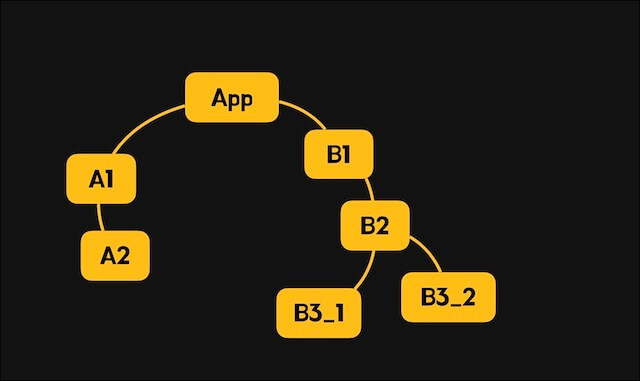
Let's start from the following project structure and learn the concepts and usage of the Context API.
123456789├─src/ │ ├─components/ │ │ ├─A1.tsx │ │ ├─A2.tsx │ │ ├─B1.tsx │ │ ├─B2.tsx │ │ ├─B3_1.tsx │ │ └─B3_2.tsx │ └─App.tsx
# Props
Props are the main way a parent component passes data to a child component.
You can pass data very easily, but if you want to pass data further than a child component, the components in between have to handle data they do not need.
Let's look at the example below to understand this.
We want to use the reactive color data (red) managed by the App component in the A2 and B3_2 components.
Then the A1 component, which sits between App and A2, has to pass the data along, and likewise the B1 and B2 components, which sit between App and B3_2, have to pass the data along.
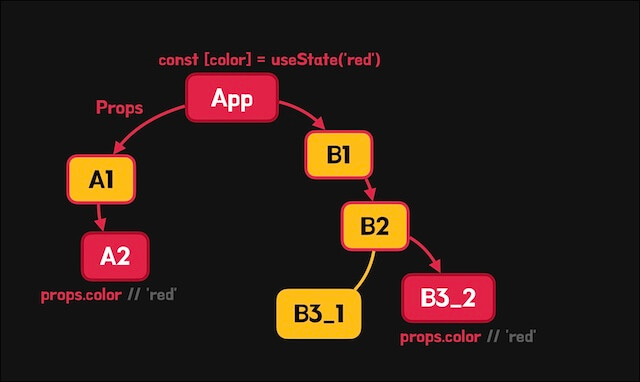
This situation is called 'prop drilling' because the props (data) seem to drill through several components.

1234567891011121314import { useState } from 'react' import A1 from './components/A1' import B1 from './components/B1' export default function App() { const [color] = useState('red') return ( <> <div>App</div> <A1 color={color} /> <B1 color={color} /> </> ) }
12345678910import A2 from './A2' export default function A1({ color }: { color: string }) { return ( <> <div>A1</div> <A2 color={color} /> </> ) }
123export default function A2({ color }: { color: string }) { return <div style={{ color }}>A2</div> }
12345678910import B2 from './B2' export default function B1({ color }: { color: string }) { return ( <> <div>B1</div> <B2 color={color} /> </> ) }
123456789101112import B3_1 from './B3_1' import B3_2 from './B3_2' export default function B2({ color }: { color: string }) { return ( <> <div>B2</div> <B3_1 /> <B3_2 color={color} /> </> ) }
123export default function B3_1() { return <div>B3_1</div> }
123export default function B3_2({ color }: { color: string }) { return <div style={{ color }}>B3_2</div> }
# Context API
To overcome the limits of the props approach we just looked at, React provides the Context API.
The Context API lets data provided by a specific component be used by its descendant components, including its children.
12345678910111213141516171819202122232425import { createContext, useContext } from 'react' // Create a context with an initial value const MyContext = createContext(data) // Provide data with the context provider <MyContext.Provider value={data}> {children} </MyContext.Provider> // Get data by using the context const data = useContext(MyContext) // Get data with the context consumer (optional) <MyContext.Consumer> {data => <div>{data}</div>} </MyContext.Consumer> // Name the context (optional) MyContext.displayName = 'MyContext'
Again, we want to use the color data of the App component in the A2 and B3_2 components.
To do this, we can use the Context API so that the App component provides the color data and its descendant components use it.
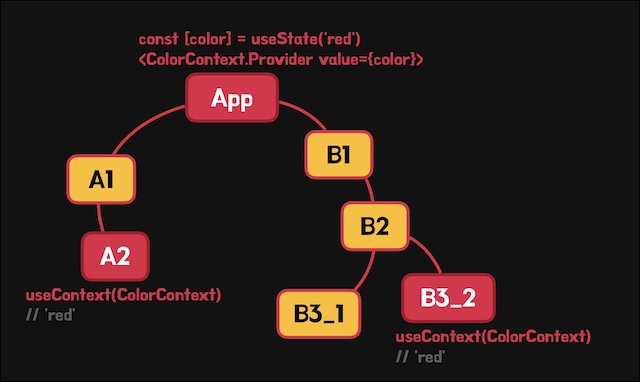
In the App component, call the createContext function to create a context with an initial value.
Wrap the descendant components that should receive the data with the .Provider component of the created context object, and provide the data to pass with the value prop.
Now the descendant components can use the data.
12345678910111213141516import { createContext } from 'react' import A1 from './components/A1' import B1 from './components/B1' export const ColorContext = createContext('') export default function App() { const [color] = useState('red') // Color data return ( <ColorContext.Provider value={color}> <div>App</div> <A1 /> <B1 /> </ColorContext.Provider> ) }
Unlike the props approach, components that do not use the provided data have nothing extra to handle.
12345678910import A2 from './A2' export default function A1() { return ( <> <div>A1</div> <A2 /> </> ) }
In components that use the data, you can get the provided data with the useContext hook.
When you use the useContext hook, just pass the context object as an argument.
1234567import { useContext } from 'react' import { ColorContext } from '../App' export default function A2() { const color = useContext(ColorContext) // 'red' return <div style={{ color }}>A2</div> }
12345678910import B2 from './B2' export default function B1() { return ( <> <div>B1</div> <B2 /> </> ) }
123456789101112import B3_1 from './B3_1' import B3_2 from './B3_2' export default function B2() { return ( <> <div>B2</div> <B3_1 /> <B3_2 /> </> ) }
123export default function B3_1() { return <div>B3_1</div> }
1234567import { useContext } from 'react' import { ColorContext } from '../App' export default function B3_2() { const color = useContext(ColorContext) // 'red' return <div style={{ color }}>B3_2</div> }
# Modularizing contexts
You can modularize contexts so that the component that provides a context and the components that use it are separated and reusable.
Create a color.tsx file in the /src/providers folder to modularize the context.
Make a ColorProvider component that wraps the content passed in as a slot (children) with the context's .Provider component, and receives and provides the color data.
Then also make a useColor function so that each component can use the provided data more easily.
123456789101112131415161718192021222324import { createContext, useContext } from 'react' // Create the context export const ColorContext = createContext('') // Provide the context export function ColorProvider({ children, color }: { children: React.ReactNode color: string }) { return ( <ColorContext.Provider value={color}> {children} </ColorContext.Provider> ) } // Use the context export function useColor() { return useContext(ColorContext) }
Note that you may get an ESLint warning or error like the following. This is because when a file mixes component and non-component exports, React Fast Refresh can have trouble telling which parts of the code it should reload.
This can cause problems with hot reloading and state preservation, so you need to split context creation and the provider (component) into separate modules.
123Fast refresh only works when a file only exports components. Use a new file to share constants or functions between components. eslint(react-refresh/only-export-components)
123456789import { createContext, useContext } from 'react' // Create the context export const ColorContext = createContext('') // Use the context export function useColor() { return useContext(ColorContext) }
12345678910111213141516import { ColorContext } from './context' // Provide the context export function ColorProvider({ children, color }: { children: React.ReactNode color: string }) { return ( <ColorContext.Provider value={color}> {children} </ColorContext.Provider> ) }
12export * from './context' export * from './provider'
Now provide the data in the App component with the modularized ColorProvider component.
123456789101112131415import { useState } from 'react' import { ColorProvider } from './providers/color' import A1 from './components/A1' import B1 from './components/B1' export default function App() { const [color] = useState('red') return ( <ColorProvider color={color}> <div>App</div> <A1 /> <B1 /> </ColorProvider> ) }
In the components that use the data, use the useColor function instead of the useContext hook as well.
123456import { useColor } from '../providers/color' export default function A2() { const color = useColor() // 'red' return <div style={{ color }}>A2</div> }
123456import { useColor } from '../providers/color' export default function B3_2() { const color = useColor() // 'red' return <div style={{ color }}>B3_2</div> }
# Updating data from descendant components
In the examples so far, the reactive color data is owned by the App component, and the descendant components can only read the data.
If you want descendant components to be able to update the data, you also need to provide a function that updates it.
When we call the useState function, we can get the data and the update function from the returned result with array destructuring assignment.
This time, let's provide this update function along with the data so that descendant components can use it.
First, create the context.
Set the initial value to null, but also create a type for the data you will provide later and specify both as a union type (<ColorState | null>).
Make the data type (ColorState) the same as the return type of the useState function.
Note that because the initial value is null, the return value of the useContext hook can be null.
So you need to use a type guard or a type assertion.
12345678910111213141516171819202122232425import { createContext, useContext } from 'react' type ColorState = [string, React.Dispatch<React.SetStateAction<string>>] export const ColorContext = createContext<ColorState | null>(null) // Provide the context export function ColorProvider({ children, color }: { children: React.ReactNode color: ColorState }) { return ( <ColorContext.Provider value={color}> {children} </ColorContext.Provider> ) } // Use the context export function useColor() { return useContext(ColorContext)! // Type assertion }
In the App component, provide the return value of useState as is, which includes not only the color value but also the update function.
123456789101112131415import { useState } from 'react' import { ColorProvider } from './providers/color' import A1 from './components/A1' import B1 from './components/B1' export default function App() { const colorState = useState('red') return ( <ColorProvider color={colorState}> <div>App</div> <A1 /> <B1 /> </ColorProvider> ) }
Now when a descendant component uses the useColor function, it gets both the color value and the update function.
You can change the color by clicking a button, as follows.
12345678910111213import { useColor } from '../providers/color' export default function B3_2() { const [color, setColor] = useColor() return ( <> <div style={{ color }}>B3_2</div> <button onClick={() => setColor('blue')}> Change! </button> </> ) }
# Nesting the same context
If needed, you can nest the same context.
When you nest the same context, a descendant component uses the data provided by the closest ancestor component.
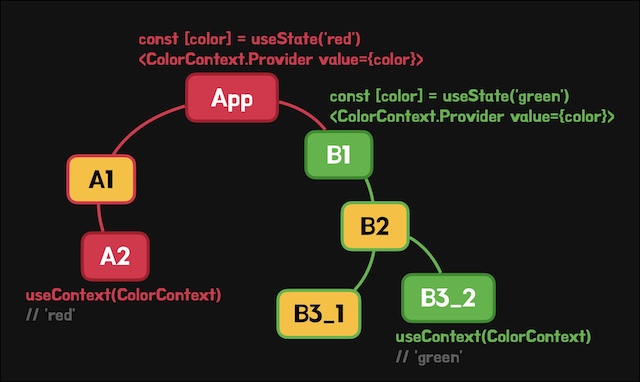
As we saw in the previous example, the App component provides red through ColorProvider.
Then, as follows, the B1 component, a descendant of App, also uses ColorProvider to provide green.
12345678910111213import { useState } from 'react' import { ColorProvider } from '../providers/color' import B2 from './B2' export default function B1() { const colorState = useState('green') return ( <ColorProvider color={colorState}> <div>B1</div> <B2 /> </ColorProvider> ) }
Now when the B3_2 component uses the useColor function, it uses the data (green) provided by B1, its closest ancestor component.
12345678910111213import { useColor } from '../providers/color' export default function B3_2() { const [color, setColor] = useColor() // 'green' return ( <> <div style={{ color }}>B3_2</div> <button onClick={() => setColor('blue')}> Change! </button> </> ) }
# Using multiple contexts
You can use several contexts in one project.
Create a new count.tsx module as follows.
This module does not receive the data it provides from outside. It manages the data internally.
123456789101112131415161718192021222324252627282930313233343536import { createContext, useContext, useState } from 'react' type Data = { count: number increase: () => void decrease: () => void } export const CountContext = createContext<Data>({} as Data) // Provide the context export function CountProvider({ children }: { children: React.ReactNode }) { const [count, setCount] = useState(0) const increase = () => setCount(c => c + 1) const decrease = () => setCount(c => c - 1) return ( <CountContext.Provider value={{ count, increase, decrease }}> {children} </CountContext.Provider> ) } // Use the context export function useCount() { return useContext(CountContext) }
In the App component, you can provide the context so that it wraps the descendant components, as follows.
The important point is that ColorProvider and CountProvider are unrelated contexts, so their positions do not matter at all.
123456789101112131415161718import { useState } from 'react' import { ColorProvider } from './providers/color' import { CountProvider } from './providers/count' import A1 from './components/A1' import B1 from './components/B1' export default function App() { const colorState = useState('red') return ( <ColorProvider color={colorState}> <CountProvider> <div>App</div> <A1 /> <B1 /> </CountProvider> </ColorProvider> ) }
Then use the provided data appropriately in the descendant components.
12345678910111213import { useCount } from '../providers/count' export default function B3_1() { const { count, increase, decrease } = useCount() return ( <> <div>B3_1</div> <div>{count}</div> <button onClick={increase}>+</button> <button onClick={decrease}>-</button> </> ) }
# Consuming a context
We got the context's provided data with the useContext hook, and used it to make and use the useColor and useCount functions.
Another way to get the data is to use the Consumer component.
When you only have the context object, you can get the data directly and render (consume) it with the Consumer component, without importing a separate function.
The content of the Consumer component must be a function, and it receives the provided data as a parameter.
123<MyContext.Consumer> {data => <div>{data}</div>} </MyContext.Consumer>
1234567891011121314151617181920import { ColorContext } from '../providers/color' import { CountContext } from '../providers/count' import A2 from './A2' export default function A1() { return ( <> <ColorContext.Consumer> {colorState => { const [color] = colorState! return <div style={{ color }}>A1</div> }} </ColorContext.Consumer> <CountContext.Consumer> {({ count }) => <div>{count}</div>} </CountContext.Consumer> <A2 /> </> ) }
# Context names
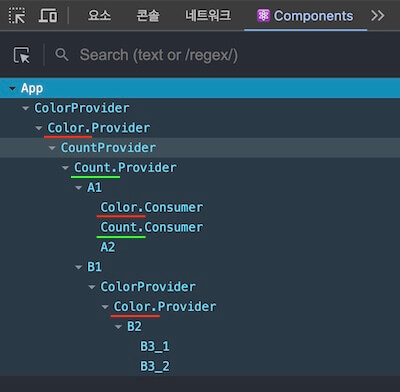
With React Developer Tools, you can check the component structure as follows.
Here, .Provider components use the name Context by default, so it is hard to tell several contexts apart.

You can name a context with the displayName property of the context object.
1234// ... export const ColorContext = createContext<ColorState | null>(null) ColorContext.displayName = 'Color'
1234// ... export const CountContext = createContext<Count>({} as Count) CountContext.displayName = 'Count'
Then the name is shown on the .Provider component, as follows.
Thanks for reading to the end.
Likes and kind comments help keep this blog going!