JS Class Core Patterns

In terms of object-oriented programming, JavaScript is a prototype-based language, and the class syntax was added in ES2015.
However, JavaScript is still prototype-based, not class-based.
The class syntax is just syntactic sugar for prototypes.
In this post, let's understand the concept of prototypes in JavaScript and look at the core patterns of the class syntax.
# Understanding prototypes
Every object (instance) in JavaScript dynamically inherits properties and methods from a prototype object.
The data returned from a constructor function called with the new keyword is called an instance, and an instance can reference the members (properties and methods) of the constructor function's prototype object.
The basic structure of a constructor function (class) and its instances is as follows.
12345678910111213function Class() { // constructor! } Class.prototype.method = function() { // ... } console.log(Class.prototype) // { constructor: f, method: f } const instanceA = new Class() instanceA.method() const instanceB = new Class() instanceB.method()
Let's look at the following constructor function example.
You can see that the greet method added to the prototype property of the User function is shared by each instance (the heropy and neo objects).
So comparing the greet method of each instance with the strict equality operator gives true.
1234567891011121314function User(name) { this.name = name } User.prototype.greet = function() { return `Hello, I'm ${this.name}.` } const heropy = new User('Heropy') console.log(heropy.greet()) // 'Hello, I'm Heropy.' const neo = new User('Neo') console.log(neo.greet()) // 'Hello, I'm Neo.' console.log(heropy.greet === neo.greet) // true
Each instance can check its reference to its prototype object through the __proto__ property, and the console shows it as [[Prototype]].
123console.log(User.prototype === heropy.__proto__) // true console.log(heropy.__proto__) console.log(neo.__proto__)

Unlike the example above, the greet methods of objects created each time with the literal style are not shared with each other.
So comparing the greet method of each object with the strict equality operator gives false.
12345678910111213141516function createUser(name) { return { name, greet() { return `Hello ${this.name}` } } } const heropy = createUser('Heropy') console.log(heropy.greet()) // 'Hello, I'm Heropy.' const neo = createUser('Neo') console.log(neo.greet()) // 'Hello, I'm Neo.' console.log(heropy.greet === neo.greet) // false
When we create data, we usually use the literal style, which is syntactically simpler.
But basic data creation is based on the constructor function style. Let's look at array data as a typical example.
Each array created with either the constructor function style or the literal style is an instance of the Array class.
123456789const numsA = new Array(1, 2, 3) // Constructor function style const numsB = [1, 2, 3] // Literal style console.log(numsA.__proto__ === Array.prototype) // true console.log(numsB.__proto__ === Array.prototype) // true console.log(numsA.__proto__ === numsB.__proto__) // true console.log(numsA) console.log(numsB)
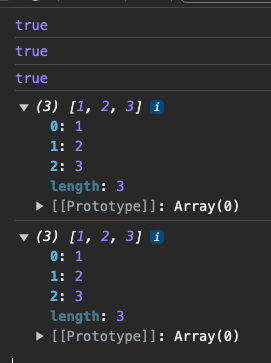
So, as follows, you can use the many built-in members already defined in Array.prototype.
1234567891011const numsA = new Array(1, 2, 3) // Constructor function style const numsB = [1, 2, 3] // Literal style console.log(Array.prototype.map) console.log(Array.prototype.filter) console.log(Array.prototype.reduce) // ... const doubles = numsA.map(v => v * 2) const even = numsB.filter(v => v % 2 === 0) const sum = numsA.reduce((acc, cur) => acc + cur, 0)
And you can check each member available on array data directly through Array.prototype.
Properties and methods that you can check through prototype like this are called prototype properties and prototype methods.
1console.log(Array.prototype)
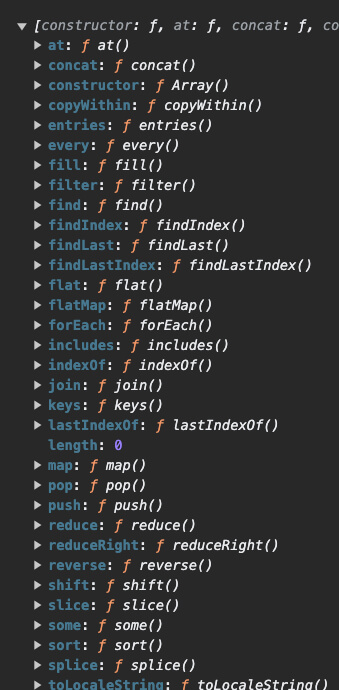
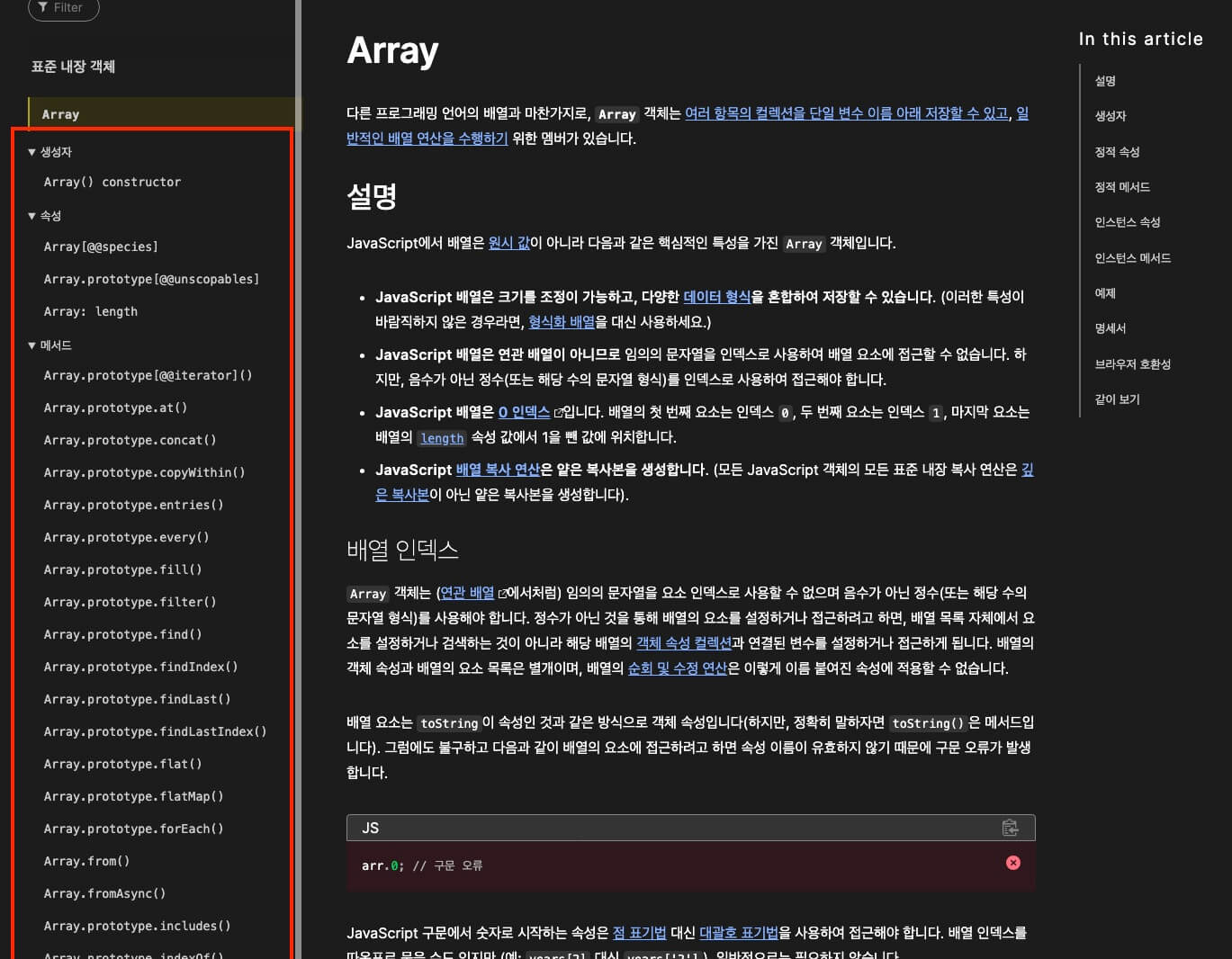
If you check the MDN documentation, you can see the many prototype members related to arrays.
With prototypes, you can also add custom members that array data can use, as follows.
12345678Array.prototype.helloWorld = function () { console.log(this) // [1, 2, 3] return this.map(v => v / 2) } const nums = [1, 2, 3] console.log(nums.helloWorld()) // [0.5, 1, 1.5]
# Class syntax
The class syntax added in ES2015 is a syntactically simplified version of prototype-based constructor functions.
So only the way you write it differs, and it is the same as prototype-based code.
123456789101112131415class Class { constructor() { // constructor! } method() { // ... } } console.log(Class.prototype) // { constructor: f, method: f } const instanceA = new Class() instanceA.method() const instanceB = new Class() instanceB.method()
# constructor
constructor is a special method that initializes the instance object inside a class.
A class can have only one, and if you do not write it explicitly, an empty constructor is created implicitly.
So if there is nothing to initialize, you do not have to write a constructor.
12345678910111213141516class User { constructor(name) { this.name = name } greet() { return `Hello, I'm ${this.name}.` } } const heropy = new User('Heropy') console.log(heropy.greet()) // 'Hello, I'm Heropy.' const neo = new User('Neo') console.log(neo.greet()) // 'Hello, I'm Neo.' console.log(heropy.greet === neo.greet) // true
# Getters
With the get keyword, you can define a method that gets the value of a specific property or computes and returns a property.
A method defined this way is called a getter, and you can think of it as a computed property.
A getter is a function, but you use it like a property without calling it.
12345678910111213141516171819class Counter { constructor(initialValue = 1) { this.value = initialValue } get double() { return this.value * 2 } increase() { this.value += 1 } } const counter = new Counter(1) console.log(counter.value) // 1 console.log(counter.double) // 2 counter.increase() console.log(counter.value) // 2 console.log(counter.double) // 4
# Setters
With the set keyword, you can define a method that is called when you assign a value to a getter.
A method defined this way is called a setter.
In the following example, the double property (getter) computes and returns a value based on the value property.
So when you assign a value to double, you have to update the value of the underlying value property so that the getter's return value can change too.
1234567891011121314151617181920212223242526class Counter { constructor(initialValue = 1) { this.value = initialValue } get double() { return this.value * 2 } set double(newValue) { this.value = newValue / 2 } increase() { this.value += 1 } } const counter = new Counter(1) console.log(counter.value) // 1 console.log(counter.double) // 2 counter.increase() console.log(counter.value) // 2 console.log(counter.double) // 4 counter.double = 10 console.log(counter.value) // 5 console.log(counter.double) // 10
# Static methods
With the static keyword, you can define a method that you call without an instance of the class.
A method defined this way is called a static method.
It is mainly used to define utility functions used at the class level.
1234567891011121314151617181920212223242526class User { constructor(name, age) { this.name = name this.age = age } greet() { return `Hello, I'm ${this.name}.` } static isUser(value) { return !!(value && typeof value.name === 'string' && typeof value.age === 'number') } } const lewis = new User('Lewis', 92) console.log(User.isUser(lewis)) // true const neo = { name: 'Neo', age: 12 } console.log(User.isUser(neo)) // true const amy = { name: 'Amy' } console.log(User.isUser(amy)) // false
A typical example is the Array.isArray() method used with array data, which is also a static method.
It checks whether a value is array data, and you call it on the Array class itself, not on an Array instance (array data).
12345const arr = [1, 2, 3] const obj = { a: 1 } console.log(Array.isArray(arr)) // true console.log(Array.isArray(obj)) // false
You can also write a static method on a prototype basis, as follows.
12345678910function User(name, age) { this.name = name this.age = age } User.prototype.greet = function() { return `Hello, I'm ${this.name}.` } User.isUser = function(value) { return !!(value && typeof value.name === 'string' && typeof value.age === 'number') }
# Arrow function methods
You can define methods with arrow functions.
Note that arrow function methods are added as separate methods on each created instance, not on prototype.
In other words, arrow function methods are not prototype methods.
1234class Class { regularFunctionMethod() {} arrowFunctionMethod = () => {} }
First, here is an example of a prototype method written as a regular function.
Because greet is a prototype method in each instance, you can see that they are strictly equal.
1234567891011121314151617class User { constructor(name, age) { this.name = name this.age = age } greet() { return `Hello, I'm ${this.name}.` } } const neo = new User('Neo', 12) const evan = new User('Evan', 10) console.log(neo.greet()) // 'Hello, I'm Neo.' console.log(evan.greet()) // 'Hello, I'm Evan.' console.log(neo.greet === evan.greet) // true
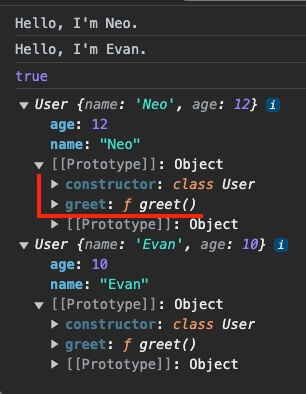
Then, if you change greet to an arrow function method as follows, greet is added as a separate method on each instance, and you can see that they are no longer equal.
Now greet is not a prototype method.
123456789class User { // ... greet = () => { return `Hello, I'm ${this.name}.` } } // ... console.log(neo.greet === evan.greet) // false
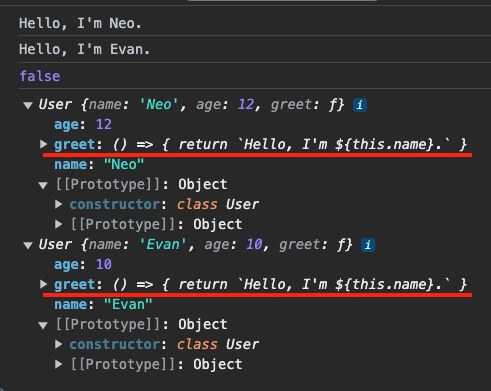
Also, unlike prototype methods that use regular functions, in arrow function methods the this keyword is defined statically at the place of declaration.
So you cannot change this with the .call(), .apply(), or .bind() methods.
In the following example, the evan object borrows and calls the greet method of the neo object.
Here, because this in the prototype method greet is defined dynamically at the call site, it can reference the name property of the evan object.
1234567891011class User { // ... greet() { return `Hello, I'm ${this.name}.` } } const neo = new User('Neo', 12) const evan = { name: 'Evan' } console.log(neo.greet.call(evan)) // Hello, I'm Evan.
However, because this in an arrow function method is defined statically, even if you borrow and call the greet method, it only references the name property of the neo object.
1234567891011class User { // ... greet = () => { return `Hello, I'm ${this.name}.` } } const neo = new User('Neo', 12) const evan = { name: 'Evan' } console.log(neo.greet.call(evan)) // Hello, I'm Neo.
# Inheritance
When you define a class, you can inherit from another class with the extends keyword, and you can call the constructor of the parent (super) class with the super function.
Through inheritance, a child (sub) class can use the properties and methods of its parent class.
123456class Class extends ParentClass { constructor() { super() // ... } }
In the following example, the Admin and Member classes can use the property (name) and method (getName) of the User class through inheritance.
1234567891011121314151617181920212223242526272829class User { constructor(name) { this.name = name } getName() { return this.name } } class Admin extends User { constructor(name) { super(name) this.admin = true } } class Member extends User { constructor(name) { super(name) this.admin = false } } const admin = new Admin('Neo') console.log(admin.getName()) // 'Neo' console.log(admin.admin) // true const member = new Member('Trinity') console.log(member.getName()) // 'Trinity' console.log(member.admin) // false
With the .prototype.isPrototypeOf() method, you can check whether the User class is the parent class of the Admin or Member class.
12345// ParentClass.prototype.isPrototypeOf(ChildClass) console.log(User.prototype.isPrototypeOf(Admin.prototype)) // true console.log(User.prototype.isPrototypeOf(Member.prototype)) // true console.log(User.prototype === Admin.prototype) // false
You can also implement inheritance on a prototype basis, as follows.
This is called a prototype chain.
12345678910111213141516171819202122232425262728function User(name) { this.name = name } User.prototype.getName = function() { return this.name } function Admin(name) { User.call(this, name) this.admin = true } Admin.prototype = Object.create(User.prototype) Admin.prototype.constructor = Admin function Member(name) { User.call(this, name) this.admin = false } Member.prototype = Object.create(User.prototype) Member.prototype.constructor = Member const admin = new Admin('Neo') console.log(admin.getName()) // 'Neo' console.log(admin.admin) // true const member = new Member('Trinity') console.log(member.getName()) // 'Trinity' console.log(member.admin) // false
# Information hiding
Inside a class, you can use the # keyword to restrict specific properties or methods so that they cannot be accessed from outside the class. These are called private fields.
You define private fields in the class body.
1234567class Class { // Class body } class Class { #property = initialValue #method() {} }
In the following example, the #age property can be accessed only inside the class.
So even a child class cannot access it.
123456789101112131415161718192021class User { #age = 0 constructor(name, age) { this.name = name this.#age = age } getAge() { return this.#age } } class Admin extends User { constructor(name, age) { super(name, age) console.log(this.#age) // Error: Private field '#age' must be declared in an enclosing class } } const neo = new User('Neo', 12) console.log(neo.name) // 'Neo' console.log(neo.getAge()) // 12 console.log(neo.#age) // Error: Private field '#age' must be declared in an enclosing class
# Anonymous classes
You can also omit the class name and define an anonymous class.
It is used in forms such as a module's default export, where the name is decided where it is used.
12345export default class { constructor(name) { this.name = name } }
1234import MyClass from './myClass.js' const neo = new MyClass('Neo') console.log(neo.name) // 'Neo'
# Checking instances
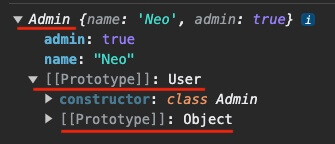
With the instanceof keyword, you can check which class an object is an instance of, including the inheritance chain of that class.
Or, you can check whether it is an instance of a specific class with the instance's .constructor property.
12345678910111213141516171819202122class User { constructor(name) { this.name = name } } class Admin extends User { constructor(name) { super(name) this.admin = true } } const neo = new Admin('Neo') console.log(neo instanceof Admin) // true console.log(neo instanceof User) // true console.log(neo instanceof Object) // true console.log(neo.constructor === Admin) // true console.log(neo.constructor === User) // false console.log(neo.constructor === Object) // false console.log(neo)
Thanks for reading to the end.
Likes and kind comments help keep this blog going!