Zustand Essentials

The following are the main updates in v5.
- Requires React v18 or later
- Requires TypeScript v4.5 or later
- UMD/SystemJS support dropped
- ES5 support dropped
- Default export removed
- The persist middleware no longer saves the initial state to storage right away
- The
use-sync-external-storepackage became a peer dependency, so install it yourself if you need it - State replacement (
replace) insetStatebehaves more strictly
# Overview
# What is a store?
A store is a pattern for managing an application's various states in one central place. (State means the data you manage)
This lets you easily share data between components, and it can also detect data changes and re-render automatically (reactivity).
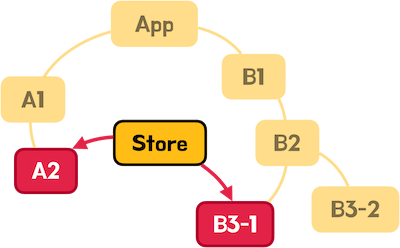
Most applications consist of several child components (A1, B1, B2, and so on) under a top-level component (App), as shown below.
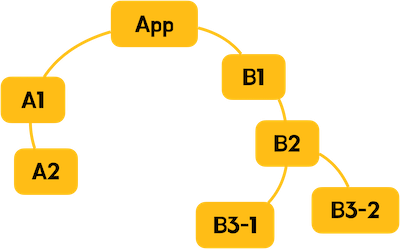
If there is data that components need to share, you can pass data between parent and child components by default.
Passing data this way is called the Props (Emits) approach.
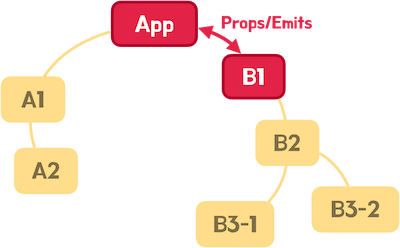
However, in component structures nested deeper than a single parent-child relationship, this approach creates intermediate components that handle data they don't need, which increases the coupling between components and makes maintenance very difficult.
In the following image, to share data between the App component and the B3-1 component, the data has to pass through the B1 and B2 components in between,
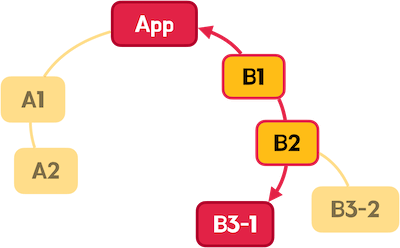
and going further, to share data between the A2 component and the B3-1 component as shown below, it has to pass through many more intermediate components.
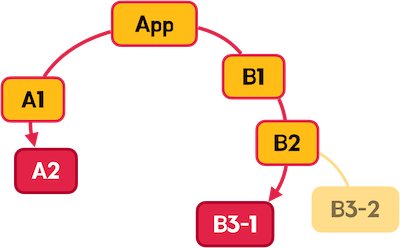
This situation is called 'Prop Drilling', because the props (data) seem to drill through several components.

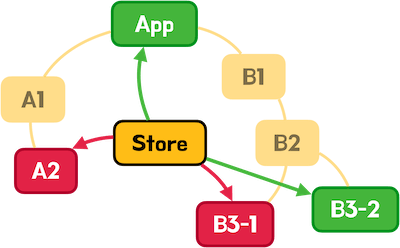
So we can use a store to manage the data shared between components in one central place.
This approach doesn't need intermediate components to pass data along, so it lowers the coupling between components and makes maintenance easier.
In the following image, the A2 and B3-1 components share data through the store, so no other intermediate components are needed.
# Comparing Redux Toolkit (RTK) and Zustand
Redux is a library for managing the state of JavaScript applications in a predictable way.
Based on the single source of truth principle, Redux stores the entire state of an application in one store, and state changes are handled by reducer functions through pure action objects. Its defining feature is a one-way data flow in which actions are delivered to the store through the dispatch function.
Redux Toolkit (RTK) is the officially recommended toolset for Redux, and it greatly reduces the complexity of Redux.
With createSlice, you can define actions and reducers in one go, and configureStore simplifies configuration.
Also, createAsyncThunk makes asynchronous actions easier to handle, and Immer is built in, so immutability management is automated.
However, even though RTK reduced the boilerplate, some of the structure still remains.
The process of managing state is split up, so you usually have to write code across several files, which hurts the readability and maintainability of the code.
- Store setup:
configureStoreand connecting slices - Slice definition: defining state, reducers, and actions with
createSlice - Component connection: using
useSelectoranduseDispatch
The example below is Redux code that manages the count and double states, and a single state change needs several files and functions.
You can see the complexity of managing actions, reducers, and selectors separately.
1npm i react-redux @reduxjs/toolkit
12345678910111213141516171819202122232425262728import { createSlice } from '@reduxjs/toolkit' interface CountState { count: number double: number } const initialState: CountState = { count: 0, double: 0 } export const countSlice = createSlice({ name: 'count', initialState, reducers: { increase: state => { state.count += 1 state.double = state.count * 2 }, decrease: state => { state.count -= 1 state.double = state.count * 2 } } }) export const { increase, decrease } = countSlice.actions export default countSlice.reducer
1234567891011import { configureStore } from '@reduxjs/toolkit' import countReducer from './countSlice' export const store = configureStore({ reducer: { count: countReducer } }) export type RootState = ReturnType<typeof store.getState> export type AppDispatch = typeof store.dispatch
12345678910import { createRoot } from 'react-dom/client' import { Provider } from 'react-redux' import { store } from './store' import App from './App' createRoot(document.getElementById('root')!).render( <Provider store={store}> <App /> </Provider> )
1234567891011121314151617import { useSelector, useDispatch } from 'react-redux' import { RootState } from '@/store' import { increase, decrease } from '@/store/countSlice' export default function App() { const { count, double } = useSelector((state: RootState) => state.count) const dispatch = useDispatch() return ( <> <h2>Count: {count}</h2> <h2>Double: {double}</h2> <button onClick={() => dispatch(increase())}>+1</button> <button onClick={() => dispatch(decrease())}>-1</button> </> ) }
Now let's look at Zustand.
Zustand is a small, fast, and scalable state management (store) library for React projects, and its core philosophy is a concise code pattern.
It combines state and actions so that you can use global state without React Context or a Provider, and it is based on hooks and uses closures to create stores.
With a single create function, you can define state and actions together, and the returned hook lets you both access state and call actions.
You can also selectively subscribe to only the state you need, which prevents unnecessary re-renders.
Here is Zustand code that manages the count and double states, just like the Redux Toolkit (RTK) example.
You can see how concise the code is, from defining the store to using it in a component.
1npm i zustand
1234567891011121314151617181920212223import { create } from 'zustand' import { combine } from 'zustand/middleware' export const useCountStore = create( combine( { count: 0, double: 0 }, set => ({ increase: () => set(state => ({ count: state.count + 1, double: (state.count + 1) * 2 })), decrease: () => set(state => ({ count: state.count - 1, double: (state.count - 1) * 2 })) }) ) )
1234567891011121314151617import { useCountStore } from '@/store/countStore' export default function App() { const count = useCountStore(state => state.count) const double = useCountStore(state => state.double) const increase = useCountStore(state => state.increase) const decrease = useCountStore(state => state.decrease) return ( <> <h2>Count: {count}</h2> <h2>Double: {double}</h2> <button onClick={increase}>+1</button> <button onClick={decrease}>-1</button> </> ) }
Here is a simple comparison of the differences between Redux Toolkit and Zustand.
Redux provides strong structure and predictable state management, but it needs complex setup across several files.
Zustand, on the other hand, lets you implement state management concisely in a single file, which greatly improves development productivity.
| Comparison | Redux Toolkit (RTK) | Zustand | Reason to choose |
|---|---|---|---|
| Store definition | createSlice and configureStore are separate | Unified in a single create function | Far less boilerplate code |
| Actions/reducers | Defined in the reducers object Actions need a separate export |
Defined as regular functions that use the set function | Intuitive, since the boundary between actions and reducers disappears |
| File structure | Many files, such as slice files and store config files | One store definition file is enough | Simple project structure that is easy to manage |
| Immutability management | Indirectly enforced through Immer | Immutability can be handled directly inside the set function | The state flow is clear when you write code |
| Provider | Required (Context-based) | Not needed (closure-based) | The top-level structure of the application becomes simpler |
| Selective subscription | Must be implemented inside useSelector | The hook subscribes to only part of the state by default | Easy to prevent unnecessary re-renders and optimize performance |
| Async handling | createAsyncThunk or Redux-Saga/Thunk middleware |
Handled simply inside the set function Extensible with middleware |
Async logic without complex setup |
# Getting started
# Installation
For the basic project setup, see Starting a React Project with Vite.
Install Zustand in your project as follows.
1npm i zustand
# Basic usage
Create a store with the create function.
The callback of the create function has set and get parameters, which you use to change or read state.
In the object returned by the create callback, the properties are called state and the methods are called actions.
The store hook returned by the create call is named with the use prefix and the Store suffix, like useCountStore, and you can use it in each component.
12345678import { create } from 'zustand' export const useNameStore = create((set, get) => { return { stateName: initialValue, actionName: someFunction } })
You can use the set and get parameters (functions) in each action as follows.
Calling the get function gives you the store object (state), which holds the state and actions.
And calling the set function (passing an object that has the states to change as properties) changes the state.
1234567891011121314import { create } from 'zustand' export const useNameStore = create((set, get) => { return { stateName: initialValue, actionName: () => { const state = get() const { stateName } = state set({ stateName: stateName + 1 }) } } })
If you use a callback when you call the set function, you get the store object (state) right away without using the get function.
The callback must return an object that has the states to change as properties.
123456789101112import { create } from 'zustand' export const useNameStore = create(set => { return { stateName: initialValue, actionName: () => { set(state => ({ stateName: state.stateName + 1 })) } } })
In a component, import the store hook (useNameStore) and pass a selector function when you call it to get the state or action you want.
Also, because the state is reactive, the component re-renders when the state changes.
So that a component doesn't re-render unnecessarily because of other states in the same store, you should get only one state (action) per hook call.
1234import { useNameStore } from '~/store/store' const selectorFn = state => state.stateOrAction const stateOrAction = useNameStore(selectorFn)
123456789101112import { useNameStore } from '~/store/store' export default function Component() { const stateName = useNameStore(state => state.stateName) const actionName = useNameStore(state => state.actionName) return ( <> <h2>{stateName}</h2> <button onClick={actionName}>+</button> </> ) }
If you call the store hook without a selector function, you get the store object instead of an individual state (action).
But be careful: every component that uses that store then re-renders even when a state it doesn't use changes!
1234567891011import { useNameStore } from '~/store/store' export default function Component() { const store = useNameStore() return ( <> <h2>{store.stateName}</h2> <button onClick={store.actionName}>+</button> </> ) }
Let's look at a simple example.
Usually, you create each store in the project's store folder.
When you use TypeScript, pass the state and action types as the generic of the create function.
1create<Type>()
Calling the get function gives you the store object, which includes the state and actions.
This lets you get state values in each action.
1234567891011121314151617import { create } from 'zustand' export const useCountStore = create<{ count: number increase: () => void decrease: () => void }>((set, get) => ({ count: 1, increase: () => { const { count } = get() set({ count: count + 1 }) }, decrease: () => { const { count } = get() set({ count: count - 1 }) } }))
If you use the set callback instead of the get function, you can change state more concisely.
1234567891011import { create } from 'zustand' export const useCountStore = create<{ count: number increase: () => void decrease: () => void }>(set => ({ count: 1, increase: () => set(state => ({ count: state.count + 1 })), decrease: () => set(state => ({ count: state.count - 1 })) }))
You can use the store you created in a component as follows.
1234567891011121314import { useCountStore } from './store/count' export default function App() { const count = useCountStore(state => state.count) const increase = useCountStore(state => state.increase) const decrease = useCountStore(state => state.decrease) return ( <> <h2>{count}</h2> <button onClick={increase}>+1</button> <button onClick={decrease}>-1</button> </> ) }
# Selecting multiple states (useShallow)
As explained earlier, to prevent unnecessary re-renders in every component that uses the store, a component should get only one state (action) at a time, but with the useShallow hook, you can get several states (actions) at once as an object or array.
Call Zustand's useShallow hook nested inside the store hook and pass it a selector function.
The selector function must return an object or array that includes the states (actions) you want to use.
First, let's look at returning an object.
12345678import { useShallow } from 'zustand/shallow' const { stateName, actionName } = useNameStore( useShallow(state => ({ stateName: state.stateName, actionName: state.actionName })) )
In the following example, instead of getting the count, increase, and decrease states (actions) one by one, we get them all at once.
You could pull out only the states (actions) you use with object destructuring assignment, but this can be useful when you handle them together as one object.
123456789101112131415161718192021222324import { useShallow } from 'zustand/shallow' import { useCountStore } from './store/count' export default function App() { // const count = useCountStore(state => state.count) // const increase = useCountStore(state => state.increase) // const decrease = useCountStore(state => state.decrease) // const { count, increase, decrease } = useCountStore(state => ({ const countState = useCountStore( useShallow(state => ({ count: state.count, increase: state.increase, decrease: state.decrease })) ) return ( <> <h2>{countState.count}</h2> <button onClick={countState.increase}>+1</button> <button onClick={countState.decrease}>-1</button> </> ) }
The selector function can also return an array instead of an object.
This can be useful when you want to write things more concisely in order, or get them all at once as an array.
12345import { useShallow } from 'zustand/shallow' const [stateName, actionName] = useNameStore( useShallow(state => [state.stateName, state.actionName]) )
12345678910111213141516import { useShallow } from 'zustand/shallow' import { useCountStore } from './store/count' export default function App() { // const [count, increase, decrease] = useCountStore( const countState = useCountStore( useShallow(state => [state.count, state.increase, state.decrease]) ) return ( <> <h2>{countState[0]}</h2> <button onClick={countState[1]}>+1</button> <button onClick={countState[2]}>-1</button> </> ) }
# Separating actions
If many components use the actions of a single store, try a pattern that manages the actions separately.
If you manage all actions inside an actions object as follows, it's easy for each component to get only the actions it needs.
123456789101112131415import { create } from 'zustand' export const useCountStore = create<{ count: number actions: { increase: () => void decrease: () => void } }>(set => ({ count: 1, actions: { increase: () => set(state => ({ count: state.count + 1 })), decrease: () => set(state => ({ count: state.count - 1 })) } }))
12345678910111213import { useCountStore } from './store/count' export default function App() { const count = useCountStore(state => state.count) const { increase, decrease } = useCountStore(state => state.actions) return ( <> <h2>{count}</h2> <button onClick={increase}>+1</button> <button onClick={decrease}>-1</button> </> ) }
# Resetting state
If you need a way to restore the state to its initial values, you can add a resetState function as follows.
You reset only the state, not the actions, so write the types and initial values with the state and actions separated.
123456789101112131415161718192021222324252627282930import { create } from 'zustand' interface State { count: number double: number min: number max: number } interface Actions { actions: { increase: () => void decrease: () => void resetState: () => void } } const initialState: State = { count: 1, double: 2, min: 0, max: 99 } export const useCountStore = create<State & Actions>(set => ({ ...initialState, actions: { increase: () => set(state => ({ count: state.count + 1 })), decrease: () => set(state => ({ count: state.count - 1 })), resetState: () => set(initialState) } }))
To reset part of the state in addition to the whole state, you can modify the resetState function as follows.
12345678910111213141516171819202122232425262728293031323334353637383940import { create } from 'zustand' interface State { count: number double: number min: number max: number } interface Actions { actions: { increase: () => void decrease: () => void resetState: (keys?: Array<keyof State>) => void } } const initialState: State = { count: 1, double: 2, min: 0, max: 99 } export const useCountStore = create<State & Actions>(set => ({ ...initialState, actions: { increase: () => set(state => ({ count: state.count + 1 })), decrease: () => set(state => ({ count: state.count - 1 })), resetState: keys => { // Reset all state if (!keys) { set(initialState) return } // Reset part of the state keys.forEach(key => { set({ [key]: initialState[key] }) }) } } }))
Call the reset action as follows.
12345678910111213import { useCountStore } from './store/count' export default function resetState() { const { resetState } = useCountStore(state => state.actions) return ( <> <button onClick={() => resetState()}>Reset All!</button> <button onClick={() => resetState(['double', 'min'])}> Reset Double, Min! </button> </> ) }
# Deleting state
If you pass true as the second argument of the set function (default false), it overwrites the state instead of merging it.
Lodash's omit function returns a new object without the specified properties.
By combining the two, you can delete specific states.
12npm i lodash-es npm i -D @types/lodash-es
123456789101112131415161718192021222324252627282930313233import { create } from 'zustand' import { omit } from 'lodash-es' interface State { count: number double: number min: number max: number } interface Actions { actions: { increase: () => void decrease: () => void deleteState: (keys: Array<keyof State>) => void } } const initialState: State = { count: 1, double: 2, min: 0, max: 99 } export const useCountStore = create<State & Actions>(set => ({ ...initialState, actions: { increase: () => set(state => ({ count: state.count + 1 })), decrease: () => set(state => ({ count: state.count - 1 })), deleteState: keys => { set(state => omit(state, keys), true) } } }))
Call the action by passing the list of states to delete, as follows.
123456789101112import { useCountStore } from './store/count' export default function DeleteState() { const { deleteState } = useCountStore(state => state.actions) return ( <> <button onClick={() => deleteState(['min', 'max'])}> Delete Min, Max! </button> </> ) }
# Middleware
Zustand lets you extend a store with additional features (type inference, changing nested objects, and so on) through what it calls middleware.
When you use multiple middleware, the nesting order can matter in some cases.
123456789101112131415// Without middleware create(callback) // Single middleware import { middleware } from 'middleware' create(middleware(callback)) // Multiple middleware import { middlewareA } from 'middlewareA' import { middlewareB } from 'middlewareB' import { middlewareC } from 'middlewareC' create(middlewareA(middlewareB(middlewareC(callback)))) // When using types create(middlewareA(middlewareB(middlewareC<Type>(callback))))
# Type inference for state (Combine)
When you use TypeScript, you can use the combine middleware to have the state types inferred instead of writing them yourself.
The combine middleware takes the state to infer as its first argument and, as its second argument, an action function that receives the set and get parameters.
12345import { combine } from 'zustand/middleware' const state = { ...yourState } const actions = (set, get) => ({ ...yourActions }) combine(state, actions)
If you use the combine middleware in the Deleting state example we looked at earlier, you can write it as follows.
In the following example, every state is inferred as the number type (number).
123456789101112131415161718192021import { create } from 'zustand' import { combine } from 'zustand/middleware' import { omit } from 'lodash-es' const initialState = { count: 1, double: 2, min: 0, max: 99 } export const useCountStore = create( combine(initialState, set => ({ actions: { increase: () => set(state => ({ count: state.count + 1 })), decrease: () => set(state => ({ count: state.count - 1 })), deleteState: (keys: Array<keyof typeof initialState>) => { set(state => omit(state, keys), true) } } })) )
Types that can't be inferred have to be written yourself.
You can write them with the type satisfaction (satisfies) or type assertion (as) keywords.
12345678910111213141516171819202122232425262728293031import { create } from 'zustand' import { combine } from 'zustand/middleware' type User = { email: string displayName: string isValid: boolean } | null const initialState = { // user: {} satisfies User as User, // Error! user: null satisfies User as User, isLoggedIn: false } export const useUserStore = create( combine(initialState, set => ({ actions: { login: () => { set({ user: { email: 'thesecon@gmail.com', displayName: 'HEROPY', isValid: true, phone: 12345678 // Error! } }) } } })) )
# Calling an action in an action
When you call another action inside an action function, you can get that action from the return value of get() and call it.
However, with the combine middleware, the get() function can't infer the action types.
The following example works fine, but it causes a type error.
123456789101112131415161718192021import { create } from 'zustand' import { combine } from 'zustand/middleware' const initialState = { count: 1, double: 2 } export const useCountStore = create( combine(initialState, (set, get) => ({ actions: { increase: () => { set(state => ({ count: state.count + 1 })) get().actions.increaseDouble() // Error - Property 'actions' does not exist on type '{ count: number; double: number; }'.ts(2339) }, increaseDouble: () => { set(state => ({ double: state.count * 2 })) } } })) )
To solve this, write the actions as separate functions, as follows.
Thanks to function hoisting, you can then easily call other actions inside an action.
12345678910111213141516171819// ... export const useCountStore = create( combine(initialState, set => { function increase() { set(state => ({ count: state.count + 1 })) increaseDouble() // OK! } function increaseDouble() { set(state => ({ double: state.count * 2 })) } return { actions: { increase, increaseDouble } } }) )
# Changing nested objects (Immer)
As in the following example, you can write an action that changes only the displayName property of the user object (state).
Here, the set function has to change the state itself, so to change only some properties of an object, you have to assign a new object and copy the existing properties.
But if you want to change a specific deep property in a multi-level nested object, such as user.relations[0].emails[0].domain, this becomes very complicated.
12345678910111213141516171819202122232425262728293031323334353637383940414243444546import { create } from 'zustand' interface State { user: { email: string displayName: string isValid: boolean } | null } interface Actions { actions: { signIn: () => void setDisplayName: (name: string) => void } } const initialState: State = { user: null } export const useUserStore = create<State & Actions>(set => ({ ...initialState, actions: { signIn: () => { set({ user: { email: 'thesecon@gmail.com', displayName: 'HEROPY', isValid: true } }) }, setDisplayName: name => { set(state => { if (state.user) { return { user: { ...state.user, displayName: name } } } return {} // State to merge: no state change! }) } } }))
With the Immer middleware, you can change nested object state more easily.
However, you need to install the Immer library.
It is a peer dependency that you have to install to use Zustand's Immer middleware.
1npm i immer
Going back to the example, apply the Immer middleware.
Now, in the set callback, you can access object properties directly and change their values, and you don't need to return a state object to merge.
You can also easily change properties of multi-level nested objects, as in user.relations[0].emails[0].domain = 'com'.
12345678910111213141516171819import { create } from 'zustand' import { immer } from 'zustand/middleware/immer' // ... export const useUserStore = create( immer<State & Actions>(set => ({ ...initialState, actions: { // ... setDisplayName: name => { set(state => { if (state.user) { state.user.displayName = name } }) } } })) )
If you use the combine and immer middleware we've looked at together, you can write code like the following example.
123456789101112131415161718192021222324import { create } from 'zustand' import { combine } from 'zustand/middleware' import { immer } from 'zustand/middleware/immer' const initialState = { count: 1, double: 2 } export const useCountStore = create( immer( combine(initialState, set => ({ actions: { increase: () => set(state => { state.count += 1 }), decrease: () => set(state => { state.count -= 1 }) } })) ) )
# Subscribing to state (subscribeWithSelector)
When you use the store hook's subscribe function, it subscribes to every state change in the store (it detects state changes and calls a listener).
Calling the return value of the subscribe function unsubscribes.
123const listener = (newState, oldState) => {} const unsubscribe = useCountStore.subscribe(listener) unsubscribe() // Unsubscribe
If you want to subscribe only to changes in a specific state rather than all states, use the subscribeWithSelector middleware.
Then the subscribe function can take a selector and a listener as arguments.
A selector is a function that returns state, and its return value determines which state to subscribe to.
1234const selector = state => state.stateToSubscribe const listener = (newValue, oldValue) => {} const unsubscribe = useCountStore.subscribe(selector, listener) unsubscribe() // Unsubscribe
The following example subscribes to the count state and changes the double state whenever the count state changes.
It lets you manage a kind of computed state.
123456789101112131415161718192021222324252627282930313233343536import { create } from 'zustand' import { combine, subscribeWithSelector } from 'zustand/middleware' import { immer } from 'zustand/middleware/immer' const initialState = { count: 1, double: 2 } export const useCountStore = create( subscribeWithSelector( immer( combine(initialState, set => ({ actions: { increase: () => set(state => { state.count += 1 }), decrease: () => set(state => { state.count -= 1 }) } })) ) ) ) // double getter useCountStore.subscribe( state => state.count, // Selector count => { // Listener console.log(useCountStore.getState().double) // Getter useCountStore.setState(() => ({ double: count * 2 })) // Setter } )
If only a single component uses the subscription, you can use the useEffect hook as follows to start the subscription and unsubscribe when the component unmounts.
123456789101112131415161718192021222324252627282930313233import { useEffect, useState } from 'react' import { useCountStore } from './store/count' export default function App() { const [double, setDouble] = useState(2) // Unsubscribe when the component unmounts useEffect(() => { const unsubscribe = useCountStore.subscribe( state => state.count, count => { setDouble(count * 2) } ) return () => { unsubscribe() } }, []) // Unsubscribe when the component unmounts (shorthand) useEffect( () => useCountStore.subscribe( state => state.count, count => { setDouble(count * 2) } ), [] ) return <h2>{double}</h2> }
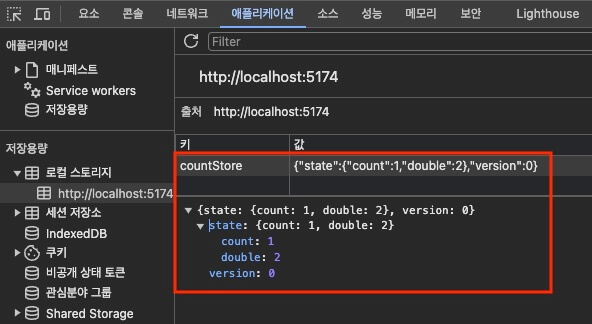
# Using storage (Persist)
With the persist middleware, Zustand can save state to storage and load it back.
This keeps the state even when you refresh the page or visit it again.
As a required option (name), you must provide a unique name under which the store is saved in storage.
It uses local storage (localStorage) by default, and if needed, you can use session storage (sessionStorage) or create your own custom storage.
Other options are explained in A summary of the Zustand persist middleware (storage) options.
123456789101112131415161718192021222324252627282930313233343536import { create } from 'zustand' import { combine, subscribeWithSelector, persist, createJSONStorage } from 'zustand/middleware' import { immer } from 'zustand/middleware/immer' const initialState = { count: 1, double: 2 } export const useCountStore = create( persist( subscribeWithSelector( immer( combine(initialState, set => ({ // actions: { // Removed to use storage (persist)! increase: () => set(state => { state.count += 1 }), decrease: () => set(state => { state.count -= 1 }) })) ) ), { name: 'countStore' // A unique name for saving in storage! // storage: createJSONStorage(() => sessionStorage) // Default: localStorage } ) )
# Developer tools (Devtools)
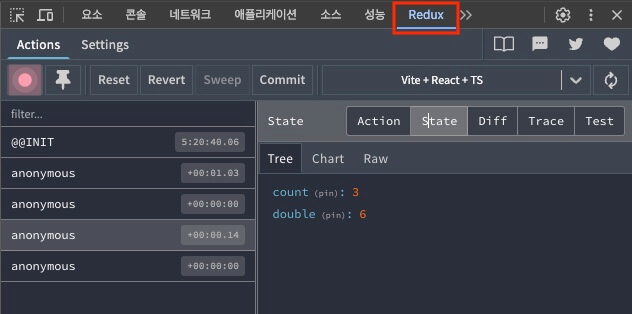
You can use developer tools such as Redux DevTools to monitor Zustand state.
Using the devtools middleware enables the developer tools.
12345678910111213141516171819202122232425262728293031323334import { create } from 'zustand' import { combine, subscribeWithSelector, persist, devtools } from 'zustand/middleware' import { immer } from 'zustand/middleware/immer' const initialState = { count: 1, double: 2 } export const useCountStore = create( devtools( persist( subscribeWithSelector( immer( combine(initialState, set => ({ increase: () => set(state => { state.count += 1 }), decrease: () => set(state => { state.count -= 1 }) })) ) ), { name: 'countStore' } ) ) )
Thanks for reading to the end.
Likes and kind comments help keep this blog going!