TypeScript at a Glance
# Overview
TypeScript is an open-source language under the Apache License, developed and maintained by Microsoft.
It is a superset of JavaScript that compiles to plain JavaScript, and it was first released in October 2012.
# Why TypeScript?
The strong type systems used in structured, refined languages such as C# and Java can provide high readability and code quality, and because errors occur in the compile environment rather than at runtime, critical bugs are much easier to catch.
JavaScript, on the other hand, is a dynamic programming language without a type system, and a JavaScript variable can hold values of many types, such as strings, numbers, and booleans.
You can describe it as a weakly typed language. It gives you a relatively flexible development environment, but it has the downside that errors can easily occur at runtime.
TypeScript applies a strong type system to JavaScript, so you can catch most errors in the compile environment while you type your code.
# Using TypeScript
Just as JavaScript is written in files with the .js extension, TypeScript is written in files with the .ts extension, and after writing it, you compile it into JavaScript files with the TypeScript compiler.
12$ tsc sample.ts ## compiled to `sample.js`
# TypeScript features
- Cross-platform support: You can use it on any platform where JavaScript runs.
- Object-oriented language: It provides powerful features such as classes, interfaces, and modules, and you can write purely object-oriented code.
- Static types: Because it uses static types, you can check for errors while you type your code. (This needs the help of an editor or plugin.)
- DOM control: Like JavaScript, it can control the DOM to add or remove elements.
- Support for the latest ECMAScript features: It lets you easily use the latest JavaScript syntax, ES6 and beyond.
# Development environment
# VSCode and WebStorm
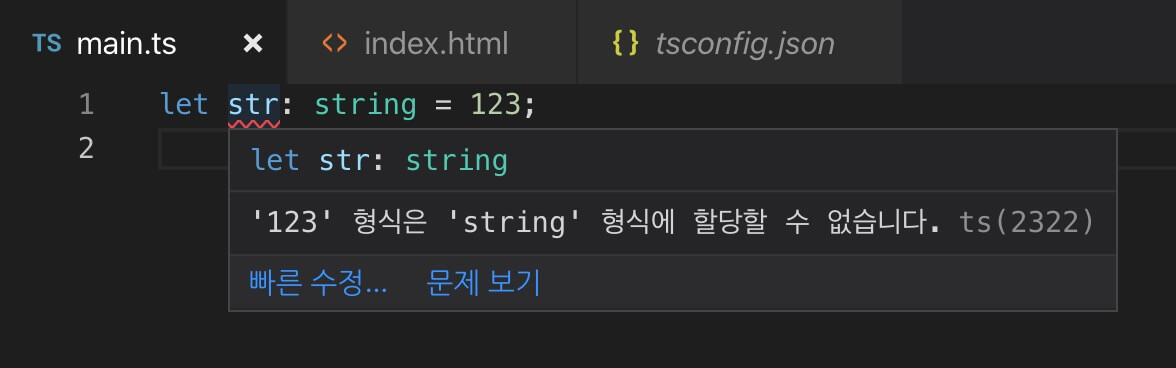
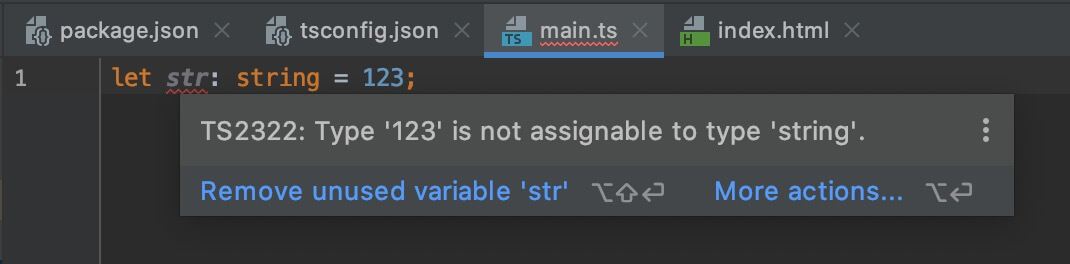
VSCode (Visual Studio Code) and WebStorm have built-in TypeScript support, so they recognize TypeScript files (.ts, tsconfig.json, etc.) without any extra setup, and you can use many features right away, such as code checking, quick fixes, running, and debugging.
However, they don't include the compiler, so you need to install it separately. (e.g., npm install typescript)
# Installing the compiler
To use the tsc command, install TypeScript globally as shown below.
If you give a TypeScript file as a path, it compiles that file.
123$ npm install -g typescript $ tsc --version $ tsc ./src/index.ts
Or, if you want to use it only in a single project, you can install it locally as usual and run it with the npx tsc command.
123$ npm install -D typescript $ npx tsc --version $ npx tsc ./src/index.ts
# Compiler options
You can set many options for compilation in TypeScript.
For the main options, see TypeScript Configuration (tsconfig.json) Summary.
1$ tsc ./src/index.ts --watch --target ES2022 --lib ES2022,DOM --module ESNext
Or you can manage options with a tsconfig.json file, as shown below.
By also adding the "include" and "exclude" options, you can set the paths to include and the paths to exclude for compilation.
If you use VScode or WebStorm, creating a
tsconfig.jsonfile at the project root lets the editor read the configuration options.
123456789101112131415{ "compilerOptions": { "strict": true, "target": "ES2022", "lib": ["ES2022", "DOM"], "module": "ESNext", "moduleResolution": "Bundler" }, "include": [ "src/**/*.ts" ], "exclude": [ "node_modules" ] }
1$ tsc --watch
TypeScript 6.0 changed the default values of key options.
Strict type checking (strict) is now on by default, target is the latest ECMAScript specification, module is ESNext, and types is an empty array.
Up to version 5, strict was off, so if you use an older version, you need to set the values yourself, as in the example above.
On the other hand, outFile and moduleResolution: "Classic" have been removed, and baseUrl, moduleResolution: "Node", and target: "ES5" are deprecated, so you shouldn't use them.
This is also why the example above sets moduleResolution as well.
If you set only module: "ESNext", versions up to 5 resolve modules as "Classic", which is slated for removal, so if you use a bundler, it's a good idea to set "Bundler" explicitly.
Among recently added options, the ones this post also covers are as follows.
| Option | Description |
|---|---|
verbatimModuleSyntax |
Keeps import and export statements exactly as written, and requires import type when importing only types |
erasableSyntaxOnly |
Allows only syntax that becomes JavaScript just by being erased, so it forbids enums, namespaces, and parameter properties |
isolatedDeclarations |
Requires explicit types on exported values, so type declarations (.d.ts) can be generated by looking at a single file |
noImplicitOverride |
Requires the override modifier when overriding a member of the parent class |
# TypeScript Playground
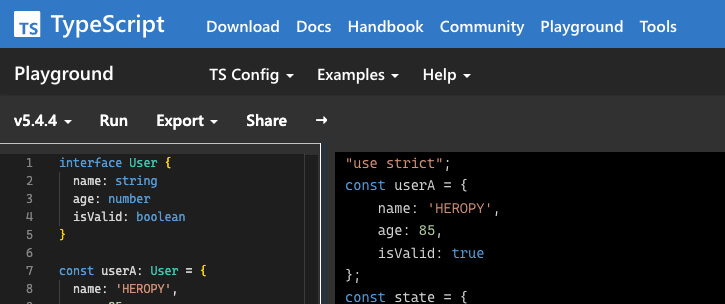
https://typescriptlang.org/play
It's a REPL on the official TypeScript site, where you can see right away how your code is converted to JavaScript depending on the compiler options.
# Vite
If you want to test TypeScript quickly, Vite is a good choice.
Setting up a project is simple:
1234567npm create vite@latest typescript-test ✔ Select a framework: Vanilla ✔ Select a variant: TypeScript cd typescript-test npm install npm run dev ## Server running at http://localhost:5173
# Parcel
You can also set things up from scratch with the Parcel bundler.
Set up the project as follows.
1234$ mkdir typescript-test $ cd typescript-test $ npm init -y $ npm install -D parcel typescript
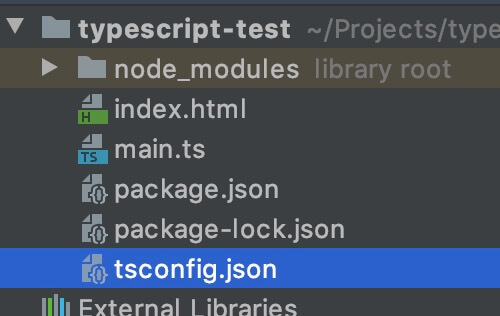
Create a tsconfig.json file and add the options you want.
Here is an example.
12345678{ "compilerOptions": { "strict": true }, "exclude": [ "node_modules" ] }
Create a main.ts file and write whatever TypeScript code you want.
12345function add(a: number, b: number) { return a + b } const sum: number = add(1, 2) console.log(sum)
Create an index.html file and link the .ts file directly instead of a .js file.
The Parcel bundler compiles the TypeScript automatically when it builds.
12345678910<!doctype html> <html> <head> <meta charset="UTF-8"> <title>TypeScript Test</title> </head> <body> <script type="module" src="main.ts"></script> </body> </html>
Finally, build with the Parcel bundler, using index.html as the entry file:
12$ npx parcel index.html ## Server running at http://localhost:1234
# Node.js
If you want to test in a Node.js environment, you can run .ts files directly without a separate runner.
Node.js introduced a feature that strips type annotations and runs the code (type stripping) in version 22.6, and it works by default without any option from versions 22.18 and 23.6.
From versions 24.12 and 25.2, it is stable.
Setting up a project is simple:
1234$ mkdir typescript-test $ cd typescript-test $ npm init -y $ npm install -D typescript @types/node
@types/nodeis a type declaration module for the Node.js API.
For more on@types, see the 'Modules' section.
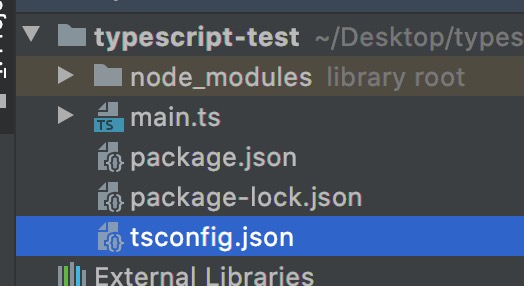
Create a tsconfig.json file and add the options you want.
Here is an example.
123456789{ "compilerOptions": { "strict": true, "module": "NodeNext" }, "exclude": [ "node_modules" ] }
Create a main.ts file and write whatever TypeScript code you want.
1console.log('TypeScript on NodeJS!')
Run main.ts directly.
12$ node main.ts ## TypeScript on NodeJS!
# Types
# Type annotations
In TypeScript, you can annotate types on ordinary variables, parameters, object properties, and so on, in the form : TYPE.
1234function someFunc(a: TYPE_A, b: TYPE_B): TYPE_RETURN { return a + b } let some: TYPE_SOME = someFunc(1, 2)
In the following example,
the parameters a and b of the add function are annotated as number,
and because the return value of that function is inferred to be a number, the variable sum is also annotated as number.
12345function add(a: number, b: number) { return a + b } const sum: number = add(1, 2) console.log(sum) // 3
The result of compiling it to JavaScript is as follows.
123456"use strict"; function add(a, b) { return a + b; } const sum = add(1, 2); console.log(sum);
# Type errors
If you annotate the variable sum as string instead of number, as below, an error occurs while you are writing the code, before you even compile.
12345function add(a: number, b: number) { return a + b } const sum: string = add(1, 2) console.log(sum)
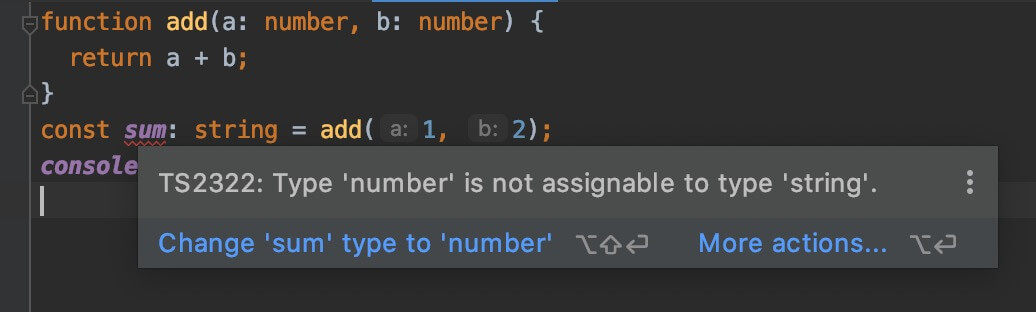
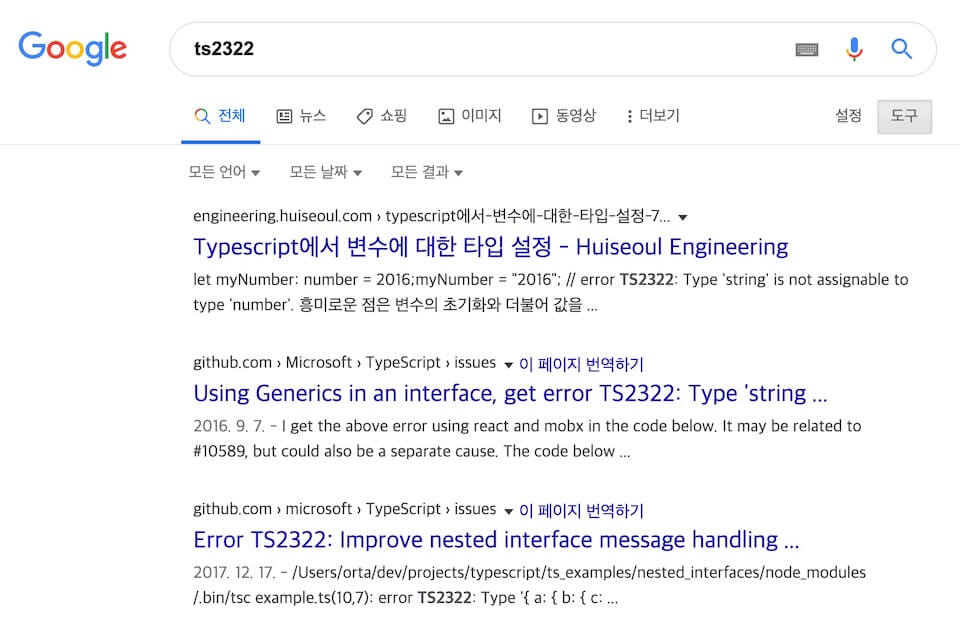
In the image above, you can see the error code TS2322, and a quick search for it will tell you more about the error.
# Type declarations
# Boolean
Represents a simple true (true) or false (false) value.
12let isBoolean: boolean let isDone: boolean = false
# Number
You can use any floating-point value.
It also supports the binary and octal literals introduced in ES6.
12345678let num: number let integer: number = 6 let float: number = 3.14 let hex: number = 0xf00d // 61453 let binary: number = 0b1010 // 10 let octal: number = 0o744 // 484 let infinity: number = Infinity let nan: number = NaN
# String
Represents a string.
It supports not only single quotes (') and double quotes (") but also ES6 template strings.
12345let str: string let red: string = 'Red' let green: string = "Green" let myColor: string = `My color is ${red}.` let yourColor: string = 'Your color is' + green
# Array
Represents an ordinary array that holds values in order.
You can declare the type of an array in two ways, as follows.
123456789// An array of strings only let fruits: string[] = ['Apple', 'Banana', 'Mango'] // Or let fruits: Array<string> = ['Apple', 'Banana', 'Mango'] // An array of numbers only let oneToSeven: number[] = [1, 2, 3, 4, 5, 6, 7] // Or let oneToSeven: Array<number> = [1, 2, 3, 4, 5, 6, 7]
With a union type (multiple types), you can also declare 'an array that holds both strings and numbers'.
123let array: (string | number)[] = ['Apple', 1, 2, 'Banana', 'Mango', 3] // Or let array: Array<string | number> = ['Apple', 1, 2, 'Banana', 'Mango', 3]
If you can't be sure of the values of the items the array holds, you can use unknown.
1let someArr: unknown[] = [0, 1, {}, [], 'str', false]
You can also use interfaces or custom types.
12345678910111213141516171819202122interface IUser { name: string, age: number, isValid: boolean } let userArr: IUser[] = [ { name: 'Neo', age: 85, isValid: true }, { name: 'Lewis', age: 52, isValid: false }, { name: 'Evan', age: 36, isValid: true } ]
It isn't very useful, but you can also write a specific value in place of a type, like this.
1234let array: 10[] array = [10] array.push(10) array.push(11) // Error - TS2345
You can also create a readonly array.
Use the readonly keyword or the ReadonlyArray type.
12345678let arrA: readonly number[] = [1, 2, 3, 4] let arrB: ReadonlyArray<number> = [0, 9, 8, 7] arrA[0] = 123 // Error - TS2542: Index signature in type 'readonly number[]' only permits reading. arrA.push(123) // Error - TS2339: Property 'push' does not exist on type 'readonly number[]'. arrB[0] = 123 // Error - TS2542: Index signature in type 'readonly number[]' only permits reading. arrB.push(123) // Error - TS2339: Property 'push' does not exist on type 'readonly number[]'.
# Tuple
The tuple type is very similar to an array.
The difference is that it represents an array of fixed length with fixed types.
1234let tuple: [string, number] tuple = ['a', 1] tuple = ['a', 1, 2] // Error - TS2322 tuple = [1, 'a'] // Error - TS2322
Instead of storing the data in separate variables, you can use a single tuple type:
12345678910// Variables let userId: number = 1234 let userName: string = 'HEROPY' let isValid: boolean = true // Tuple let user: [number, string, boolean] = [1234, 'HEROPY', true] console.log(user[0]) // 1234 console.log(user[1]) // 'HEROPY' console.log(user[2]) // true
Going a step further, you can use this approach to build an array of tuples (a two-dimensional array).
12345let users: [number, string, boolean][] // Or // let users: Array<[number, string, boolean]> users = [[1, 'Neo', true], [2, 'Evan', false], [3, 'Lewis', true]]
Here too, you can use values in place of types.
1234let tuple: [1, number] tuple = [1, 2] tuple = [1, 3] tuple = [2, 3] // Error - TS2322: Type '2' is not assignable to type '1'.
A tuple represents an array of fixed length with fixed types, but this applies only to assignment.
It can't stop you from adding values with .push(), .splice(), and so on.
123456let tuple: [string, number] tuple = ['a', 1] tuple = ['b', 2] tuple.push(3) console.log(tuple) // ['b', 2, 3] tuple.push(true) // Error - TS2345: Argument of type 'true' is not assignable to parameter of type 'string | number'.
As with arrays, you can use the readonly keyword to create a readonly tuple.
12let a: readonly [string, number] = ['Hello', 123] a[0] = 'World' // Error - TS2540: Cannot assign to '0' because it is a read-only property.
# Enum
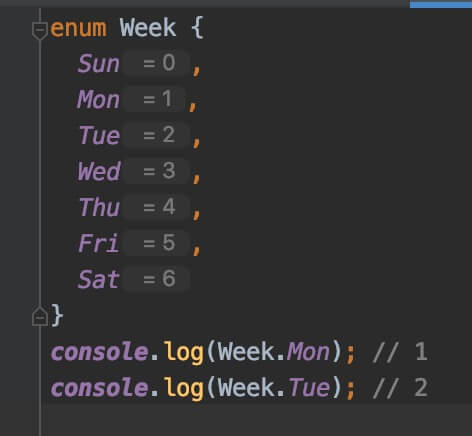
An enum is a type that lets you give names (members) to a set of numeric or string values, and it's useful when the kinds of values are limited to a fixed range.
By default, it starts at 0 and each value increases by 1.
123456789enum Week { Sun, Mon, Tue, Wed, Thu, Fri, Sat }
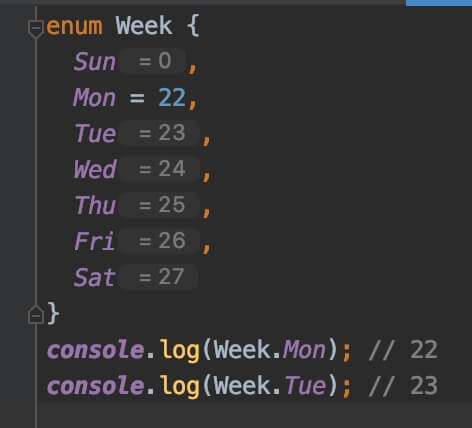
You can change values manually, and from the point where you changed a value, values again increase by 1.
One interesting thing about enums is that they support reverse mapping.
This means you can access a value through an enumerated member (like Sun or Mon), and a member through its value.
Let's print Week to the console.
1234567enum Week { // ... } console.log(Week) console.log(Week.Sun) // 0 console.log(Week['Sun']) // 0 console.log(Week[0]) // 'Sun'
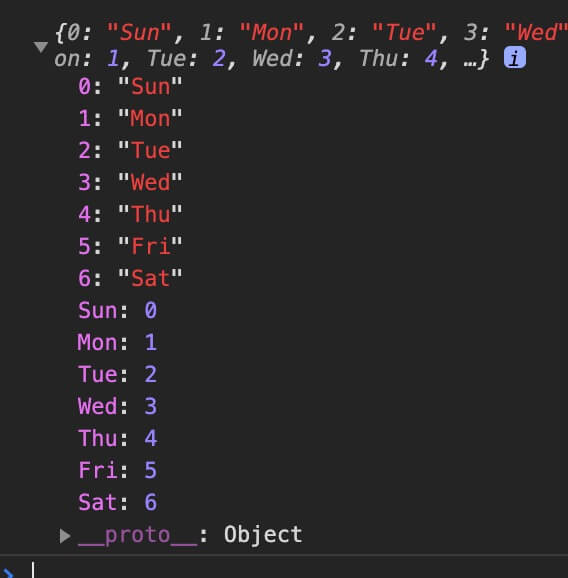
Besides numeric values, an enum can also be initialized with string values.
However, this approach doesn't support reverse mapping, so you have to initialize each member individually.
1234567enum Color { Red = 'red', Green = 'green', Blue = 'blue' } console.log(Color.Red) // red console.log(Color['Green']) // green
The following example replaces the Color enum above with an as const object.
12345678const Color = { Red: 'red', Green: 'green', Blue: 'blue' } as const type Color = typeof Color[keyof typeof Color] // 'red' | 'green' | 'blue' console.log(Color.Red) // red
# Any
Any means every type.
So, just like an ordinary JavaScript variable, you can assign a value of any type to it.
It can come in handy when you work with external resources and simply can't pin down a type.
1234let any: any = 123 any = 'Hello world' any = {} any = null
You can also use it to represent an array that holds various values.
1const list: any[] = [1, true, 'Anything!']
To keep the benefits of a strong type system, you can use the compiler option "noImplicitAny": true to raise an error when something implicitly becomes Any because no type is given.
This option is included in strict, and strict is on by default, so it applies even if you don't set it separately.
# Unknown
Unknown, a top type like Any, means a type that isn't known.
Like Any, you can assign a value of any type to Unknown, but you can't assign Unknown to other types.
1234567let a: any = 123 let u: unknown = 123 let v1: boolean = a // The any type (any) can be assigned anywhere. let v2: number = u // The unknown type (unknown) can't be assigned to any type except any. let v3: any = u // OK! let v4: number = u as number // It can be assigned once you assert its type.
# Object
By default, it represents every type for which the typeof operator returns "object".
123456let obj: object = {} let arr: object = [] let func: object = function () {} let nullValue: object = null let date: object = new Date() // ...
Because it's a supertype of many types, it isn't very useful.
To annotate types more precisely, you can annotate the type of each object property individually, like this.
12345678910let userA: { name: string, age: number } = { name: 'HEROPY', age: 123 } let userB: { name: string, age: number } = { name: 'HEROPY', age: false, // Error email: 'thesecon@gmail.com' // Error }
For reuse, it's better to use interface or type.
123456789101112131415interface IUser { name: string age: number } let userA: IUser = { name: 'HEROPY', age: 123 } let userB: IUser = { name: 'HEROPY', age: false, // Error email: 'thesecon@gmail.com' // Error }
# Null, Undefined
Null and Undefined represent the values null and undefined respectively, and they can't be assigned to other types.
They can't be assigned to each other's types either.
12345678let num: number = undefined // Error - TS2322: Type 'undefined' is not assignable to type 'number'. let str: string = null let obj: { a: 1, b: false } = undefined let arr: any[] = null let und: undefined = null let nul: null = undefined let voi: void = null // ...
This behavior comes from the compiler option "strictNullChecks": true, which is included in strict and on by default.
Conversely, if you turn the option off, Null and Undefined become subtypes of every type, so all the assignments above are allowed, and this used to be the default behavior.
However, regardless of the option, you can assign Undefined to Void.
1let voi: void = undefined // ok
# Void
Void is usually used in functions that don't return a value.
The : void position is where a function specifies its return type.
123function hello(msg: string): void { console.log(`Hello ${msg}`) }
A function that doesn't return a value actually returns undefined.
12345function hello(msg: string): void { console.log(`Hello ${msg}`) } const hi: void = hello('world') // Hello world console.log(hi) // undefined
# Never
Never represents a value that never occurs, and no type can be assigned to it.
123function error(message: string): never { throw new Error(message) }
You usually see Never when you mistakenly declare an empty array as a type, like this.
12const never: [] = [] never.push(3) // Error - TS2345: Argument of type '3' is not assignable to parameter of type 'never'.
# Literal
A type that allows only one specific value is called a literal type.
Instead of a broad range like string or number, you write the value itself in the type position.
123456let yes: 'Yes' yes = 'Yes' yes = 'No' // Error - TS2322: Type '"No"' is not assignable to type '"Yes"'. let answer: 'Yes' | 'No' | 'Cancel' answer = 'Cancel' // ok
A type that allows only one value is rarely useful on its own, so it's mainly used with unions to build a list of allowed values, like answer above.
The union you'll see next and the 'Discriminated unions' section later on are both based on literal types.
A string literal can be extended into a template literal type, which uses ${} interpolation.
It's a way to specify the shape of a value rather than a single value.
12345678type UserId = `user_${number}` let idA: UserId = 'user_123' let idB: UserId = 'admin_123' // Error - TS2322 type Lang = 'ko' | 'en' type TitleKey = `title_${Lang}` // 'title_ko' | 'title_en' let keyA: TitleKey = 'title_ko' let keyB: TitleKey = 'title_jp' // Error - TS2322
# Union
When a type allows two or more types, it's called a union.
Types are separated with | (vertical bar), and () is optional.
1234let union: (string | number) union = 'Hello type!' union = 123 union = false // Error - TS2322: Type 'false' is not assignable to type 'string | number'.
# Intersection
When you combine two or more types with & (ampersand), it's called an intersection.
Intersections are useful because they let you combine existing types without creating a new type, but they aren't used often.
If you can think of the union above as 'Or', you can think of an intersection as 'And'.
123456789101112131415161718// If existing types can be combined, you can use an intersection. interface IUser { name: string age: number } interface IValidation { isValid: boolean } const heropy: IUser = { name: 'Heropy', age: 36, isValid: true // Error - TS2322: Type '{ name: string; age: number; isValid: boolean; }' is not assignable to type 'IUser'. } const neo: IUser & IValidation = { name: 'Neo', age: 85, isValid: true }
# Function
You can annotate a function's types at the same time you declare it.
123function add(a: number, b: number): number { return a + b }
If needed, you can also annotate the type separately in arrow function form, like this.
Enter the types of the arguments and the type of the return value.
1234567891011// myFunc is a function that takes 2 number arguments and returns a number. let myFunc: (arg1: number, arg2: number) => number myFunc = function (x, y) { return x + y } // No arguments and no return value. let yourFunc: () => void yourFunc = function () { console.log('Hello world~') }
An async function returns a Promise instance, so you specify its return type with generics, like this.
12345678type Movie = { title: string poster: string } async function getMovie(title: string): Promise<Movie[]> { const res = fetch(`https://gettitles.movie/${title}`) return await res.json() }
# Type inference
When a type isn't declared explicitly, TypeScript infers it for you.
The concept is very simple, but very important!
[Infer]: To reach a conclusion based on evidence and reasoning.
12let num = 12 num = 'Hello type!' // TS2322: Type '"Hello type!"' is not assignable to type 'number'.
The variable num was initialized with the number 12, so it was inferred as the Number type, and an error occurs because a String value like 'Hello type!' can't be assigned to it.
TypeScript infers types in the following cases.
- Initialized variables
- Parameters with default values
- Functions with return values
12345678// The initialized variable `num` let num = 12 // The parameter `b`, which has a default value function add(a: number, b: number = 2): number { // A function with a return value (`a + b`) return a + b }
# Type assertions
When something goes beyond the range of types TypeScript can determine through type inference, you can tell it to stop inferring.
This is called a 'type assertion', and it's for situations where you, the programmer, understand the type better than TypeScript does.
[Assert]: To state something firmly and confidently.
Let's look at the following example.
The function's parameter val is a union type, so it can be a string or a number.
The parameter isNumber is a boolean, and from its name, we can infer that it tells whether the value is a number.
So we know for sure that when isNumber is true, val will be a number and we can use toFixed on it.
But TypeScript can't infer this from the name 'isNumber' alone, so it reports the following error (at the compile stage), saying "you can't use toFixed when val is a string".
123456function someFunc(val: string | number, isNumber: boolean) { // some logics if (isNumber) { val.toFixed(2) // Error - TS2339: ... Property 'toFixed' does not exist on type 'string'. } }
So we can assert that val is a number when isNumber is true in two ways, as follows.
The second way (<number>val) can trip up the parser on certain syntax when you use JSX, so you can't use it at all in .tsx files.
12345678910function someFunc(val: string | number, isNumber: boolean) { // some logics if (isNumber) { // 1. variable as Type (val as number).toFixed(2) // Or // 2. <Type>variable // (<number>val).toFixed(2) } }
# Non-null assertion operator
With the non-null assertion operator, which uses !, you can assert that an operand isn't a nullish value (null or undefined). It's useful because you can use it easily on variables and properties.
In the fnA function in the following example, the parameter x is treated as a number inside the function, where toFixed is used, but an error occurs because it may be null or undefined.
You could solve this with a type assertion or an if statement, but you can clean it up simply with the non-null assertion operator, !, as in the last function.
123456789101112131415161718192021222324// Error - TS2533: Object is possibly 'null' or 'undefined'. function fnA(x: number | null | undefined) { return x.toFixed(2) } // if statement function fnD(x: number | null | undefined) { if (x) { return x.toFixed(2) } } // Type assertion function fnB(x: number | null | undefined) { return (x as number).toFixed(2) } function fnC(x: number | null | undefined) { return (<number>x).toFixed(2) } // Non-null assertion operator function fnE(x: number | null | undefined) { return x!.toFixed(2) }
It's especially useful when working with the DOM, which is hard to check in the compile environment.
Of course, you can also use an ordinary type assertion.
123456789// Error - TS2531: Object is possibly 'null'. document.querySelector('.menu-item').innerHTML // Type assertion (document.querySelector('.menu-item') as HTMLDivElement).innerHTML (<HTMLDivElement>document.querySelector('.menu-item')).innerHTML // Non-null assertion operator document.querySelector('.menu-item')!.innerHTML
# Const assertions
A const assertion, which uses as const, fixes a value to a literal type and makes all of its properties readonly.
Use it when you want to keep a value from being inferred as a broader type.
1234567891011121314// Inferred: { mode: string; size: number } const configA = { mode: 'dark', size: 10 } // Inferred: { readonly mode: 'dark'; readonly size: 10 } const configB = { mode: 'dark', size: 10 } as const configA.mode = 'light' // ok configB.mode = 'light' // Error - TS2540: Cannot assign to 'mode' because it is a read-only property.
Used on an array, it becomes a readonly tuple.
How to use this to turn all the elements of an array into a union type is covered in the 'Interfaces / keyof' section.
# Type guards
As in the following example, you sometimes end up using type assertions many times to guarantee the type of val each time.
12345678910function someFunc(val: string | number, isNumber: boolean) { if (isNumber) { (val as number).toFixed(2) isNaN(val as number) } else { (val as string).split('') (val as string).toUpperCase() (val as string).length } }
In this case, if you provide a type guard, TypeScript can guarantee the type within a specific scope it can infer.
A type guard is a function that declares a type predicate as its return type, in the form NAME is TYPE.
In the following example, the type predicate is val is number.
With the type assertions gone, it's much cleaner.
[Predicate]: The part of a sentence that describes the state or nature of the subject.
123456789101112131415// Type guard function isNumber(val: string | number): val is number { return typeof val === 'number' } function someFunc(val: string | number) { if (isNumber(val)) { val.toFixed(2) isNaN(val) } else { val.split('') val.toUpperCase() val.length } }
Since TypeScript 5.5, you can leave out the type predicate in simple cases like the example above.
If the function's return value narrows the type of a parameter, TypeScript infers the predicate.
123456789101112// Inferred as `val is number` even without an explicit return type. function isNumber(val: string | number) { return typeof val === 'number' } function someFunc(val: string | number) { if (isNumber(val)) { val.toFixed(2) } else { val.toUpperCase() } }
Besides the approach above, there are more type guards you can use.
These are type guards that use the typeof, in, and instanceof operators directly.
They are recommended for relatively simple logic.
The
typeofoperator recognizes all 8 results,string,number,bigint,boolean,symbol,undefined,object, andfunction, as type guards.
Theinoperator works on union types as is, and you don't need to assert the right-hand object asany.
1234567891011121314151617181920212223242526272829303132333435363738394041424344// Even without providing (abstracting) `isNumber` as in the earlier example, using the `typeof` operator directly works as a type guard. // https://developer.mozilla.org/en-US/docs/Web/JavaScript/Reference/Operators/typeof function someFuncTypeof(val: string | number) { if (typeof val === 'number') { val.toFixed(2) isNaN(val) } else { val.split('') val.toUpperCase() val.length } } // Provides a type guard with the `in` operator, without a separate abstraction. // https://developer.mozilla.org/en-US/docs/Web/JavaScript/Reference/Operators/in interface IFixed { toFixed(digits: number): string } interface ISplit { split(separator: string): string[] } function someFuncIn(val: IFixed | ISplit) { if ('toFixed' in val) { val.toFixed(2) } else { val.split('') } } // Likewise, provides a type guard with the `instanceof` operator, without a separate abstraction. // https://developer.mozilla.org/en-US/docs/Web/JavaScript/Reference/Operators/instanceof class Cat { meow() {} } class Dog { woof() {} } function sounds(ani: Cat | Dog) { if (ani instanceof Cat) { ani.meow() } else { ani.woof() } }
# Type satisfaction
TypeScript provides the satisfies keyword, which checks whether an object satisfies a type.
Let's look at a few examples based on a User interface where the name and age properties are required.
1234interface User { name: string age: number }
In the following example, the object assigned to userA doesn't match the User type, but no error occurs because of the type assertion.userB is declared to be of the User type, so an object that doesn't match the User type can't be assigned to it, and an error occurs.
The object assigned to userC is checked with the satisfies keyword to see whether it satisfies the User type, and an error occurs because it doesn't.
In short, a type assertion can be unsafe because developers make mistakes, declaring the type directly is the safest option, and since satisfies only checks whether a type is satisfied, it doesn't look very useful so far.
1234567891011121314// Pass.. an unsafe type 'assertion'.. const userA = { name: 'Neo' } as User // Error! A safe type 'declaration'! const userB: User = { name: 'Neo' } // Error! A safe type 'satisfaction'! const userC = { name: 'Neo' } satisfies User
In the following example, the object assigned to the info property of userD doesn't match the User type, but no error occurs because of the type assertion.userE wants its info property to be of the User type, but syntactically you can't declare a type directly on an object property.
For userF, the object assigned to the info property is checked with the satisfies keyword to see whether it satisfies the User type, and an error occurs because it doesn't.
This is where satisfies shines: it can check whether the types inside an object are satisfied.
1234567891011121314151617181920212223242526272829// Pass.. an unsafe inner object type 'assertion'.. const userD = { info: { name: 'Neo', age: 85, isValid: true } as User, photo: null } // Pass.. an inner object type that can't be 'declared' syntactically.. const userE = { info: { name: 'Neo', age: 85, isValid: true }, photo: null } // Error! A safe inner object type 'satisfaction'! const userF = { info: { name: 'Neo', age: 85, isValid: true } satisfies User, photo: null }
Note that the satisfies keyword only checks whether the target satisfies a type and doesn't annotate the type, so you can use it like this.satisfies checks type satisfaction, and as annotates (asserts) the type.
123456789// Error! A safe inner object type 'satisfaction'! then an 'assertion' const userF = { info: { name: 'Neo', age: 85, isValid: true } satisfies User as User, photo: null }
# Type aliases
You can create a new combination of types with the type keyword, and this is called a type alias.
You combine one or more types and give them an alias (a name); more precisely, you create an alias that refers to each of the combined types.
In general, unions are often used to compose a combination of two or more types.
In TUser, T is used as a prefix meaning Type.
12345678910111213141516171819202122232425type MyType = string type YourType = string | number | boolean type TUser = { name: string age: number isValid: boolean } | [string, number, boolean] let userA: TUser = { name: 'Neo', age: 85, isValid: true } let userB: TUser = ['Evan', 36, false] function someFunc(arg: MyType): YourType { switch (arg) { case 's': return arg.toString() // string case 'n': return parseInt(arg) // number default: return true // boolean } }
# Interfaces
In TypeScript, an interface is a kind of rule, or structure, that defines the shape of objects.
You write one with the interface keyword, as shown below.
1234567891011121314151617interface IUser { name: string age: number isAdult: boolean } let user1: IUser = { name: 'Neo', age: 123, isAdult: true } // Error - TS2741: Property 'isAdult' is missing in type '{ name: string; age: number; }' but required in type 'IUser'. let user2: IUser = { name: 'Evan', age: 456 }
You can separate members with ; or ,, or leave the separators out entirely.
1234567891011121314interface IUser { name: string, age: number } // Or interface IUser { name: string; age: number; } // Or interface IUser { name: string age: number }
If you use ? on a property, as below, you can define it as an optional property.
Optional properties are explained separately in the Optional section, but in short, this is a way to 'define a property that isn't required'.
1234567891011interface IUser { name: string age: number isAdult?: boolean // Optional property } // No error occurs even if you don't initialize `isAdult`. let user: IUser = { name: 'Neo', age: 123 }
# Readonly properties
With the readonly keyword, you can define readonly properties that must keep their initialized values.
12345678910111213interface IUser { readonly name: string age: number } // Initialization let user: IUser = { name: 'Neo', age: 36 } user.age = 85 // Ok user.name = 'Evan' // Error - TS2540: Cannot assign to 'name' because it is a read-only property.
If every property is readonly, you can use a utility or a type assertion.
123456789101112131415161718192021222324252627282930313233// All readonly properties interface IUser { readonly name: string readonly age: number } let user: IUser = { name: 'Neo', age: 36 } user.age = 85 // Error user.name = 'Evan' // Error // Readonly Utility interface IUser { name: string age: number } let user: Readonly<IUser> = { name: 'Neo', age: 36 } user.age = 85 // Error user.name = 'Evan' // Error // Type assertion let user = { name: 'Neo', age: 36 } as const user.age = 85 // Error user.name = 'Evan' // Error
# Function types
When you define a function type with an interface, you use what's called a call signature.
A call signature specifies the function's parameters and return type, like this.
123interface IName { (PARAMETER: PARAM_TYPE): RETURN_TYPE // Call signature }
Let's look at a simple example.
The function type is defined through the interface IGetUser, which takes one name parameter (the name doesn't have to match) and must return the IUser type.
123456789101112131415interface IUser { name: string } interface IGetUser { (name: string): IUser } // Parameter names don't have to match the interface. // Also, through type inference, parameters can get implicit types in order. const getUser: IGetUser = function (n) { // n is name: string // Find user logic.. // ... return user } getUser('Heropy')
# Class types
When you define a class with an interface, you use the implements keyword.
1234567891011121314interface IUser { name: string getName(): string } class User implements IUser { constructor(public name: string) {} getName() { return this.name } } const neo = new User('Neo') neo.getName() // Neo
The basic usage isn't hard.
But if you use the defined class as an argument, you may run into the following problem.
That's because the interface ICat in the following example isn't a callable structure.
12345678910111213interface ICat { name: string } class Cat implements ICat { constructor(public name: string) {} } function makeKitten(c: ICat, n: string) { return new c(n) // Error - TS2351: This expression is not constructable. Type 'ICat' has no construct signatures. } const kitten = makeKitten(Cat, 'Lucy') console.log(kitten)
For this, you can provide a construct signature.
A construct signature is similar to the call signature we saw above, but it must use the new keyword.
123interface IName { new (PARAMETER: PARAM_TYPE): RETURN_TYPE // Construct signature }
Change the earlier example as follows.
If you define a callable interface called ICatConstructor with a construct signature, you can see that it works without problems.
12345678910111213141516interface ICat { name: string } interface ICatConstructor { new (name: string): ICat } class Cat implements ICat { constructor(public name: string) {} } function makeKitten(c: ICatConstructor, n: string) { return new c(n) // ok } const kitten = makeKitten(Cat, 'Lucy') console.log(kitten)
Here's a similar but more fun example.
It's enough if you find where the error occurs and understand why.
123456789101112131415161718192021222324252627282930313233343536373839interface IFullName { firstName: string lastName: string } interface IFullNameConstructor { new(firstName: string): IFullName // Construct signature } function makeSon(c: IFullNameConstructor, firstName: string) { return new c(firstName) } function getFullName(son: IFullName) { return `${son.firstName} ${son.lastName}` } // Anderson family class Anderson implements IFullName { public lastName: string constructor (public firstName: string) { this.lastName = 'Anderson' } } const tomas = makeSon(Anderson, 'Tomas') const jack = makeSon(Anderson, 'Jack') getFullName(tomas) // Tomas Anderson getFullName(jack) // Jack Anderson // Smith family? class Smith implements IFullName { public lastName: string constructor (public firstName: string, agentCode: number) { this.lastName = `Smith ${agentCode}` } } const smith = makeSon(Smith, 7) // Error - TS2345: Argument of type 'typeof Smith' is not assignable to parameter of type 'IFullNameConstructor'. getFullName(smith)
# Indexable types
With interfaces, we can define the types of specific properties (methods and so on), but the usual approach alone has limits for structures that have a great many properties or include arbitrary properties you can't be sure of. Let's look at index signatures, which are useful in these situations.
There are indexable types, which you index with a 'number', as in arr[2], or with a 'string', as in obj['name'].
An interface that defines such indexable types can have what's called an index signature.
An index signature specifies the name and type of the indexer used for indexing and the return value of the indexing result, as in the following structure.
The type of the indexer can be string, number, symbol, or a template literal pattern.
123interface INAME { [INDEXER_NAME: INDEXER_TYPE]: RETURN_TYPE // Index signature }
The number (string) that points to a position in an array (object) is called an index, and using an index to access each array element (object property) is called indexing. (Each value that makes up an array is called an array element.)
To help you understand, look at the following example.
The interface IItem has an index signature, item uses that IItem as its type (interface), and when you index item with a number, as in item[0] or item[1], the returned value must be a string such as 'a' or 'b'.
Indexing item with a string, as in item['0'], causes an error.
1234567interface IItem { [itemIndex: number]: string // Index signature } let item: IItem = ['a', 'b', 'c'] // Indexable type console.log(item[0]) // 'a' is string. console.log(item[1]) // 'b' is string. console.log(item['0']) // Error - TS7015: Element implicitly has an 'any' type because index expression is not of type 'number'.
For reference, you can also use a union as the return type of the indexing result:
1234567interface IItem { [itemIndex: number]: string | boolean | number[] } let item: IItem = ['Hello', false, [1, 2, 3]] console.log(item[0]) // Hello console.log(item[1]) // false console.log(item[2]) // [1, 2, 3]
This time, let's look at an example of indexing with strings.
The interface IUser has an index signature, user uses that IUser as its type (interface), and when you index user with a string, as in user['name'], user['email'], or user['isValid'], the returned value must be a string such as 'Neo' or 'thesecon@gmail.com' or a boolean such as true.
Also, whether you index with a number, as in user[0], or with a string, as in user['0'], the number is converted to a string before indexing, so both return a value.
123456789101112131415interface IUser { [userProp: string]: string | boolean } let user: IUser = { name: 'Neo', email: 'thesecon@gmail.com', isValid: true, 0: false } console.log(user['name']) // 'Neo' is string. console.log(user['email']) // 'thesecon@gmail.com' is string. console.log(user['isValid']) // true is boolean. console.log(user[0]) // false is boolean console.log(user[1]) // undefined console.log(user['0']) // false is boolean
An index signature is useful when you use properties that aren't defined in the interface, as in the following example.
Note, however, that those properties must have the return value defined in the index signature.
In the following example, the isAdult property causes an error because it doesn't return the defined string or number type.
1234567891011121314interface IUser { [userProp: string]: string | number name: string age: number } let user: IUser = { name: 'Neo', age: 123, email: 'thesecon@gmail.com', isAdult: true // Error - TS2322: Type 'true' is not assignable to type 'string | number'. } console.log(user['name']) // 'Neo' console.log(user['age']) // 123 console.log(user['email']) // thesecon@gmail.com
Besides string and number, the other two indexers are used in the following forms.
With a template literal pattern, you can allow only property names that follow a specific rule.
1234567891011interface ISymbolKey { [key: symbol]: string } interface IDataAttrs { [key: `data-${string}`]: string } let attrs: IDataAttrs = { 'data-id': '1234', 'data-role': 'button' }
# keyof
Using keyof on an indexable type lets you use its property names as a type.
The property names of the indexable type are applied as a union type.
Let's look at a simple example.
12345678interface ICountries { KR: 'South Korea' US: 'United States' CP: 'China' } let country: keyof ICountries // 'KR' | 'US' | 'CP' country = 'KR' // ok country = 'RU' // Error - TS2322: Type '"RU"' is not assignable to type '"KR" | "US" | "CP"'.
You can also access the individual values of a type by indexing with keyof.
12345678interface ICountries { KR: 'South Korea' US: 'United States' CP: 'China' } let country: ICountries[keyof ICountries] // ICountries['KR' | 'US' | 'CP'] country = 'South Korea' country = 'Russia' // Error - TS2322: Type '"Russia"' is not assignable to type '"South Korea" | "United States" | "China"'.
You can also use keyof when working with array data.
The following example defines array data as an unchanging constant and uses an index signature with keyof to return the types of all the elements in the array.
This lets you turn all the elements of the array data into a union type.
123const fruits = ['Apple', 'Banana', 'Cherry'] as const type Fruit = typeof fruits[number] // type Fruit = 'Apple' | 'Banana' | 'Cherry'
# Extending interfaces
Like classes, interfaces can inherit with the extends keyword.
123456789101112interface IAnimal { name: string } interface ICat extends IAnimal { meow(): string } class Cat implements ICat { // Error - TS2420: Class 'Cat' incorrectly implements interface 'ICat'. Property 'name' is missing in type 'Cat' but required in type 'ICat'. meow() { return 'MEOW~' } }
You can also create multiple interfaces with the same name.
This is useful when you add to an interface that already exists.
12345678910111213interface IFullName { firstName: string lastName: string } interface IFullName { middleName: string } const fullName: IFullName = { firstName: 'Tomas', middleName: 'Sean', lastName: 'Connery' }
# Generics
Generics provide a way to declare types at the point of use, rather than when a function or class is declared, for the sake of reuse.
It's easy to understand if you think of it as taking a type as an argument.
In the following example, the toArray function is written to return the values it receives as arguments as an array.
Because the parameters allow only the Number type, the function call with String arguments causes an error.
12345function toArray(a: number, b: number): number[] { return [a, b] } toArray(1, 2) toArray('1', '2') // Error - TS2345: Argument of type '"1"' is not assignable to parameter of type 'number'.
To make it a bit more general, let's use a union.
Now it can take String arguments, but it's harder to read and a new problem has appeared.
Look at the third call: it can now unintentionally take Number and String types at the same time.
123456function toArray(a: number | string, b: number | string): (number | string)[] { return [a, b] } toArray(1, 2) // Only Number toArray('1', '2') // Only String toArray(1, '2') // Number & String
This time, let's use generics.
Start by writing <T> to the right of the function name.T is a type variable, an identifier that will be replaced by the type the user provides.
Now the third call can take Number and String types at the same time, but only on purpose. (Without the union, an error occurs.)
Like parameters, you can give type variables any name you want.
12345678function toArray<T>(a: T, b: T): T[] { return [a, b] } toArray<number>(1, 2) toArray<string>('1', '2') toArray<string | number>(1, '2') toArray<number>(1, '2') // Error
With type inference, you can skip providing the type at the point of use.
1234567function toArray<T>(a: T, b: T): T[] { return [a, b] } toArray(1, 2) toArray('1', '2') toArray(1, '2') // Error
# Constraints
You can also write generics that use interfaces or type aliases.
The following example has no constraints, so every type is allowed.
123456789101112131415161718192021interface MyType<T> { name: string value: T } const dataA: MyType<string> = { name: 'Data A', value: 'Hello world' } const dataB: MyType<number> = { name: 'Data B', value: 1234 } const dataC: MyType<boolean> = { name: 'Data C', value: true } const dataD: MyType<number[]> = { name: 'Data D', value: [1, 2, 3, 4] }
If you want to allow the type variable T to be only string or number, you can add a constraint with the extends keyword, as in the example below.
The basic syntax is as follows.
1T extends U
123456789101112131415161718192021interface MyType<T extends string | number> { name: string value: T } const dataA: MyType<string> = { name: 'Data A', value: 'Hello world' } const dataB: MyType<number> = { name: 'Data B', value: 1234 } const dataC: MyType<boolean> = { // TS2344: Type 'boolean' does not satisfy the constraint 'string | number'. name: 'Data C', value: true } const dataD: MyType<number[]> = { // TS2344: Type 'number[]' does not satisfy the constraint 'string | number'. name: 'Data D', value: [1, 2, 3, 4] }
Type declarations, typically those using the type and interface keywords, can be divided into an 'identifier' and a 'type implementation' around the = symbol, as in the following example.
Constraints are limited to extends used in the 'identifier' part.
12345678910type U = string | number | boolean // type identifier = type implementation type MyType<T extends U> = string | T // interface identifier { type implementation } interface IUser<T extends U> { name: string age: T }
# const type parameters
If you put the const modifier in front of a type variable, values received as arguments are inferred as literal types rather than broad types.
Callers don't have to write as const every time.
123456789101112function listA<T extends readonly string[]>(items: T) { return items } function listB<const T extends readonly string[]>(items: T) { return items } const a = listA(['Apple', 'Banana']) // string[] const b = listB(['Apple', 'Banana']) // readonly ['Apple', 'Banana'] const fruitB: 'Apple' = b[0] // ok const fruitA: 'Apple' = a[0] // Error - TS2322: Type 'string' is not assignable to type '"Apple"'.
# Conditional types
Unlike constraints, extends used in the 'type implementation' part can use the conditional ternary operator.
This is called a conditional type, and it has the following syntax.
1T extends U ? X : Y
12345678910type U = string | number | boolean // type identifier = type implementation type MyType<T> = T extends U ? string : never // interface identifier { type implementation } interface IUser<T> { name: string age: T extends U ? number : never }
1234567891011121314151617// `T` is constrained to the `boolean` type. interface IUser<T extends boolean> { name: string age: T extends true ? string : number // Returns `string` if the type of `T` is `true`, otherwise returns `number`. isString: T } const str: IUser<true> = { name: 'Neo', age: '12', // String isString: true } const num: IUser<false> = { name: 'Lewis', age: 12, // Number isString: false }
You can also chain ternary operators, like this.
1234567type MyType<T> = T extends string ? 'Str' : T extends number ? 'Num' : T extends boolean ? 'Boo' : T extends undefined ? 'Und' : T extends null ? 'Nul' : 'Obj'
# infer
With the infer keyword, you can check whether the type of a type variable can be inferred.
The basic syntax is as follows.
True if
Uis a type that can be inferred, false otherwise
1T extends infer U ? X : Y
It isn't very useful, but let's look at a very simple example to understand it.
The basic structure is the same as the conditional types we saw above.
12345type MyType<T> = T extends Array<infer R> ? R : null const a: MyType<string[]> = 'Hello~' const b: MyType<number[]> = 123 const c: MyType<string> = null
Here, the type variable R means the items of the array.
So in the case of MyType<string[]>, R becomes string, and the infer keyword checks whether its type can be inferred.
The string type can of course be inferred, so it returns R (string) as is.
On the other hand, in the case of MyType<string>, R means the items of an array, but string isn't an array, so the type can't be inferred.
So in this case, it returns null instead of R.
This time, let's look at an example that is a little more complex but useful.ReturnType returns the type of a function's return value.
See the 'TS utility types > ReturnType' section.
1234567type ReturnType<T extends (...args: any) => any> = T extends (...args: any) => infer R ? R : any function fn(num: number) { return num.toString() } const a: ReturnType<typeof fn> = 'Hello'
In the example above, typeof fn is (num: number) => string, and its return type is string.
So R is string, and again, because its type can be inferred through the infer keyword, it returns R.
In other words, it returns string.
- The
inferkeyword can be used only in theextendsclause of a conditional type, not in a constraint'sextends - The
inferkeyword can use the same type variable in multiple positions- In ordinary covariant positions, it's inferred as a union type
- In contravariant positions, which are function arguments, it's inferred as an intersection type
- With multiple call signatures (function overloads), it's inferred from the last signature
# Functions
We covered basic function usage above.
Here, let's look at the main features of functions in TypeScript.
# this
One of the most important things in working with functions is this.
Inside a function, this sometimes loses the context we want and becomes another value, for example referring to the global object (sloppy mode) or becoming undefined (strict mode).
12345678910const obj = { a: 'Hello~', b: function () { console.log(this.a) // obj.a // Inner function function b() { console.log(this.a) // global.a } } }
Problems with this come up especially when you use a method 'without calling it'.
First, let's look at the following example.
In the object data obj, the b method refers to the a property through this.
123456const obj = { a: 'Hello~', b: function () { console.log(this.a) } }
Based on the object above, if you use (assign) a method 'without calling it', as in the example below, this loses its valid context and can no longer refer to a.
In many cases, this applies to callback functions.
1234567891011obj.b() // Hello~ const b = obj.b b() // Cannot read property 'a' of undefined function someFn(cb: any) { cb() } someFn(obj.b) // Cannot read property 'a' of undefined setTimeout(obj.b, 100) // undefined
Let's look at ways to keep the this context intact in these situations so you can refer to the a property.
The first is to bind this directly with the bind method.
In TypeScript, the bind, call, and apply methods don't check argument types by default, so you need to set
strict: true(orstrictBindCallApply: true) in the compiler options for proper type checking.
1234567891011obj.b() // Hello~ const b = obj.b.bind(obj) b() // Hello~ function someFn(cb: any) { cb() } someFn(obj.b.bind(obj)) // Hello~ setTimeout(obj.b.bind(obj), 100) // Hello~
The second is to use arrow functions.
As shown below, use an arrow function to call the method while keeping a valid context.
An arrow function captures
thiswhere the function was created, not where it was called.
1234567891011obj.b() // Hello~ const b = () => obj.b() b() // Hello~ function someFn(cb: any) { cb() } someFn(() => obj.b()) // Hello~ setTimeout(() => obj.b(), 100) // Hello~
When you define a method member of a class, you can use an arrow function instead of a prototype method.
12345678910111213141516class Cat { constructor(private name: string) {} getName = () => { console.log(this.name) } } const cat = new Cat('Lucy') cat.getName() // Lucy const getName = cat.getName getName() // Lucy function someFn(cb: any) { cb() } someFn(cat.getName) // Lucy
Note that a separate getName is created every time you create an instance. Using an arrow function is inefficient for ordinary method calls, but if you mainly use the method as a callback, referring to the getName created by the arrow function can be much more efficient than calling a new closure on the prototype.
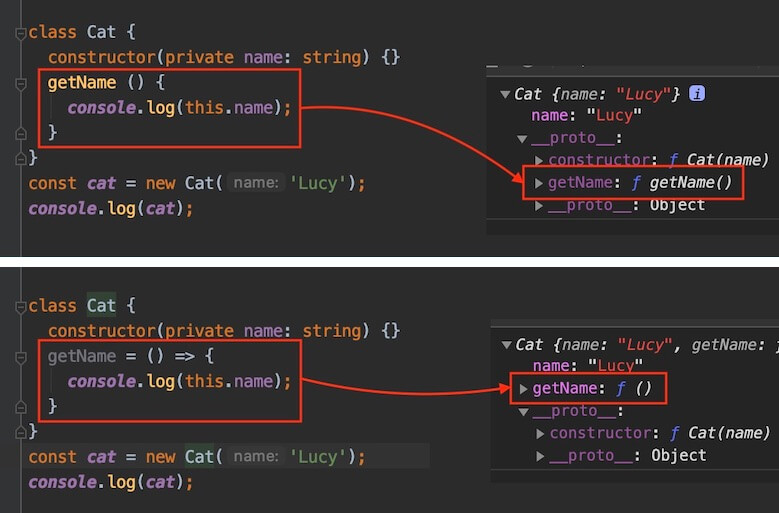
Each approach is a trade-off between memory and performance.
It's best to choose based on the situation.
# Explicit this
In the following example, the cat object that this can capture inside the someFn function is passed and run through the call method, but an error occurs because in strict mode this is implicitly of type any.
'Strict mode' means the case where
strict: true(ornoImplicitThis: true) is set in the compiler options.
123456789101112interface ICat { name: string } const cat: ICat = { name: 'Lucy' } function someFn(greeting: string) { console.log(`${greeting} ${this.name}`) // Error - TS2683: 'this' implicitly has type 'any' because it does not have a type annotation. } someFn.call(cat, 'Hello') // Hello Lucy
In this case, you can declare the type of this explicitly.
Declare this as a fake first parameter, as shown below.
123456789101112interface ICat { name: string } const cat: ICat = { name: 'Lucy' } function someFn(this: ICat, greeting: string) { console.log(`${greeting} ${this.name}`) // ok } someFn.call(cat, 'Hello') // Hello Lucy
# Overloads
'Function overloads' in TypeScript let you have multiple functions with the same name but different parameter types and return types.
With function overloads, you can create and manage functions with various structures.
In the example below, the add function has 2 declarations and 1 implementation.
Note that the function declarations and the implementation must have the same number of parameters.
anyis often used in the function implementation.
123456789function add(a: string, b: string): string // Function declaration function add(a: number, b: number): number // Function declaration function add(a: any, b: any): any { // Function implementation return a + b } add('hello ', 'world~') add(1, 2) add('hello ', 2) // Error - No overload matches this call.
You can also use overloads in method definitions in interfaces, type aliases, and so on.
With type assertions or type guards, you can define the dynamic parameters and return values of the function declarations.
123456789101112131415161718192021interface IUser { name: string age: number getData(x: string): string[] getData(x: number): string } let user: IUser = { name: 'Neo', age: 36, getData: (data: any) => { if (typeof data === 'string') { return data.split('') } else { return data.toString() } } } user.getData('Hello') // ['h', 'e', 'l', 'l', 'o'] user.getData(123) // '123'
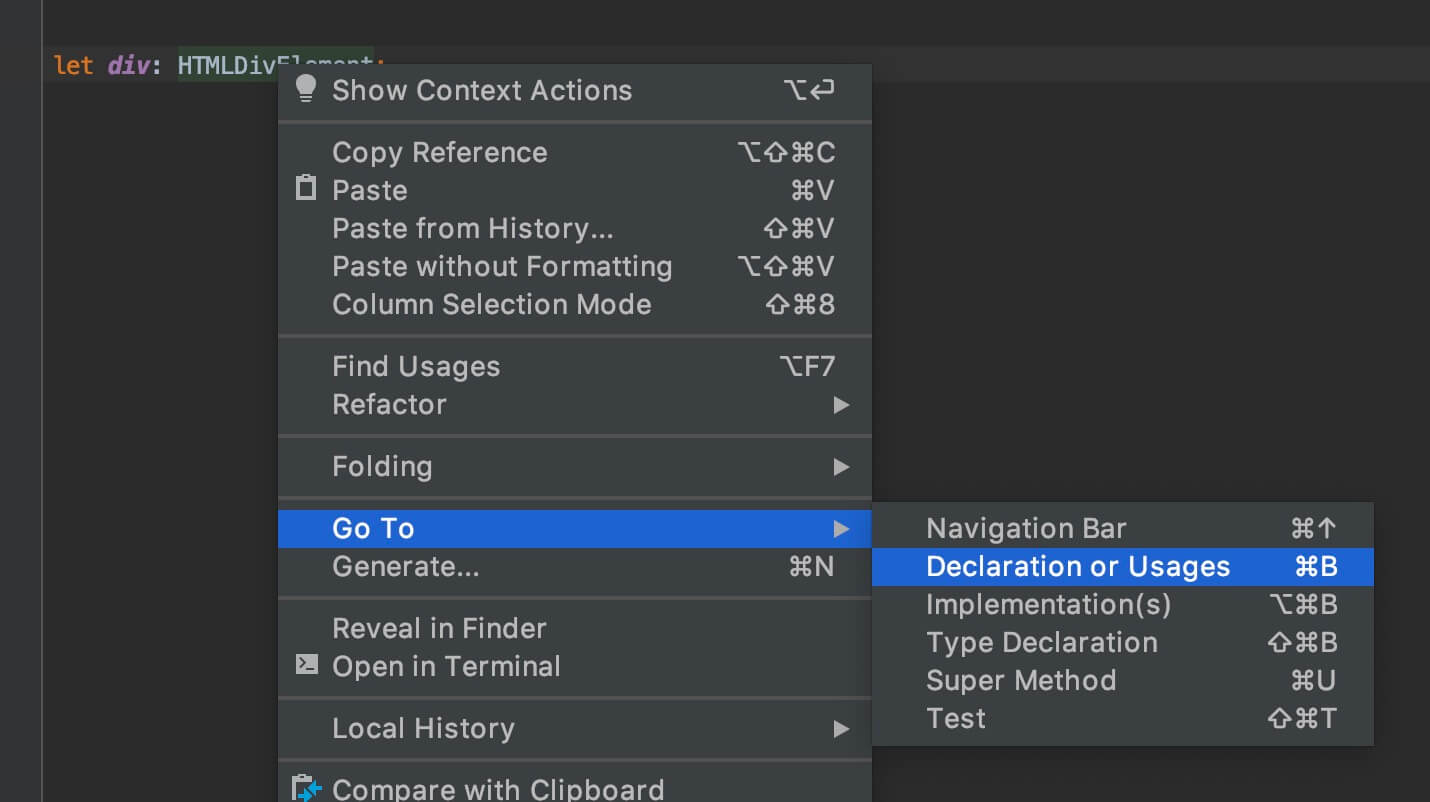
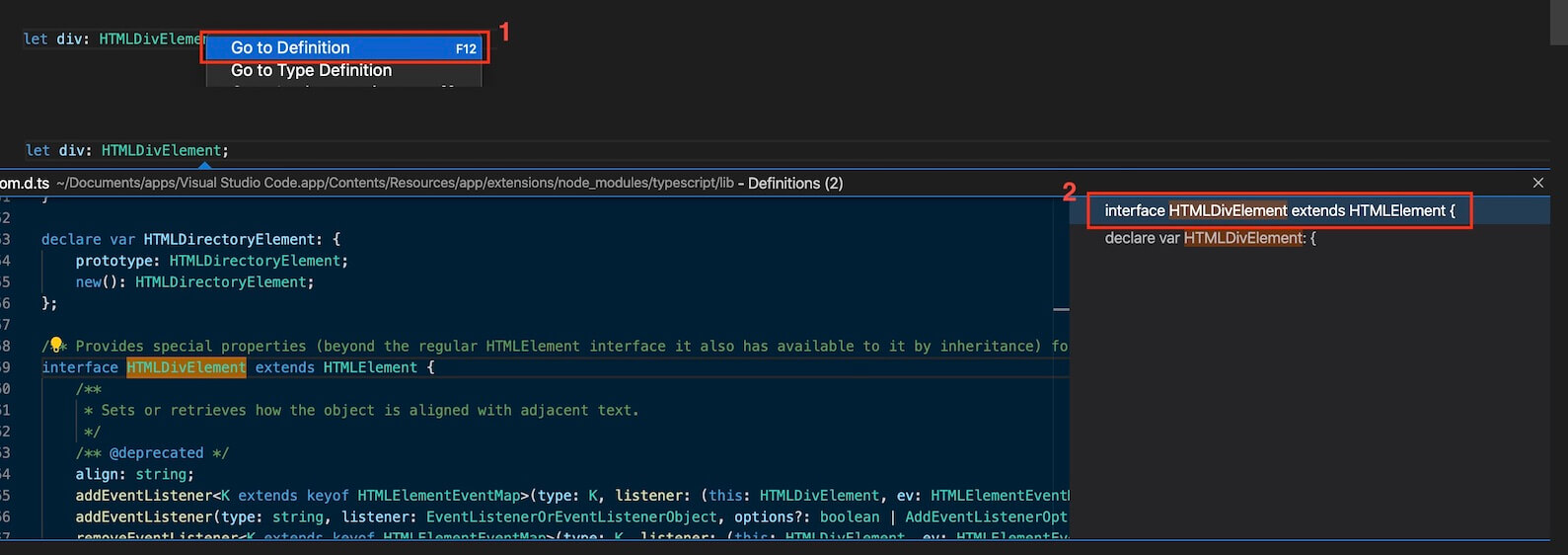
If you look at the declaration of a DOM type such as HTMLDivElement, it looks like this.
123456789101112/** Provides special properties (beyond the regular HTMLElement interface it also has available to it by inheritance) for manipulating <div> elements. */ interface HTMLDivElement extends HTMLElement { /** * Sets or retrieves how the object is aligned with adjacent text. */ /** @deprecated */ align: string; addEventListener<K extends keyof HTMLElementEventMap>(type: K, listener: (this: HTMLDivElement, ev: HTMLElementEventMap[K]) => any, options?: boolean | AddEventListenerOptions): void; addEventListener(type: string, listener: EventListenerOrEventListenerObject, options?: boolean | AddEventListenerOptions): void; removeEventListener<K extends keyof HTMLElementEventMap>(type: K, listener: (this: HTMLDivElement, ev: HTMLElementEventMap[K]) => any, options?: boolean | EventListenerOptions): void; removeEventListener(type: string, listener: EventListenerOrEventListenerObject, options?: boolean | EventListenerOptions): void; }
# Classes
Unlike a class's constructor method (constructor) and ordinary method members, properties get their types declared separately in the class body, as in name: string.
The class body means the area wrapped in curly braces
{}.
1234567891011121314class Animal { name: string constructor(name: string) { this.name = name } } class Cat extends Animal { getName(): string { return `Cat name is ${this.name}.` } } let cat: Cat cat = new Cat('Lucy') console.log(cat.getName()) // Cat name is Lucy.
# Class modifiers
Let's look at the class modifiers related to TypeScript.
There are access modifiers you can use on class members (properties and methods).
Let's see how they differ.
Access modifiers are keywords in object-oriented languages that set how accessible classes, methods, and other members are.
| Access modifier | Meaning | Scope |
|---|---|---|
public |
Freely accessible from anywhere (can be omitted) | Properties, methods |
protected |
Accessible within my class and derived descendant classes | Properties, methods |
private |
Accessible only within my class | Properties, methods |
The following modifiers can be used together with the access modifiers above.
| Modifier | Meaning | Scope |
|---|---|---|
static |
Used statically | Properties, ordinary methods |
readonly |
Used as readonly | Properties |
abstract |
Forces derived classes to implement it | Classes, properties, methods |
override |
States that it overrides a member of the parent class | Properties, methods |
accessor |
Generates a getter and setter automatically | Properties |
First, let's look at how the access modifiers differ.
In the following example, the name property of the Animal class is public, so there's no problem referring to it as this.name in the derived child class (Cat) or accessing it as cat.name from an instance.
(Freely accessible from anywhere (can be omitted))
1234567891011121314151617class Animal { // Uses the public modifier (can be omitted) public name: string constructor(name: string) { this.name = name } } class Cat extends Animal { getName(): string { return `Cat name is ${this.name}.` } } let cat = new Cat('Lucy') console.log(cat.getName()) // Cat name is Lucy. cat.name = 'Tiger' console.log(cat.getName()) // Cat name is Tiger.
In the following example, the name property of the Animal class is protected, so you can refer to it as this.name in the derived child class (Cat), but you can't access it as cat.name from an instance.
(Accessible within my class and derived descendant classes)
123456789101112131415161718class Animal { // Uses the protected modifier protected name: string constructor(name: string) { this.name = name } } class Cat extends Animal { getName(): string { return `Cat name is ${this.name}.` } } let cat = new Cat('Lucy') console.log(cat.getName()) // Cat name is Lucy. console.log(cat.name) // Error - TS2445: Property 'name' is protected and only accessible within class 'Animal' and its subclasses. cat.name = 'Tiger' // Error - TS2445: Property 'name' is protected and only accessible within class 'Animal' and its subclasses. console.log(cat.getName())
In the following example, the name property of the Animal class is private, so you can't refer to it as this.name in the derived child class (Cat), and you can't access it as cat.name from an instance either.
(Accessible only within my class)
123456789101112131415161718class Animal { // Uses the private modifier private name: string constructor(name: string) { this.name = name } } class Cat extends Animal { getName(): string { return `Cat name is ${this.name}.` // Error - TS2341: Property 'name' is private and only accessible within class 'Animal' } } let cat = new Cat('Lucy') console.log(cat.getName()) console.log(cat.name) // Error - TS2341: Property 'name' is private and only accessible within class 'Animal'. cat.name = 'Tiger' // Error - TS2341: Property 'name' is private and only accessible within class 'Animal'. console.log(cat.getName())
The following example causes an error when creating an instance because protected is used on the constructor method (constructor).
1234567class Animal { name: string protected constructor(name: string) { this.name = name } } const cat = new Animal('Dog') // Error - TS2674: Constructor of class 'Animal' is protected and only accessible within the class declaration.
Interestingly, if you use an access modifier while declaring argument types in the constructor method, the arguments are defined as property members right away.
Be careful not to leave out the access modifier.
12345678910111213class Cat { constructor(public name: string, protected age: number) {} getName() { return this.name } getAge() { return this.age } } const cat = new Cat('Neo', 2) console.log(cat.getName()) // Neo console.log(cat.getAge()) // 2
Next, let's look at static and readonly.
With static, you can create not only static methods but also static properties.
Static properties became standard in ES2022, so you can now use them in JavaScript too.
Static properties are used in the class body along with the property's type declaration, and unlike static methods, their values can't be initialized in the class body, so they need to be initialized in the constructor or a method.
1234567891011121314151617class Cat { static legs: number constructor() { Cat.legs = 4 // Init static property. } } console.log(Cat.legs) // undefined new Cat() console.log(Cat.legs) // 4 class Dog { // Init static method. static getLegs() { return 4 } } console.log(Dog.getLegs()) // 4
With readonly, the property is 'readonly'.
123456789class Animal { readonly name: string constructor(n: string) { this.name = n } } let dog = new Animal('Charlie') console.log(dog.name) // Charlie dog.name = 'Tiger' // Error - TS2540: Cannot assign to 'name' because it is a read-only property.
static and readonly can also be used together with access modifiers.
The access modifier must come first.
1234567891011class Cat { public readonly name: string protected static eyes: number constructor(n: string) { this.name = n Cat.eyes = 2 } private static getLegs() { return 4 } }
override states that a member overrides a member of the parent class.
Using it on a member that doesn't exist in the parent causes an error, so it catches mistakes when the name of a parent method changes.
If you turn on the compiler option noImplicitOverride, override is required on every overriding member.
12345678910111213class Animal { getName() { return 'Animal' } } class Cat extends Animal { override getName() { return 'Cat' } override getAge() { // Error - TS4113: This member cannot have an 'override' modifier because it is not declared in the base class 'Animal'. return 2 } }
accessor declares a property and creates a getter and setter for it automatically.
You read and write the value the same way as an ordinary property, but the getter and setter are actually called.
1234567class Animal { accessor legs = 4 } const cat = new Animal() console.log(cat.legs) // 4 (calls the getter) cat.legs = 2 // (calls the setter) console.log(cat.legs) // 2
Apart from TypeScript's private, you can also use private fields with #, which is a JavaScript standard.private is TypeScript syntax that disappears when compiled, so it can be accessed at runtime, but # actually blocks access at runtime too.
1234567891011class Animal { private name = 'Lucy' #secret = 'hidden' reveal() { return this.#secret } } const cat = new Animal() console.log(cat.reveal()) // hidden console.log(cat.name) // Error - TS2341: Property 'name' is private and only accessible within class 'Animal'. console.log(cat.#secret) // Error - TS18013: Property '#secret' is not accessible outside class 'Animal' because it has a private identifier.
# Abstract classes
An abstract class is a base class from which other classes can be derived, and it's very similar to an interface.abstract can be used not only on classes but also on properties and methods.
You can't create an instance of an abstract class directly, so you need to create instances from derived descendant classes.
12345678910111213141516171819202122232425262728// Abstract Class abstract class Animal { abstract name: string // Must be implemented in the derived class. abstract getName(): string // Must be implemented in the derived class. } class Cat extends Animal { constructor(public name: string) { super() } getName() { return this.name } } new Animal() // Error - TS2511: Cannot create an instance of an abstract class. const cat = new Cat('Lucy') console.log(cat.getName()) // Lucy // Interface interface IAnimal { name: string getName(): string } class Dog implements IAnimal { constructor(public name: string) {} getName() { return this.name } }
What makes an abstract class different from an interface is that it can contain detailed implementations of property or method members.
123456789abstract class Animal { abstract name: string abstract getName(): string // Abstract class constructor can be made protected. protected constructor(public legs: string) {} getLegs() { return this.legs } }
# Optional
Let's look at the various optional concepts that use the ? keyword.
# Parameters
First, you can specify optional parameters when you declare types.
In the following example, y is made an optional parameter with the ? keyword.
So no error occurs even if there is no argument for y.
12345function add(x: number, y?: number): number { return x + (y || 0) } const sum = add(2) console.log(sum)
The ? keyword is the same as adding | undefined to the type.
So y in the example above has the same type as in the following example.
12345function add(x: number, y: number | undefined): number { return x + (y || 0) } const sum = add(2, undefined) console.log(sum)
But only the type is the same; the way you call it isn't.
With y?: number, you can leave out the argument, but with y: number | undefined, you must pass an argument, even if it's undefined.
1234function add(x: number, y: number | undefined): number { return x + (y || 0) } add(2) // Error - TS2554: Expected 2 arguments, but got 1.
# Properties and methods
You can also use the ? keyword in property and method type declarations.
Here's the example we saw in the Interfaces section.
Declaring isAdult as an optional property means the error no longer occurs.
12345678910111213141516interface IUser { name: string age: number isAdult?: boolean } let user1: IUser = { name: 'Neo', age: 123, isAdult: true } let user2: IUser = { name: 'Evan', age: 456 }
You can also use it in types and classes.
123456789101112131415161718interface IUser { name: string age: number isAdult?: boolean validate?(): boolean } type TUser = { name: string age: number isAdult?: boolean validate?(): boolean } abstract class CUser { abstract name: string abstract age: number abstract isAdult?: boolean abstract validate?(): boolean }
# Modules
To understand TypeScript modules, you first need to understand JavaScript modules.
Much of the official TypeScript documentation covers JavaScript modules, but here we'll look only at how TypeScript's module concepts differ.
# Exports and imports
If you aren't familiar with exports and imports in JavaScript modules, please see the following MDN documents first.
https://developer.mozilla.org/en-US/docs/Web/JavaScript/Reference/Statements/export
https://developer.mozilla.org/en-US/docs/Web/JavaScript/Reference/Statements/import
In TypeScript, you can export not only ordinary variables, functions, and classes but also interfaces and type aliases as modules.
12345678910// myTypes.ts // Export an interface export interface IUser { name: string age: number } // Export a type alias export type MyType = string | number
123456789// Import the declared module (myTypes.ts) import type { IUser, MyType } from './myTypes' const user: IUser = { name: 'HEROPY', age: 85 } const something: MyType = true // Error - TS2322: Type 'true' is not assignable to type 'MyType'.
import type in the example above states that only types are imported, and the whole statement disappears when compiled.
If you turn on the compiler option verbatimModuleSyntax, import and export statements are kept exactly as written, and in exchange, import type is required when you import only types.
Because the compiler no longer guesses what to erase, this is especially useful in environments that run code by stripping only the type annotations.
For CommonJS modules, TypeScript provides export and import syntax such as export = ABC and import ABC = require('abc').
This provides a default export, which exports only one object from a module, like export default in ES6 modules.
So in TypeScript, you can import a CommonJS module in any of these ways.
The third way needs the compiler option esModuleInterop, which is on by default.
123456// CommonJS import ABC = require('abc') // or import * as ABC from 'abc' // or Default Import import ABC from 'abc'
# Type declarations for modules
Let's look at how TypeScript uses external JavaScript modules.
We'll create a simple project and install and use Lodash as an external module.
To set up the TypeScript project for this 'Modules' section, see the 'Development environment / Node.js' section.
This section covers CommonJS-style type declarations, so we run the code with tsx.
1$ npm install lodash
In main.ts, write very simple code that uses the camelCase API of the Lodash module to print to the console.
But as shown below, an error occurs at the 'import' step.
This is because there is no type declaration for the module that the TypeScript compiler can check.
Without a type declaration, the imported value implicitly becomes Any, and noImplicitAny, which is included in strict, treats this as an error.
12345// main.ts import * as _ from 'lodash' // Error - TS7016: Could not find a declaration file for module 'lodash'. console.log(_.camelCase('import lodash module'))
If you haven't installed the module itself, you get the error
TS2307: Cannot find module 'lodash'before any type declaration issue.
Unlike TypeScript, where a module's implementation and its type declaration happen together, when you use a JavaScript module that has only an implementation (e.g., Lodash), you need a type declaration for the module that the compiler can understand, and this is usually provided as a .d.ts file.
Now let's write a type declaration for Lodash.
Create a lodash.d.ts file at the project root.

The basic structure is simple.
To make the module importable, specify the module name with the module keyword.
Then, within that scope, all you need to do is declare a variable (_) that has a type (interface) and export it.
You must declare it with the
declarekeyword so the TypeScript compiler can understand it!
123456789101112131415// lodash.d.ts // Type declaration for a module (ambient module declaration) declare module 'lodash' { // 1. Declare the type (interface) interface ILodash { camelCase(str?: string): string } // 2. Declare a variable that has the type (interface) const _: ILodash // 3. Export (CommonJS) export = _ }
The example above uses export = because Lodash is a CommonJS package that assigns a single object to module.exports.
An ES module package, on the other hand, is declared in the same shape as the actual module, like this.
Named exports are declared with export, and the default export with export default; export default _ corresponds to export = _ in the earlier CommonJS example.
12345678910111213// lodash-es.d.ts declare module 'lodash-es' { // 1. Named export export function camelCase(str?: string): string // 2. Default export interface ILodash { camelCase(str?: string): string } const _: ILodash export default _ }
The importing side also uses ES module syntax as is.
123456// main.ts import _, { camelCase } from 'lodash-es' console.log(camelCase('import lodash module')) // Named export console.log(_.camelCase('import lodash module')) // Default export
If you don't set the compiler option include or files in the configuration file (tsconfig.json), every file in the project is compiled, so the lodash.d.ts above is included without any extra setup.
Type declarations outside the compile scope, however, aren't recognized automatically. In that case, you can specify the file to bring in with a reference tag (<reference />), which uses /// (a triple-slash directive), and its path attribute, like this.
Before moving on, here are a few characteristics of reference tags.
- What a reference tag brings in is a type declaration, not a module implementation, so you shouldn't import it with the
importkeyword. - A triple-slash directive is just a comment once compiled to JavaScript.
- The
pathattribute specifies the relative path of the type declaration to bring in, and you must include the file extension. - The
typesattribute specifies a module name, as in/// <reference types="lodash" />, and it's based on the compiler optiontypeRootsand Definitely Typed (@types).
The compiler option
typeRootsand Definitely Typed (@types) are covered later.
123456// Reference tag (triple-slash directive) /// <reference path="./lodash.d.ts" /> import * as _ from 'lodash' console.log(_.camelCase('import lodash module'))
Check that it prints to the console correctly.
12$ npx tsx main.ts ## importLodashModule
# Definitely Typed (@types)
In the previous section, we used Lodash's camelCase method, and this time we want to use snakeCase as well.
But we never declared a type for snakeCase in lodash.d.ts, so we get an error.
12345678// main.ts /// <reference path="./lodash.d.ts" /> import * as _ from 'lodash' console.log(_.camelCase('import lodash module')) console.log(_.snakeCase('import lodash module')) // Error - TS2339: Property 'snakeCase' does not exist on type 'ILodash'.
You can solve this simply by declaring a type for snakeCase in lodash.d.ts.
1234567891011// lodash.d.ts declare module 'lodash' { interface ILodash { camelCase(str?: string): string snakeCase(str?: string): string // Add a type declaration } const _: ILodash export = _ }
However, writing type declarations yourself every time (typing) for every module your project uses is very inefficient.
So we can use Definitely Typed, built through the contributions of many users.
Types for a great many modules are defined there, and more are added all the time.
Install and use it with npm install -D @types/module-name.
Searching with npm info @types/module-name tells you whether type declarations exist for the module you want.
Install the Lodash type declarations:
1$ npm i -D @types/lodash
Now delete lodash.d.ts, since you no longer need it.
Delete the reference tag (triple-slash directive) in main.ts as well!
Without any extra setup, you can use the various Lodash APIs.
1234567// main.ts import * as _ from 'lodash' console.log(_.camelCase('import lodash module')) console.log(_.snakeCase('import lodash module')) console.log(_.kebabCase('import lodash module'))
1234$ npx tsx main.ts ## importLodashModule ## import_lodash_module ## import-lodash-module
How it works is simple.
The type declaration module (@types/lodash) is installed in the node_modules/@types path,
and every type declaration in this path is automatically included in compilation through module imports.
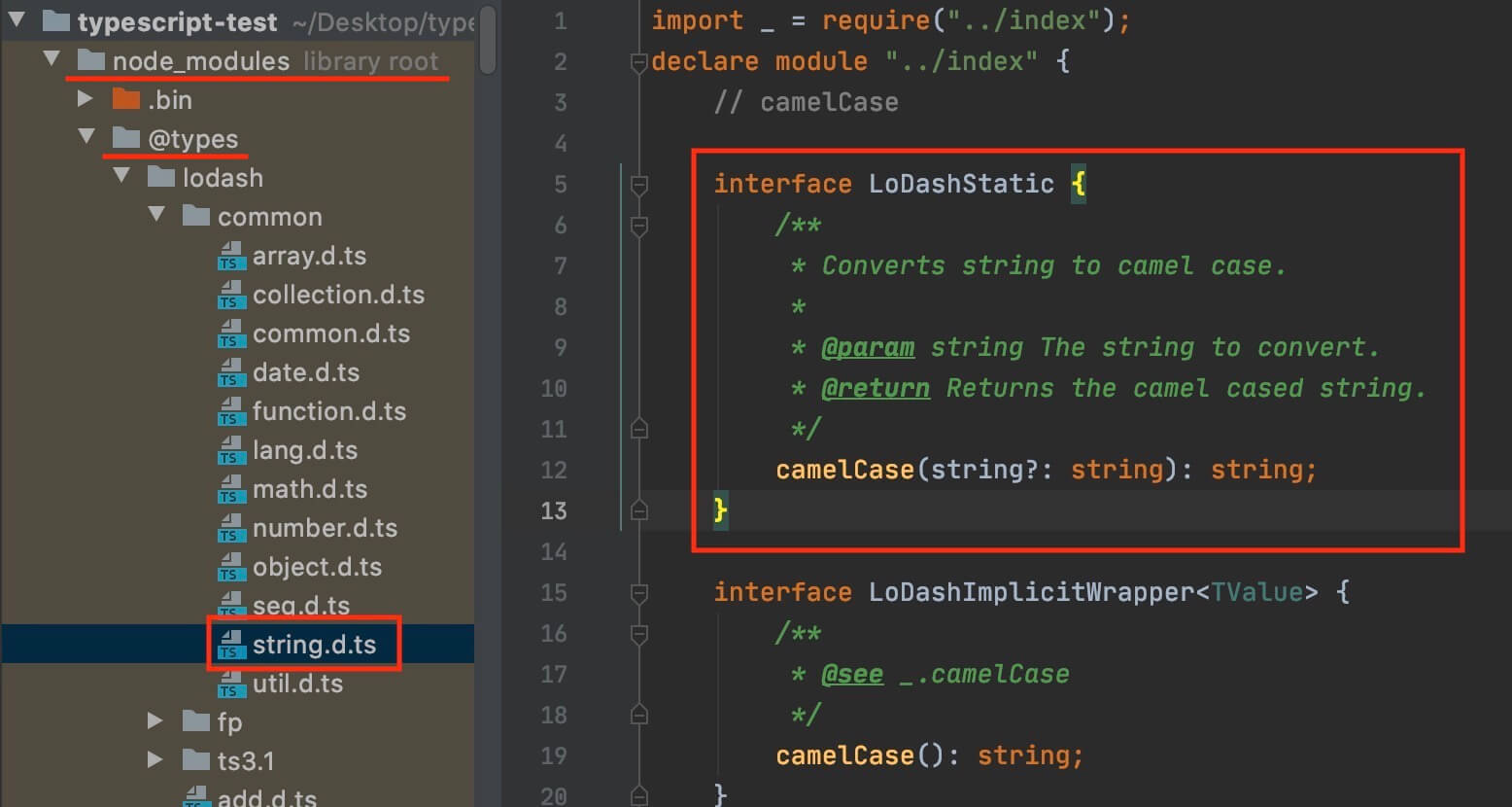
# Discriminated unions
If each member of a union has one common property and its values don't overlap, you can narrow down which member it is by comparing just that property.
A union designed this way is called a 'discriminated union', and the common property it's based on is called the discriminant.
[Discriminate]: To recognize the difference between things and tell them apart.
For the discriminant, use a literal type that allows only one value, not a broad type like string or number.
Let's look at the response types of a movie search API as an example.
When a search succeeds, you get a list of movies (Search) and the number of results (totalResults), and when it fails, you get an error message (Error).
Both responses have a Response property, but its values don't overlap: 'True' for success and 'False' for failure.
1234567891011121314interface Movie { title: string poster: string } interface ResponseDataSuccess { Response: 'True' Search: Movie[] totalResults: `${number}` // '817' } interface ResponseDataError { Response: 'False' Error: string } type ResponseData = ResponseDataSuccess | ResponseDataError
Now comparing just the Response property guarantees the types of the other properties too.
You don't need to check properties or classes separately with the in or instanceof operators.
12345678910function printResult(data: ResponseData) { if (data.Response === 'True') { // Narrowed to ResponseDataSuccess. console.log(data.totalResults) data.Search.forEach(movie => console.log(movie.title)) } else { // Narrowed to ResponseDataError. console.error(data.Error) } }
You can name the discriminant however you like.
Many examples use names like kind or type, but that's only a convention, and you can use the name the API chose as is, like Response in the example above.
There are only 2 conditions you need to meet.
- Every member of the union has that property
- In each member, that property is a literal type that doesn't overlap with the others
The term varies by source.
It's also called a tagged union, among other names, so keep that in mind.
# Decorators
A decorator in TypeScript is a function you can use on classes, their inner members (properties and methods), and accessors, and it can change or extend a class's behavior at runtime.
You use it above a target such as a class member, as in @functionName, and it receives the target's value and context as arguments.
The context holds information the decorator can refer to, such as the kind and name of the target.
123456function decorator(value: Type, context: Type) { console.log(value, context) } @decorator target
If a decorator needs to take separate arguments other than the target when you use it, you can also write it as a factory function that returns the decorator function.
12345678function decorator(arg: Type) { return function (value: Type, context: Type) { console.log(value, context) } } @decorator(arg) target
You can also use multiple decorators on one target.
Decorators applied to a target are called in order from bottom to top.
1234567import { decorator1, decorator2 } from 'path1' import { decorator3 } from 'path2' @decorator3 @decorator2 @decorator1 target
# Class decorators
Decorators that target classes are used to modify the class itself, add members to the class, or change how instances of the class are created.
You use them right above the class declaration.
Let's look at a simple example to understand them.
First, write a class that performs calculations on the value passed to its constructor.
123456789101112131415161718192021class Calculator { constructor(public x: number) {} add(y: number) { return this.x + y } sub(y: number) { return this.x - y } mul(y: number) { return this.x * y } div(y: number) { return this.x / y } } const calc = new Calculator(7) console.log(calc.add(1)) // 8 console.log(calc.sub(3)) // 4 console.log(calc.mul(4)) // 28 console.log(calc.div(2)) // 3.5
The following example uses a decorator to seal a class.
In a sealed class, you can't add, modify, or delete properties through the prototype object.
However, because the decorator's work happens at runtime, no error occurs at compile time, but an error occurs at runtime.
1234567891011function sealed(constructor: Function) { Object.seal(constructor) // Seal the class (no extending or deleting) Object.seal(constructor.prototype) // Seal the prototype object too } @sealed class Calculator { // ... } Calculator.prototype.x = 10 // Type OK! but, Runtime Error!
The following example uses a decorator to extend a class.
The new class returned from the decorator function replaces the original class.
Contrary to the example above, the added method causes an error at compile time but not at runtime.
You can ignore the compile error with a @ts-ignore comment.
123456789101112131415161718type Constructor = { new (...args: any[]): any } function modulo<T extends Constructor>(constructor: T) { return class extends constructor { mod(y: number) { return this.x % y } } } @modulo class Calculator { // ... } const calc = new Calculator(7) console.log(calc.add(1)) // 8 // @ts-ignore console.log(calc.mod(2)) // Type Error! but, 1
# Method decorators
Decorators that target a class's methods are used to observe or replace methods.
This decorator receives the original method as its first argument and a context of type ClassMethodDecoratorContext as its second.
The context has the following properties.
| Property | Description |
|---|---|
kind |
The kind of target; always 'method' for method decorators |
name |
The name of the target method |
static |
Whether it's a static method |
private |
Whether it's a private method starting with # |
access |
has and get methods that check the target's existence and value at runtime |
addInitializer |
Registers a function to run at initialization time |
metadata |
An object for sharing information between decorators |
In the following example, the log decorator prints information about the method it's used on.
If the decorator function returns a new function that wraps the original method, you can change the behavior of the target method.
12345678910111213141516171819202122232425262728function log(original: Function, context: ClassMethodDecoratorContext) { return function (this: any, ...args: any[]) { const result = original.apply(this, args) // Call the original function console.log('Kind:', context.kind) console.log('Name:', context.name) console.log('Static:', context.static) console.log('Arguments:', args) console.log('Result:', result) return result } } class Calculator { constructor(public x: number) {} @log add(y: number) { return this.x + y } // ... } const calc = new Calculator(7) calc.add(1) // Kind: method // Name: add // Static: false // Arguments: [1] // Result: 8
# TS utility types
TypeScript provides a variety of built-in utility types that you can use to transform and manipulate types.
With them, you can make your code more reusable and write code that is more concise and easier to read.
| Utility | Description (main type) | Type variables |
|---|---|---|
Partial |
Returns a new type with every property of TYPE made optional (interface) |
<TYPE> |
Required |
Returns a new type with every property of TYPE made required (interface) |
<TYPE> |
Readonly |
Returns a new type with every property of TYPE made readonly (interface) |
<TYPE> |
Record |
Returns a new type that uses KEY as its properties and TYPE as the type of their values (interface) |
<KEY, TYPE> |
Pick |
Returns a new type with the properties picked from TYPE by KEY (interface) |
<TYPE, KEY> |
Omit |
Returns a new type that omits the properties in KEY from TYPE and keeps the rest (interface) |
<TYPE, KEY> |
Exclude |
Returns a new type with TYPE2 excluded from TYPE1 (union) |
<TYPE1, TYPE2> |
Extract |
Returns a new type with TYPE2 extracted from TYPE1 (union) |
<TYPE1, TYPE2> |
NonNullable |
Returns a new type with null and undefined excluded from TYPE (union) |
<TYPE> |
Parameters |
Returns the parameter types of TYPE as a new tuple type (function, tuple) |
<TYPE> |
ConstructorParameters |
Returns the parameter types of TYPE as a new tuple type (class, tuple) |
<TYPE> |
ReturnType |
Returns the return type of TYPE as a new type (function) |
<TYPE> |
InstanceType |
Returns the instance type of TYPE (class) |
<TYPE> |
ThisParameterType |
Returns the type of the explicit this parameter of TYPE as a new type (function) |
<TYPE> |
OmitThisParameter |
Returns a new type with the explicit this parameter of TYPE removed (function) |
<TYPE> |
ThisType |
Specifies the this context of TYPE and returns nothing! (interface) |
<TYPE> |
Awaited |
Returns the resolve type of a Promise |
<TYPE> |
NoInfer |
Blocks type inference for the generic type T |
<TYPE> |
Uppercase |
Converts every character of the string literal TYPE to uppercase |
<TYPE> |
Lowercase |
Converts every character of the string literal TYPE to lowercase |
<TYPE> |
Capitalize |
Converts the first character of the string literal TYPE to uppercase |
<TYPE> |
Uncapitalize |
Converts the first character of the string literal TYPE to lowercase |
<TYPE> |
Thanks for reading to the end.
Likes and kind comments help keep this blog going!