Key Optimization Strategies for a Claude Code Token Diet
When you build complex logic with Claude Code, you sometimes run into the 'usage limit reached' message.
This is not only a matter of cost but also something that breaks your development flow in the middle of work, and at the center of this problem are tokens.
Anthropic's pricing falls into two broad types.
There are API plans billed per token, and subscription plans that allocate usage for a monthly fee.
On API plans, output tokens cost five times as much as input tokens.
As of October 2026, the official API prices are as follows.
| Model | Input (per 1M tokens) | Output (per 1M tokens) |
|---|---|---|
| Claude Fable 5.1 / 5 | $10 | $50 |
| Claude Opus 5.5 | $4 | $20 |
| Claude Opus 5 / 4.8 / 4.7 | $5 | $25 |
| Claude Sonnet 5.5 / 5 | $2 | $10 |
| Claude Haiku 5.5 | $0.10 ($0.50 for prompts over 100K tokens) |
$0.50 ($2.50 for prompts over 100K tokens) |
Opus 5.5, released on September 22, 2026, has input and output prices 20% lower than Opus 5, and the price of input read from the cache is 60% lower.
Anthropic announced that with the default settings it costs about 40% less than Opus 5, and since Claude Code v2.1.280, Opus 5.5 is also the default model on all plans and the API.
Sonnet 5.5, released on September 28, has the same prices as Sonnet 5, but Anthropic announced that it outputs more than 30% faster than Sonnet 5 and handles the same work with fewer tokens, so its cost per task is up to 30% lower.
Haiku 5.5, released on October 7, is 90% cheaper than Haiku 4.5 for requests with prompts of 100K tokens or less, and a price five times higher applies to requests over 100K tokens.
On the same day, the cache Read price of Sonnet 5.5 was also cut in half, from $0.20 to $0.10 per 1M tokens.
Also, models from Claude 4.7 onward use a new tokenizer.
This includes all the latest models, such as Opus 5.5, Sonnet 5.5, Haiku 5.5, and Fable, and they split the same text into about 30% more tokens.
Even when the list price is the same, the actual bill can go up, so keep this in mind when you compare with the previous generation.
On subscription plans, usage is shared between the Claude app (chat and Cowork) and Claude Code.
Claude Code is available from the Pro plan, and the eligible plans are as follows.
| Plan | Monthly / annual price | Usage |
|---|---|---|
| Pro | $20 / $17 | The minimum plan for using Claude Code |
| Max | $100 - $200 | 5x or 20x Pro |
| Team | Standard seat $25 / $20 Premium seat $125 / $100 |
Allocated by seat tier |
| Enterprise | From $20 per seat + usage |
Admins set the limits |
Even on subscription plans, which model you use has a big effect on how fast you use up your quota.
In particular, Fable is billed only through usage credits on the Pro plan, and on the Max plan you can use it for up to 50% of your weekly limit.
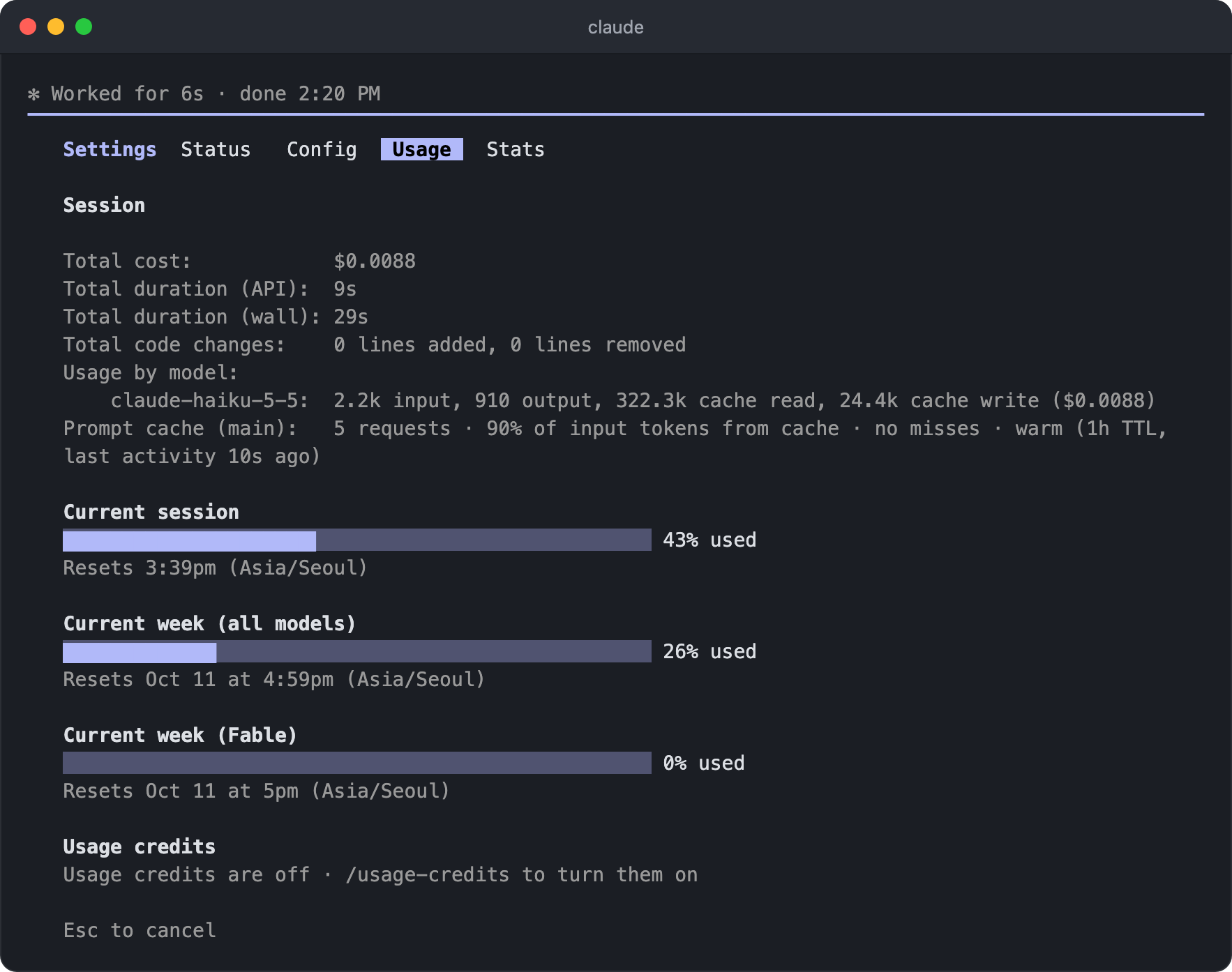
You can check your remaining quota and the session's token usage with the /usage command, and the Stats tab (/stats) on the same screen shows activity statistics.
On the Pro, Max, Team, and Enterprise plans, it breaks down your recent usage by skill, subagent, plugin, and MCP server, and if an activity such as a long context or a cache miss takes up 10% or more of your usage, it tells you about it along with ways to reduce it.
You are billed per token, but what you actually pay for is inference time.
The cost is the time the GPU spends running the model to process tokens, and on subscription plans the price is simply hidden, but the same requests use up your usage limit.
Three things decide how long it takes to process a token: which model you use, whether it is an input or output token, and whether it is cached.
This is also why output tokens cost more than input.
A single request is processed in two phases.
In the prefill phase, the model reads the system prompt, CLAUDE.md, the user message, and the files and command output that have piled up in the conversation so far.
These are input tokens, and a large amount can be processed in parallel at once.
In the decode phase, the model generates its thinking, tool calls, and the visible answer one token at a time, in order.
A 200-token response is the result of running the model 200 times in a row, so it occupies the GPU much longer, and that is why output tokens cost five times as much as input.
The model does not remember previous requests, so it reads the entire conversation again from the start on every request.
This is the starting point for the context management and prompt caching covered later.
Besides cutting costs, token management directly affects productivity and response quality.
When the context gets too large, Claude's reasoning quality drops and hallucinations become more likely.
# Splitting work across models
Using Opus for every task is inefficient.
However, since Claude Code v2.1.280, the default model on all plans, including Pro, is Opus 5.5, so if you do not pick a model yourself, Opus handles every task.
Opus 5.5 is cheaper than previous Opus models, but it still costs twice as much as Sonnet 5.5, and Anthropic says Sonnet is enough for most everyday coding tasks and recommends saving Opus for high-level design or complex debugging.
Sonnet 5.5 is strong at everyday tasks with a clear scope and at bug fixes, and in Anthropic's comparison, on several benchmarks it beat Sonnet 5's best scores with only the low or medium effort level, at about one-tenth of the cost.
It pays to hand simple tasks and subagents off to Haiku.
Haiku 5.5 is about 75% cheaper than Haiku 4.5 on average, and Anthropic describes it as a good fit for repetitive tasks such as summarizing, compressing, and classifying, and for subagents in coding work.
However, Anthropic added that Sonnet 5.5 and Opus 5.5 are still better for complex agentic coding.
There are two ways to balance performance and cost.
The opusplan model automatically splits work into 'planning' and 'execution'.
Opus, which has stronger reasoning, handles the planning phase, and it automatically switches to Sonnet for the execution phase, where the actual code is written.
The conversation context is kept even when the model changes, so Sonnet sees the plan Opus made and implements it as is.
However, the model changes every time you move in and out of plan mode, so keep in mind that the prompt cache is reset each time.
Use the /model command like this.
1/model opusplan
With /advisor, a fast and cheap executor model (Sonnet, Haiku) does the actual work, and it asks a more capable advisor model (usually Opus) for advice only at moments that need difficult judgment.
You do not call it manually each time; the executor model decides on its own to call the advisor model when it reaches a complex decision, repeated errors, or a task completion checkpoint.
The advisor must perform the same as or better than the executor model, so for the default model, Opus 5.5, you can set only Opus 5 or later models or Fable as the advisor.
If your goal is to cut costs, first switch the executor model to Sonnet with /model, then use the /advisor command.
12/model sonnet /advisor opus
To lower costs further, you can also set Haiku 5.5 as the executor with /model haiku (Claude Code v2.1.293 or later).
It costs more than using Haiku alone, but less than switching the main model to Sonnet or Opus, and you can still get advice from Opus at points that need difficult judgment.
Each time the advisor is called, the advisor model reads the entire conversation fresh without the cache, and those tokens are billed at the advisor model's price or counted toward your plan usage.
Even so, it is called only at points that need a decision, not on every turn, so it costs less than working with a strong model from start to finish.
Turning /advisor on or off in the middle of a session keeps the executor model's prompt cache.
Both of these methods are known to be more cost-effective than handling every task with Opus alone.
Depending on your project, use opusplan to split roles within a single session and advisor to get a second opinion during long sessions.
On the other hand, some options increase costs./fast is a research preview feature that makes Opus output up to 2.5 times faster, and its price per 1M tokens is $8 input and $40 output for Opus 5.5, and $10 input and $50 output for Opus 5 and Opus 4.8, which is twice the standard price.
On subscription plans, it is billed only through usage credits, not plan usage, so you first need to enable credit usage in /usage-credits.
The cache is invalidated once the moment you turn it on, so it is best to turn it on early in the session, before the conversation gets long.
Also, by default it stays on into the next session, so when you finish the work that needs fast responses, turn it off again with /fast.
# Adjusting the effort level
Claude's latest models use adaptive reasoning, thinking as much as needed before generating an answer.
What is easy to overlook here is that this thinking is also billed as output tokens.
Even a simple file edit request can use thousands to tens of thousands of tokens on internal reasoning, and if you leave it unchecked, you can use up your session limit in just a few exchanges, especially on the Pro plan.
The tool for controlling this is the /effort command.
The effort level is not just a setting for thinking time.
According to Anthropic's blog, the effort level sets the total amount of work Claude puts into a request.
This includes how many files it reads, how much it verifies the results, and how far it goes through multi-step work before checking with you.
At a low effort level, Claude chooses to ask you for the information it needs rather than spend tokens looking it up on its own.
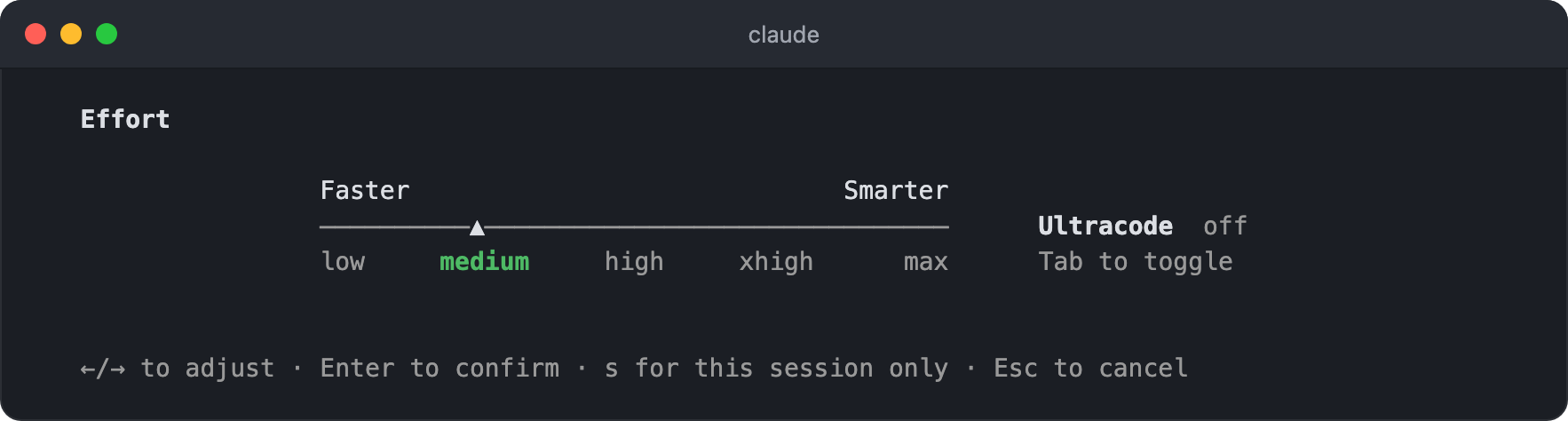
low: Short tasks with a narrow scope, latency-sensitive tasksmedium: Tasks where you want to reduce token usage even at a small cost in intelligence, the default for Opus 5.5, Sonnet 5.5, and Haiku 5.5high: The balance point between token usage and intelligence, the default for models other than Opus 5.5, Sonnet 5.5, Haiku 5.5, and Opus 4.7xhigh: Deeper reasoning that uses more tokens accordingly, the default for Opus 4.7max: The deepest reasoning. It tends to overthink, so it does not help with every task, and unless you set it with an environment variable, it applies only to the current session.
Anthropic recommends using the model's default for most tasks, and treating the effort level as a setting you choose based on the kind of work you usually do, rather than changing it for each task.
Opus 5.5 (the default model), Sonnet 5.5, and Haiku 5.5 already start at medium, so in a session with many simple tasks you can lower it to low, and for models that start at high, such as Fable, lowering it with /effort medium or low is effective.
Haiku 5.5 is the first Haiku model to support effort levels; you cannot change the effort level on the earlier Haiku 4.5.
You can also tell what to change when a result is wrong.
If Claude had all the context it needed and tried hard enough but still got it wrong, that is a sign you need a bigger model.
On the other hand, if it got it wrong because it skipped files, did not run tests, or stopped a refactor halfway, that is a sign you need to raise the effort level.
However, before raising the effort level, first check that your prompt is not vague and that your CLAUDE.md and task scope are appropriate.
The /effort screen also has an ultracode toggle that you turn on and off with Tab.
It is a Claude Code setting, not a model effort level, and when it is on, Claude builds a workflow for each sizable task and handles it with multiple subagents.
Since v2.1.284, it turns on at the current effort level without raising it to xhigh, but because one task can lead to several workflows, it uses far more tokens than handling the same task with it off and reaches the usage limit faster.
In a session where you want to save tokens, it is best not to turn it on.
If you want Claude to think deeply just once, include ultrathink in your prompt.
It leaves the effort level sent to the API as is and adds an instruction to reason more deeply only for that turn.
Changing the effort level in the middle of a session invalidates the whole prompt cache on most models, and while the cache is alive, Claude Code asks you to confirm before changing it.
The exceptions are Opus 5.5, Sonnet 5.5, Haiku 5.5, and Fable 5.1: if you connect with an API key or a Claude subscription, the cache is kept even when you change the effort level.
For other models, as with the model itself, set it when you start a session and try not to change it in the middle of work.
The level you confirm with Enter on the /effort screen, or enter like /effort medium, is saved per model and becomes the default for the next session.
To apply it only to the current session, press s instead of Enter.
The model you pick with /model is also saved as the default for the next session.
A setting you raised for a hard task in a previous session can carry over to today's simple tasks, so when you start a new session, run /model and /effort once each to check your current settings.
Your settings should be intentional choices, not accidents.
With /effort auto, you can clear the level saved for the current model and go back to the model default, and you can also override it permanently with the CLAUDE_CODE_EFFORT_LEVEL environment variable.
12345{ "env": { "CLAUDE_CODE_EFFORT_LEVEL": "medium" } }
You can also turn off extended thinking entirely.
Turn it on and off for the current session with Option+T (Alt+T on Windows and Linux), or, for a session that handles only simple tasks, run MAX_THINKING_TOKENS=0 claude.
However, Opus 5.5, Sonnet 5.5, Haiku 5.5, and Fable models cannot turn off extended thinking, so this setting does not apply, and for these models you control it only with the effort level.
# Context management
The way an AI loses focus as a conversation gets longer is called context rot.
To this, you need to add one more point of view: cost.
In Claude Code, something that enters the conversation is not sent only once.
The files Claude reads and the output of the commands it runs are sent again on every later turn until the session ends.
Thanks to the cache, resending is cheap but not free, and since the model has to reason with all of it on every turn, it also affects quality.
So the cost of a session comes down to how many tokens go into the context, how many turns those tokens stay there, and how many contexts run at the same time.
One long session costs more than the same work split into several short sessions.
That is because the 40th question rereads all 39 turns before it.
So keep the session's context short, with only what is relevant to the current task.
# Managing fixed costs
Even before you send your first message, the context already holds tool definitions, the system prompt, CLAUDE.md, and the skill list.
Start by checking these fixed-cost items that load automatically in every session.
CLAUDE.md is a project instruction file that loads automatically when a session starts and is included in every conversation turn after that.
It is a fixed cost sent on every turn, so it is recommended to write the file so that it uses 2,000 tokens or less.
The official docs suggest 200 lines or less as a guideline, but for Korean text, 50 to 100 lines or less is about right.
So the key is to leave out general conventions Claude can guess on its own and keep only the rules and context unique to your project.
If you need detailed documentation, an effective strategy is to split it into separate files or skills and put only the reference paths in CLAUDE.md.
Note that CLAUDE.md is read once when the session starts, so editing the file in the middle of a session does not affect that session.
The new content applies only after you run /clear or /compact, or restart the session.
Skills also have a fixed cost.
The body of a skill is loaded only when it is invoked, but the list of skill names and descriptions is included in the context on every turn, whether or not you use them.
Run the /skill-doctor command to see how much context each skill takes and how often it is used, along with skills that have never been invoked and where to turn them off (Claude Code v2.1.252 or later).
Clean up the skills with the largest context cost first, and for skills you use only by invoking them directly with /name, set disable-model-invocation: true in the frontmatter so they drop out of the list too.
You should also tidy up your MCP tools.
In the past, the full definitions of MCP tools were loaded into the context from the start, so you had to disable unused MCP servers manually, but now tool search works by default, so only the server instructions and tool names go in, and the definitions load only when the tool is actually used.
Even so, as you add more MCP servers, the list of names alone takes up context, and in environments where tool search does not work, the full definitions are loaded as is, so some management is needed.
Check your configured servers with the /mcp command, disable MCP servers you are not using right now, and enable them again when you need them.
Anthropic's official guide recommends using CLI tools over MCP whenever possible.
CLI tools such as gh, aws, gcloud, and sentry-cli have no tool definition overhead and return only the output you need, so they are much more efficient with context.
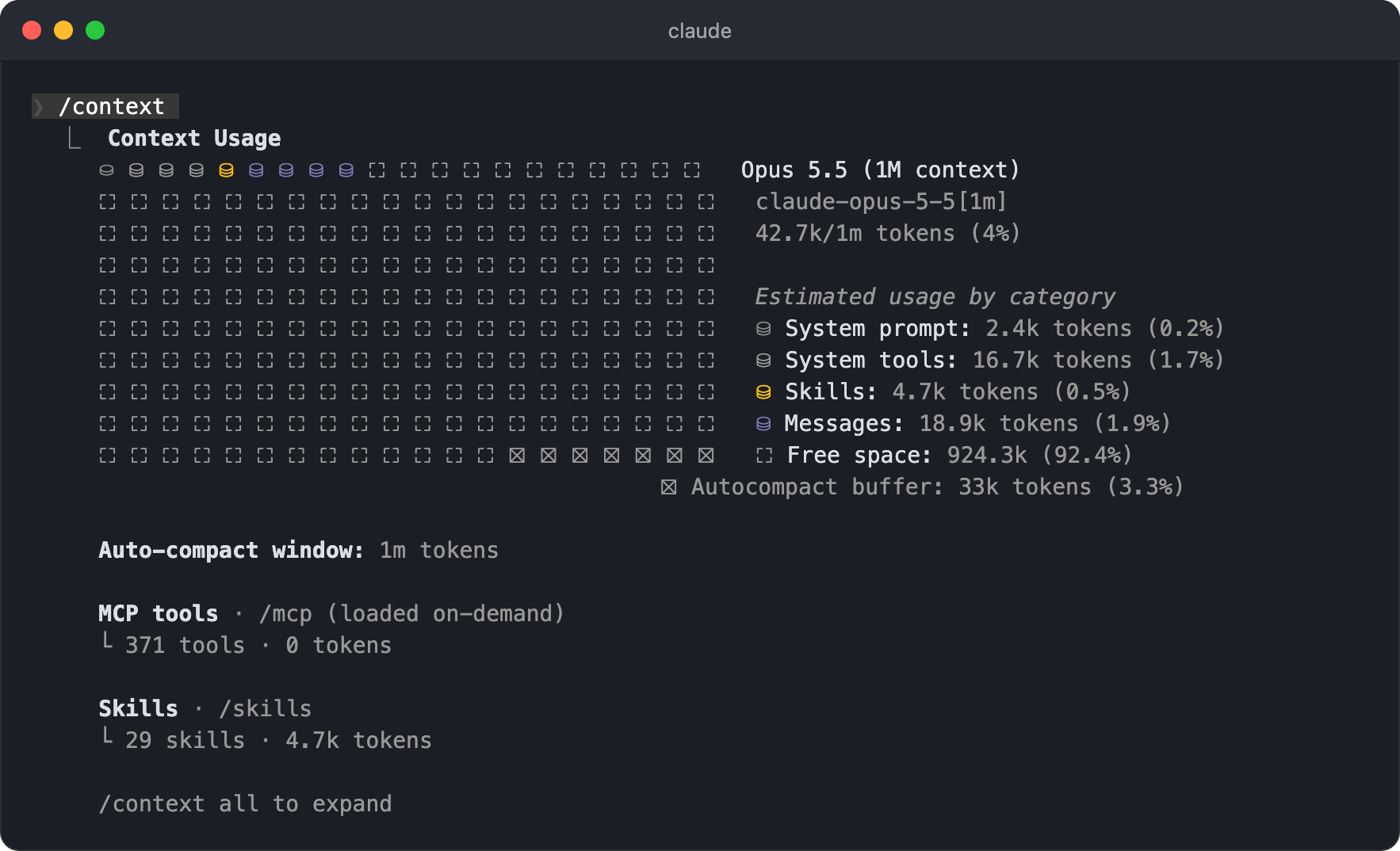
If you run the /context command in a new session before typing anything, you can see item by item what is loaded at the start and how much.
If you make a habit of checking the actual numbers for what percentage each item takes, you can optimize based on data rather than gut feeling.
# Files and command output
Most of what gets added to the context after the session starts is tool results.
The messages you type are a few lines, but a single file Claude reads is thousands of tokens, and the output of a single command can be just as long.
How much Claude reads depends on how much it has to figure out on its own.
If you ask something like "The tests are failing," it first has to find which test, so it runs a few searches and opens several files that look relevant, and those results stay in the context until the end of the session, even after they are no longer useful.
If you name the file, as in "Fix the failing test in utils.test.ts," the search step disappears and only one Read call remains.
If you mention the file with @, even that one call disappears.
1Fix the failing test in @utils.test.ts
Claude Code attaches mentioned files to the message before sending it, so the file is included from the first request and the turn where the model asks to read the file is skipped.
The context size the file takes is the same either way, so mentioning it once per conversation is enough.
If you mention the same file again in a later turn, another copy is attached, so from the second time on, type just the file name.
If you use a typed language such as TypeScript, installing a code intelligence plugin is another option.
Instead of searching text and reading several candidate files, it finds the location it needs with a single go-to-definition call, which cuts down on unnecessary file reads.
Command output stays in the context the same way files do.
Every time you run tests, a build, or git log, the output is added to the conversation and stays for as many turns as files do.
Large output over 30,000 characters is actually not a problem, because Claude Code saves it to a file and puts only a preview of about the first 2,000 characters and the path into the conversation.
You can adjust this threshold up to 128,000 characters with the bashOutputMaxChars setting (Claude Code v2.1.261 or later).
For failed commands, the threshold is about 10,000 characters, and output over it is not saved to a file; only part of the beginning and end is put into the conversation.
The problem is output below that size.
A test runner that prints 400 passing tests one line each does not hit the threshold, and those 400 lines are included in every remaining turn.
Claude often adds flags that reduce output or tail on its own, but for the two or three commands you use every day, it is more reliable to write them in CLAUDE.md in a form that includes the options that reduce output.
1- Run a single test file: `npx vitest run src/utils.test.ts --reporter=dot`
The official docs also have a PreToolUse hook example that rewrites a command so that only failed items remain in the test output.
# Cleaning up the conversation
How long something stays in the context depends on how you split your sessions.
So that the context of one task is not carried into the next, use /clear when you start a new task and /compact when the first part of the same task is done.
/clear empties the conversation completely.
If you finish the post editing you were doing in the morning and start a completely different task, there is no reason to continue the previous conversation, so clear it and start fresh.
Clearing costs nothing, and if you might come back to that session later, run it with a name, like /clear post-editing.
The previous conversation gets that name, so it is easy to find with /resume.
The /compact command replaces the conversation history with a summary.
When you are continuing the same task but do not need to carry along everything you looked up early on, it compresses the past steps into a summary and continues with only the key points.
Autocompact starts when the context gets close to the end of the window.
The threshold is the point where the output reserve (up to 20K tokens) and a buffer (13K tokens) are subtracted from the window, so in a 1M window, compaction starts at about 967K tokens.
Opus 4.7 and later models (including Opus 5.5), Sonnet 5 and later models, Haiku 5.5, and Fable models run with a 1M window on all plans, including Pro, without any extra setup, and you do not need to pick the [1m] variant or turn on usage credits for 1M.
You can check your current usage yourself with the /context command, and the Context is 80% full warning in the result is only a notice that compaction will start soon, not the actual point of compaction.
A larger window does not mean lower costs.
Compaction starting later also means that a longer conversation is sent again on every turn.
To move the trigger point earlier, set the window size used for autocompact with the /autocompact command.
The default auto uses a size that fits the model, and you can also pass a token value between 100K and 1M directly, like /autocompact 300k (300,000).
The value you set is saved per model in your user settings, so when you switch to another model, that model's value applies (Claude Code v2.1.288 or later), and to apply the same value to all models, use autoCompactWindow in the settings file.
In particular, Haiku 5.5's API price goes up fivefold for requests with prompts over 100K tokens, so if you run a long session with Haiku, moving the compaction point earlier pays off.
If you want to move it earlier by percentage instead of window size, use the CLAUDE_AUTOCOMPACT_PCT_OVERRIDE environment variable.
Percentages higher than the default are ignored, so you can use it only to move compaction earlier.
12345{ "env": { "CLAUDE_AUTOCOMPACT_PCT_OVERRIDE": "70" } }
You can also steer the summary by adding instructions after /compact.
1/compact Focus the summary on the auth module and the current test failures
If you always want to keep the same things, you can also add a Compact instructions section to your project's CLAUDE.md.
123# Compact instructions When compacting, keep the decisions made, the paths of edited files, and the tests that still fail.
Summarizing is work where the model reads the entire conversation, so compaction itself also costs something.
If you plan to be away for a long time, run /compact before you leave.
While the cache is alive, it summarizes while reading the previous conversation at the cache price, but after the cache expires, it has to reread the entire conversation at full price.
The details of how this works are covered in Prompt caching.
On the Pro and Max plans, if you continue a session of 100K tokens or more after a break of more than an hour, a dialog opens before you send the first message, asking how you want to continue.
If you choose Resume from summary, it runs /compact right away so that later requests include only the summary, and if you choose Resume full session as-is, it loads the conversation as is and caches the whole thing again.
Either way, the cache has already expired, so the whole conversation is reread once, but later requests are much smaller with the summary.
Turns that happen while you are not typing also count toward the session length.
A recurring task registered with /loop runs as a full turn carrying the entire conversation of the session it was set up in, and if the cache lifetime has passed since the last turn, a cache miss is added on top.
In a session with a goal set by /goal, turns that check progress while waiting on background tasks (up to 3 between prompts) and turns that receive messages sent from other sessions also send the entire conversation in the same way.
Run recurring tasks in a new session opened in another terminal.
/btw (By The Way) is a slash command for asking side questions that do not need to stay in the conversation history.
It is not a prefix you put in front of a message; you use it in the form /btw your question.
It refers to the current context but has no tool access, and the answer does not pile up in the history, so it does not affect the context size of the rest of the conversation.
It is useful that you can call it even while Claude is working.
1/btw By the way, what does this module name mean?
/rewind (or pressing ESC twice) is a command that takes you back to just before a specific point when Claude has gone in the wrong direction.
Pick the point to go back to, then choose one of the following options from the menu.
Restore code and conversation: Restores both the code and the conversationRestore conversation: Keeps the code and restores only the conversationRestore code: Keeps the conversation and restores only the codeSummarize from here: Compresses the conversation from the selected point onward into a summary (to free up context)Summarize up to here: Compresses the conversation before the selected point into a summary and keeps the later messages as they areNever mind: Closes the menu without rewinding
If there are no file changes to restore after the selected point, the two code-related items do not appear in the menu.
Also, unlike /compact, /rewind goes back to a point that is already cached, so the prompt cache is kept.
If you want to throw away a conversation that went in the wrong direction, /rewind is better than /compact.
# Subagents
If all the methods so far were about piling up less in the context, subagents are a way to handle work that would pile up in a different context from the start.
A subagent is a separate Claude that the main conversation splits off and hands a task to.
It starts in its own context window with its own system prompt and tools, plus the CLAUDE.md the main conversation read, but it does not receive the main conversation.
The built-in Explore and Plan subagents do not even load CLAUDE.md, so that they can explore quickly and cheaply.
It runs its own turns, and when the work is done, only one final answer comes back to the main conversation.
The files the subagent read and the output of the commands it ran are all discarded the moment the work ends.
That does not mean it is free.
A subagent does not know the main conversation, so it may have to reread files the main conversation already read, and all the tokens from those turns count toward your bill.
They just do not stay in the main context, so for small tasks it actually costs more.
Subagents pay off for work where there is a lot to read but little worth keeping.
A typical example is finding the cause of an error in a log file thousands of lines long: if the main conversation handles it, thousands of lines stay until the end of the session, but if you hand it to a subagent, only one line with the cause remains.
When Claude runs into this kind of work, it often uses a subagent on its own, and when you want to make it do so, just say it in your request without any special command.
1Review this log file with a subagent and tell me only the cause of the error
Only what the subagent chooses to report comes back to the main conversation, so anything it found during the work is lost along with the process if it is not in the answer.
When you hand off the work, specify in advance what it should bring back.
The subagent's model is decided in this order: the model Claude specifies when calling it, model in the definition file, the CLAUDE_CODE_SUBAGENT_MODEL environment variable, then the main conversation's model.
If nothing is specified, it uses the same model as the main conversation, so if you are working with the default Opus 5.5, the subagent also runs on Opus.
The built-in Explore also uses the main conversation's model as is, so if you define a user subagent with the same name with model: haiku, you can run exploration with Haiku.
For work you hand off repeatedly, specify the model in the subagent definition file, like model: haiku, and haiku points to Haiku 5.5 starting with Claude Code v2.1.293.
You can also set the effort level with effort in the definition file, and since v2.1.292, Claude passes the effort level written in your request as is when it calls a subagent, so you can also ask something like "Run the subagent at low."
If the instructions passed during delegation are enough for the task, you can also add omitClaudeMd: true so it starts without the user and project CLAUDE.md (Claude Code v2.1.271 or later).
12345678--- name: log-reader description: Finds and summarizes the cause of errors in log files model: haiku omitClaudeMd: true --- Read the log file and briefly report only the cause of the error and where it happened.
# Prompt caching
Claude supports prompt caching, which caches repeated context so that reusing it costs less.
Claude Code manages this caching on its own, but to actually reduce costs, there are two things you need to understand.
It is commonly said that "caching is 90% cheaper," but that applies only at cache Read (cache hit) time.
A cache Write (cache miss) actually costs more than the base input price.
| Item | Relative to input cost |
|---|---|
| 5-minute TTL cache Write | 1.25x |
| 1-hour TTL cache Write | 2x |
| Cache Read (cache hit / refresh) | 0.1x 0.05x for Opus 5.5 and Sonnet 5.5, 0.025x for Fable 5.1 |
In other words, the cache pays off only when reuse actually happens.
A 5-minute TTL breaks even from the first Read, and a 1-hour TTL from the second Read.
A Write happens once per token and Reads repeat on every turn after it, so in a typical session where the conversation continues, the cache pays off.
When Anthropic announced Opus 5.5, it explained that cache Reads make up most of the cost of agent and coding work, which is why it lowered Opus 5.5's cache Read price to $0.20 per 1M tokens.
For the same reason, on October 7, 2026, the cache Read price of Sonnet 5.5 was also cut in half to $0.10, and Anthropic explained that this cut reduces the cost of Sonnet 5.5 by about 20% for most agent work.
The bill for one turn consists of the cache Read for the previous conversation, full-price input for the part newly added in this turn, and the output price for the response.
Because of the asymmetry, where tens of thousands of tokens go in and a few hundred come out, it matters that only the newly added part is processed at full price.
Claude Code requests different TTLs depending on the kind of request and how it is billed.
The main conversation within the plan usage of a subscription uses a 1-hour TTL, and requests that happen outside the main conversation, such as subagents, workflows, and compaction, use a 5-minute TTL.
Once you go over your plan limit and start being billed through usage credits, the main conversation also drops to 5 minutes, and if you connect with an API key or a cloud provider, it is 5 minutes from the start.
| Request type | Within subscription plan usage | Usage credits, API key |
|---|---|---|
| Main conversation | 1 hour | 5 minutes |
| Others (subagents, workflows, compaction, etc.) | 5 minutes | 5 minutes |
You can also set the TTL yourself.
For the main conversation, use the promptCacheTtl setting or the CLAUDE_CODE_PROMPT_CACHE_TTL environment variable, and for other requests, use the subagentPromptCacheTtl setting or the CLAUDE_CODE_SUBAGENT_PROMPT_CACHE_TTL environment variable; the only allowed values are 5m and 1h.
123{ "promptCacheTtl": "1h" }
Each time the cache is hit (that is, each time the cached context is reused), its TTL is renewed automatically for free.
So during continuous work, the cache stays alive, but if there is no cache hit before the TTL passes, it expires, and on your next question all the accumulated tokens are billed again at the Write price.
You can see how often the cache actually hits on the Prompt cache (main) line of the /usage screen we looked at earlier (Claude Code v2.1.251 or later).
It shows the number of requests, the share of input tokens read from the cache, the number of cache misses, and whether the cache is currently alive, and since v2.1.260 it also shows the estimated cause of the last cache miss.
The cache is reused only for the part that matches the previous request, compared from the very beginning of the request.
A request is always assembled in this order: the system prompt including tool definitions, project context such as CLAUDE.md and memory, then the conversation.
The ideal case is when one tool result is added to the end of the conversation; if something near the front changes, everything after it is recomputed, even if the content is the same.
Every action that breaks the cache either changes the front of the request or changes the cache key.
Not only time, but also certain actions in the middle of a session break the cache.
The following actions make the next request reread the entire conversation.
- Changing the model with
/model. Each model has its own cache, and while the cache is alive, Claude Code asks you to confirm before changing it. Switching plan mode withopusplanand settingmodelin a skill's frontmatter are also model switches. - Changing the effort level with
/effort. Most models have a separate cache for each level, and only Opus 5.5, Sonnet 5.5, Haiku 5.5, and Fable 5.1 are exceptions. - Turning on fast mode with
/fast. It happens only once per conversation, the first time you turn it on, and the recomputation is also done at the fast mode price. Turning it off or on again does not affect the cache. - Connecting or disconnecting an MCP server, or turning on or off a plugin that includes an MCP server. If the tool definitions are lazy-loaded, the cache is kept.
- Adding a deny rule that blocks a whole tool by its name alone, like
Bash, in an environment where tool search does not work - Compacting the conversation with
/compact. Only the conversation part is replaced, so the cache for the system prompt in front of it is kept. - Attaching so many images that you hit the request limit. Claude Code removes old images one batch at a time and recomputes from that point.
- The first conversation you start after a Claude Code update. The system prompt or tool definitions have changed, so the cache is built from scratch.
On the other hand, the following actions keep the cache.
- Editing files in the repository
- Editing
CLAUDE.mdin the middle of a session. In return, that change also applies only from the next session. - Switching permission modes
- Changing the output style. The new style is delivered as a conversation message and applies from the next message.
- Invoking skills or slash commands
- Turning
/advisoron and off - Viewing a summary with
/recap - Going back to an earlier point with
/rewind - Running subagents
Continuing a previous session with --resume does not break the cache by itself.
A resumed conversation keeps the system prompt from when it first started, so within the cache lifetime it hits the cache as is; in most cases, though, the cache has already expired, so it simply rereads the conversation.
Because of this, the common advice to "regularly clean up with /compact as the context piles up" can be wrong depending on the situation.
The /compact command replaces the conversation structure itself, so the cache for the conversation part is invalidated, and the cost of generating the summary is added.
To keep the cache, consider the following approaches.
- Decide the model and effort level when the cache is empty, such as when you start a session or right after
/clear, and do not change them in the middle of a long conversation. Opus 5.5, Sonnet 5.5, Haiku 5.5, and Fable 5.1 keep the cache even when you change the effort level. - Run
/compactbefore you are away for a long time. Summarizing while the cache is alive is cheaper than rereading everything after it expires. - Roll back a conversation that went in the wrong direction with
/rewindinstead of/compact. - In an environment that runs with a 5-minute TTL, keep calls coming within 5 minutes, or set the TTL to 1 hour yourself.
When you call the Claude API directly, you set the TTL with cache_control on each request.
12345678910111213// ... const client = new Anthropic() const response = await client.messages.create({ model: 'claude-opus-5-5', system: [ { type: 'text', text: largeContext, cache_control: { type: 'ephemeral', ttl: '1h' } } ], // ... })
# Wrapping up
In its official blog, Anthropic lists the factors that affect session cost the most in the following order.
I have organized the methods covered above in this order, so find the combination that fits your workflow and use Claude Code more reliably.
- Long sessions: The entire conversation is sent again on every turn, so most of the tokens a session uses are spent here. Keep sessions short and light with
/clearfor new tasks,/compactfor the next step of the same task,/btwfor side questions, and/rewindfor wrong turns, and in a 1M window you can move the compaction point earlier with/autocompact. - Context overload: Unneeded files, command output, and unused skills and MCP servers are sent again on every turn. Pass files with
@mentions, add options that reduce output to commands with a lot of output, and hand work with a lot of reading to subagents. In a new session, check the starting state with/context, keepCLAUDE.mdunder 2,000 tokens, clean up unused skills and servers with/skill-doctorand/mcp, and use CLI tools over MCP. - Too much model and effort: Every other cost is multiplied by this. Do not use the default Opus 5.5 for every task as is; split work across models with
/model opusplanand/advisor, and adjust the effort level with/effort, but both settings carry over to the next session, so check them in each new session. - Actions that break the cache: Changing the model mid-conversation, changing the effort level on models other than Opus 5.5, Sonnet 5.5, Haiku 5.5, and Fable 5.1, and gaps longer than the cache lifetime make the entire conversation get recomputed at full price. Change settings when you start a session, run
/compactbefore you step away, and check the cache TTL that matches how you are billed.
And check your current usage and cache hit rate often with the /usage and /context commands.
Thanks for reading to the end.
Likes and kind comments help keep this blog going!