JS Intersection Observer: Observing Element Visibility

# Overview
Intersection Observer watches the intersection between the browser viewport and a target element, and lets you tell whether the element is inside the viewport or not, or more simply, whether it's currently visible on the user's screen.
Because it runs asynchronously, you can use it without the problems that come with event-based element observation such as scroll, like poor rendering performance or events firing over and over.
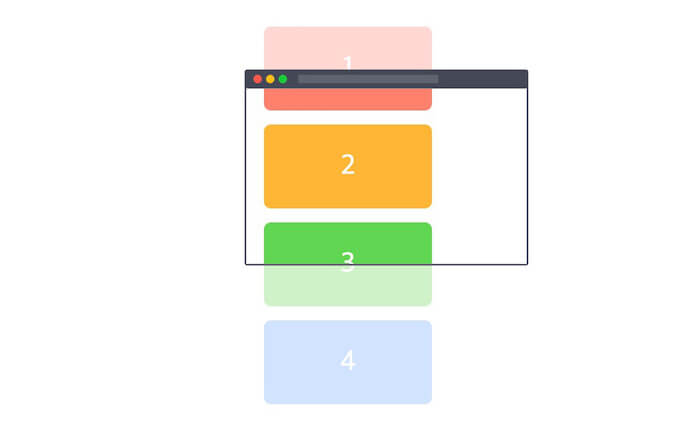
You initialize an observer with an instance (io) created by new IntersectionObserver(), and specify the target to observe (Element).
The constructor takes 2 arguments (callback, options).
12const io = new IntersectionObserver(callback, options) // Initialize the observer io.observe(element) // Register the target (element) to observe
# Callback
When a target is registered or its visibility (whether it's visible or not) changes, the observer runs the callback.
The callback takes 2 arguments (entries, observer).
123const options = {} const io = new IntersectionObserver((entries, observer) => {}, options) io.observe(element)
# entries
entries is an array of IntersectionObserverEntry instances, which represent the targets observed with the .observe() method.
IntersectionObserverEntry contains the following readonly properties.
boundingClientRect: The rectangle information of the target (DOMRectReadOnly)intersectionRect: Information about the target's intersecting area (DOMRectReadOnly)intersectionRatio: The percentage of the target's intersecting area (the ratio of theintersectionRectarea to theboundingClientRectarea, Number)isIntersecting: The target's intersection state (Boolean)rootBounds: The rectangle information of the specified root element (DOMRectReadOnly)target: The target element (Element)time: Information about when the change occurred (DOMHighResTimeStamp)
123456789const io = new IntersectionObserver((entries, observer) => { entries.forEach(entry => { console.log(entry) // entry is 'IntersectionObserverEntry' }) }, options) io.observe(element1) // Target 1 io.observe(element2) // Target 2 // ...
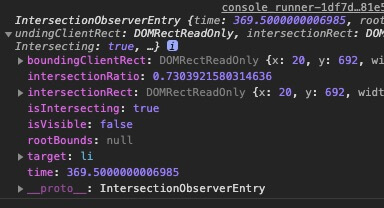
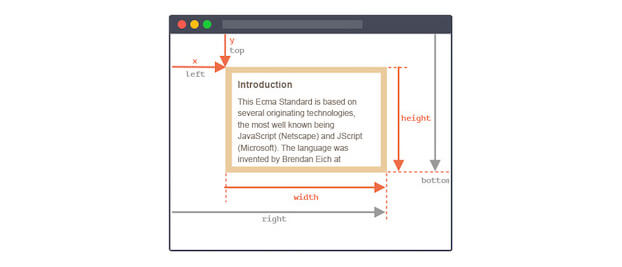
# entry.boundingClientRect
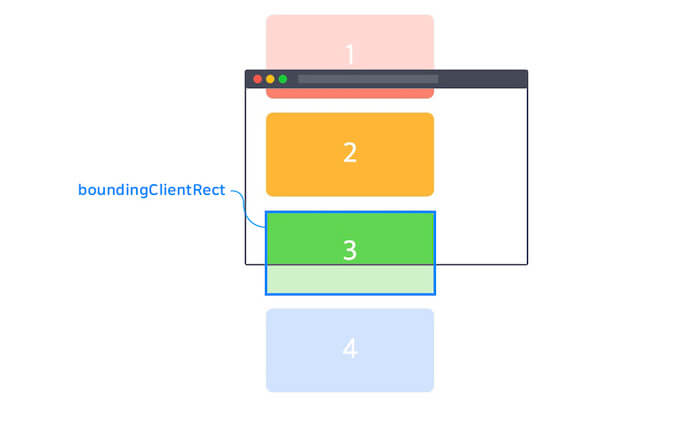
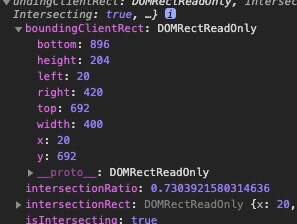
Returns the rectangle information of the target (DOMRectReadOnly).
You can get the same value with Element.getBoundingClientRect(). (Calling getBoundingClientRect causes a reflow.)
# entry.intersectionRect
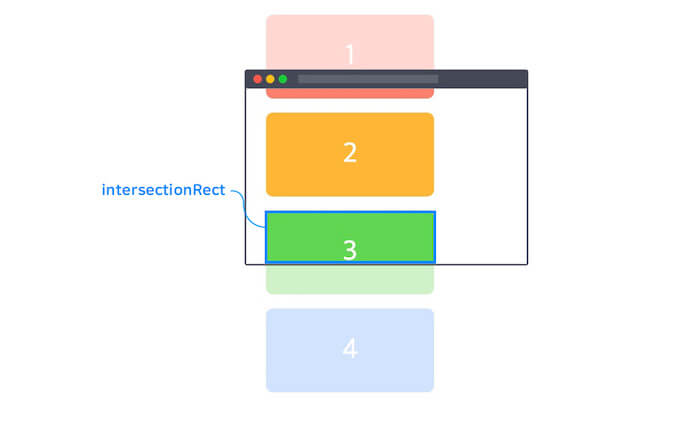
Returns the rectangle information (DOMRectReadOnly) of the area where the target intersects (overlaps) the root element.
# entry.intersectionRatio
Returns how much the target intersects (overlaps) the root element, as a number between 0.0 and 1.0.
This is the ratio of the intersectionRect area to the boundingClientRect area.
# entry.isIntersecting
A value (Boolean) that indicates whether the target is entering the intersecting state with the root element (true) or leaving it (false).
# entry.rootBounds
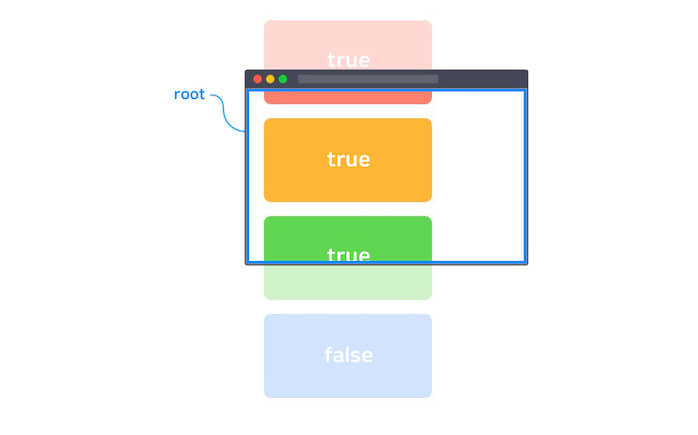
Returns the rectangle information of the root element (DOMRectReadOnly).
This value changes with the rootMargin option, and if you didn't declare a separate root element (the root option), it returns null.
# entry.target
Returns the target (Element).
# entry.time
Returns a DOMHighResTimeStamp that indicates when the intersection state changed, relative to the time the document was created.
# observer
References the instance whose callback is running.
12345const io = new IntersectionObserver((entries, observer) => { console.log(observer) }, options) io.observe(element)
# Options
You can use a few options to set the observation range.
# root
Specifies the element object (root element) to use instead of the viewport when checking the target's visibility.
It must be an ancestor of the target, and if you don't specify it or set it to null, the browser's viewport is used by default.
The default value is null.
123const io = new IntersectionObserver(callback, { root: document.getElementById('my-viewport') })
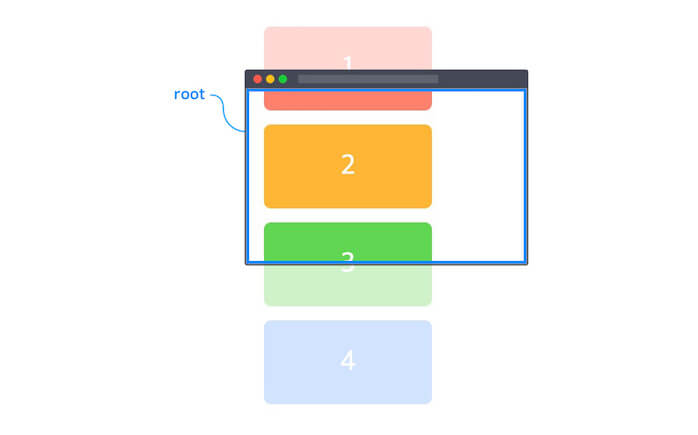
# rootMargin
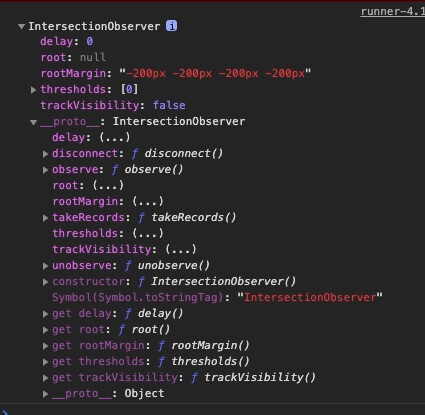
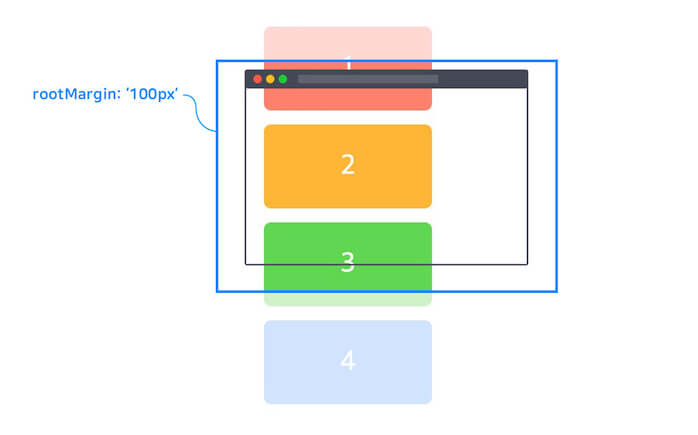
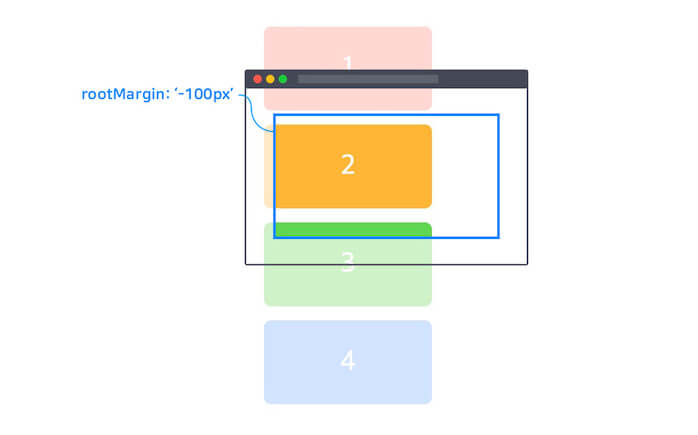
You can grow or shrink the root's range with margins.
Like CSS margin, you can set the margins in 4 forms, using px or %.
The default value is 0px 0px 0px 0px, and you must include the units.
- TOP, RIGHT, BOTTOM, LEFT / e.g.
10px 0px 30px 0px - TOP, (LEFT, RIGHT), BOTTOM / e.g.
10px 0px 30px - (TOP, BOTTOM), (LEFT, RIGHT) / e.g.
30px 0px - (TOP, BOTTOM, LEFT, RIGHT) / e.g.
30px
123const io = new IntersectionObserver(callback, { rootMargin: '200px 0px' })

# threshold
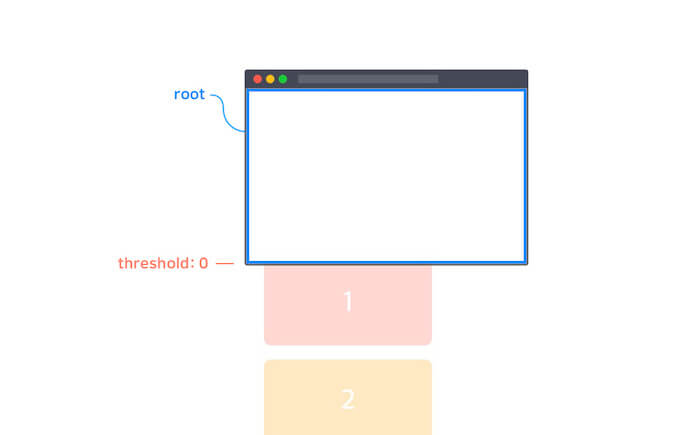
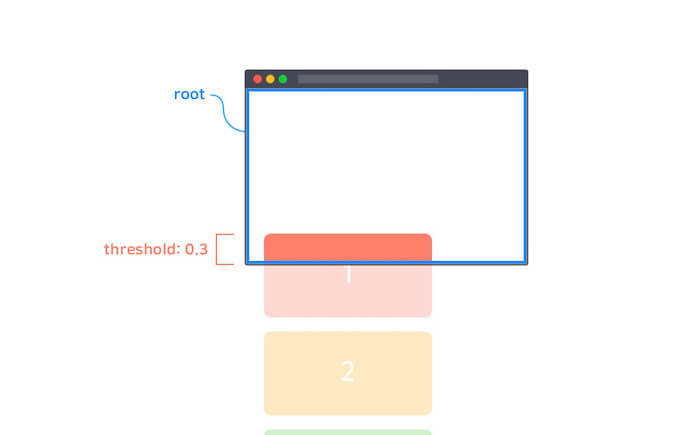
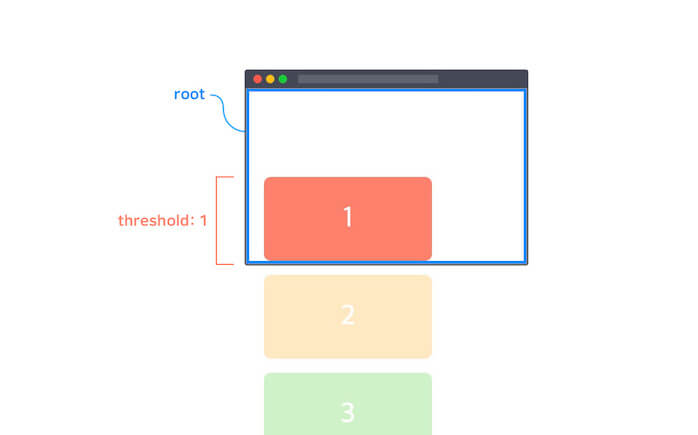
Sets, as a percentage, how much of the target must be visible for the observer to run.
The default value is [0] (an Array), but you can also write a single Number value.
0: The observer runs the moment the target's edge pixel crosses the root's range (when the target's visibility is 0%).0.3: The observer runs when the target's visibility is 30%.[0, 0.3, 1]: The observer runs when the target's visibility reaches 0%, 30%, and 100%.
123const io = new IntersectionObserver(callback, { threshold: 0.3 // or `threshold: [0.3]` })
# Methods
# observe
Starts observing the target element.
12345678910const io1 = new IntersectionObserver(callback, options) const io2 = new IntersectionObserver(callback, options) const div = document.querySelector('div') const li = document.querySelector('li') const h2 = document.querySelector('h2') io1.observe(div) // Observe the DIV element io2.observe(li) // Observe the LI element io2.observe(h2) // Observe the h2 element
# unobserve
Stops observing the target element.
You must pass the one target element you want to stop observing as an argument.
However, if you pass a target element that the IntersectionObserver instance isn't observing, nothing happens.
1234567891011const io1 = new IntersectionObserver(callback, options) const io2 = new IntersectionObserver(callback, options) // ... io1.observe(div) io2.observe(li) io2.observe(h2) io1.unobserve(h2) // nothing.. io2.unobserve(h2) // Stop observing the H2 element
Since the callback's second argument observer references the instance, you can also write it like this.
1234567891011121314const io1 = new IntersectionObserver((entries, observer) => { entries.forEach(entry => { // When visibility changes, the callback runs for all targets, // so skip the target if its intersection state is false (not visible). if (!entry.isIntersecting) { return } // Runs when the target's intersection state is true (visible). // ... // Handle the code above (once), then stop observing observer.unobserve(entry.target) }) }, options)
# disconnect
Stops observing all elements that the IntersectionObserver instance is observing.
12345678910const io1 = new IntersectionObserver(callback, options) const io2 = new IntersectionObserver(callback, options) // ... io1.observe(div) io2.observe(li) io2.observe(h2) io2.disconnect() // Stop observing all elements io2 is observing (LI, H2)
# Support
Each front-end framework has libraries that make Intersection Observer easier to use.
Here is some simple usage for each; see each library's documentation for details.
# React
https://www.npmjs.com/package/react-intersection-observer
The useInView hook returns ref and inView, which you can use.
Attach ref to the target element you want to observe.inView is reactive data that represents the target's intersection state (Boolean).
1npm i react-intersection-observer
12345678910111213141516171819202122import { useEffect } from 'react' import { useInView } from 'react-intersection-observer' export default function Component() { const { ref, inView } = useInView({ rootMargin: '200px 0px', threshold: 0.3 }) useEffect(() => { if (inView) { console.log('Intersecting!') } }, [inView]) return ( <section ref={ref}> <h2>Hello Intersection Observer!</h2> <p>See me? {inView ? 'Yes' : 'No'}</p> </section> ) }
# Vue
https://vueuse.org/core/useIntersectionObserver/
useIntersectionObserver takes the target, a callback, and options as arguments, in that order.
1npm i @vueuse/core
1234567891011121314151617181920212223242526<script setup lang="ts"> import { ref } from 'vue' import { useIntersectionObserver } from '@vueuse/core' const target = ref<HTMLElement | null>(null) const inView = ref(false) useIntersectionObserver( target, ([{ isIntersecting }]) => { inView.value = isIntersecting console.log('Intersecting!') }, { rootMargin: '200px 0px', threshold: 0.3 } ) </script> <template> <section ref="target"> <h2>Hello Intersection Observer!</h2> <p>See me? {{ inView ? 'Yes' : 'No' }}</p> </section> </template>
# Svelte
https://github.com/metonym/svelte-intersection-observer
Use the IntersectionObserver component to connect the target reference and the intersection state data.
Use the reactive statement ($:) to handle what happens based on the intersection state.
1npm i svelte-intersection-observer
123456789101112131415161718192021<script lang="ts"> import IntersectionObserver from 'svelte-intersection-observer' let element: HTMLElement let intersecting: boolean $: if (intersecting) { console.log('Intersecting!') } </script> <IntersectionObserver bind:intersecting {element} rootMargin="200px 0px" threshold={0.3}> <section bind:this={element}> <h2>Hello Intersection Observer!</h2> <p>See me? {intersecting ? 'Yes' : 'No'}</p> </section> </IntersectionObserver>
# polyfill
An official library is available so that you can use the IntersectionObserver API even in browsers that don't support it (MSIE).
There's nothing to configure; you just import the module.
1npm i intersection-observer
1234567891011// For IE import 'intersection-observer' // Use it the same way. const io = new IntersectionObserver(callback, options) const els = document.querySelectorAll('element') // For IE Array.prototype.slice.call(els).forEach(el => { io.observe(el) })
Or you can use it globally like this.
1<script src="https://polyfill.io/v3/polyfill.min.js?features=IntersectionObserver"></script>
# Examples
# Infinite scroll
Thanks for reading to the end.
Likes and kind comments help keep this blog going!