The Complete Guide to CSS Grid

CSS Grid provides a two-dimensional (rows and columns) layout system.
Flexible Box is great too, but it is meant for relatively simple one-dimensional layouts, and for more complex layouts we can use CSS Grid.
CSS Grid is a special CSS module created to solve the various layout workarounds that have long been called hacks.
Open the developer tools, find the element, and select the grid button shown next to it.
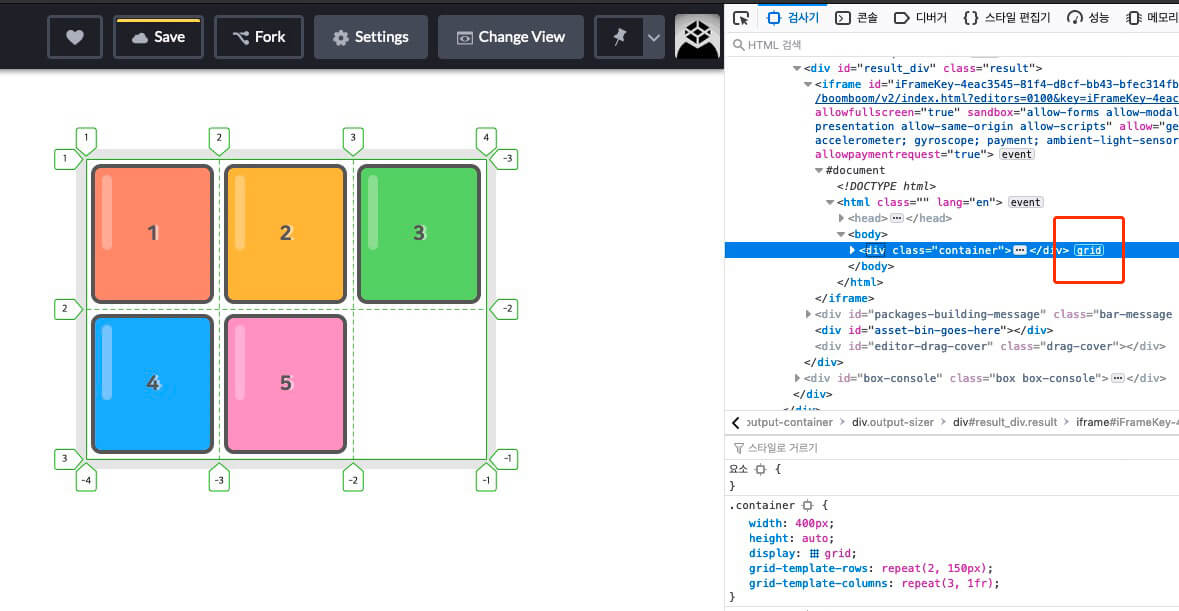
I've prepared a short test video for those who are just getting started with CSS Grid.
The following is the sample code used in the video above and in the examples below.
It's written in SCSS, but SCSS can include CSS syntax, so try defining .container and .item below // Test here!.
Or test Grid in a new environment of your own.
Like CSS Flex, CSS Grid is divided into two concepts: the container and the item.
The container is the parent element that wraps the items, and you can place each item inside it.
# Grid container properties
The properties for the grid container are as follows.
| Property | Meaning |
|---|---|
| display | Defines a grid container |
| grid-template-rows | Defines the sizes of explicit rows (tracks) |
| grid-template-columns | Defines the sizes of explicit columns (tracks) |
| grid-template-areas | Creates a template by referencing area names |
| grid-template | Shorthand for grid-template-xxx |
| row-gap | Defines the gap (line) between rows |
| column-gap | Defines the gap (line) between columns |
| gap | Shorthand for xxx-gap |
| grid-auto-rows | Defines the sizes of implicit rows (tracks) |
| grid-auto-columns | Defines the sizes of implicit columns (tracks) |
| grid-auto-flow | Defines how the auto-placement algorithm works |
| grid | Shorthand for grid-template-xxx and grid-auto-xxx |
| align-content | Aligns the grid contents vertically (column axis) |
| justify-content | Aligns the grid contents horizontally (row axis) |
| place-content | Shorthand for align-content and justify-content |
| align-items | Aligns the grid items vertically (column axis) |
| justify-items | Aligns the grid items horizontally (row axis) |
| place-items | Shorthand for align-items and justify-items |
# Grid item properties
The properties for grid items are as follows.
| Property | Meaning |
|---|---|
| grid-row-start | Specifies the row start position of a grid item |
| grid-row-end | Specifies the row end position of a grid item |
| grid-row | Shorthand for grid-row-xxx (row start/end positions) |
| grid-column-start | Specifies the column start position of a grid item |
| grid-column-end | Specifies the column end position of a grid item |
| grid-column | Shorthand for grid-column-xxx (column start/end positions) |
| grid-area | Sets an area name, or shorthand for grid-row and grid-column |
| align-self | Aligns a single grid item vertically (column axis) |
| justify-self | Aligns a single grid item horizontally (row axis) |
| place-self | Shorthand for align-self and justify-self |
| order | Specifies the placement order of grid items |
| z-index | Specifies the stacking order of grid items |
# Grid containers
# display
Defines a grid container.
The child elements of a defined container automatically become grid items.
You must write this on the container to use the grid!
| Value | Meaning |
|---|---|
grid |
Defines a block-level grid container |
inline-grid |
Defines an inline-level grid container |
123.container { display: grid; }
# grid-template-rows
Defines the sizes of explicit rows (tracks).
You can also define the names of the lines at the same time.
You can use the fr (fraction, a ratio of space) unit.
You can use the repeat() function.
It is used the same way as
grid-template-columns.
12345.container { display: grid; grid-template-rows: row1Size row2Size ...; grid-template-rows: [lineName] row1Size [lineName] row2Size [lineName] ...; }
123456789101112/* Define the size of each row. */ .container { grid-template-rows: 100px 200px; } /* You can also define the name of each line at the same time. */ .container { grid-template-rows: [first] 100px [second] 200px [third]; } /* A line can have more than one name. */ .container { grid-template-rows: [row1-start] 100px [row1-end row2-start] 200px [row2-end]; }
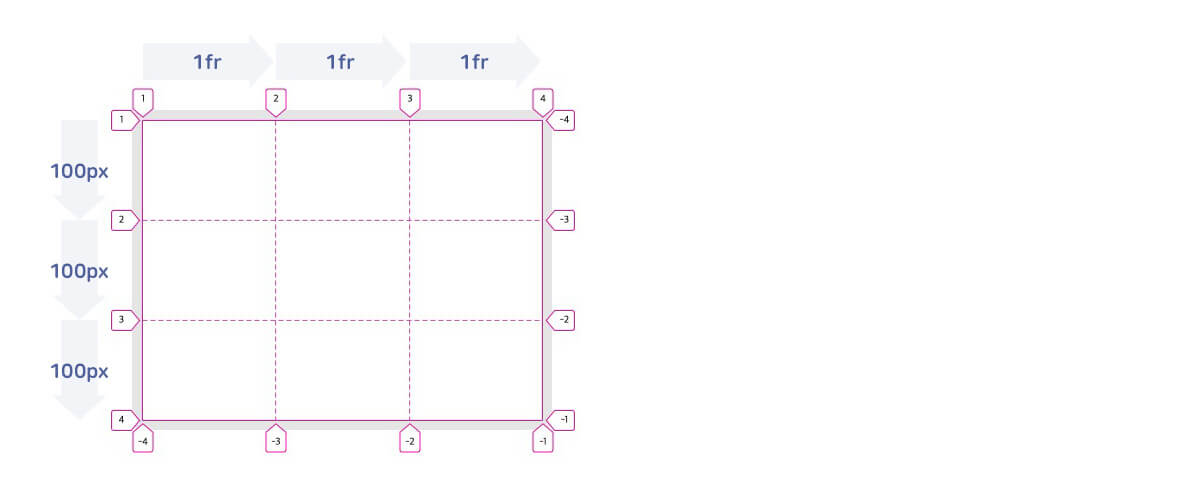
Each line is automatically named with numbers (positive/negative) based on the number of rows (tracks) and columns (tracks), so you don't need to define line names unless you really need them.
1234.container { grid-template-rows: 100px 200px; /* grid-template-rows: [1 -3] 100px [2 -2] 200px [3 -1]; */ }
123456.container { width: 400px; display: grid; grid-template-rows: repeat(3, 100px); grid-template-columns: repeat(3, 1fr); }
# grid-template-columns
Defines the sizes of explicit columns (tracks).
You can also define the names of the lines at the same time.
You can use the fr (fraction, a ratio of space) unit.
You can use the repeat() function.
It is used the same way as
grid-template-rows.
12345.container { display: grid; grid-template-columns: col1Size col2Size ...; grid-template-columns: [lineName] col1Size [lineName] col2Size [lineName] ...; }
123456789101112/* Define the size of each column. */ .container { grid-template-columns: 100px 200px; } /* You can also define the name of each line at the same time. */ .container { grid-template-columns: [first] 100px [second] 200px [third]; } /* A line can have more than one name. */ .container { grid-template-columns: [col1-start] 100px [col1-end col2-start] 200px [col2-end]; }
If you want to define a '12-column grid template' that is 1200px wide, you can write it as follows.
1234.container { width: 1200px; grid-template-columns: 100px 100px 100px 100px 100px 100px 100px 100px 100px 100px 100px 100px; }
We specified the sizes of the 12 columns one by one, but of course this is hard to type and hard to maintain!
With the repeat() function, you can simplify the code above as follows.
1234.container { width: 1200px; grid-template-columns: repeat(12, 100px); }
You can also set column sizes as ratios with the fr unit, as follows.
Each column is displayed according to its ratio, so you don't need to change the column sizes even when the container's width changes.
You can find more about the
frunit in the 'Grid units / fr' part at the bottom of this post.
1234.container { width: 80%; grid-template-columns: repeat(12, 1fr); }
Because the repeat() function repeats its second argument, you can use it like this.
12345678.container { grid-template-columns: repeat(4, 100px 200px 50px); /* grid-template-columns: 100px 200px 50px 100px 200px 50px 100px 200px 50px 100px 200px 50px; */ } .container { grid-template-columns: repeat(4, 1fr 2fr 3fr); /* grid-template-columns: 1fr 2fr 3fr 1fr 2fr 3fr 1fr 2fr 3fr 1fr 2fr 3fr; */ }
# grid-template-areas
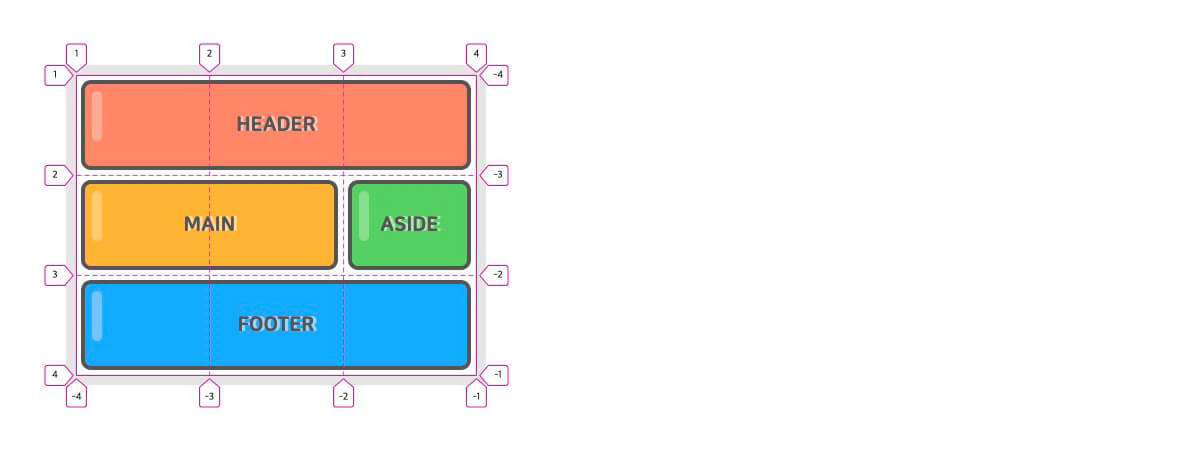
Creates a grid template by referencing the specified grid area names (grid-area).
grid-areais a property you apply to grid items, not to the grid container.
12345678910111213.container { display: grid; grid-template-rows: repeat(3, 100px); grid-template-columns: repeat(3, 1fr); grid-template-areas: "header header header" "main main aside" "footer footer footer"; } header { grid-area: header; } main { grid-area: main; } aside { grid-area: aside; } footer { grid-area: footer; }
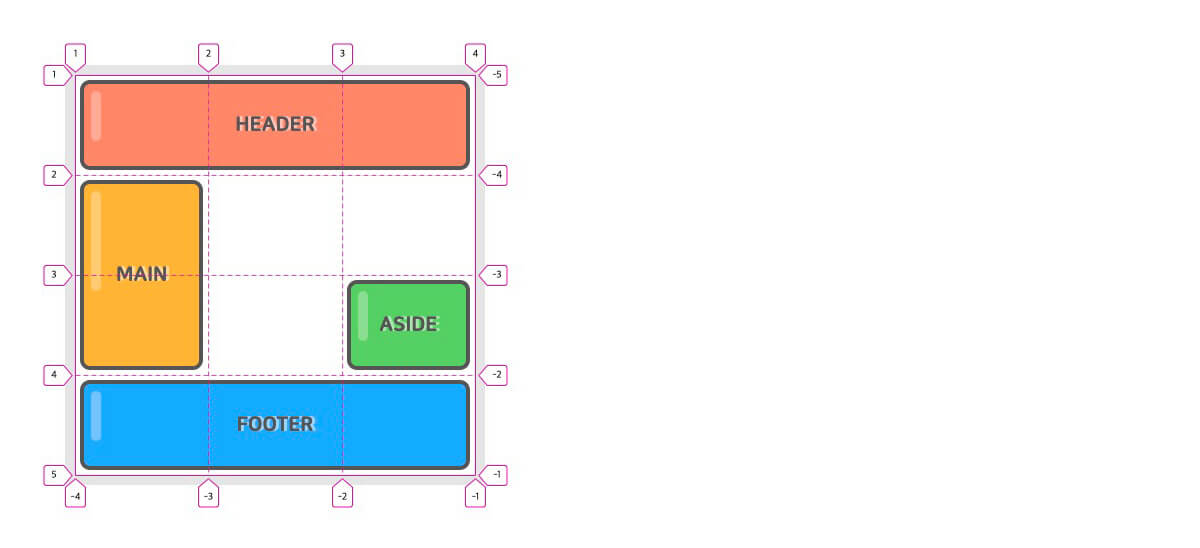
You can define an empty area by using . (a period) or by explicitly entering none.
1234567891011121314.container { display: grid; grid-template-rows: repeat(4, 100px); grid-template-columns: repeat(3, 1fr); grid-template-areas: "header header header" "main . ." "main . aside" "footer footer footer"; } header { grid-area: header; } main { grid-area: main; } aside { grid-area: aside; } footer { grid-area: footer; }
# grid-template
Shorthand for grid-template-rows, grid-template-columns, and grid-template-areas.
1234.container { grid-template: <grid-template-rows> / <grid-template-columns>; grid-template: <grid-template-areas>; }
You can also write it like this.
123456.container { grid-template: [row1StartLineName] "AREAS" rowSize [row1EndLineName] [row2StartLineName] "AREAS" rowSize [row2EndLineName] / <grid-template-columns>; }
123456789101112.container { display: grid; grid-template: "header header header" 80px "main main aside" 350px "footer footer footer" 130px / 2fr 100px 1fr; } header { grid-area: header; } main { grid-area: main; } aside { grid-area: aside; } footer { grid-area: footer; }
The container in the example above can be interpreted as follows.
123456789.container { display: grid; grid-template-rows: 80px 350px 130px; grid-template-columns: 2fr 100px 1fr; grid-template-areas: "header header header" "main main aside" "footer footer footer"; }
# row-gap
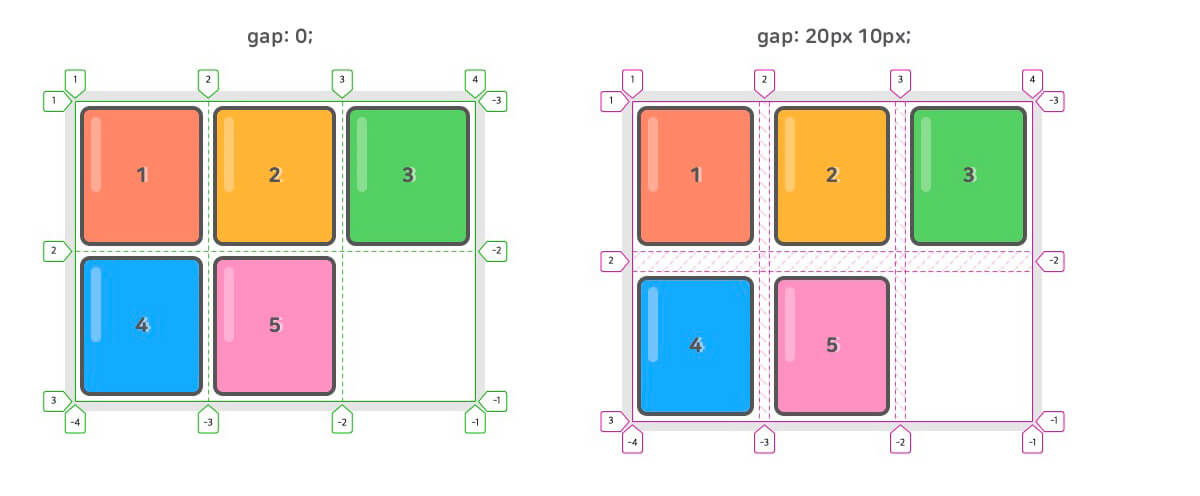
Specifies the gap (line width | gutter) between rows.
More precisely, you could say it specifies the size of the grid lines.
123.container { row-gap: size; }
# column-gap
Specifies the gap (line width | gutter) between columns.
123.container { column-gap: size; }
# gap
Specifies the gaps (line width | gutter) between rows and between columns.
123.container { gap: <row-gap> <column-gap>; }
123456789101112131415.container { display: grid; grid-template-rows: repeat(2, 150px); grid-template-columns: repeat(3, 1fr); gap: 20px 10px; } /* You can use a single value for both. */ .container { gap: 10px; /* row-gap: 10px; + column-gap: 10px; */ } /* If you want to apply only one of them, you can write it like this. */ .container { gap: 10px 0; /* row-gap */ gap: 0 10px; /* column-gap */ }
# grid-auto-rows
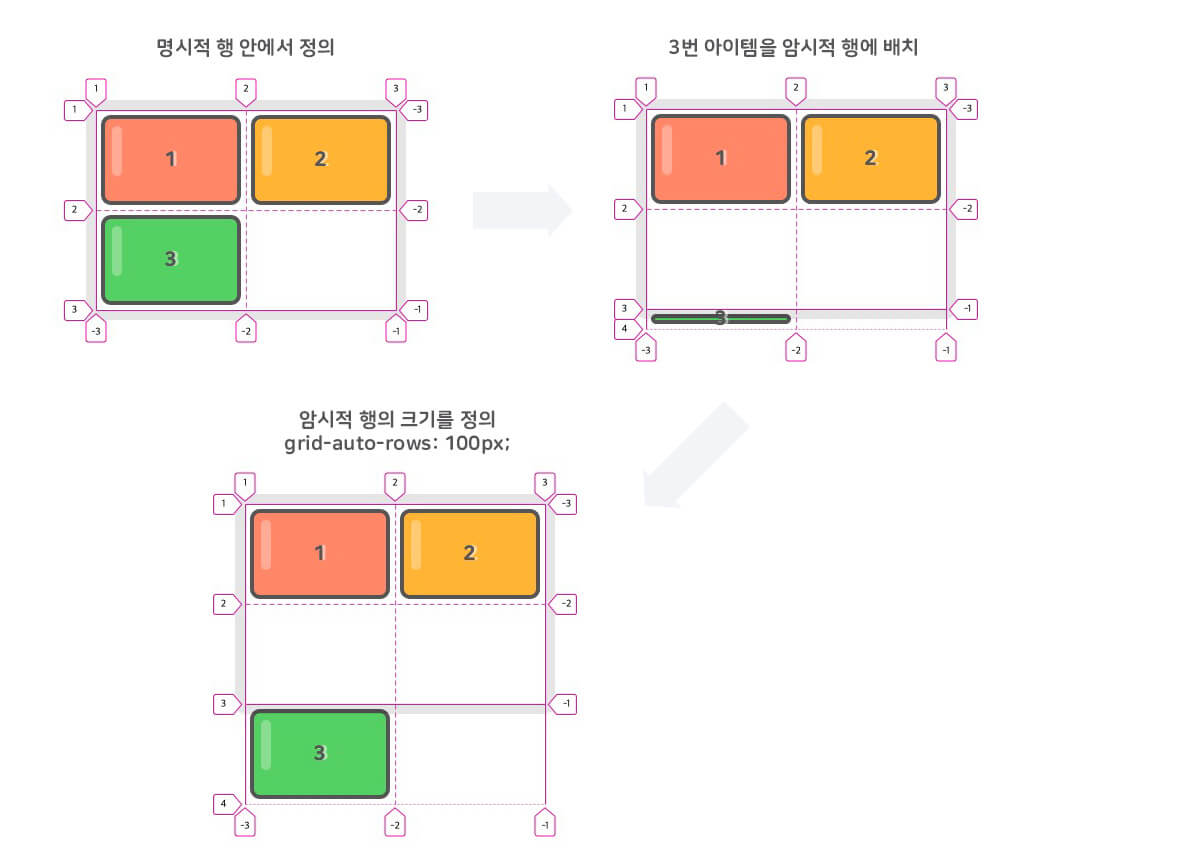
Defines the sizes of implicit rows (tracks).
When an item is placed outside the explicit rows defined with grid-template-rows, the implicit row size is applied.
12345<div class="container"> <div class="item">1</div> <div class="item">2</div> <div class="item">3</div> </div>
1234567891011.container { width: 300px; height: 200px; display: grid; grid-template-rows: 100px 100px; /* Define 2 explicit rows */ grid-template-columns: 150px 150px; /* Define 2 explicit columns */ grid-auto-rows: 100px; /* Define the size of other (implicit) rows */ } .item:nth-child(3) { grid-row: 3 / 4; }
# grid-auto-columns
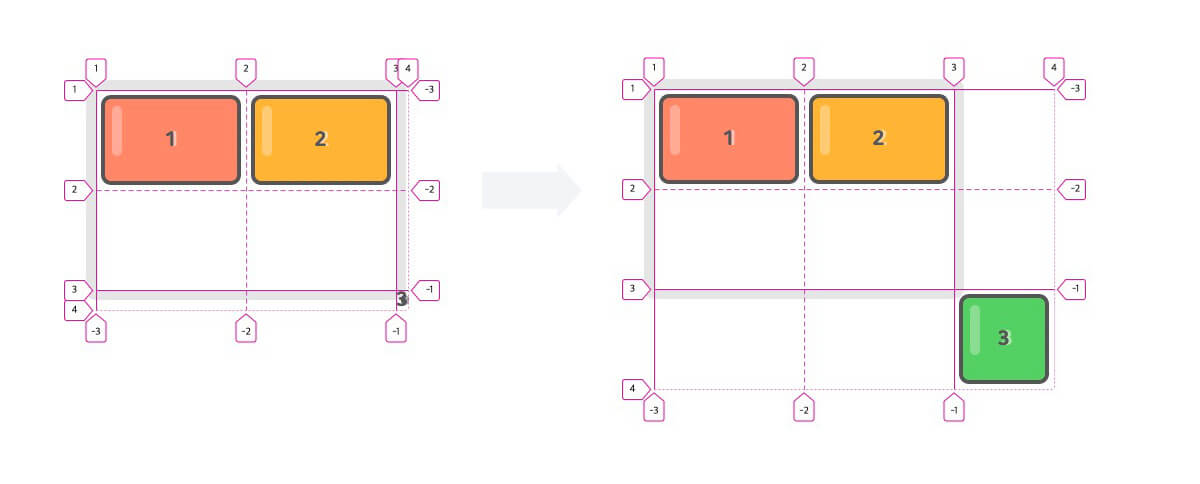
Defines the sizes of implicit columns (tracks).
When an item is placed outside the explicit columns defined with grid-template-columns, the implicit column size is applied.
12345678910111213.container { width: 300px; height: 200px; display: grid; grid-template-rows: 100px 100px; grid-template-columns: 150px 150px; grid-auto-rows: 100px; grid-auto-columns: 100px; } .item:nth-child(3) { grid-row: 3 / 4; grid-column: 3 / 4; }
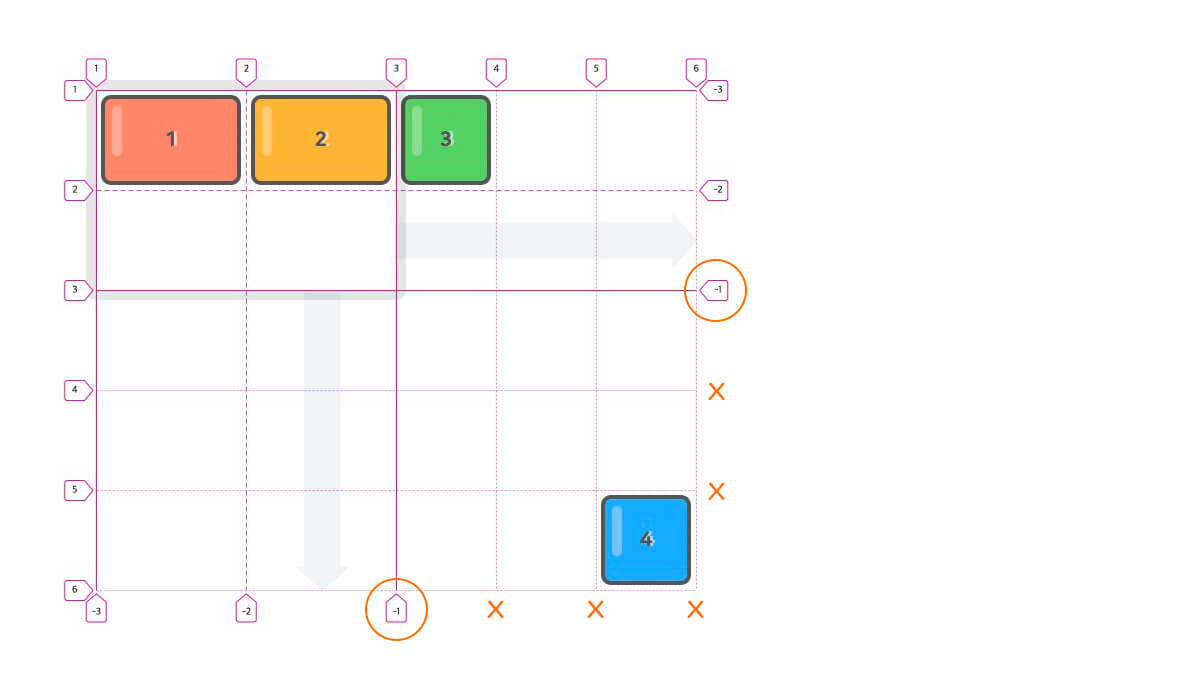
As shown below, as many implicit rows and columns are created as needed to fit where the items are placed.
Rows and columns with implicit sizes can use only positive line numbers. (Negative numbers can't be used)
# grid-auto-flow
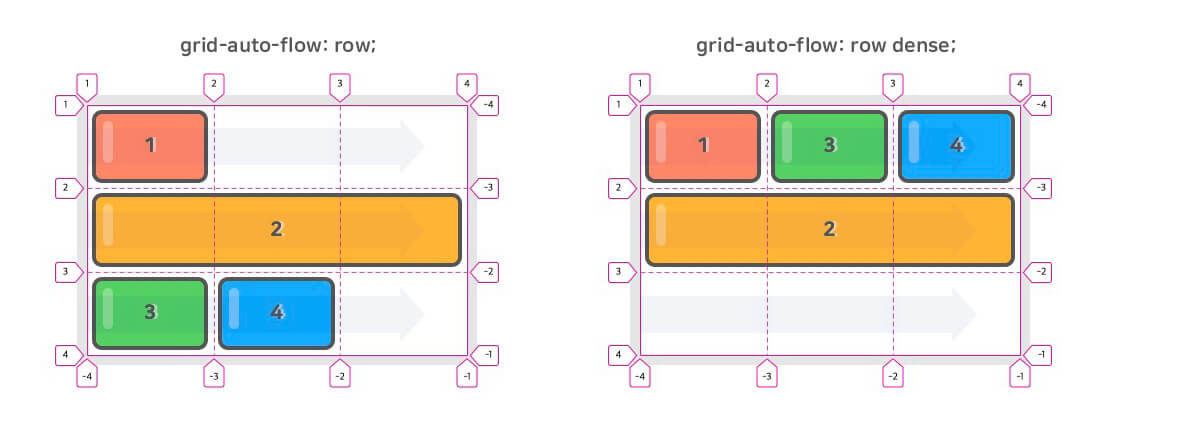
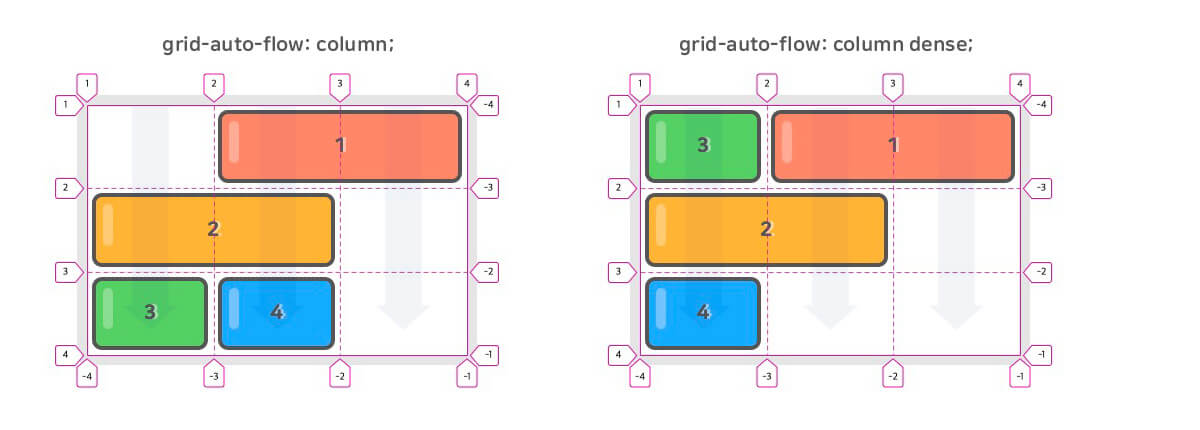
Defines which 'auto-placement algorithm' handles the items you haven't placed.
Placed items means items that use
grid-area(including its individual properties below).
| Value | Meaning | Default value |
|---|---|---|
| row | Places items in order along each row axis | row |
| column | Places items in order along each column axis | |
| row dense(dense) | Places items in order along each row axis, filling empty areas! | |
| column dense | Places items in order along each column axis, filling empty areas! |
The following is an example of row and row dense.
12345678910/* For row & row dense */ .container { display: grid; grid-template-rows: repeat(3, 1fr); grid-template-columns: repeat(3, 1fr); grid-auto-flow: row || row dense || dense; } .item:nth-child(2) { grid-column: span 3; }
The following is an example of column and column dense.
12345678910111213/* For column & column dense */ .container { display: grid; grid-template-rows: repeat(3, 1fr); grid-template-columns: repeat(3, 1fr); grid-auto-flow: column || column dense; } .item:nth-child(1) { grid-column: 2 / span 2; } .item:nth-child(2) { grid-column: span 2; }
# grid
Shorthand for grid-template-xxx and grid-auto-xxx.
12345.container { grid: <grid-template>; grid: <grid-template-rows> / <grid-auto-flow> <grid-auto-columns>; grid: <grid-auto-flow> <grid-auto-rows> / <grid-template-columns>; }
The containers (.container) within each code block all mean the same thing.
12345678910.container { grid: <grid-template-rows> / <grid-template-columns>; } .container { grid: 100px 200px / 1fr 2fr; } .container { grid-template-rows: 100px 200px; grid-template-columns: 1fr 2fr; }
1234567891011121314151617.container { grid: <grid-template>; } .container { grid: "header header header" 80px "main main aside" 350px "footer footer footer" 130px / 2fr 100px 1fr; } .container { grid-template: "header header header" 80px "main main aside" 350px "footer footer footer" 130px / 2fr 100px 1fr; }
When you write grid-auto-flow, use the auto-flow keyword.
Which side of the / you write it on is what determines the row or column value.
So don't write the row or column value.
Add the dense value after auto-flow.
1234567891011.container { grid: <grid-template-rows> / <grid-auto-flow> <grid-auto-columns>; } .container { grid: 100px 100px / auto-flow 150px; } .container { grid-template-row: 100px 100px; grid-auto-flow: column; grid-auto-columns: 150px; }
1234567891011.container { grid: <grid-auto-flow> <grid-auto-rows> / <grid-template-columns>; } .container { grid: auto-flow 150px / 100px 100px; } .container { grid-template-columns: 100px 100px; grid-auto-flow: row; grid-auto-rows: 150px; }
12345678.container { grid: auto-flow dense 150px / 100px 100px; } .container { grid-template-columns: 100px 100px; grid-auto-flow: row dense; grid-auto-rows: 150px; }
# align-content
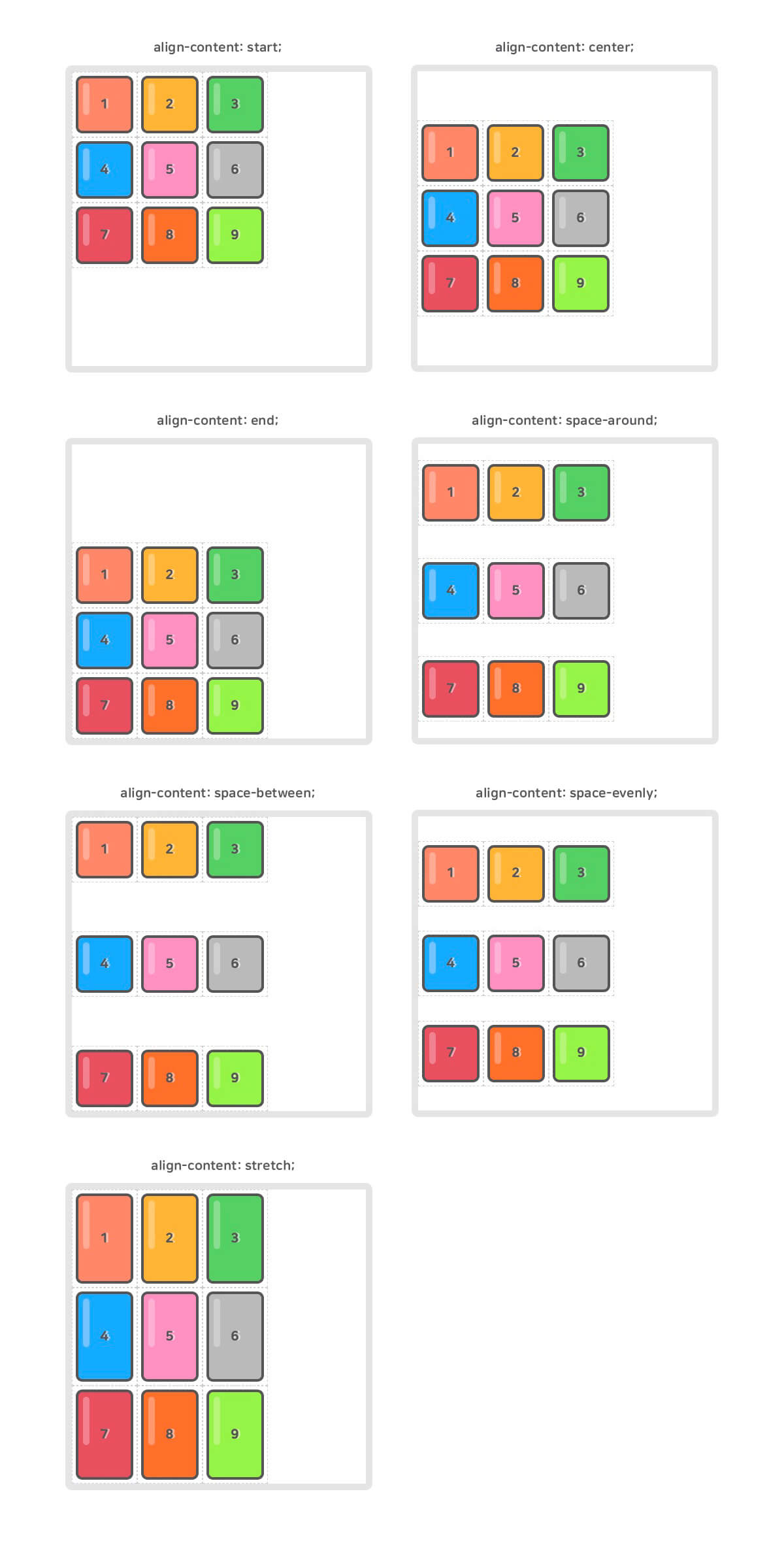
Aligns the grid contents vertically (column axis).
The height of the grid contents must be smaller than the grid container.
| Value | Meaning | Default value |
|---|---|---|
| normal | Same as stretch. |
normal |
| start | Aligns to the start (top) | |
| center | Centers vertically | |
| end | Aligns to the end (bottom) | |
| space-around | Distributes space evenly above and below each row | |
| space-between | Aligns the first row to the start and the last row to the end, and distributes the remaining space evenly | |
| space-evenly | Distributes all space evenly | |
| stretch | Stretches the grid contents to fill the column axis |
12345678.container { width: 450px; height: 450px; display: grid; grid-template-rows: repeat(3, 100px); grid-template-columns: repeat(3, 100px); align-content: <align-content>; }
# justify-content
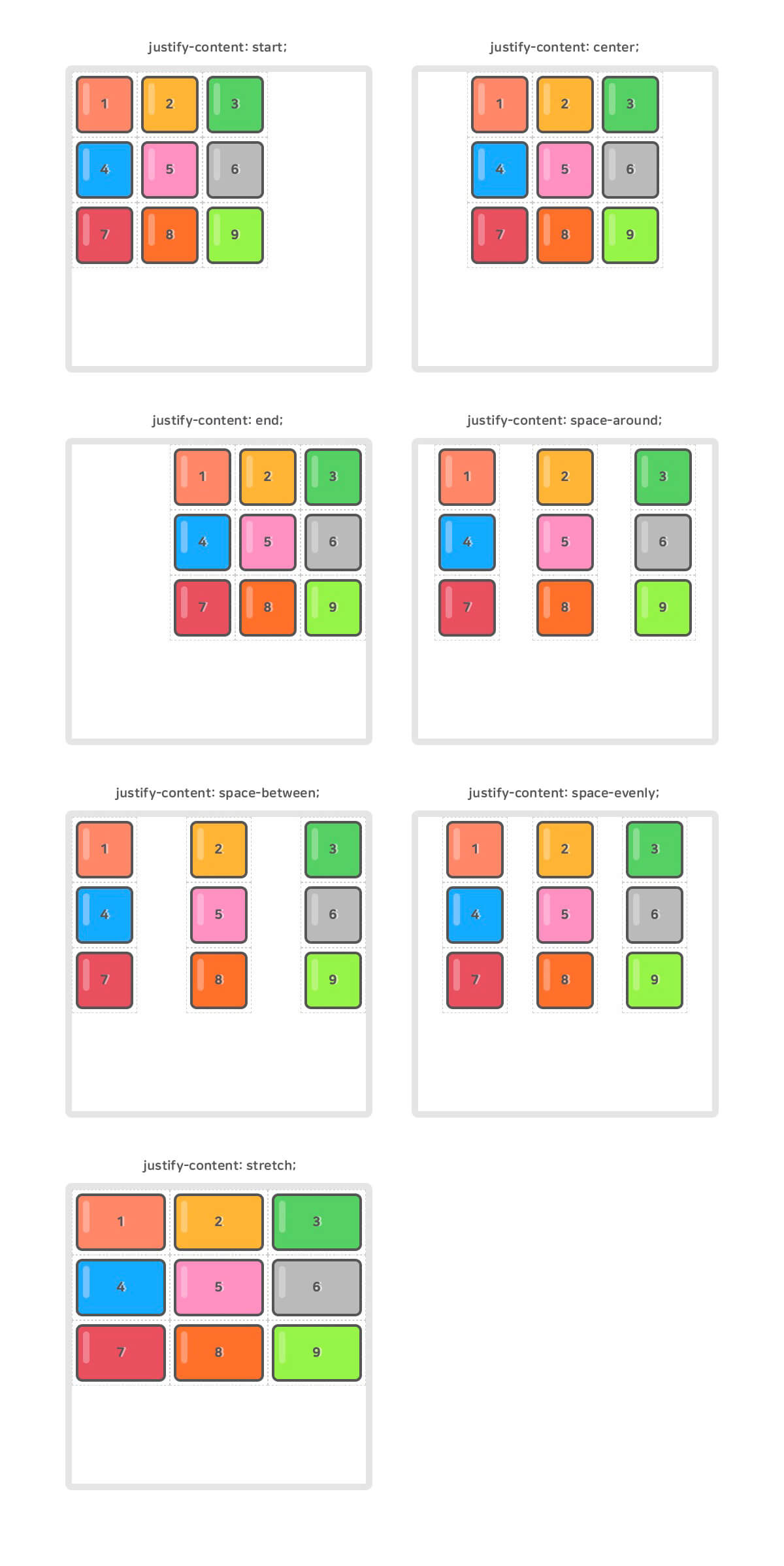
Aligns the grid contents horizontally (row axis).
The width of the grid contents must be smaller than the grid container.
| Value | Meaning | Default value |
|---|---|---|
| normal | Same as stretch. |
normal |
| start | Aligns to the start (left) | |
| center | Centers horizontally | |
| end | Aligns to the end (right) | |
| space-around | Distributes space evenly to the left and right of each column | |
| space-between | Aligns the first column to the start and the last column to the end, and distributes the remaining space evenly | |
| space-evenly | Distributes all space evenly | |
| stretch | Stretches the grid contents to fill the row axis |
12345678.container { width: 450px; height: 450px; display: grid; grid-template-rows: repeat(3, 100px); grid-template-columns: repeat(3, 100px); justify-content: <justify-content>; }
# place-content
Shorthand for align-content and justify-content.
If you enter only one value, it applies to both properties.
This property is not supported in the Edge (IE) browser.
123.container { place-content: <align-content> <justify-content>; }
The containers (.container) within each code block all mean the same thing.
1234567.container { place-content: center space-evenly; } .container { align-content: center; justify-content: space-evenly; }
1234567.container { place-content: end; } .container { align-content: end; justify-content: end; }
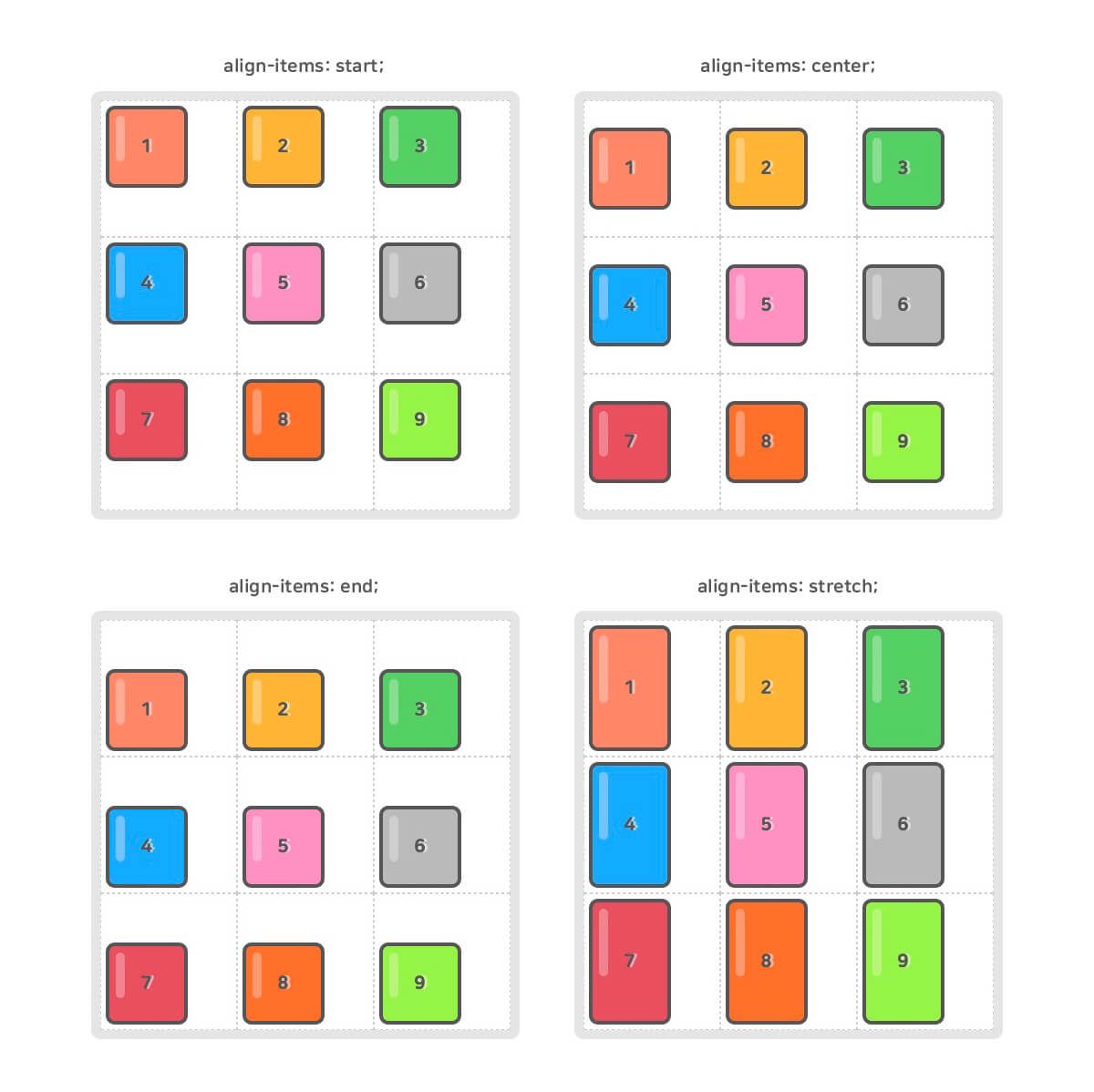
# align-items
Aligns the grid items vertically (column axis).
The height of a grid item must be smaller than the size of the grid row (track) it belongs to.
| Value | Meaning | Default value |
|---|---|---|
| normal | Same as stretch. |
normal |
| start | Aligns to the start (top) | |
| center | Centers vertically | |
| end | Aligns to the end (bottom) | |
| stretch | Stretches the grid items to fill the column axis |
12345678.container { width: 450px; height: 450px; display: grid; grid-template-rows: repeat(3, 1fr); grid-template-columns: repeat(3, 1fr); align-items: <align-items>; }
# justify-items
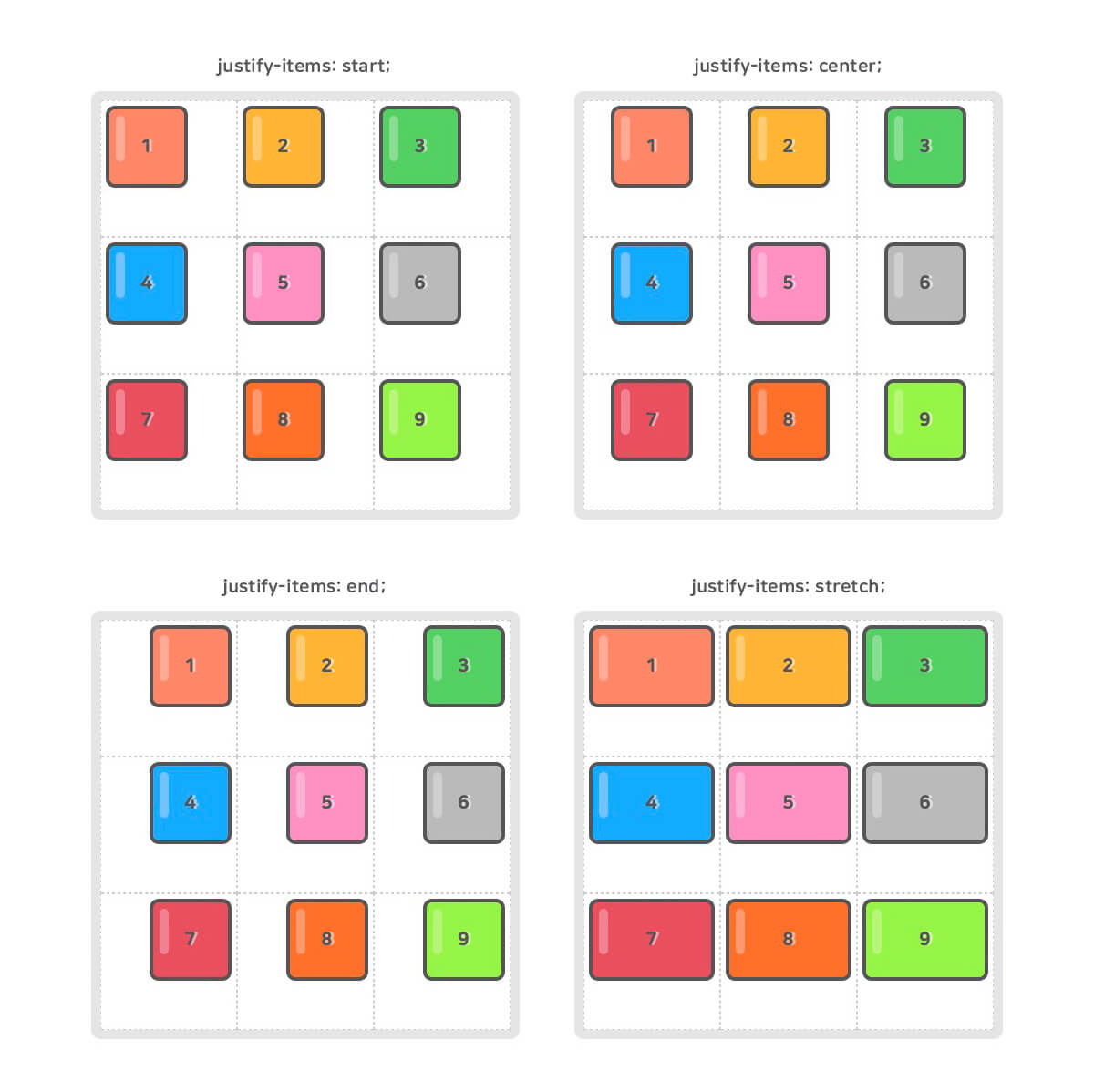
Aligns the grid items horizontally (row axis).
The width of a grid item must be smaller than the size of the grid column (track) it belongs to.
| Value | Meaning | Default value |
|---|---|---|
| normal | Same as stretch. |
normal |
| start | Aligns to the start (left) | |
| center | Centers horizontally | |
| end | Aligns to the end (right) | |
| stretch | Stretches the grid items to fill the row axis |
12345678.container { width: 450px; height: 450px; display: grid; grid-template-rows: repeat(3, 1fr); grid-template-columns: repeat(3, 1fr); justify-items: <justify-items>; }
# place-items
Shorthand for align-items and justify-items.
If you enter only one value, it applies to both properties.
This property is not supported in the Edge (IE) browser.
123.container { place-items: <align-items> <justify-items>; }
The containers (.container) within each code block all mean the same thing.
1234567.container { place-items: start stretch; } .container { align-items: start; justify-items: stretch; }
1234567.container { place-items: center; } .container { align-items: center; justify-items: center; }
# Grid items
The child elements of a defined container automatically become grid items.
# grid-row-start, grid-row-end, grid-column-start, grid-column-end
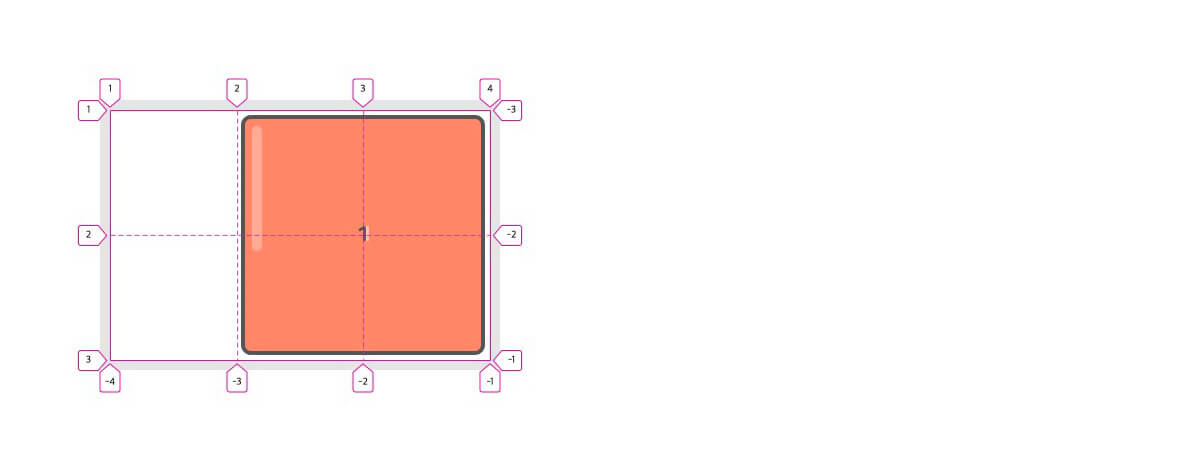
Specifies the 'start position' and 'end position' on the grid lines to place a grid item.
You specify a 'number' or a 'line name', or use the span keyword.
1234567891011.container { display: grid; grid-template-rows: repeat(2, 1fr); grid-template-columns: repeat(3, 1fr); } .item:nth-child(1) { grid-row-start: 1; grid-row-end: 3; grid-column-start: 2; grid-column-end: 4; }
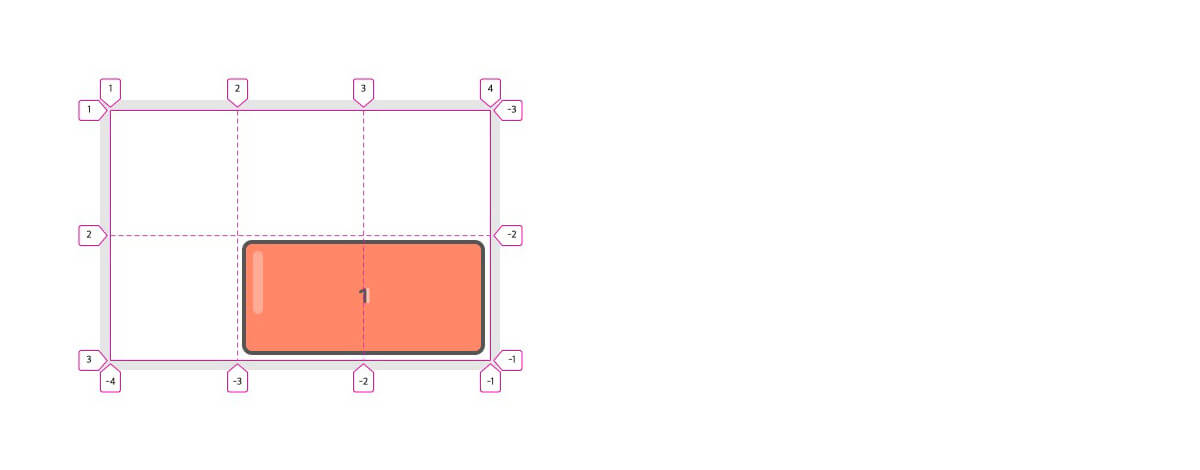
You can also specify line names.
1234567891011.container { display: grid; grid-template-rows: [row-1st] 1fr [row-2nd] 1fr [row-3rd]; grid-template-columns: [col-1st] 1fr [col-2nd] 1fr [col-3rd] 1fr [col-4th]; } .item:nth-child(1) { grid-row-start: row-2nd; grid-row-end: row-3rd; grid-column-start: col-2nd; grid-column-end: col-4th; }
The span keyword makes placement a bit easier.
Combining the span keyword with a 'number' means extending (+) across that 'number' of lines.
If you don't specify it, span 1 is the default.
123456789.item:nth-child(1) { /* From row line 1 to 3 (1+2=3) */ grid-row-start: 1; grid-row-end: span 2; /* From column line 2 to 3 (2+1=3) */ grid-column-start: 2; /* grid-column-end: span 1; (omitted) */ }
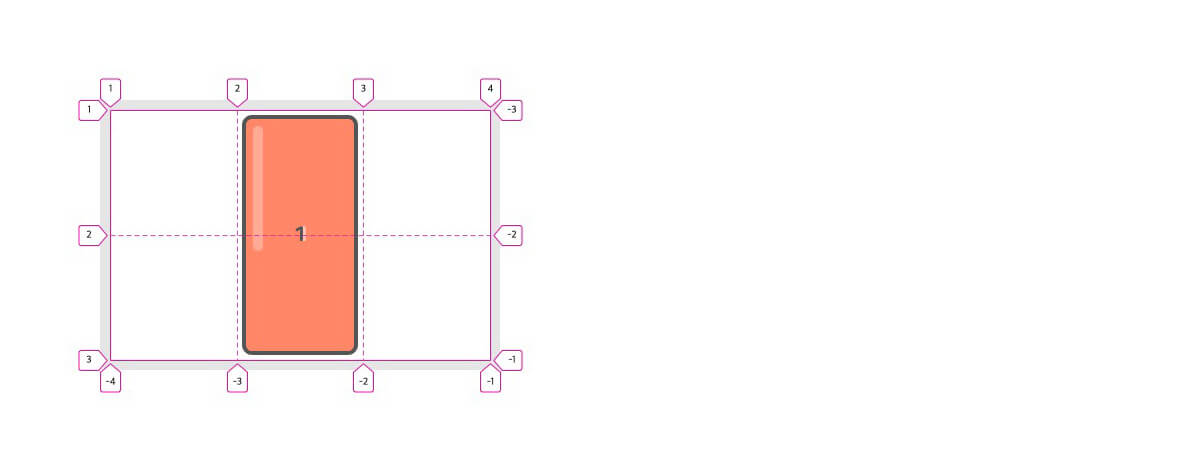
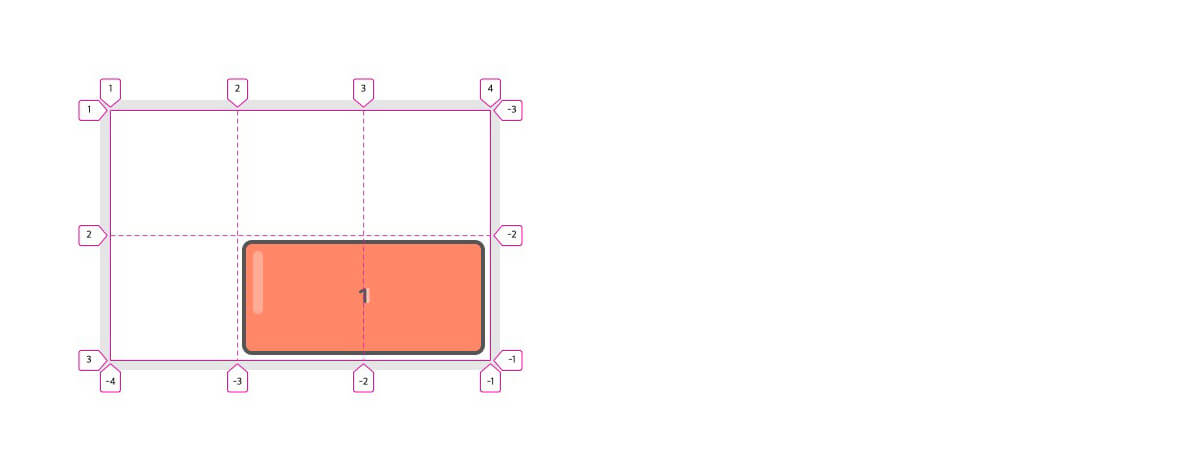
You can also write the span keyword in the 'start position' and specify the 'end position' to extend (-) backward.
123456789.item:nth-child(1) { /* From row line 3 to 2 (3-1=2) */ /* grid-row-start: span 1; (omitted) */ grid-row-end: 3; /* From column line 4 to 2 (4-2=2) */ grid-column-start: span 2; grid-column-end: 4; }
# grid-row
Shorthand for grid-row-start and grid-row-end.
Note that the two properties are separated by /.
123.item { grid-row: <grid-row-start> / <grid-row-end>; }
The items (.item) within each code block all mean the same thing.
1234567.item { grid-row-start: 1; grid-row-end: 2; } .item { grid-row: 1 / 2; }
12345678910.item { grid-row-start: 2; grid-row-end: span 3; } .item { grid-row: 2 / span 3; } .item { grid-row: 2 / 5; }
12345678910.item { grid-row-start: span 3; grid-row-end: 4; } .item { grid-row: span 3 / 4; } .item { grid-row: 1 / 4; }
# grid-column
Shorthand for grid-column-start and grid-column-end.
Note that the two properties are separated by /.
123.item { grid-column: <grid-column-start> / <grid-column-end>; }
The items (.item) within each code block all mean the same thing.
Note that the span keyword is written in the 'start position' to get a negative result!
1234567891011.item { grid-column-start: -1; grid-column-end: -3; } .item { grid-column: -1 / -3; } .item { /* From column line -1 to -3 (-1-2=-3) */ grid-column: span 2 / -1; }
12345678.item { grid-column-start: 2; grid-column-end: -1; } .item { /* From column line 2 to the end (line -1) */ grid-column: 2 / -1; }
# grid-area
Shorthand for grid-row-start, grid-column-start, grid-row-end, and grid-column-end.
Alternatively, it can set the area name that grid-template-areas references.
When you set an area name, the grid-row and grid-column concepts are ignored.
1234.item { grid-area: <grid-row-start> / <grid-column-start> / <grid-row-end> / <grid-column-end>; grid-area: areaName; }
The items (.item) within each code block all mean the same thing.
12345678.item { grid-row: 2 / 3; grid-column: span 2 / -1; } .item { /* Note that the order is 'start / start / end / end'! */ grid-area: 2 / span 2 / 3 / -1; }
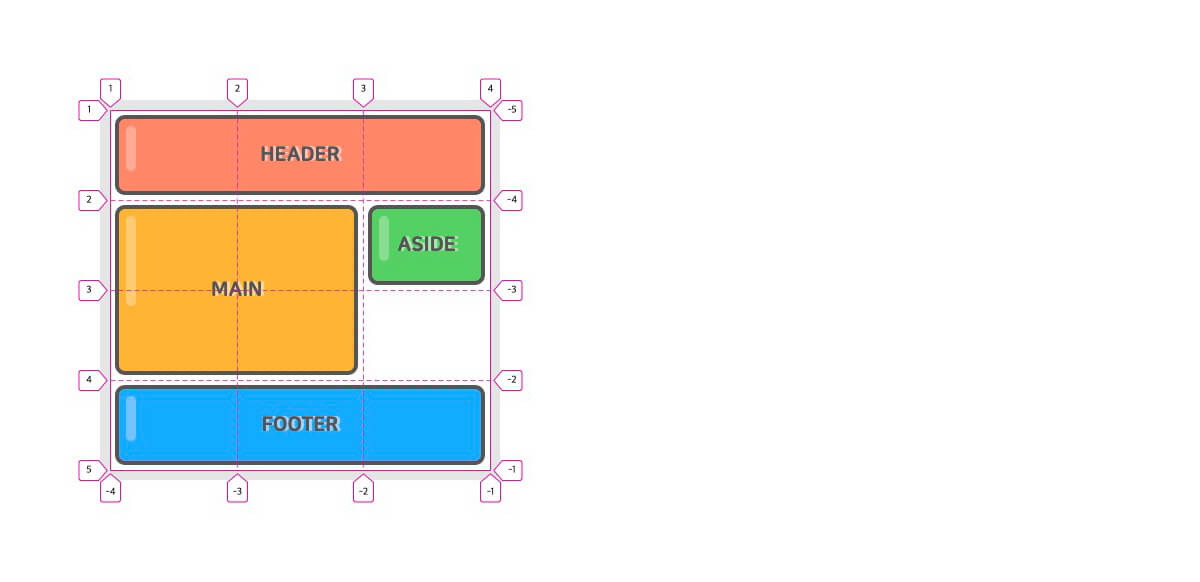
You can specify area names as follows and reference them in grid-template-areas.
123456<div class="container"> <header class="item">HEADER</header> <main class="item">MAIN</main> <aside class="item">ASIDE</aside> <footer class="item">FOOTER</footer> </div>
1234567891011121314.container { display: grid; grid-template-rows: repeat(4, 90px); grid-template-columns: repeat(3, 1fr); grid-template-areas: "header header header" "main main aside" "main main ." "footer footer footer"; } header.item { grid-area: header; } main.item { grid-area: main; } aside.item { grid-area: aside; } footer.item { grid-area: footer; }
# align-self
Aligns a single grid item vertically (column axis).
The height of the grid item must be smaller than the size of the grid row (track) it belongs to.
| Value | Meaning | Default value |
|---|---|---|
| normal | Same as stretch. |
normal |
| start | Aligns to the start (top) | |
| center | Centers vertically | |
| end | Aligns to the end (bottom) | |
| stretch | Stretches the grid item to fill the column axis |
123456789.container { display: grid; grid-template-rows: repeat(2, 1fr); grid-template-columns: repeat(2, 1fr); } .item:nth-child(1) { align-self: start; } .item:nth-child(2) { align-self: center; } .item:nth-child(3) { align-self: end; } .item:nth-child(4) { align-self: stretch; }

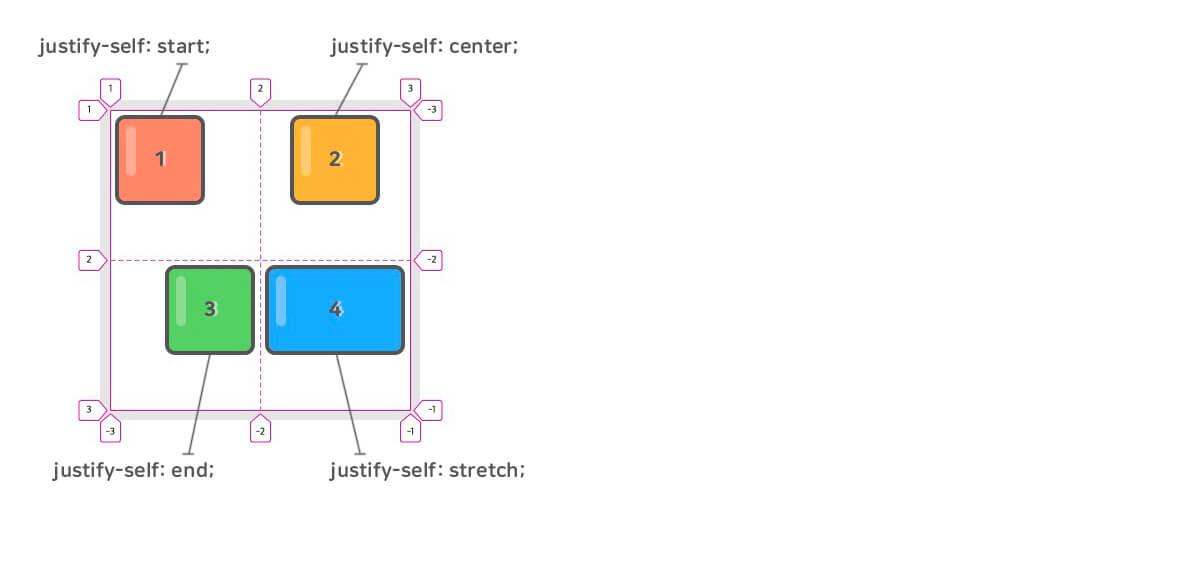
# justify-self
Aligns a single grid item horizontally (row axis).
The width of the grid item must be smaller than the size of the grid column (track) it belongs to.
| Value | Meaning | Default value |
|---|---|---|
| normal | Same as stretch. |
normal |
| start | Aligns to the start (left) | |
| center | Centers horizontally | |
| end | Aligns to the end (right) | |
| stretch | Stretches the grid item to fill the row axis |
123456789.container { display: grid; grid-template-rows: repeat(2, 1fr); grid-template-columns: repeat(2, 1fr); } .item:nth-child(1) { justify-self: start; } .item:nth-child(2) { justify-self: center; } .item:nth-child(3) { justify-self: end; } .item:nth-child(4) { justify-self: stretch; }
# place-self
Shorthand for align-self and justify-self.
If you enter only one value, it applies to both properties.
This property is not supported in the Edge (IE) browser.
123.item { place-self: <align-self> <justify-self>; }
The items (.item) within each code block all mean the same thing.
1234567.item { place-self: start end; } .item { align-self: start; justify-self: end; }
1234567.item { place-self: center; } .item { align-self: center; justify-self: center; }
# order
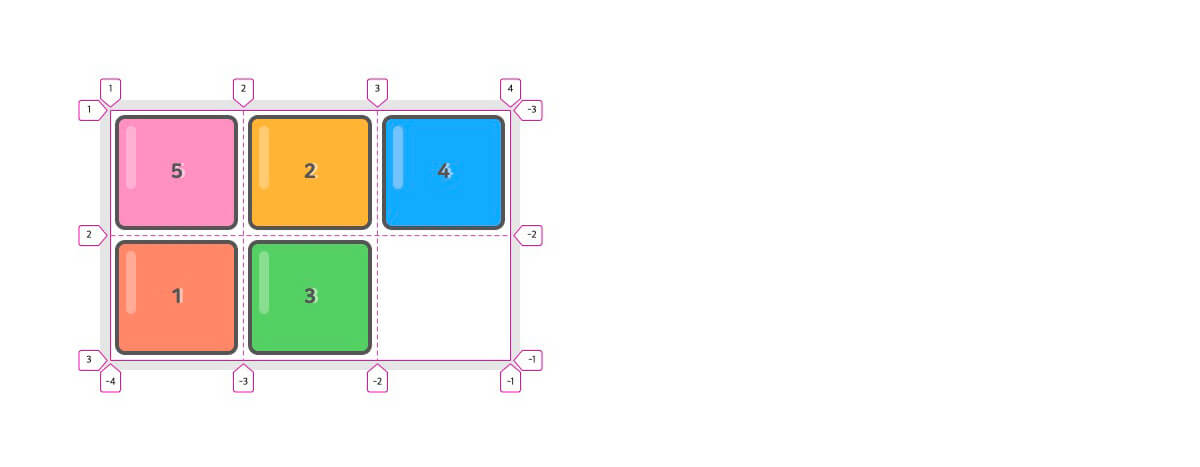
You can change the order in which grid items are auto-placed.
The smaller the number, the earlier the item is placed.
12345678.container { display: grid; grid-template-rows: repeat(2, 1fr); grid-template-columns: repeat(3, 1fr); } .item:nth-child(1) { order: 1; } .item:nth-child(3) { order: 5; } .item:nth-child(5) { order: -1; }
# z-index
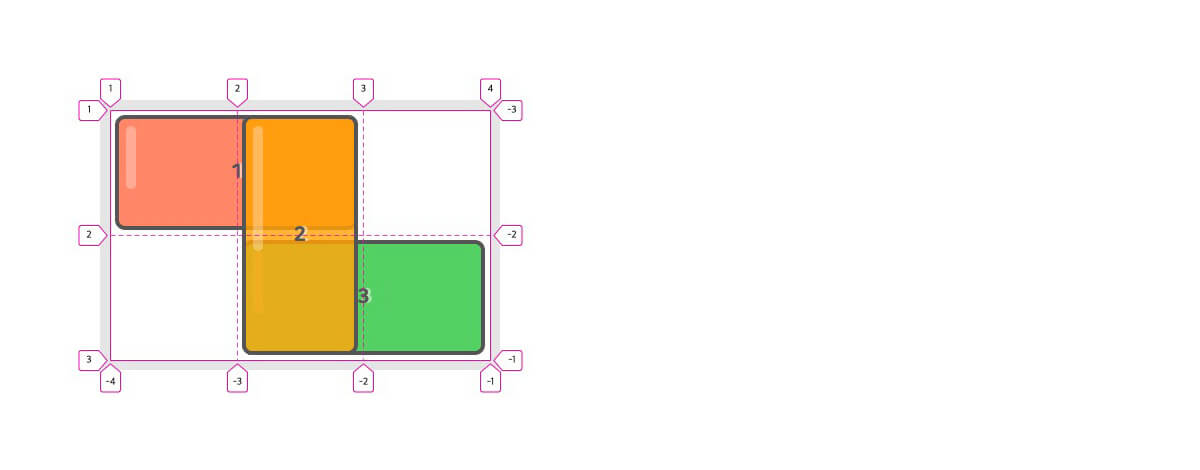
You can change the stacking order of items with the z-index property.
12345678910.item:nth-child(1) { grid-area: 1 / 1 / 2 / 3; } .item:nth-child(2) { grid-area: 1 / 2 / 3 / 3; z-index: 1; } .item:nth-child(3) { grid-area: 2 / 2 / 3 / 4; }
# Grid functions
Let's look at the main functions used in grids.
# repeat
The repeat() function repeats the size definitions of rows/columns (tracks).
It takes 'the number of repetitions' and 'the row/column size definitions' as arguments.
It is used in grid-template-rows and grid-template-columns.
The containers (.container) within each code block all mean the same thing.
1234567/* 9-column grid */ .container { grid-template-columns: 100px 100px 100px 100px 100px 100px 100px 100px 100px; } .container { grid-template-columns: repeat(9, 100px); }
1234567891011.container { grid-template-rows: [row-start] 200px [row-end row-start] 200px [row-end]; grid-template-columns: [col-start] 100px [col-end col-start] 100px [col-end col-start] 100px [col-end]; } .container { grid-template-rows: repeat(2, [row-start] 200px [row-end]); grid-template-columns: repeat(3, [col-start] 100px [col-end]); } .container { grid-template: repeat(2, [row-start] 200px [row-end]) / repeat(3, [col-start] 100px [col-end]); }
1234567.container { /* 12-column grid */ grid-template-columns: 1fr 2fr 1fr 2fr 1fr 2fr 1fr 2fr 1fr 2fr 1fr 2fr; } .container { grid-template-columns: repeat(6, 1fr 2fr); }
# minmax
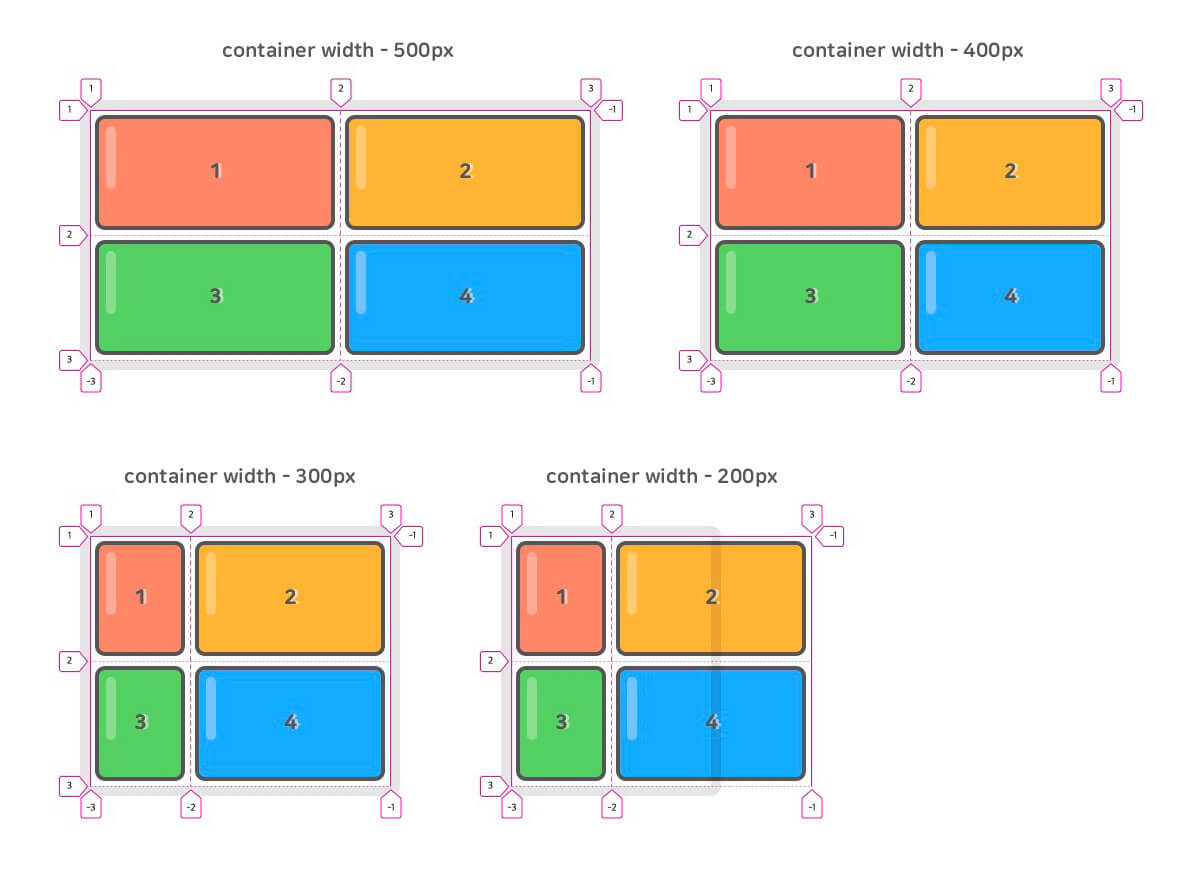
The minmax() function defines the 'minimum/maximum size' of rows/columns (tracks).
The first argument is the 'minimum value' and the second argument is the 'maximum value'.
It is used in grid-template-rows, grid-template-columns, grid-auto-rows, and grid-auto-columns.
It is similar to setting both the min-width and max-width properties on a regular element.
123.container { grid-template-columns: minmax(100px, 1fr) minmax(200px, 1fr); }
With minmax(), you can use implicit row/column (track) sizes more flexibly.
The following example sets the implicit 'row/column' sizes to a minimum of '200px/300px', but with auto they can grow according to the size of the grid items.
1234.container { grid-auto-rows: minmax(200px, auto); grid-auto-columns: minmax(300px, auto); }
# fit-content
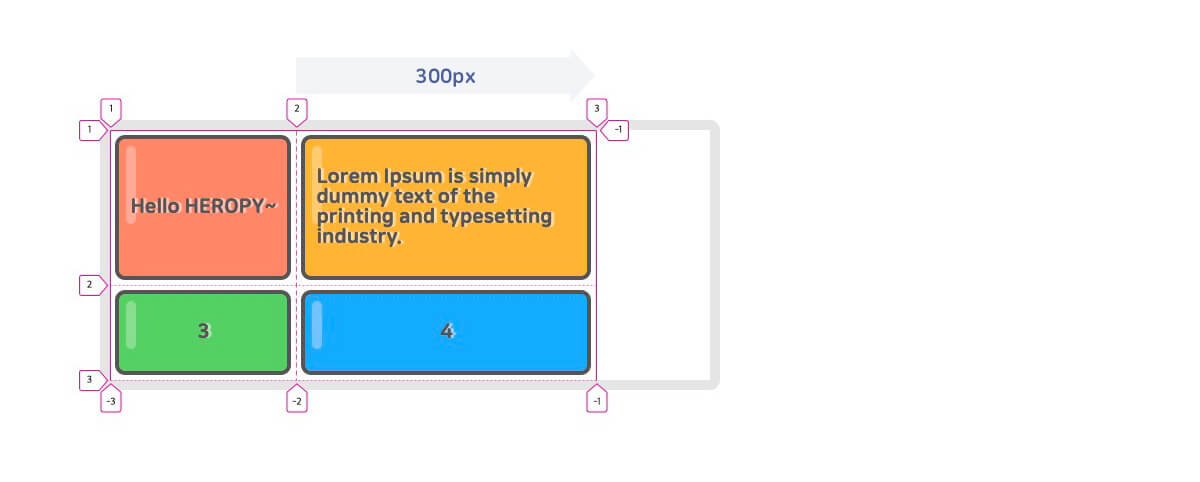
The fit-content() function fits the size of rows/columns (tracks) to the size of the contents that the grid items contain.
It takes 'the maximum size of the contents' as its argument.
It is similar to minmax(auto, max-content).
123.container { grid-template-columns: fit-content(300px) fit-content(300px); }
# Grid units
Let's look at the main units used in grids.
# fr
fr (fractional unit) means a fraction of the available space.
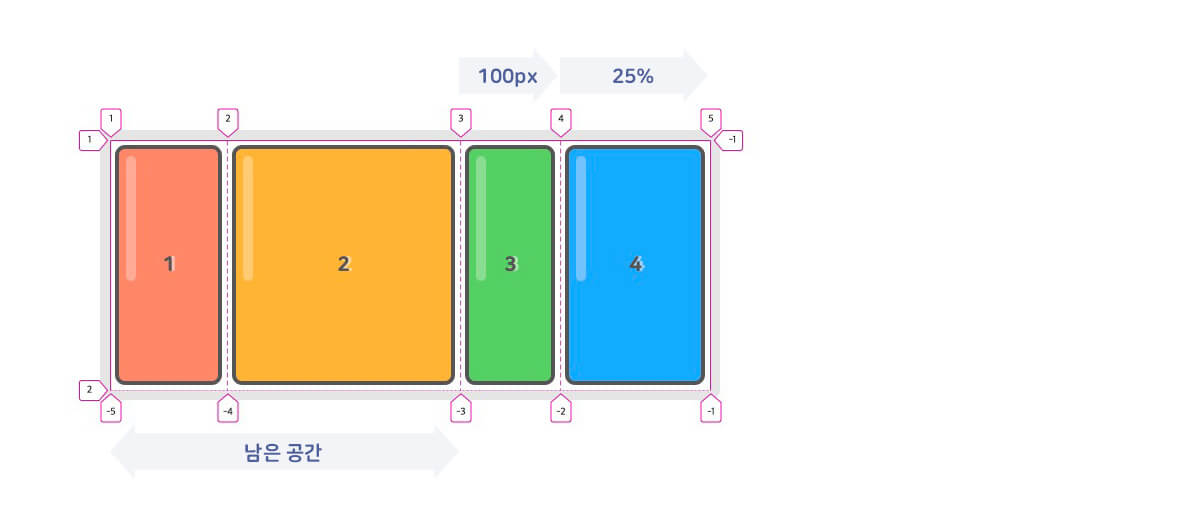
In the following example, the grid container uses 100px for the 3rd column and 25% for the 4th column, and gives '1/3' of the remaining space to the 1st column and '2/3' to the 2nd column.
123.container { grid-template-columns: 1fr 2fr 100px 25%; }
# min-content
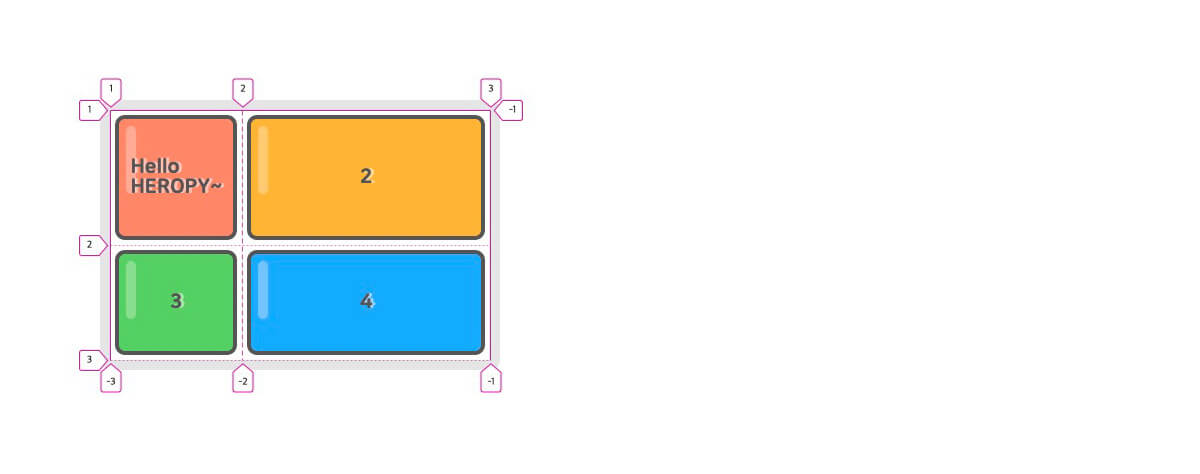
Means the minimum size of the contents that a grid item contains.
1234<div class="container"> <div class="item">Hello HEROPY~</div> <!-- ... --> </div>
123.container { grid-template-columns: min-content 1fr; }
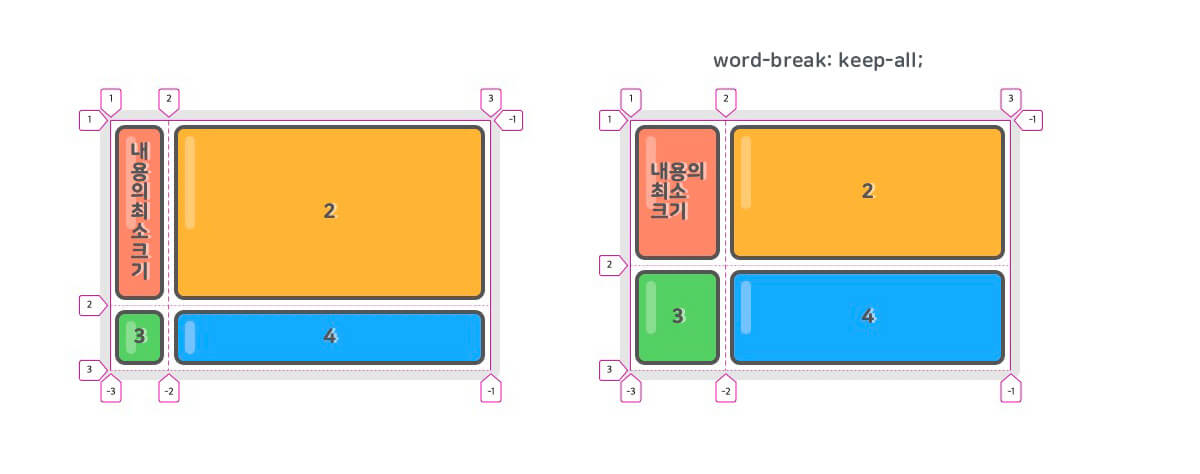
1234<div class="container"> <div class="item">내용의 최소 크기</div> <!-- ... --> </div>
If you use Korean text like the example above (내용의 최소 크기, 'the minimum size of the content'), setting word-break: keep-all; makes it work as expected.
# max-content
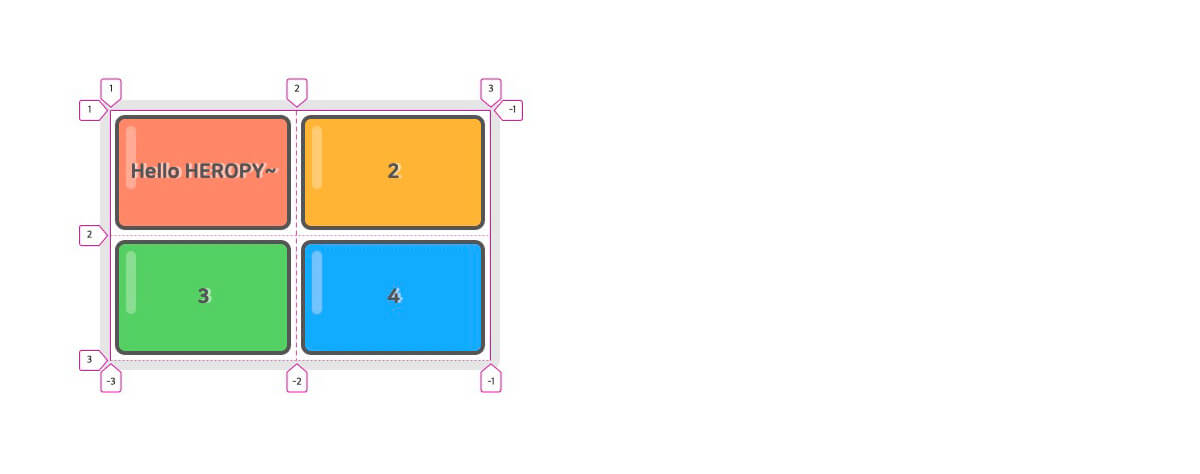
Means the maximum size of the contents that a grid item contains.
1234<div class="container"> <div class="item">Hello HEROPY~</div> <!-- ... --> </div>
123.container { grid-template-columns: max-content 1fr; }
It becomes even more useful together with the grid functions.
The following example creates a 4-column grid in which each column (track) can be up to 1fr wide, but thanks to max-content, it can't become smaller than the contents of the grid item it holds.
123.container { grid-template-columns: repeat(4, minmax(max-content, 1fr)); }
# auto-fill, auto-fit
Automatically (implicitly) adjusts the number of rows/columns (tracks) to fit the grid container and the row/column sizes.
It is used with the repeat() function and is useful when the number of rows/columns and items doesn't need to be fixed or isn't known in advance. (Responsive grids)auto-fill and auto-fit work the same way except for one simple difference.
In the following 4-column grid example, when the container isn't big enough to hold the items, the items start to overflow. (The minimum size of an item is 120px.)
123.container { grid-template-columns: repeat(4, minmax(120px, 1fr)); }
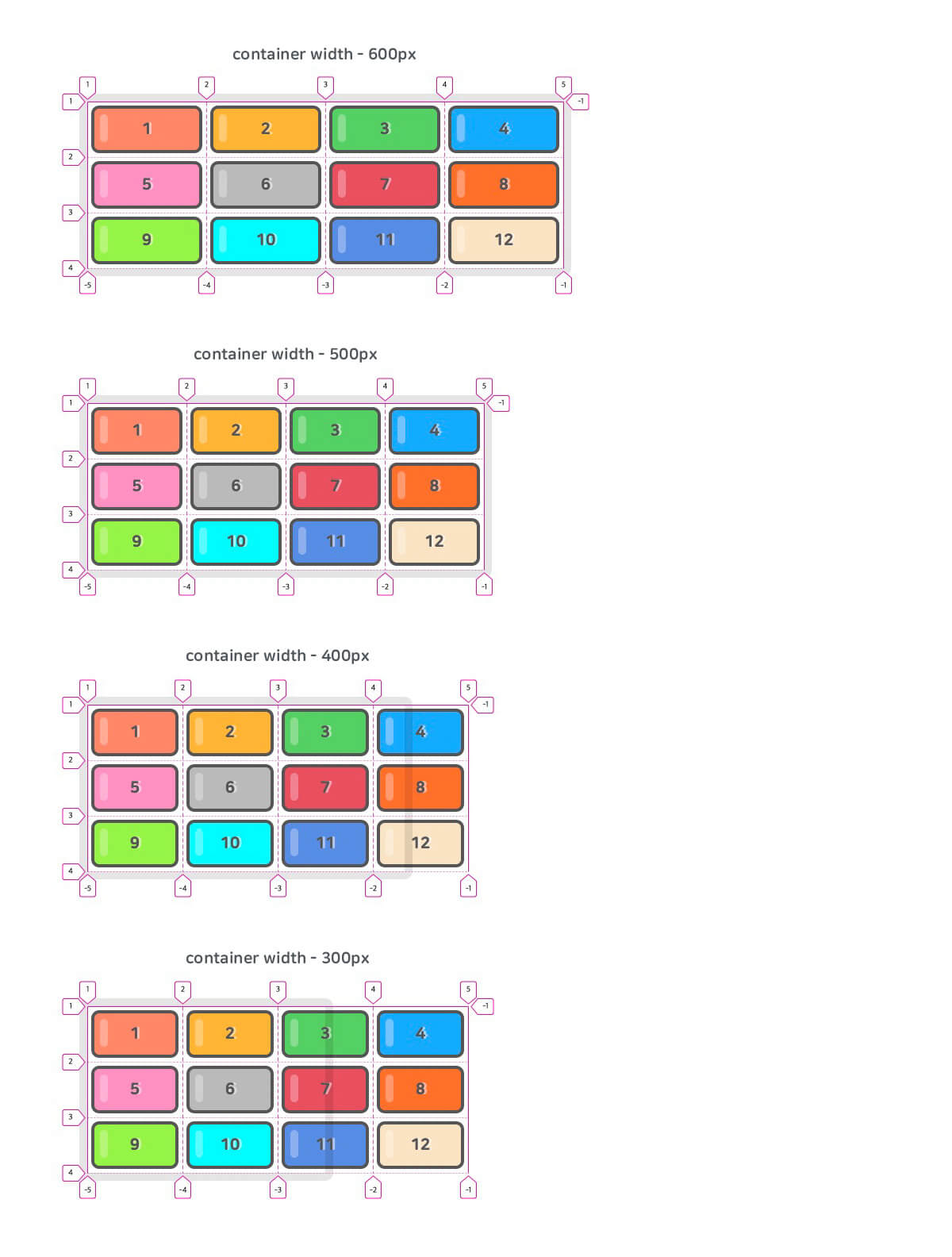
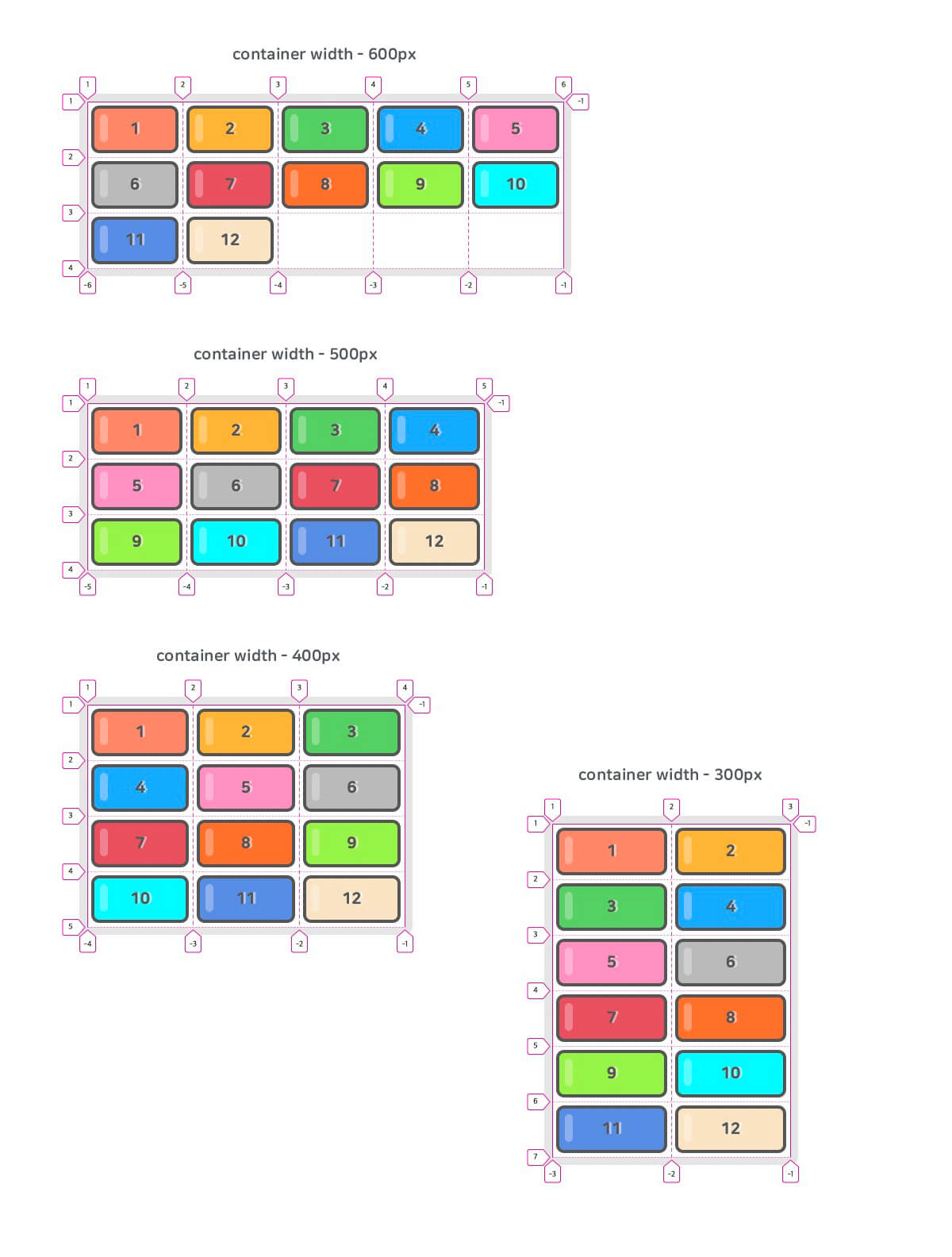
If you don't need to stick with a 4-column grid, you can change the 'repeat count' (the first argument of the repeat() function) to auto-fill or auto-fit, as follows.
Then, when the container isn't big enough to hold the items, the items automatically wrap to the next line, and the implicit rows/columns are adjusted automatically to match.
123.container { grid-template-columns: repeat(auto-fill, minmax(120px, 1fr)); }
# The difference between auto-fill and auto-fit
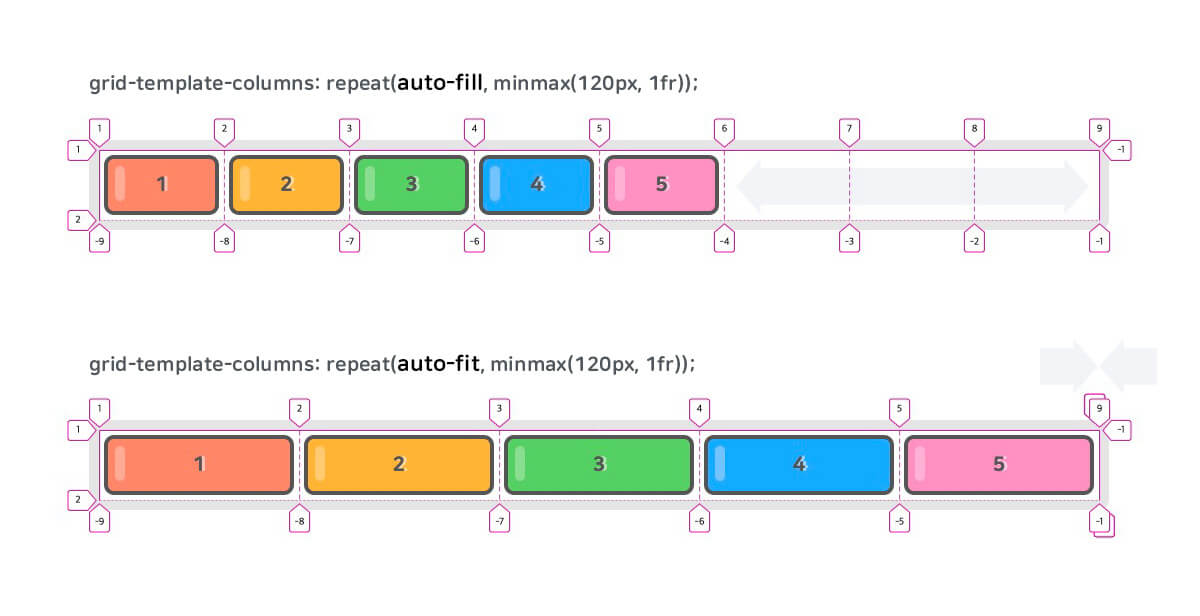
The difference between auto-fill and auto-fit appears when the grid container holds all the items in one row/column (track) and there is space left over.
As shown below, auto-fill keeps the leftover space (empty tracks) as is, while auto-fit collapses the leftover space.
123456.container.auto-fill { grid-template-columns: repeat(auto-fill, minmax(120px, 1fr)); } .container.auto-fit { grid-template-columns: repeat(auto-fit, minmax(120px, 1fr)); }
# Key terms
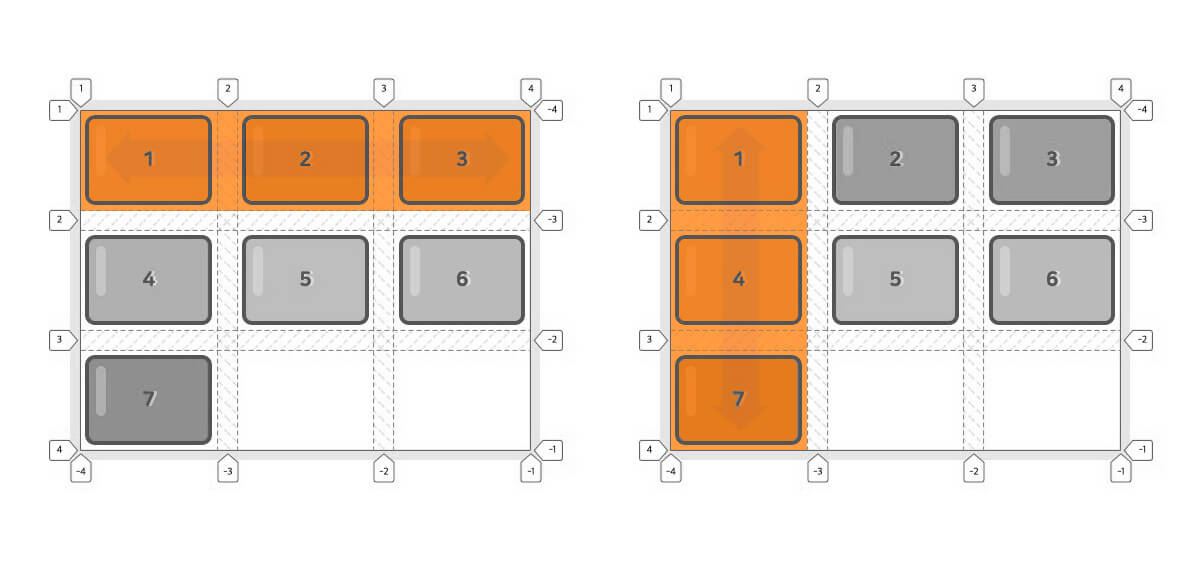
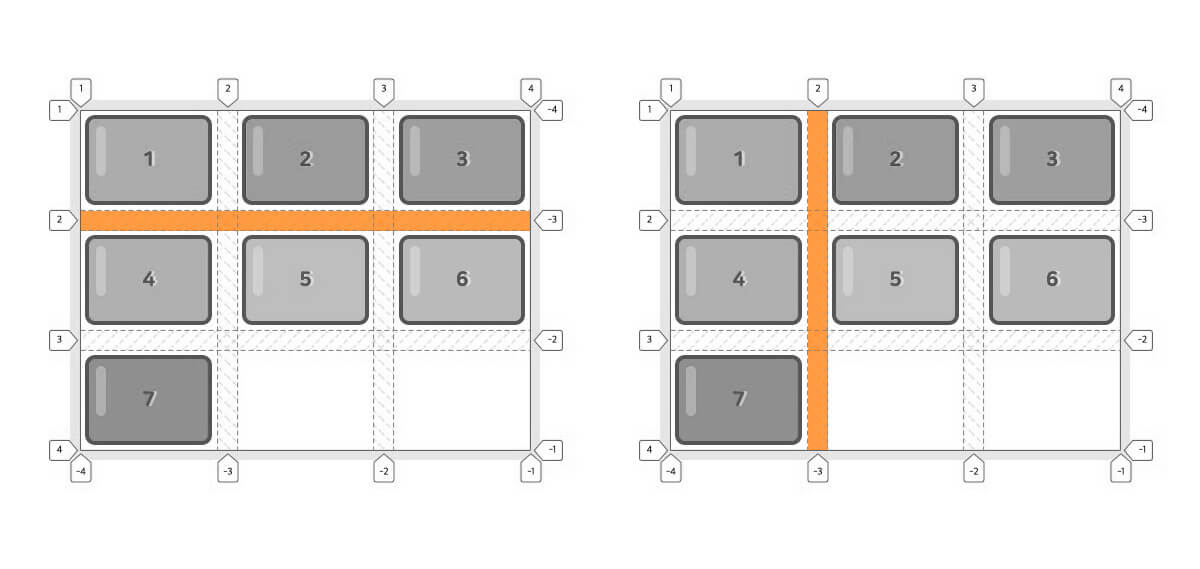
# Track
A track means a single row or column.
# Line
A line means the gap between tracks, commonly called a gutter.
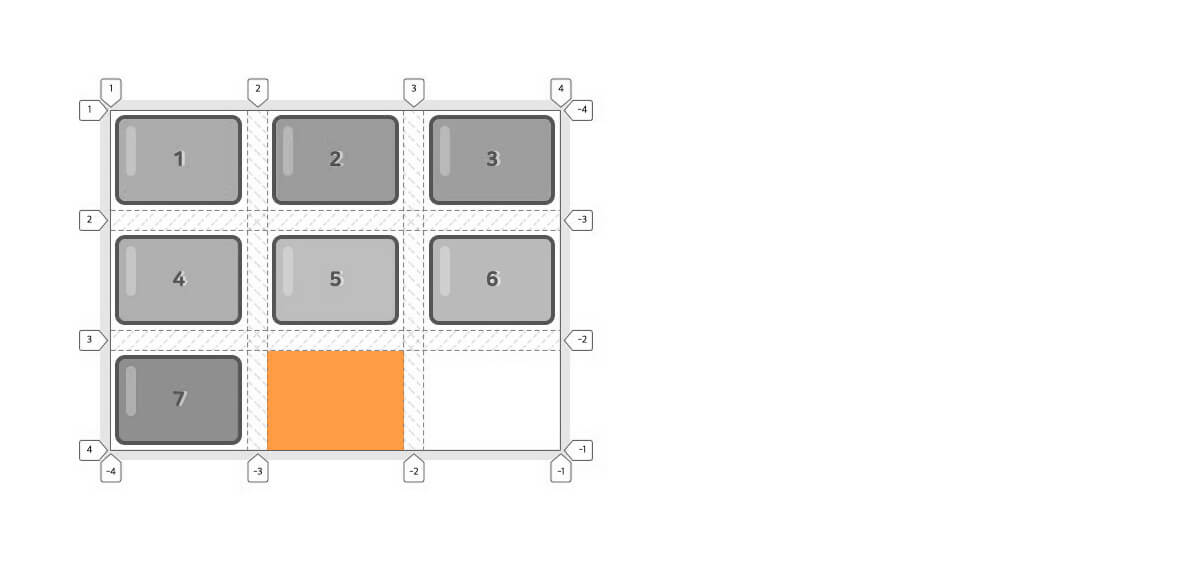
# Cell
A cell is the smallest unit of area in which an item is placed.
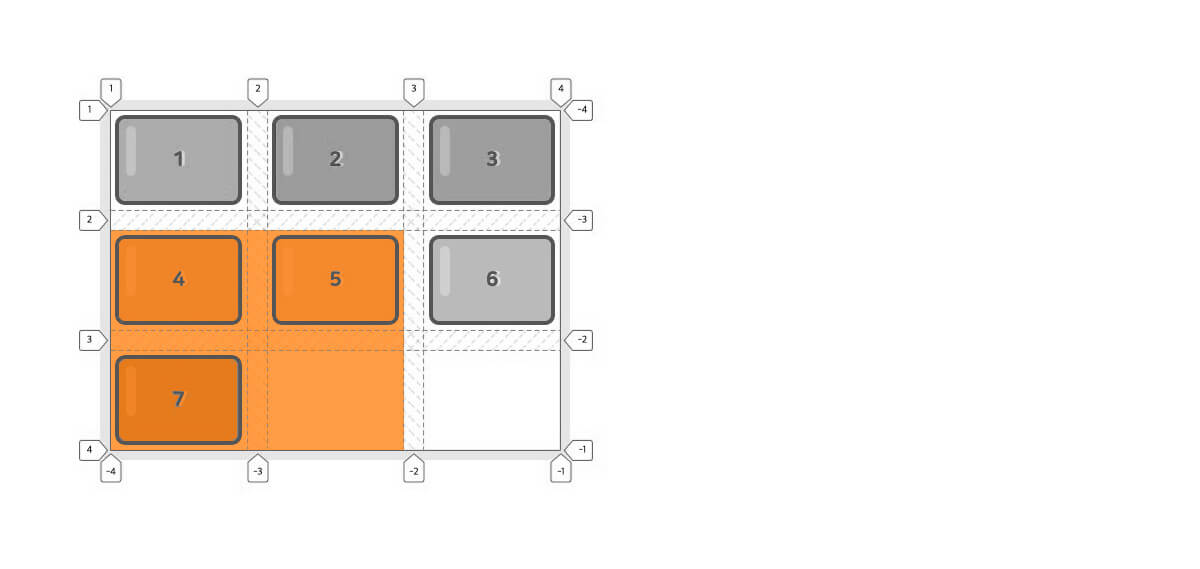
# Area
An area is a region made up of one or more cells in which an item is placed.
# Browser support
https://caniuse.com/#search=grid
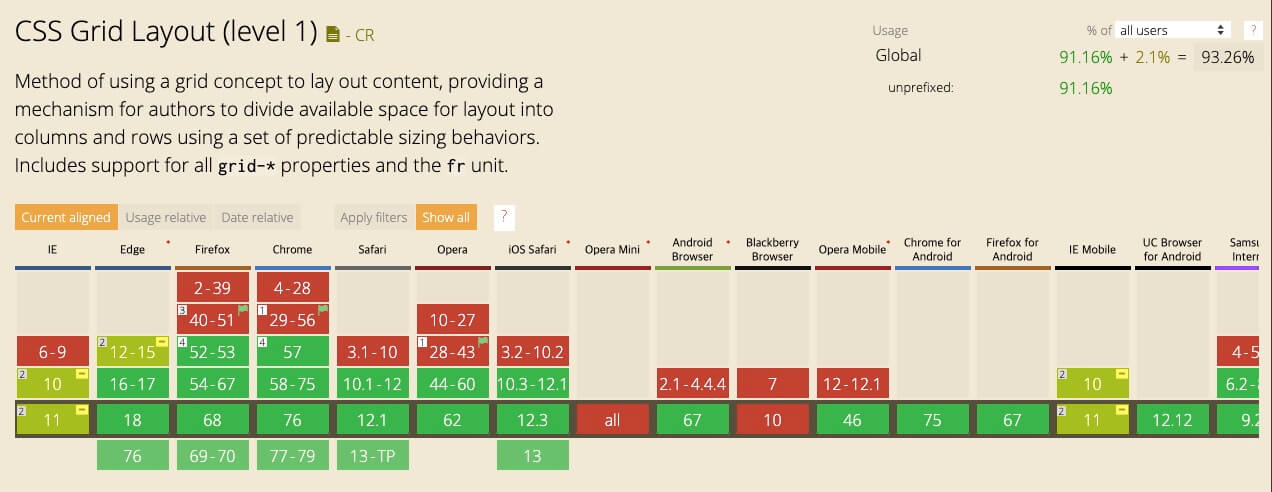
IE11 supports some Grid features with the -ms- prefix.
Below, I've listed only the properties that Autoprefixer can support.
| Property | IE property |
|---|---|
display: grid; |
display: -ms-grid; |
grid-template-rows |
-ms-grid-rows |
grid-template-columns |
-ms-grid-columns |
| grid-template-areas | - |
| grid-template | - |
| row-gap(grid-row-gap) | - |
| column-gap(grid-column-gap) | - |
| gap(grid-gap) | - |
| grid-row-start | -ms-grid-row |
| grid-row-end | - |
| grid-row | - |
| grid-column-start | -ms-grid-column |
| grid-column-end | - |
| grid-column | - |
| align-self | -ms-grid-row-align |
| justify-self | -ms-grid-column-align |
| - | -ms-grid-row-span |
| - | -ms-grid-column-span |
Thanks for reading to the end.
Likes and kind comments help keep this blog going!