Essential JS + TS Core Syntax
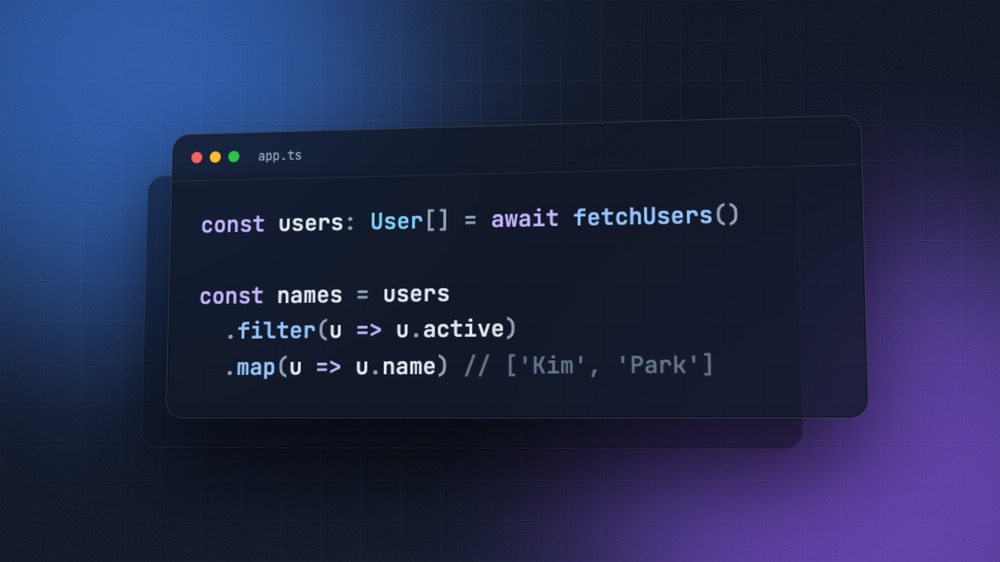
This post covers the JavaScript and TypeScript syntax you use over and over in web development.
Code in frameworks like React, Vue, and Svelte isn't written in a separate new syntax; it's written on top of this syntax.
So if you're not comfortable with the language itself, you may get stuck while learning a framework, not because of the framework but because of the syntax.
This post is for readers who are just starting to learn JavaScript, or who roughly know the syntax but haven't put it in order yet.
Each piece of syntax is explained in this order: a definition, an example you can run right away, and common mistakes.
The output of the code is shown in comments.
JavaScript comes first, followed by TypeScript, which adds types on top of it.
# JavaScript
This is JavaScript syntax that runs as is in both the browser and Node.js.
You can run most of the examples by pasting them into the console of your browser's developer tools.
# Variables and scope
Declare variables with const and let.
constcan't be reassigned (given a different value), whileletcan.- Use
constby default, and useletonly when you need to assign a new value. varis an old way to declare variables, and we don't use it because of the scope problems explained below.
12345const name = 'Kim' let count = 0 count = 1 // let can be reassigned // name = 'Lee' // Error, const can't be reassigned
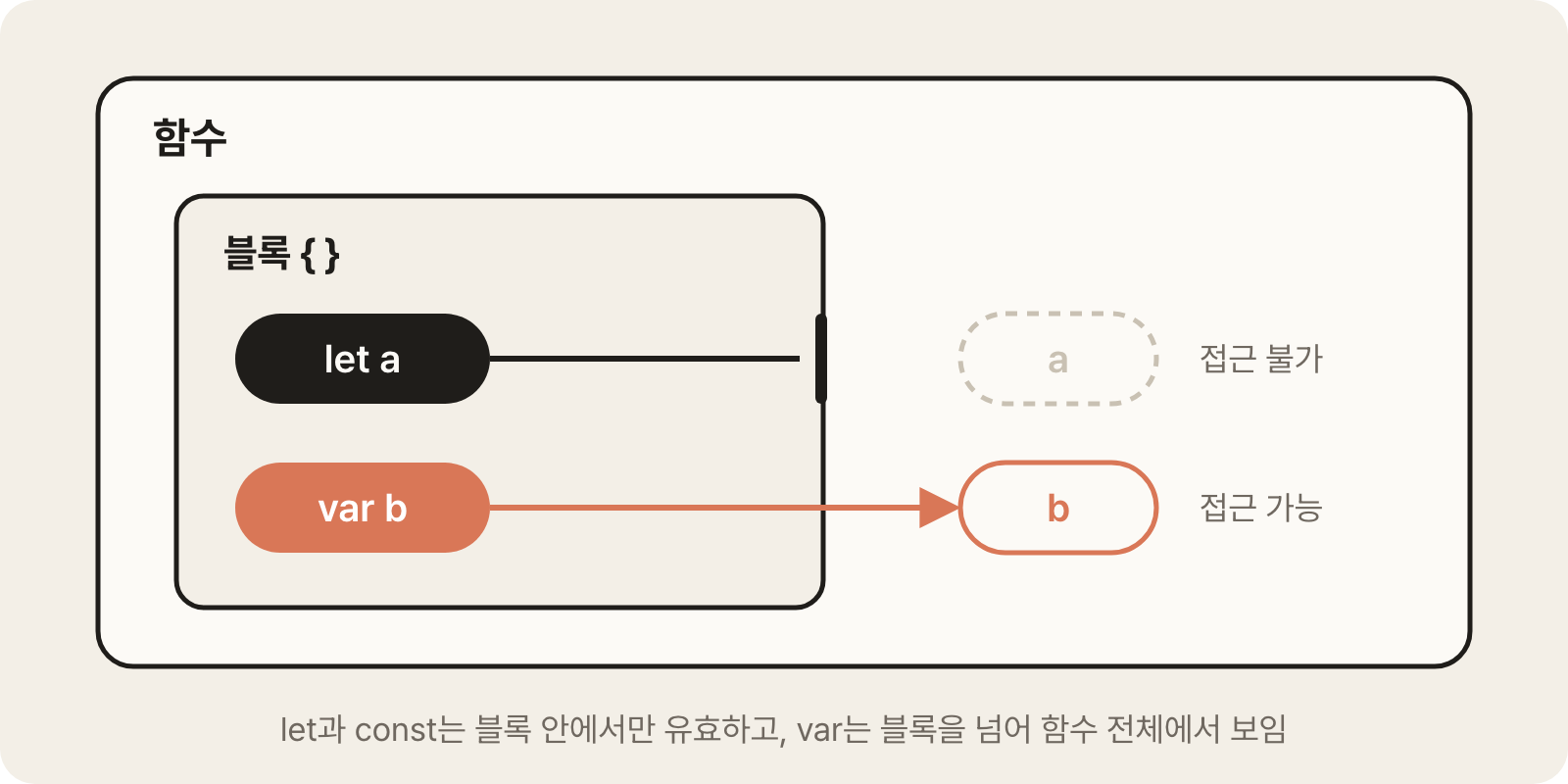
The range where a variable is valid is called its scope.const and let are scoped to blocks wrapped in curly braces ({ }), so you can't access them outside the block.
12345678let message = 'outer' if (true) { let message = 'inner' // A separate variable that is valid only inside the block console.log(message) // 'inner' } console.log(message) // 'outer'
var has function scope, so it ignores blocks.
This causes behavior that's hard to predict, such as loop variables leaking out of the loop, so use only const and let in new code.
12345for (var i = 0; i < 3; i++) {} console.log(i) // 3, accessible even outside the block for (let j = 0; j < 3; j++) {} // console.log(j) // Error, j is valid only inside the loop block
# Values and references
There are two ways values are stored and handled.
- Primitive types:
number,string,boolean,null,undefined, and so on. The variable stores the value itself. - Reference types: objects, arrays, and functions. The variable stores the location of the value (a reference).
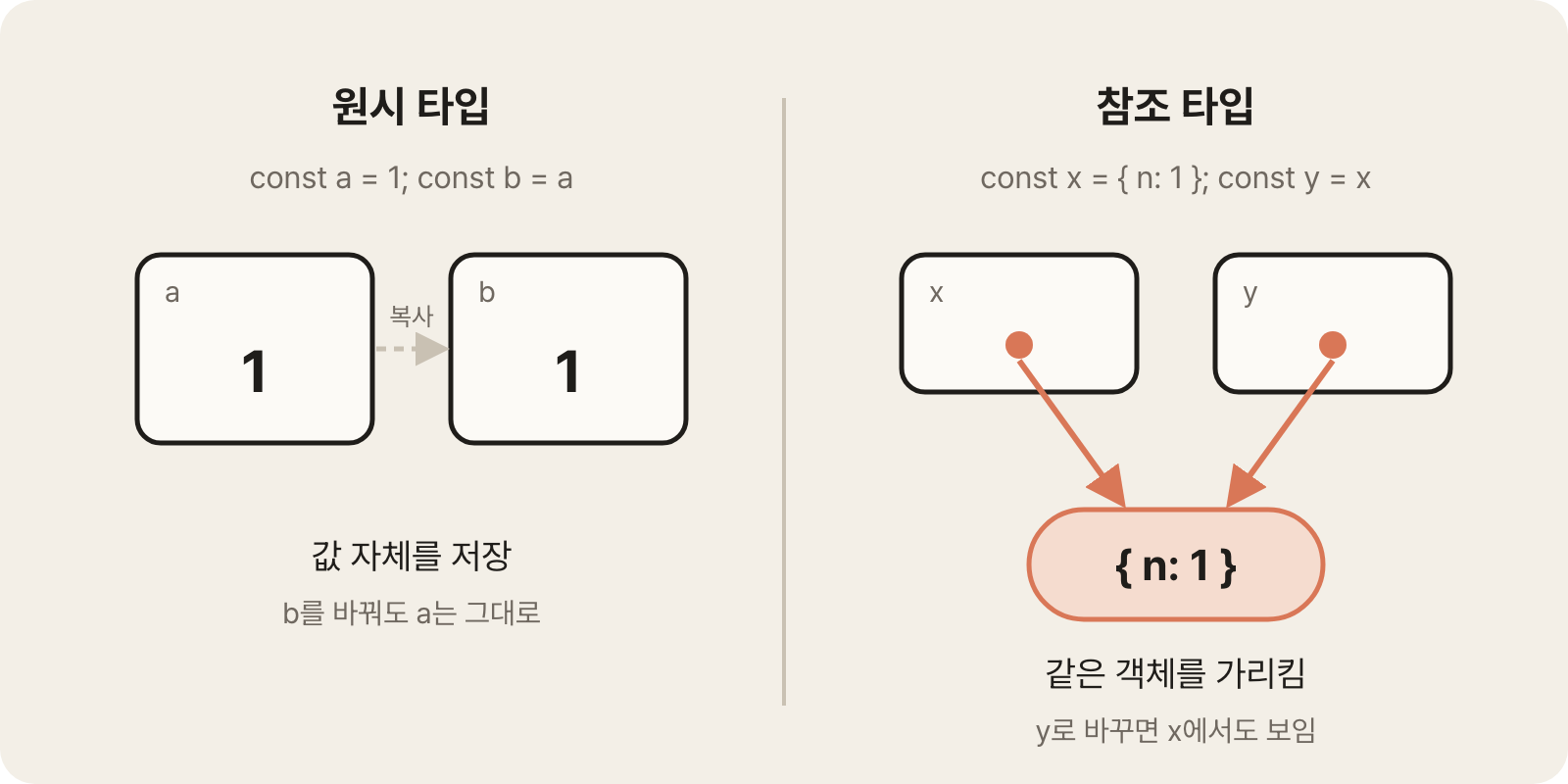
Because of this difference, comparing and copying give different results.
Primitive values are considered equal if their values are the same, but objects with the same contents are different objects if they're in different locations.
1234561 === 1 // true 'abc' === 'abc' // true, primitive types are compared by value const obj1 = { a: 1 } const obj2 = { a: 1 } obj1 === obj2 // false, different objects even with the same contents
When you assign an object to another variable, the reference is copied, not the object.
Both variables point to the same object, so if you change it through one, you see the change through the other too.
12345const a = [1, 2] const b = a // Points to the same array, not a copy b.push(3) console.log(a) // [1, 2, 3], a changes too
The same goes for passing an object to a function.
If you change an object received as a parameter inside the function, the original outside the function changes.
1234567function addItem(cart, item) { cart.push(item) // Changes the received array directly } const cart = ['apple'] addItem(cart, 'banana') console.log(cart) // ['apple', 'banana'], the original changed
How to handle data without changing the original is covered in Immutability and copying.
# Template literals
A template literal is syntax that wraps a string in backticks (the key to the left of the number 1 on the keyboard).
If you write a value or expression inside ${ }, its result is included in the string; this is called interpolation.
12345678const name = 'Kim' const age = 20 const id = 7 const page = 2 const greeting = `Hello, ${name}` // Variable interpolation const info = `${name} is ${age} and will be ${age + 1} next year` // Expressions can be interpolated too const url = `/api/users/${id}?page=${page}` // '/api/users/7?page=2', often used to build URLs
Line breaks are included in the string as is, so template literals are also used for multi-line strings.
123456const isActive = true const html = ` <li class="${isActive ? 'active' : ''}"> ${name} </li> ` // class="active" if isActive is true
isActive ? 'active' : '' is the ternary operator, which picks one of two values based on a condition; it's explained in the next section.
# Conditions and short-circuit evaluation
Always use === and !== for comparisons.== converts types automatically before comparing, which produces unexpected results.
1234'1' == 1 // true, automatic conversion causes confusion '1' === 1 // false, compares types too null == undefined // true null === undefined // false
Conditionals judge values as truthy or falsy.
Only the few values below are treated as falsy, and everything else is truthy.
| Category | Values |
|---|---|
| Falsy | false, 0, '', null, undefined, NaN, plus -0 and 0n |
| Truthy | Every other value. '0', 'false', [], and {} are truthy too |
123if (list.length) {} // Doesn't run if the length is 0 if (user) {} // Doesn't run if user is null or undefined if ([]) {} // Runs, because an empty array is truthy too
The ternary operator is an expression that picks one of two values based on a condition.
Unlike an if statement, it returns a value, so you can use it directly in variable assignments and templates.
1const label = count > 0 ? `${count} items` : 'None'
&& and || are logical operators, but they stop evaluating as soon as the result is determined and return the value at that point.
This is called short-circuit evaluation, and it's often used to pick values or to run something conditionally.
A || B: A if A is truthy, otherwise B. Used to set a default value.A && B: A if A is falsy, otherwise B. Used to run B only when A is true.
12const title = user.nickname || 'Anonymous' // 'Anonymous' if there's no nickname isOpen && close() // Calls close only when isOpen is true
|| has a problem: it skips valid values like 0 and '' because they're falsy.
The nullish coalescing operator ?? uses the right-hand value only when the left-hand value is null or undefined.
12const page = options.page || 1 // Becomes 1 if page is 0 const page2 = options.page ?? 1 // Stays 0 if page is 0, becomes 1 only for null or undefined
??= is an operator that assigns only when the value is null or undefined.||= and &&= work the same way.
1config.timeout ??= 3000 // Assigns 3000 only if there's no timeout
Optional chaining ?. returns undefined without an error if a value along the way is null or undefined.
When accessing nested objects, it keeps the program from stopping because an intermediate value is missing.
1234567const user = { profile: { name: 'Kim' } } user.profile.name // 'Kim' // user.account.name // Error, account is undefined, so the next access stops the program user.account?.name // undefined, moves on without an error user.profile?.address?.city // Safe access at every level
You can also use it for function calls and array access.
12user.getName?.() // Calls getName only if it exists list?.[0] // Accesses the first element only if list exists
Using ?. and ?? together, you can even handle a default value for missing data in a single line.
1const city = user.profile?.address?.city ?? 'No address'
# Functions
There are three ways to create a function: declarations, expressions, and arrow functions.
They behave the same, but arrow functions are short, so they're used especially often for callbacks.
123456789function add(a, b) { // Function declaration return a + b } const subtract = function (a, b) { // Function expression return a - b } const multiply = (a, b) => a * b // Arrow function
Here are the form and shorthand rules of arrow functions.
- The form is
(parameters) => returnValue. - If the body is a single expression, you can omit the curly braces and
return(implicit return). - If there's only one parameter, you can omit the parentheses.
- When implicitly returning an object, wrap it in parentheses so the curly braces aren't read as the function body.
123456const double = n => n * 2 // Parentheses can be omitted for a single parameter const makeUser = name => ({ name }) // Wrap a returned object in parentheses const area = (w, h) => { // Use curly braces and return for a multi-line body const result = w * h return result }
You can give parameters default values.
If you don't pass an argument or pass undefined, the default value is used.
1234const greet = (name = 'guest') => `Hello, ${name}` greet('Kim') // 'Hello, Kim' greet() // 'Hello, guest'
For a function with several options, take a single object instead of listing parameters.
Callers don't need to remember the order, and they can pass only the options they need.
The syntax for destructuring an object as soon as you receive it is covered in Destructuring assignment.
123456function request({ url, method = 'GET', retry = 0 }) { // Takes an object and destructures it right away console.log(method, url, retry) } request({ url: '/api/users' }) // 'GET', '/api/users', 0 request({ url: '/api/users', method: 'POST' }) // 'POST', '/api/users', 0
Arrow functions don't have their own this; they use the this of the outer scope where they're declared.
If you need this in an object's method or inside a class, use a regular function or the method shorthand syntax.
How this works is covered in detail in JS Function Core Patterns.
# Callbacks and higher-order functions
A callback is a function that you pass as an argument to another function.
The function that receives it calls the callback at a time of its choosing.
A function that takes a function as an argument or returns a function is called a higher-order function; the array methods map and filter and registering event listeners are typical examples.
123456789101112const button = document.querySelector('button') button.addEventListener('click', () => { console.log('Clicked') // Runs on every click }) setTimeout(() => { console.log('Runs after 1 second') }, 1000) const nums = [1, 2, 3] nums.forEach(n => console.log(n)) // Runs for each element
When you pass a function, pass the function itself, not the result of calling it.
If you add parentheses, it runs immediately on the spot and its return value (usually undefined) is passed.
123456function handleClick() { console.log('Clicked') } button.addEventListener('click', handleClick) // Passes the function itself button.addEventListener('click', handleClick()) // Passes the result of running it immediately (undefined), a mistake
If you want to pass a callback with preset arguments, wrap it in an arrow function.
1button.addEventListener('click', () => handleClick('save')) // Runs handleClick('save') at click time
# Destructuring assignment
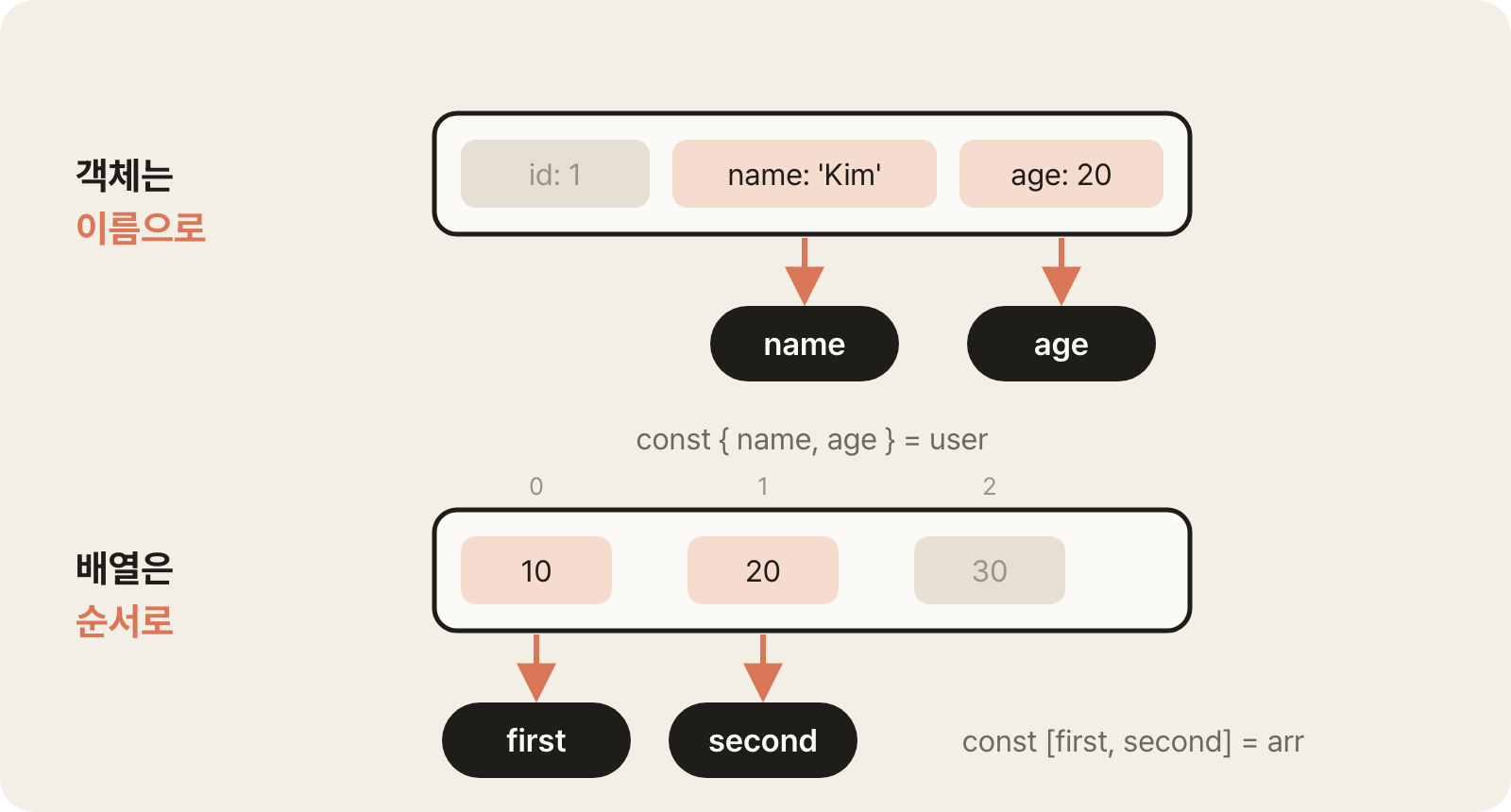
Destructuring assignment is syntax that takes the values you need out of an object or array and assigns them to variables.
Objects are unpacked by property name, and arrays by order.
12345const user = { id: 1, name: 'Kim', age: 20 } const { name, age } = user // Extract only the values you need const { name: userName } = user // Under a different name, userName const { role = 'guest' } = user // Default value 'guest' if there's no value
You can also destructure nested objects level by level.
However, deeper nesting is hard to read, so use it only up to about two levels.
123const data = { user: { name: 'Kim', address: { city: 'Seoul' } } } const { user: { address: { city } } } = data // city is 'Seoul'
The pattern of destructuring right in a function's parameter list is used very often.
This is also how framework components receive props.
12345function printUser({ name, age }) { console.log(`${name} (${age})`) } printUser(user) // 'Kim (20)'
Arrays are unpacked in index order.
Skip the positions you don't need with commas.
12const [first, second] = [10, 20] // first is 10, second is 20 const [, , third] = [1, 2, 3] // Skips the first two, third is 3
A function that returns several values bundles them in an array or object, and the caller destructures them.
Use an array if the order of the returned values is fixed, and an object if you want to tell them apart by name.
12345678910function getSize(el) { return [el.offsetWidth, el.offsetHeight] // Told apart by order } const [width, height] = getSize(box) function parseNumber(text) { const value = Number(text) return { value, ok: !Number.isNaN(value) } // Told apart by name } const { value, ok } = parseNumber('42') // value is 42, ok is true
# Spread and rest
... works in two ways, depending on where it's used.
It's either spread, which expands values, or rest, which gathers the remaining values into one.
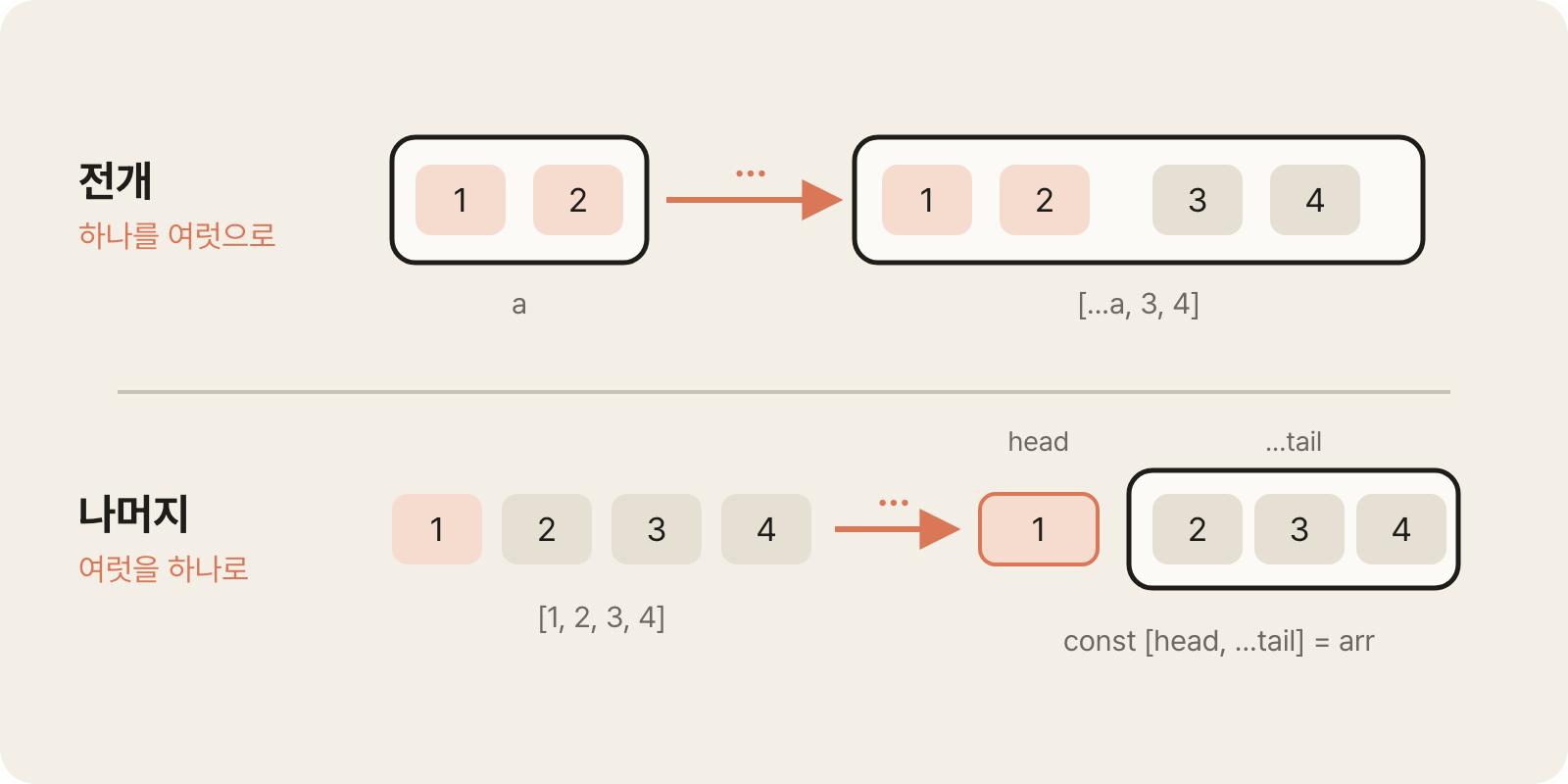
Spread expands an object or array to copy or merge it.
12345678const a = [1, 2] const b = [3, 4] const merged = [...a, ...b] // [1, 2, 3, 4] const copy = [...a] // A copy separate from the original const base = { name: 'Kim', age: 20 } const updated = { ...base, age: 21 } // A new object with only age overwritten
It's also used to spread an array into a function's arguments.
12const nums = [5, 2, 8] Math.max(...nums) // Same as Math.max(5, 2, 8), 8
When merging objects, if property names overlap, the later value overwrites the earlier one.
This is used for the pattern of overriding default settings with user settings.
123const defaults = { theme: 'light', lang: 'ko' } const custom = { lang: 'en' } const settings = { ...defaults, ...custom } // { theme: 'light', lang: 'en' }
Rest gathers the remaining values into a single array or object.
It can be used only in the last position of a destructuring pattern.
When used in a function's parameter list, it's called rest parameters, and it gathers the passed arguments into an array.
1234567891011const [head, ...tail] = [1, 2, 3, 4] // head is 1, tail is [2, 3, 4] const { id, ...rest } = { id: 1, name: 'Kim', age: 20 } // id is 1, rest is { name: 'Kim', age: 20 } function sum(...numbers) { // Gathers the arguments into an array, numbers is [1, 2, 3] let total = 0 for (const n of numbers) total += n return total } sum(1, 2, 3) // 6
Rest properties are often used to make a copy of an object without certain properties.
1const { password, ...safeUser } = user // Only the rest, without password, goes into safeUser
# Array methods
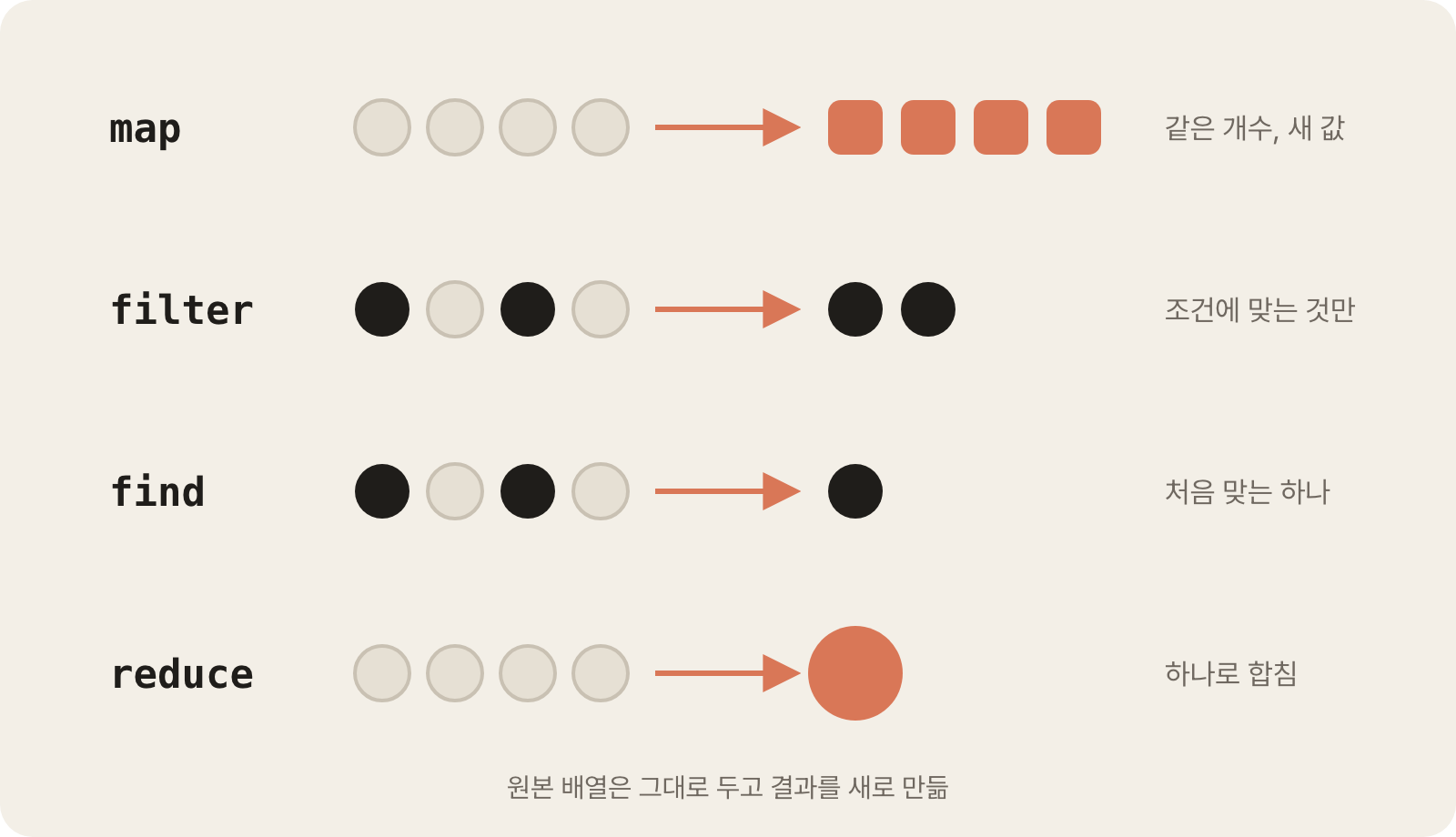
You often handle data with array methods instead of loops.
They all take a callback function as an argument, and the callback receives the element, the index, and the array, in that order.
| Method | What it does | Returns |
|---|---|---|
map |
Transforms each element | A new array of the same length |
filter |
Keeps only the elements that meet a condition | A new array |
find |
The first element that meets a condition | One element, or undefined if none |
findIndex |
The position of the first element that meets a condition | The index, or -1 if none |
some |
Whether at least one element meets a condition | true or false |
every |
Whether all elements meet a condition | true or false |
includes |
Whether a specific value is present | true or false |
reduce |
Accumulates the elements into one | The accumulated result |
forEach |
Only runs an action for each element | Nothing (undefined) |
123456789101112const users = [ { name: 'Kim', age: 20, active: true }, { name: 'Lee', age: 17, active: false }, { name: 'Park', age: 25, active: true } ] const names = users.map(u => u.name) // ['Kim', 'Lee', 'Park'] const adults = users.filter(u => u.age >= 20) // Kim, Park const lee = users.find(u => u.name === 'Lee') // { name: 'Lee', ... } const hasActive = users.some(u => u.active) // true const allAdults = users.every(u => u.age >= 20) // false const totalAge = users.reduce((sum, u) => sum + u.age, 0) // 62
reduce takes a callback that receives the accumulator and the current element, plus the initial value of the accumulator.
Besides totals, it's also used to change the shape of data, such as turning an array into an object.
1234const byName = users.reduce((acc, u) => { acc[u.name] = u // Converts to an object keyed by name return acc }, {}) // { Kim: {...}, Lee: {...}, Park: {...} }
Methods that return a new array can be called one after another with a dot (.).
This is called method chaining.
123const activeNames = users .filter(u => u.active) .map(u => u.name) // ['Kim', 'Park']
Sort with sort or toSorted.sort sorts the original array in place, while toSorted leaves the original as is and returns a new sorted array.
Both convert elements to strings to compare them by default, so you need to pass a compare function when sorting numbers.
If the compare function returns a negative number, the first argument comes first.
12345const nums = [10, 9, 1] nums.toSorted() // [1, 10, 9], sorted as strings nums.toSorted((a, b) => a - b) // [1, 9, 10], ascending users.toSorted((a, b) => b.age - a.age) // Descending by age
When you need a loop, use for...of.
Unlike forEach, you can stop it midway with break, and you can use await inside it.
12345678for (const user of users) { if (!user.active) continue console.log(user.name) } for (const [index, user] of users.entries()) { console.log(index, user.name) // When you need the index }
# Immutability and copying
Primitive values are immutable.
Even when it looks like you're changing a value, the existing value doesn't change; the variable just points to a new value.
Objects and arrays are mutable.
You can change their internal properties or elements while the reference stays the same.const only prevents reassignment; it doesn't prevent internal changes.
123const user = { name: 'Kim' } user.name = 'Lee' // Allowed, changes an internal value // user = {} // Error, reassignment
Array methods are divided into those that change the original and those that return a new array.
| Category | Methods |
|---|---|
| Change the original | push, pop, shift, unshift, splice, sort, reverse |
| Return a new array | map, filter, slice, concat, toSorted, toReversed, toSpliced, with |
sort and reverse cause mistakes especially often because they change the original in place instead of returning a new sorted array.
To keep the original, sort a copy or use toSorted, which returns a new array.
12345const nums = [3, 1, 2] nums.sort() // The original changes, nums is [1, 2, 3] const sorted = [...nums].sort() // Sorts only the copy const sorted2 = nums.toSorted() // Returns a new array, keeps the original
Here's how to change values without changing the original.
Copy the object or array, then create a new value with only the needed parts changed.
1234567const user = { name: 'Kim', age: 20 } const updated = { ...user, age: 21 } // Copy, then change only part of it const list = [1, 2, 3] const added = [...list, 4] // Add, [1, 2, 3, 4] const removed = list.filter(n => n !== 2) // Remove, [1, 3] const doubled = list.map(n => n * 2) // Change, [2, 4, 6]
Working this way makes it easy to track when values change and reduces bugs caused by accidentally changing a shared reference.
In tools like React that detect changes by whether the reference changed, changing the original directly causes a problem where the screen doesn't update even though the value changed.
The spread operator and Object.assign make a shallow copy.
They copy only the first level of properties, and the objects inside still share the same references.
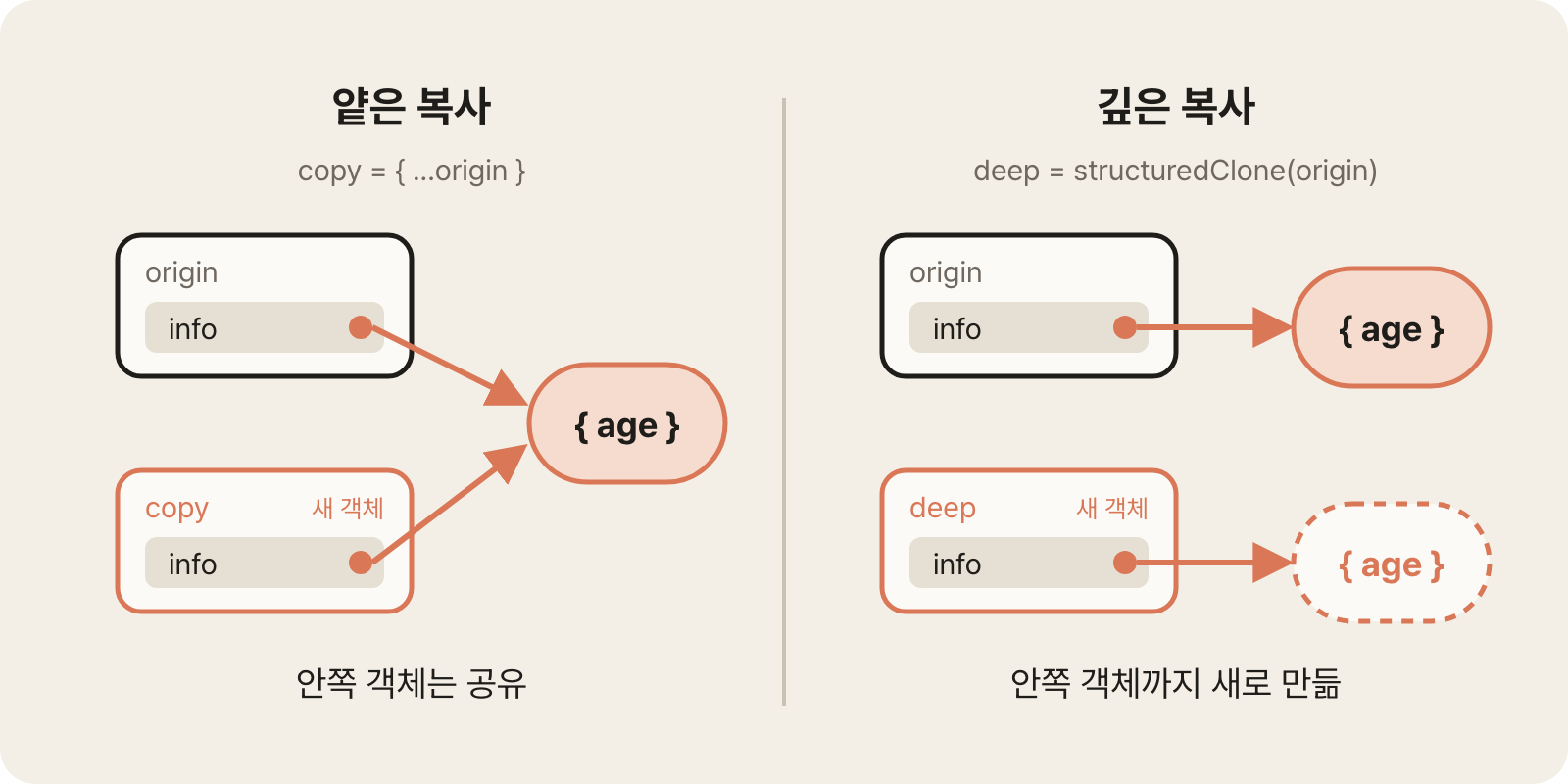
12345const origin = { info: { age: 20 } } const copy = { ...origin } copy.info.age = 30 console.log(origin.info.age) // 30, the inner object is shared
To fully copy nested structures, use a deep copy.structuredClone creates new copies of all nested objects and arrays.
1234const deep = structuredClone(origin) // Copies even the inner objects separately deep.info.age = 40 console.log(origin.info.age) // 30, the original stays the same
To change a nested value without changing the original, copy each level you want to change with the spread operator.
1234const next = { ...origin, info: { ...origin.info, age: 40 } // Creates a new inner object too }
# Working with objects
If a property name and a variable name are the same, write it only once (shorthand property).
Methods can also be written in short form without the function keyword (method shorthand).
12345678910const name = 'Kim' const age = 20 const user = { name, // name: name age, greet() { // greet: function () { ... } return `Hello, I'm ${this.name}` } }
If you wrap a property name in square brackets, the variable's value is used as the property name (computed property name).
It's used when the property name is decided at runtime, such as updating state by the name of an input field.
1234567const key = 'score' const obj = { [key]: 100 } // { score: 100 } const form = { email: '', password: '' } function update(field, value) { return { ...form, [field]: value } // Updates any field with the same function }
Objects don't have array methods like map and filter, so convert the properties to an array before working with them.
You can create an array with Object.entries, process it, and then turn it back into an object with Object.fromEntries.
12345678910111213const scores = { kim: 90, lee: 85 } Object.keys(scores) // ['kim', 'lee'] Object.values(scores) // [90, 85] Object.entries(scores) // [['kim', 90], ['lee', 85]] for (const [name, score] of Object.entries(scores)) { console.log(`${name}: ${score}`) // 'kim: 90', 'lee: 85' } const passed = Object.fromEntries( Object.entries(scores).filter(([, score]) => score >= 90) ) // { kim: 90 }
You can't send an object to a server or store it as is, so you convert it to a string to exchange it.
JSON (JavaScript Object Notation) is the text format used for this, and you convert with JSON.stringify and JSON.parse.
12345const json = JSON.stringify({ name: 'Kim', age: 20 }) // '{"name":"Kim","age":20}' const user = JSON.parse(json) // { name: 'Kim', age: 20 } localStorage.setItem('user', JSON.stringify(user)) // To a string when saving const saved = JSON.parse(localStorage.getItem('user')) // Back to an object when reading
JSON.stringify drops functions and undefined properties, and turns Date objects into strings.
Note that running JSON.parse after the conversion doesn't bring back the original types.
Set is a collection of unique values, and Map is a key-value store that can use any type as a key.Set is most often used to remove duplicates from an array.
123456789101112const tags = ['js', 'ts', 'js'] const unique = [...new Set(tags)] // ['js', 'ts'] const set = new Set([1, 2]) set.add(3) set.has(2) // true set.size // 3 const map = new Map() map.set('kim', { age: 20 }) map.set(button, 'clicked') // Objects can be used as keys too map.get('kim') // { age: 20 }
# Asynchronous programming
# Synchronous and asynchronous
Synchronous code runs line by line from top to bottom, and it moves on only after the previous task finishes.
Asynchronous code starts a time-consuming task, such as a network request or a timer, and runs the next code first without waiting for the task to finish.
You get the result of the task later through a callback or a Promise.
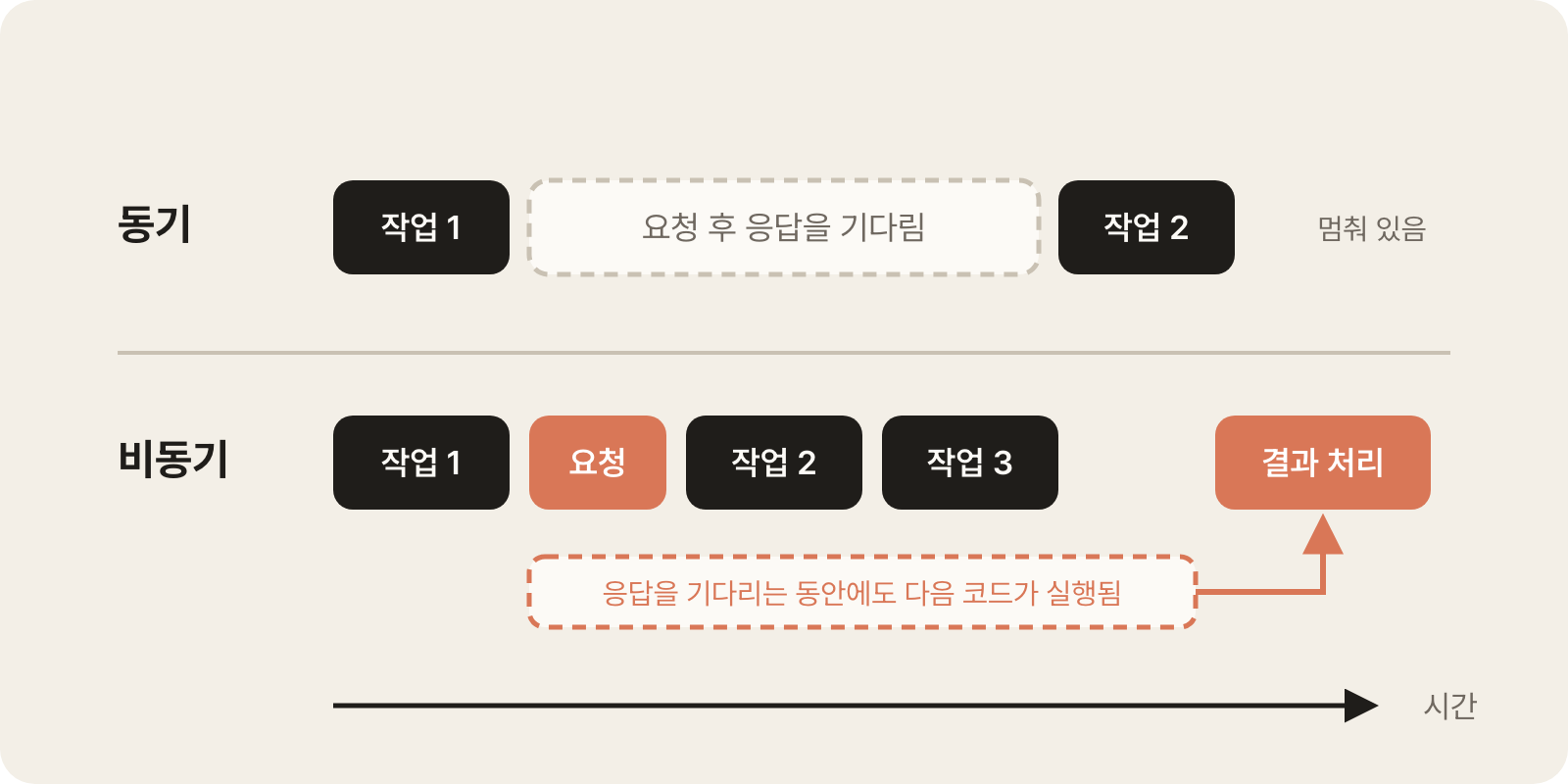
1234console.log(1) setTimeout(() => console.log(2), 0) // Runs later, even with a 0-second delay console.log(3) // Output order: 1, 3, 2
JavaScript has only a single flow that runs code line by line, so if it waited synchronously for a time-consuming task, the screen would freeze in the meantime.
That's why network requests, file reads, and timers in the browser all work asynchronously.
# Promise
A Promise is an object that promises to hold the result of an asynchronous task later.
It has three states, and once it settles from pending to fulfilled or rejected, it never changes again.
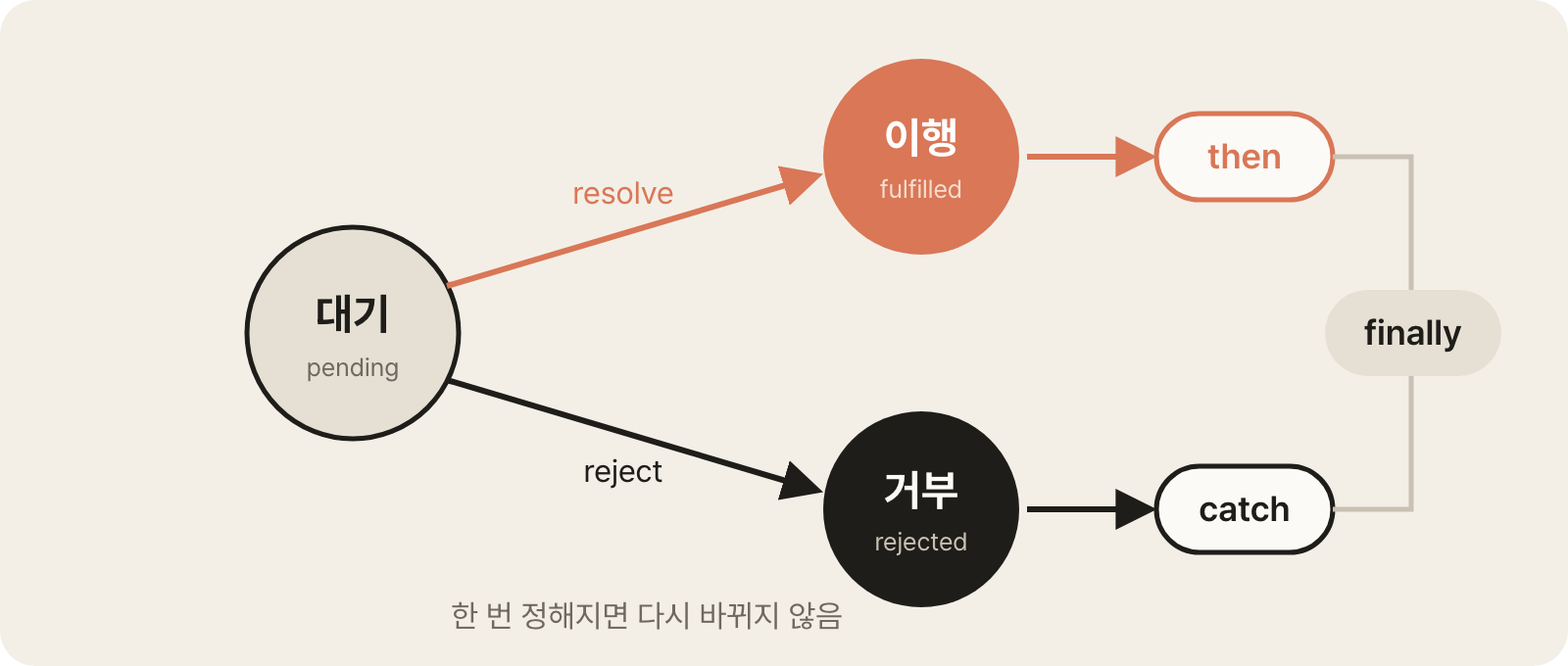
- Pending: Not finished yet.
- Fulfilled: Succeeded, and a result value exists.
- Rejected: Failed, and an error exists.
Receive the result with then, the error with catch, and any cleanup that runs regardless of success with finally.
In the examples below, assume that fetchUser and fetchPosts are functions that get data from a server and return a Promise.
1234fetchUser() .then(user => console.log(user.name)) // Runs when fulfilled .catch(error => console.log(error.message)) // Runs when rejected .finally(() => console.log('Request finished')) // Always runs
then returns a new Promise, so you can chain calls one after another.
The value returned from a callback is passed to the next then, and if an error occurs in the middle of the chain, it jumps to the nearest catch.
1234fetchUser() .then(user => fetchPosts(user.id)) // Uses the previous result for the next task .then(posts => console.log(posts)) .catch(error => console.log(error)) // Comes here no matter which step fails
To create one yourself, pass new Promise a function that receives resolve for success and reject for failure.
This is mainly used to wrap a callback-based API in a Promise.
12345function delay(ms) { return new Promise(resolve => setTimeout(resolve, ms)) } delay(1000).then(() => console.log('Runs after 1 second'))
# async/await
async and await are syntax for writing Promise code that reads from top to bottom like synchronous code.
- An
asyncfunction always returns a Promise. awaitwaits until a Promise is fulfilled and then gives back its result value.- Use
awaitinside anasyncfunction. You can also use it at the top level of a module. awaitpauses only that function's execution, not the whole program.
1234567async function load() { const user = await fetchUser() const posts = await fetchPosts(user.id) // Runs after user is received return posts // Returned wrapped in a Promise } load().then(posts => console.log(posts))
If a Promise is rejected, await throws the error right there.
Handle it by wrapping the code in try...catch, and put code that should run regardless of success in finally.
1234567891011async function load() { try { const user = await fetchUser() return user } catch (error) { console.log('Failed to load:', error.message) return null } finally { setLoading(false) // Runs whether it succeeds or fails } }
# fetch
fetch is a network request function built into browsers and Node.js.
It returns a Promise that holds the response object, and json(), which reads the body as JSON, also returns a Promise, so you await twice.
1234567async function getUser(id) { const response = await fetch(`/api/users/${id}`) if (!response.ok) { // HTTP errors like 404 and 500 aren't rejected, so check yourself throw new Error(`Request failed: ${response.status}`) } return await response.json() // Converts the body to an object }
fetch is rejected only when the network itself fails; it's fulfilled even if the server sends an error status code.
That's why you need code that checks response.ok.
To send data, pass method, headers, and body as options.
Convert objects to strings with JSON.stringify before sending them.
12345const response = await fetch('/api/users', { method: 'POST', headers: { 'Content-Type': 'application/json' }, body: JSON.stringify({ name: 'Kim', age: 20 }) })
# Running multiple tasks at once
If you await unrelated tasks one after another, the next task can't start until the previous one finishes.
If you pass them to Promise.all as an array, all the tasks start at the same time, and you get the results as an array when they're all done.
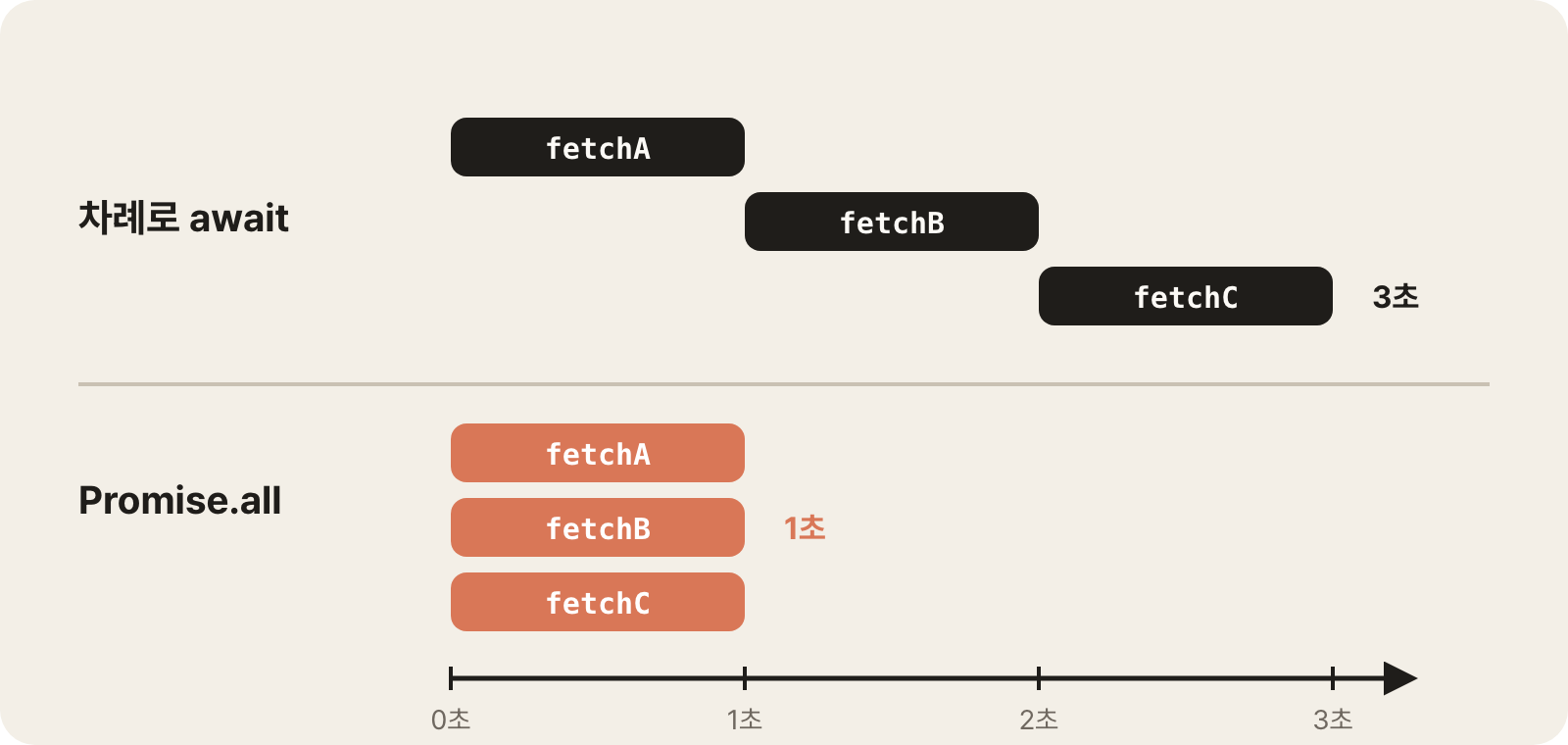
12const user = await fetchUser() // 1 second const config = await fetchConfig() // 1 second, starts after the previous task finishes
1const [user, config] = await Promise.all([fetchUser(), fetchConfig()])
Methods that handle multiple Promises together differ in how they handle failures.
| Method | Behavior |
|---|---|
Promise.all |
An array of results if all succeed, rejected immediately if any one fails |
Promise.allSettled |
Gets every result, whether it succeeded or failed |
Promise.race |
The result of whichever finishes first, success or failure |
Promise.any |
The result of whichever succeeds first |
123456const results = await Promise.allSettled([fetchUser(), fetchConfig()]) for (const result of results) { if (result.status === 'fulfilled') console.log(result.value) // The successful result else console.log(result.reason) // The reason for failure }
If you use await inside forEach, it moves on to the next element without waiting.
If you need to wait in order, use for...of; if they can run at the same time, create an array of Promises with map and pass it to Promise.all.
12345for (const id of ids) { await deleteUser(id) // One at a time, in order } await Promise.all(ids.map(id => deleteUser(id))) // All at the same time
# Modules
Modules are a structure that splits code into multiple files and connects them with import and export.
Each file is a module, and each module has its own scope, so variables that aren't exported can't be accessed from outside.
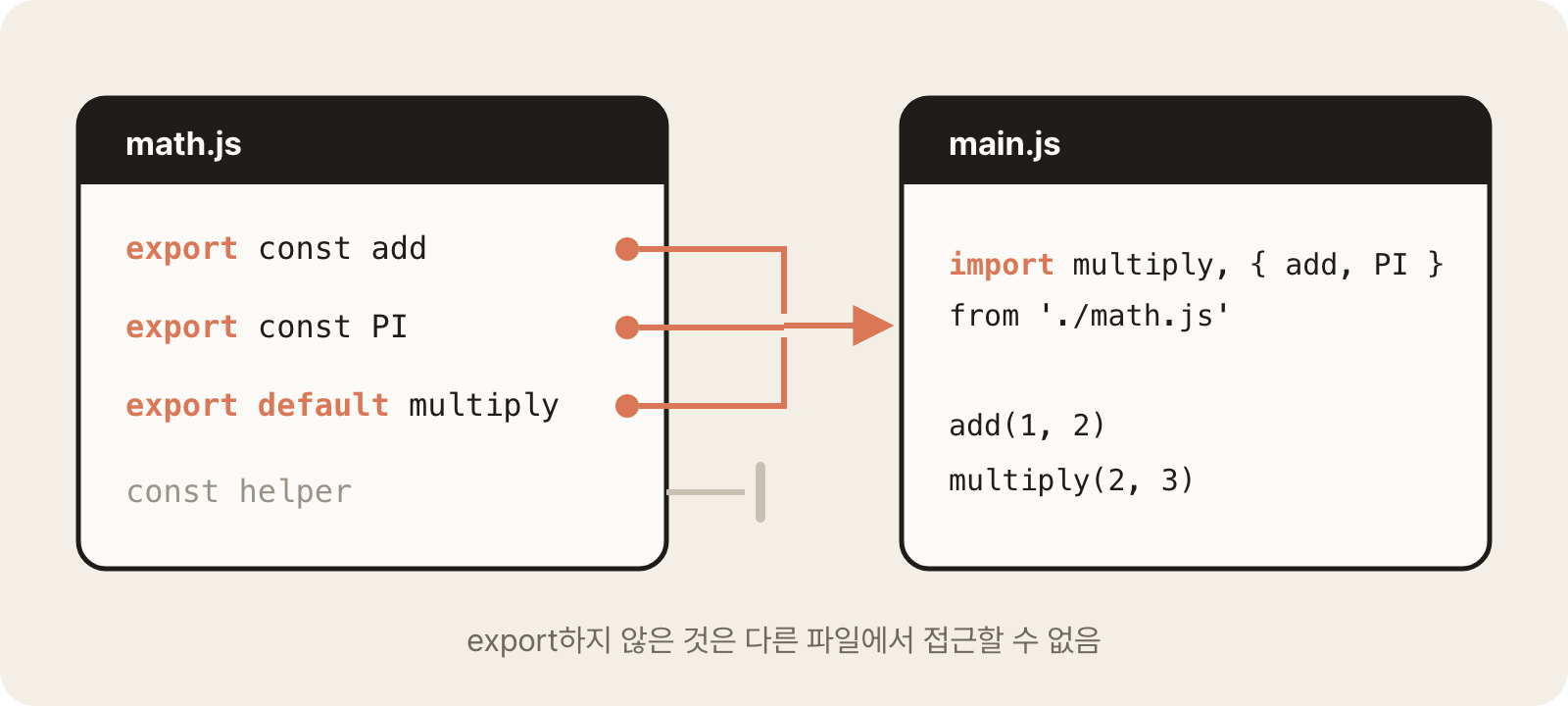
There are two ways to export.
- Named export: Export several things, each with a name. When importing, receive them with the same names in curly braces.
- Default export: Export only one per file. When importing, you choose the name freely.
123456export const add = (a, b) => a + b // Named export export const PI = 3.14 export default function multiply(a, b) { // Default export return a * b }
123import multiply, { add, PI } from './math.js' // Default and named together import { add as plus } from './math.js' // Rename with as import * as math from './math.js' // Bundle everything and use it as math.add
Here are the rules for writing paths.
- A path starting with
./or../points to a file you wrote. - Just a name points to an installed package (
node_modules).
12import { format } from 'date-fns' // Installed package import { add } from './math.js' // File you wrote
To use modules directly in the browser, load them with <script type="module">.
Projects that use a build tool like Vite can use them without extra setup, and the build process combines multiple modules into a single file.
Calling import() like a function loads a module when you need it.
It's used to load heavy modules later to reduce the initial loading size.
1234button.addEventListener('click', async () => { const { default: Chart } = await import('./chart.js') // Loaded at click time new Chart() })
# Classes
A class is a template for creating many objects with the same structure, and an object created from a class is called an instance.
Create an instance with new, set the initial state in the constructor, and access the instance itself with this in methods.
12345678910111213141516class Counter { count = 0 // Field constructor(start) { this.count = start } increase() { // Method this.count += 1 return this.count } } const counter = new Counter(10) counter.increase() // 11 counter instanceof Counter // true, checks whether it's an instance created from Counter
Extend an existing class with extends.
You'll extend built-in or library classes, or create instances of them, more often than you'll design classes yourself.
Classes that extend Error are often used to tell kinds of errors apart.
123456789101112class HttpError extends Error { constructor(status, message) { super(message) // Calls the parent class's constructor this.status = status } } try { throw new HttpError(404, 'Not found') } catch (error) { if (error instanceof HttpError) console.log(error.status) // 404 }
Prototypes, getters and setters, static methods, and more are covered in JS Class Core Patterns.
# TypeScript
TypeScript is JavaScript with types added.
All JavaScript code is valid TypeScript code, so you keep using the syntax we've covered so far and only need to learn the type syntax on top of it.
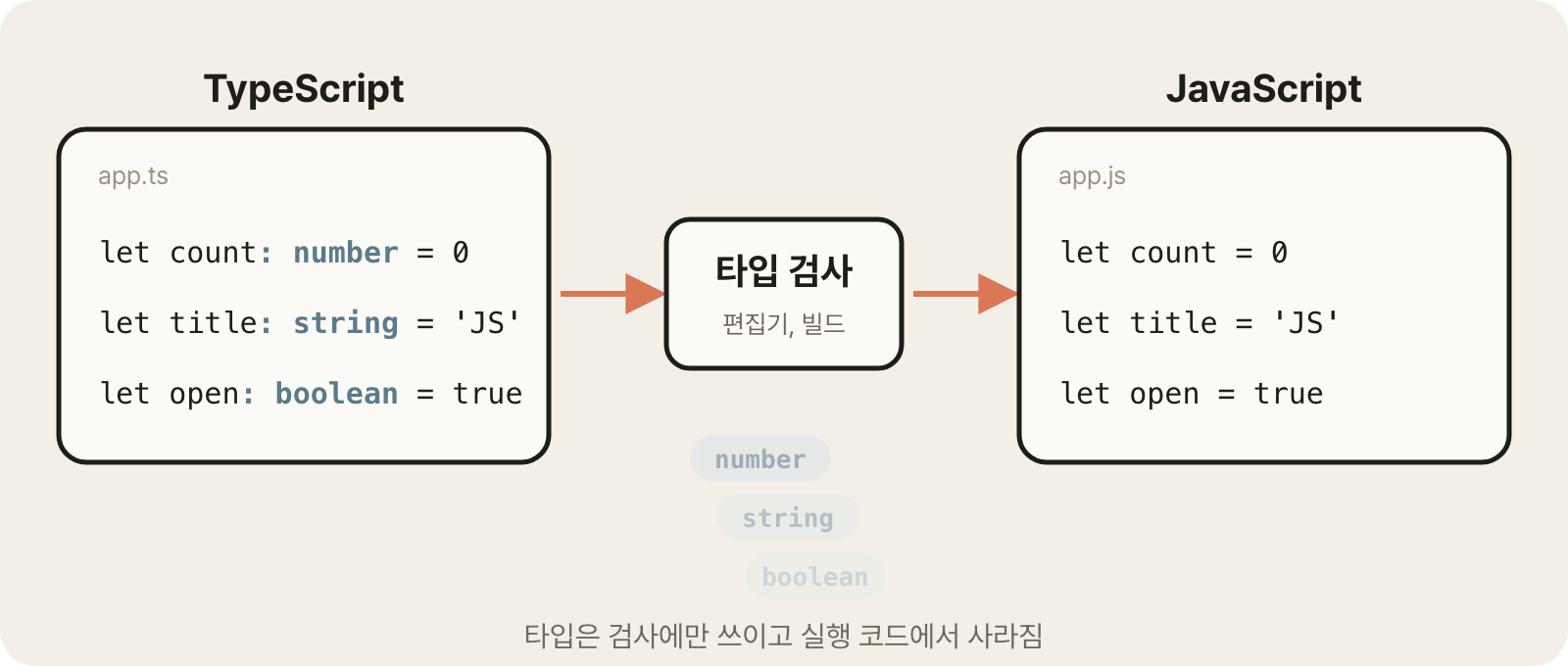
- You can catch wrong values and typos before running the code (in the editor or at build time).
- Autocompletion and code navigation become accurate.
- Types disappear when the code is converted to JavaScript, so they don't affect runtime speed.
12let count: number = 0 count = '3' // Shown as an error in the editor right away
12let count = 0 count = '3' // The types are gone and only the code remains
Use the .ts file extension, and .tsx for files that use JSX, like in React.
Projects created with Vite can use .ts files without extra setup; for other development environments, see TypeScript at a Glance.
# Type annotations and inference
A type annotation states that "this value is of this type" for a variable or function.
Put a colon (:) after the name and write the type.
123let title: string = 'Hello' let age: number = 20 let isOpen: boolean = false
Basic types are written in lowercase.
| Type | Values |
|---|---|
string |
Strings |
number |
Both integers and decimals |
boolean |
true, false |
null, undefined |
Each allows only that one value |
Type[] |
An array of that type. number[], string[] |
{ property: Type } |
An object. { id: number; name: string } |
12345const ids: number[] = [1, 2, 3] const names: string[] = ['Kim', 'Lee'] const user: { id: number; name: string } = { id: 1, name: 'Kim' } const users: { id: number; name: string }[] = [] // An array of objects
For functions, write types for the parameters and the return value.
If there's no return value, use void.
1234567function add(a: number, b: number): number { return a + b } const greet = (name: string): void => { console.log(`Hi, ${name}`) }
If there's an initial value, the type is inferred automatically even if you don't annotate it (type inference).
In the editor, hover over a variable to see its inferred type.
1234567let count = 0 // Inferred as number let text = 'hi' // Inferred as string const user = { id: 1, name: 'Kim' } // Inferred as { id: number; name: string } function double(x: number) { return x * 2 // The return type is inferred as number }
It's practical to leave inference to TypeScript where it works and to annotate types yourself only where inference doesn't work or is ambiguous.
Always annotate function parameters, since there's nothing to infer them from, and also annotate when the initial value alone can't tell you the type of values that come later, as with an empty array.
12const items: string[] = [] // Annotate an empty array, because its element type is unknown items.push('a') // Only strings can be added
# Union and literal types
A union type allows one of several types with |.
A literal type allows only specific values.
Combine the two to express a list of allowed values as a type; this is very often used to define string status values or options.
123456789let value: string | number // A string or a number value = 'hello' value = 42 let status: 'idle' | 'loading' | 'done' // Allows only these three values status = 'loading' // status = 'stop' // Error let user: User | null = null // A value that can be empty; User is an object type defined in the next section
Giving a type a name with the type keyword is called a type alias, and you can reuse it in many places.
123456type Status = 'idle' | 'loading' | 'done' type Size = 'sm' | 'md' | 'lg' function setSize(size: Size) {} setSize('md') // setSize('xl') // Error
To derive a type from an array that lists values, fix the values as literal types with a const assertion, as const.
You can then use the same list both as values and as a type.
1234const SIZES = ['sm', 'md', 'lg'] as const // readonly ['sm', 'md', 'lg'] type Size = (typeof SIZES)[number] // 'sm' | 'md' | 'lg' SIZES.map(size => `<option>${size}</option>`) // Also used as values
typeof SIZES is the type of the array value, and adding [number] after it takes out the type of the array's elements.
TypeScript also has enum, but in web development, literal unions like the one above are used more often.
For the features of enum and how it differs, see TypeScript Enum Types in Depth.
# interface and type
These are the two ways to define the shape of an object.interface defines an object structure and can inherit from and extend other interfaces with extends.
12345678910interface User { id: number name: string } interface Admin extends User { // Inherits User's properties and extends them role: string } const admin: Admin = { id: 1, name: 'Kim', role: 'owner' }
type, which creates type aliases, can name any type, not just objects: unions, functions, primitive types, and more.
To combine object types, use an intersection type, &.
123type ID = number | string // Naming a union type Handler = (event: MouseEvent) => void // Function type type Admin = User & { role: string } // Combining two object types
Define object types with interface, and use type for types that interface can't express, such as unions, and for function types.
The official docs also advise using interface until you need features of type.
With interface, declaring the same name several times merges them into one (declaration merging), which is also useful for adding properties to types provided by libraries.
This is covered in detail in Should I use interface or type in TypeScript?.
Adding ? after a property name makes it an optional property, which may or may not be present.
Its type automatically becomes Type | undefined, so you need to check whether the value exists before using it.
Adding readonly means it can't be changed once it's set.
123456789interface Props { title: string subtitle?: string // Optional, string | undefined readonly id: number // Readonly } const props: Props = { title: 'Title', id: 1 } props.subtitle?.toUpperCase() // Accessed with ?. because it may be missing // props.id = 2 // Error, readonly
Function types are written in a form similar to arrow functions.
They're used when passing event handlers or callbacks as props.
12345678interface ButtonProps { label: string onClick: (event: MouseEvent) => void // Function type onChange?: (value: string) => void // Optional property } type Calculator = (a: number, b: number) => number const sum: Calculator = (a, b) => a + b // Parameter types are inferred from Calculator
When you import only types, use import type.
That import is removed when the code is converted to JavaScript, so importing a types-only file doesn't leave unnecessary code behind.
12import type { User } from './types' // Imports only types import { fetchUser, type Role } from './api' // To import values and types together, put type before each type
# Type guards
A value that can be one of several types, like a union type, only allows operations that are possible for all of those types.
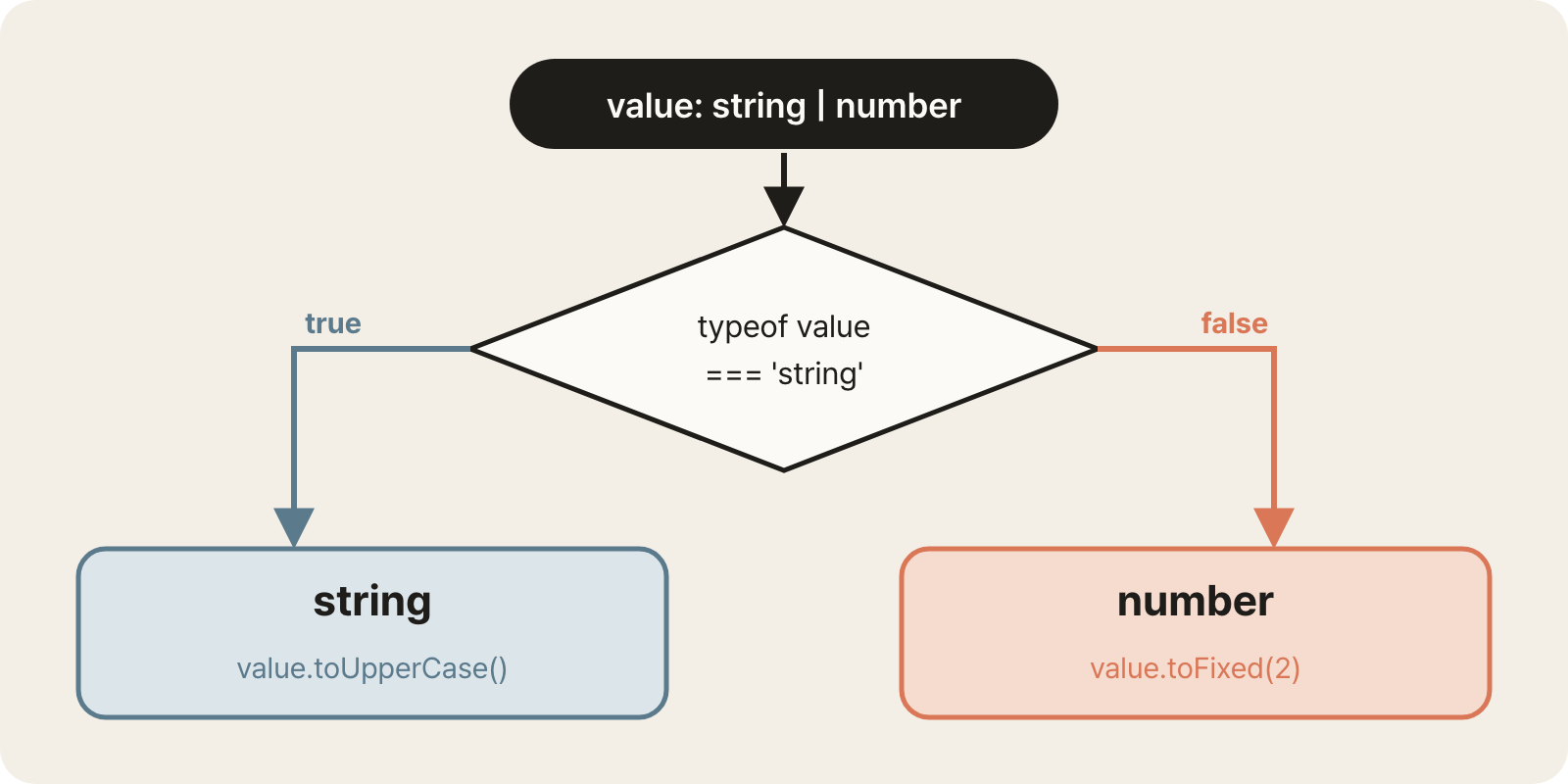
A type guard is a condition that checks a value's type, such as typeof or instanceof; inside a block that passes the guard, the type is narrowed down to one, so you can use operations that only that type supports.
| Type guard | Use |
|---|---|
typeof value === 'string' |
Distinguishes primitive types |
Array.isArray(value) |
Checks whether it's an array |
'property' in value |
Checks whether an object has a specific property |
value instanceof Class |
Checks whether it's an instance of a specific class |
value === null, !value |
Excludes null and undefined |
123456function format(value: string | number) { if (typeof value === 'string') { return value.toUpperCase() // Inside this block, it's a string } return value.toFixed(2) // Here, it's a number }
For values that can be null, a common pattern is to check first and return early.
In the code after the check, the type is treated as one with null excluded.
1234function getName(user: User | null) { if (!user) return 'No name' // Return first if it's null return user.name // Below this line, it's definitely User }
Object unions are told apart by the literal value of a shared property.
You express results with different shapes, like success and failure, as a single type, and checking the discriminant property narrows the types of the other properties too.
This is called a discriminated union, and it's often used for API responses and state.
It's covered in detail in TypeScript at a Glance.
1234567891011type Result = | { ok: true; data: User } | { ok: false; error: string } function handle(result: Result) { if (result.ok) { console.log(result.data.name) // Narrowed to the shape where ok is true, so data can be used } else { console.log(result.error) // Only error exists here } }
# any, unknown, never
These three types mean "anything", "unknown", and "nothing", respectively.
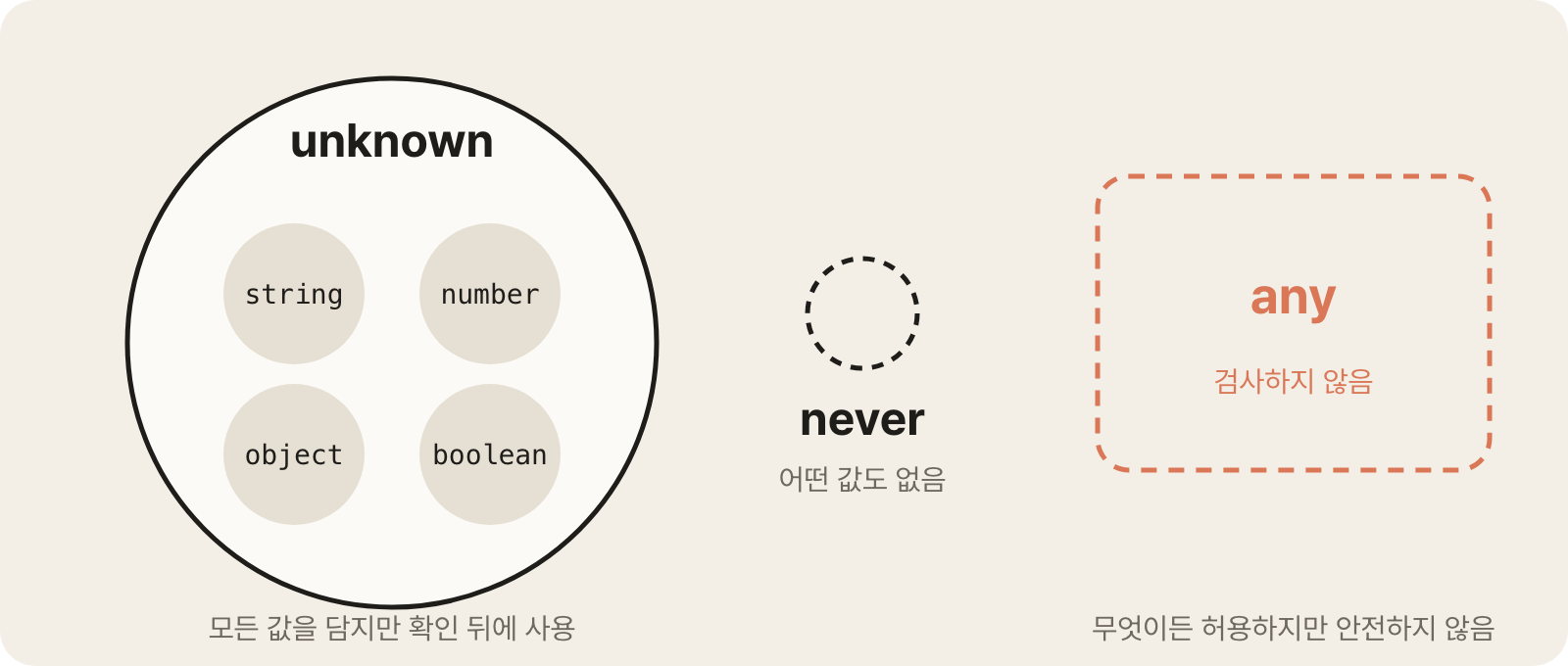
any: Doesn't check types. It allows anything, but you lose the benefits of TypeScript, so avoid it.unknown: A value whose type isn't known. Unlikeany, it forces you to check the type before using it, so it's safe.never: Can't be any value. Used as the return type of functions that always throw an error or never finish.
123456789101112let a: any = JSON.parse(text) a.foo.bar // Not checked, may throw an error at runtime let u: unknown = JSON.parse(text) // u.name // Error, can't be used before checking if (typeof u === 'object' && u !== null && 'name' in u) { console.log(u.name) // Used after narrowing } function fail(message: string): never { throw new Error(message) // Never returns a value normally }
Use unknown instead of any when receiving values from outside.
The error in catch is also unknown because any value can be thrown, so check that it's an Error instance before reading message.
123456try { await fetchUser() } catch (error) { // If the strict option in tsconfig is on, error is unknown const message = error instanceof Error ? error.message : String(error) console.log(message) }
# Type assertions
A type assertion is syntax that tells TypeScript, "I know this value's type better."
It doesn't change or check the actual value, and a wrong assertion leads to runtime errors, so use it only when you really need it.
as asserts the type of a value.
It's mainly used for values whose specific type can't be inferred, such as DOM elements.
12345// The return type of getElementById is HTMLElement | null, which has no value property const input = document.getElementById('email') as HTMLInputElement input.value = 'test@mail.com' // Asserted as HTMLInputElement, so value can be used const data = JSON.parse(text) as User // Treats the parsed result as User without checking the actual value
! is the non-null assertion operator, which asserts that a value isn't null or undefined.
12const el = document.querySelector('input') // Type: HTMLInputElement | null el!.focus() // Asserts it isn't null; use only when you're sure
Whenever possible, check with a type guard first and use assertions as a last resort.
12const el = document.querySelector('input') if (el) el.focus() // Used after checking, safe even when it's missing
# Generics
Generics are syntax that leaves a slot for a type to be decided later and fills it in when used.
Declare a type parameter inside angle brackets, like <T>, and pass the type when calling or let it be inferred from the arguments.
It's easy to understand if you think of it as passing a type the way you pass an argument to a function.
123456function first<T>(arr: T[]): T { return arr[0] } const n = first<number>([1, 2, 3]) // T is number, and the return is number too const s = first(['a', 'b']) // T is inferred as string from the argument
You'll write types in the < > slots that libraries require far more often than you'll create generics yourself.Promise<User> means "a Promise that fulfills with a User", and useState<User | null> means "state that holds a User or null".
1234async function getUser(id: number): Promise<User> { // A Promise that holds a User const response = await fetch(`/api/users/${id}`) return response.json() }
1const [user, setUser] = useState<User | null>(null) // Pass the type the state will hold
1const user = ref<User | null>(null)
Generics are also used for object types.
They're used when the outer structure is the same and only the data inside differs, as with API responses.
1234567interface ApiResponse<T> { data: T status: number } const userResponse: ApiResponse<User> = { data: { id: 1, name: 'Kim' }, status: 200 } const listResponse: ApiResponse<User[]> = { data: [], status: 200 }
You can put a constraint on a type parameter with extends.
It means "any type is fine, but it must have at least this structure."
123456function getId<T extends { id: number }>(item: T) { return item.id // Can be used, since id is guaranteed to exist } getId({ id: 1, name: 'Kim' }) // getId({ name: 'Kim' }) // Error, no id
# Utility types
Utility types are built-in generic types that create new types from existing ones.
Instead of defining similar types many times, you create variations from a single type.
| Utility type | Result |
|---|---|
Partial<T> |
Makes all properties optional |
Required<T> |
Makes all properties required |
Pick<T, K> |
Picks only the specified properties |
Omit<T, K> |
Excludes only the specified properties |
Record<K, V> |
An object with K as keys and V as values |
ReturnType<F> |
The return type of function F |
12345678910111213interface User { id: number name: string email: string } type UserUpdate = Partial<User> // { id?: number; name?: string; email?: string } type UserPreview = Pick<User, 'id' | 'name'> // { id: number; name: string } type UserForm = Omit<User, 'id'> // Everything except id, used for a create form type UsersById = Record<number, User> // An object that holds a User for each number key function update(id: number, changes: UserUpdate) {} update(1, { name: 'Lee' }) // Pass only the properties to change
The full list and how they work are covered in TypeScript Utility Types in Depth.
# Types for external data
Types are checked only before the code runs and disappear at runtime, so data that comes from outside, such as server responses or values read from localStorage, isn't subject to type checking.
Asserting with as User or writing Promise<User> is only a declaration that "I'll trust it's so"; if the actual value is different, you run into problems at runtime.
12const user = (await response.json()) as User // Not checked even if the server sends a different shape user.name.toUpperCase() // Runtime error if there's no name
Where you really need the value to be right, receive it as unknown and check the actual value before using it.
If you use a type predicate, written in the return type like value is User, the function becomes a type guard, and when it returns true, the type is narrowed on the calling side too.
123456789101112131415function isUser(value: unknown): value is User { // Narrows value to User if true return ( typeof value === 'object' && value !== null && 'id' in value && typeof value.id === 'number' && 'name' in value && typeof value.name === 'string' ) } const data: unknown = await response.json() if (isUser(data)) { console.log(data.name) // Used as User after it's checked }
When there are many properties to check, use a library that validates with a schema instead of writing the checks yourself.
Zod Essentials covers how to define both the type and the validation with a single schema.
# Next steps
Once you're fairly comfortable with the syntax, move on to the framework you'll use.
Each framework writes components differently, but the syntax covered here is used as is everywhere.
- React: Starting a project with Vite, Core patterns with TypeScript
- Vue: Starting a project with Vite, Composition API core patterns with TypeScript
- Svelte: Overview and basic syntax, The complete guide
To understand each piece of syntax in more depth, see the posts below.
- JS Function Core Patterns: Hoisting,
this, closures, currying - JS Async Core Patterns: Callbacks, error handling, async in loops
- JS Class Core Patterns: Prototypes, inheritance, information hiding
- TypeScript at a Glance: Development environment, function overloads, classes, decorators
- Understanding Bundlers and Build Tools: How modules are combined into a single file
Thanks for reading to the end.
Likes and kind comments help keep this blog going!