TanStack Query (React Query) Essentials

# Overview
TanStack Query is a library that lets you manage data easily and efficiently, including fetching data from a server, caching data, and controlling the cache.
It started under the name React Query, but from v4 its features were expanded so that it can also be used in other frameworks such as Vue and Svelte, and it was renamed TanStack Query.

Its main features are as follows.
- Fetching and caching data
- Deduplicating identical requests
- Keeping data fresh
- Performance optimizations such as infinite scrolling and pagination
- Automatic refreshing on network reconnection, failed requests, and more
# Data caching
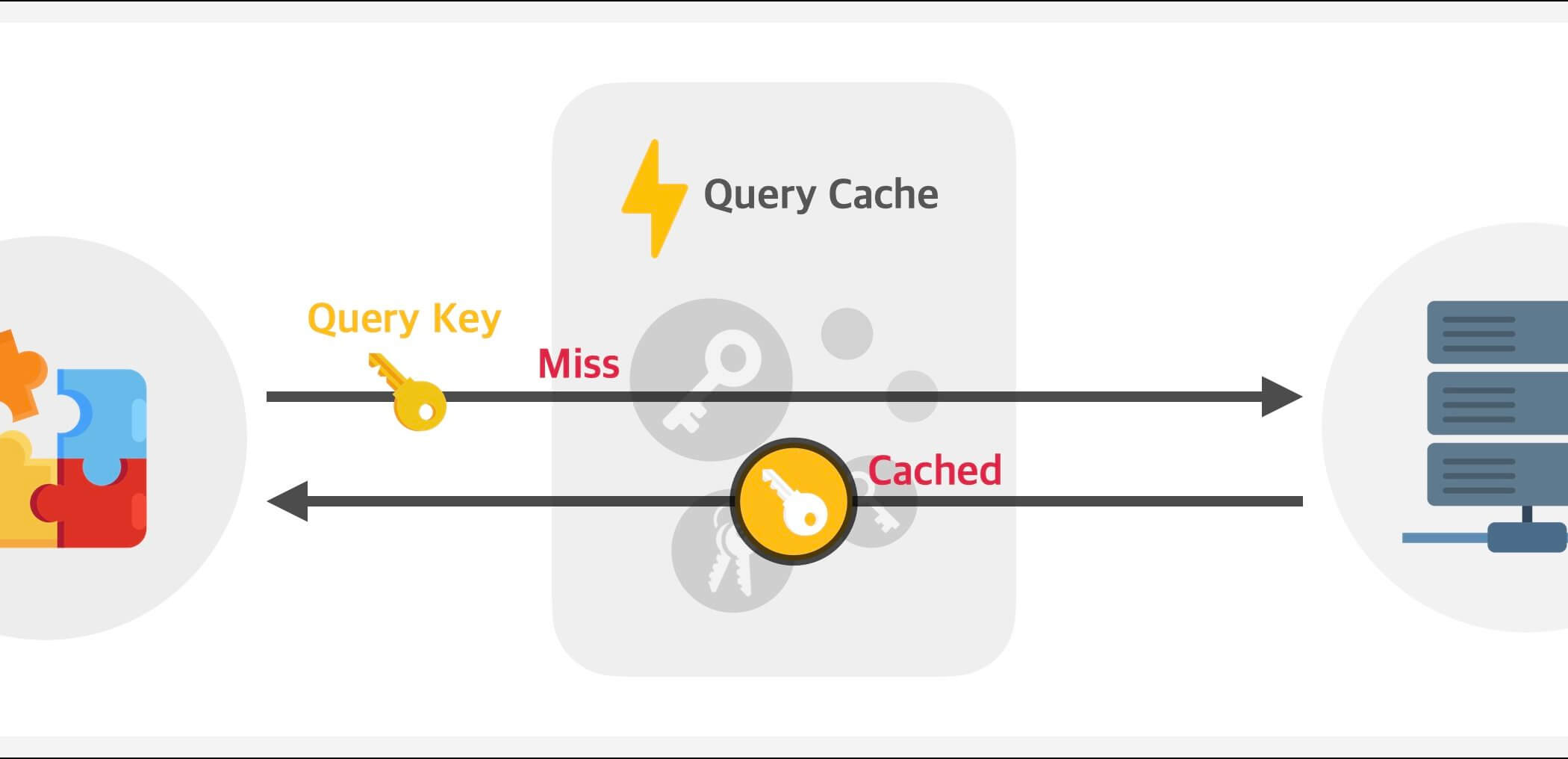
Whenever you fetch data with TanStack Query, you specify a query key (queryKey).
This query key is what TanStack Query compares against the cached data to decide whether to fetch new data or use the cached data.
123456789import { useQuery } from '@tanstack/react-query' export default function DelayedData() { const { data } = useQuery({ queryKey: ['delay'], queryFn: async () => (await fetch('https://api.heropy.dev/v0/delay?t=1000')).json() }) return <div>{JSON.stringify(data)}</div> }
The following image shows how new data is fetched from the server when there is no cached data matching the query key.
Once the data is fetched from the server, it is cached, and later requests can use the cached data.
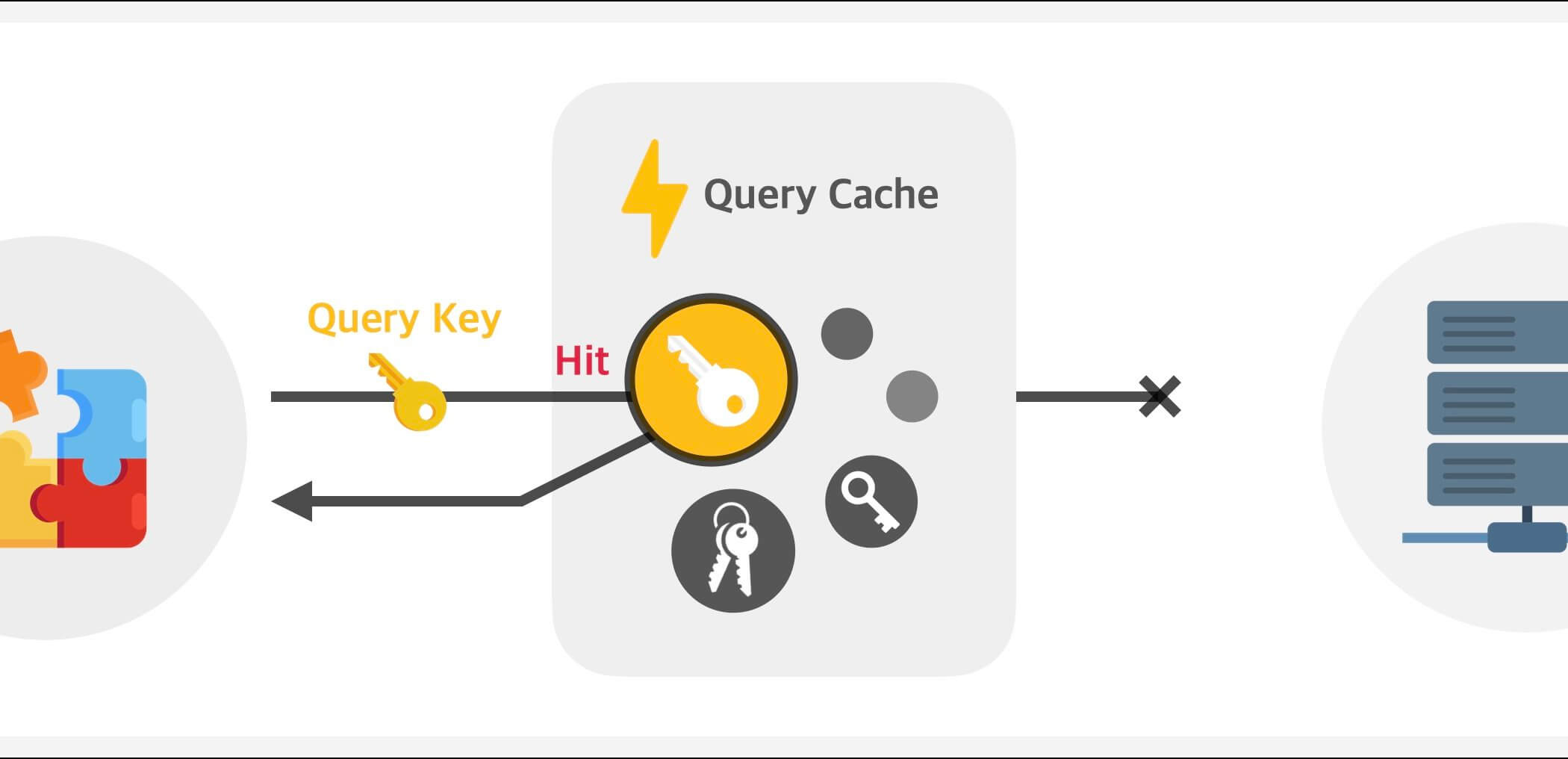
On the other hand, if there is cached data matching the query key, the cached data is used without a request to the server.
So even if the same data is requested many times, the cached data is used, which reduces duplicate requests.
However, by default, cached data is treated as stale right away, so while the cached data is shown on the screen, new data is fetched again in the background.
So how do you decide how long to keep using the cached data?
# Data freshness
TanStack Query manages cached data by dividing it into two states: fresh and stale.
If the cached data is fresh, it is used as is without a request to the server.
If the data is stale, on the other hand, it becomes eligible for refetching, and when a component newly mounts, the browser window regains focus, or the network reconnects, a new request is sent to the server to fetch new data.
Data going stale doesn't trigger a request right away.
It's easy to understand data freshness if you think of it as a kind of expiration date.

You can set how long it takes for data to go stale with the staleTime option.
And you can check whether the data is fresh or stale with isStale.
123456789101112131415import { useQuery } from '@tanstack/react-query' export default function DelayedData() { const { data, isStale } = useQuery({ queryKey: ['delay'], queryFn: async () => (await fetch('https://api.heropy.dev/v0/delay?t=1000')).json(), staleTime: 1000 * 10 // Stale after 10 seconds. In other words, fresh for 10 seconds. }) return ( <> <div>The data is {isStale ? 'stale..' : 'fresh!'}</div> <div>{JSON.stringify(data)}</div> </> ) }
For data that never changes once you receive it, you can set staleTime to 'static' instead of a time.
Data marked 'static' never goes stale and isn't refetched even under automatic refresh conditions such as a component mounting or the window regaining focus.
If you set Infinity, the data is refetched when you invalidate it with queryClient.invalidateQueries(), but 'static' data isn't refetched even when invalidated.
12345678export default function DelayedData() { const { data } = useQuery({ queryKey: ['delay'], queryFn: async () => (await fetch('https://api.heropy.dev/v0/delay?t=1000')).json(), staleTime: 'static' // Never goes stale. }) return <div>{JSON.stringify(data)}</div> }
# Installation and setup
Install TanStack Query as follows.
You can also use the TanStack Query ESLint plugin.
12npm i @tanstack/react-query npm i -D @tanstack/eslint-plugin-query
Using the ESLint plugin's recommended rules helps you avoid common mistakes.
In a Flat Config (eslint.config.js), spread configs['flat/recommended'] to add it.
This value is an array of config objects, so you need the spread operator (...).
12345import tanstackQuery from '@tanstack/eslint-plugin-query' export default [ ...tanstackQuery.configs['flat/recommended'] ]
The recommended rules (flat/recommended) are the following seven.
@tanstack/query/exhaustive-deps: Add external variables used in the query function to the query key!@tanstack/query/stable-query-client: Create and use a single query client in your application!@tanstack/query/no-rest-destructuring: Don't use rest parameters (...rest) when destructuring what a query returns!@tanstack/query/no-unstable-deps: Don't put what a query returns directly into a React hook's dependency array! Put the destructured values instead!@tanstack/query/infinite-query-property-order: For type inference, writequeryFn,getPreviousPageParam, andgetNextPageParamin that order!@tanstack/query/no-void-query-fn: Always return a value from the query function!@tanstack/query/mutation-property-order: For type inference, writeonMutate,onError, andonSettledin that order!
For stricter checks, you can use flat/recommended-strict.
It adds the @tanstack/query/prefer-query-options rule, which recommends grouping queryKey and queryFn with queryOptions().
Wrap the scope of your project with <QueryClientProvider> and connect the queryClient instance to use.
Now you're ready to go!
123456789101112131415import { QueryClient, QueryClientProvider, } from '@tanstack/react-query' import DelayedData from '@/components/DelayedData' const queryClient = new QueryClient() export default function App() { return ( <QueryClientProvider client={queryClient}> <DelayedData /> </QueryClientProvider> ) }
# Core features
# useQuery
This is the most basic query hook, and you use it to fetch data in a component.
1const result = useQuery<DataType>(options)
The delayed response API in the following example responds after the time given in the t parameter has passed.
The response data includes a simple message (message) and the response time (time).
123456789101112131415import { useQuery } from '@tanstack/react-query' type ResponseValue = { message: string time: string } export default function DelayedData() { const { data } = useQuery<ResponseValue>({ queryKey: ['delay'], queryFn: async () => (await fetch('https://api.heropy.dev/v0/delay?t=1000')).json(), staleTime: 1000 * 10 // 10 seconds }) return <div>{data?.time}</div> }
# Options
The following list is sorted alphabetically.
| Option | Description | Default | Type |
|---|---|---|---|
enabled |
Whether the query runs automatically. If false, it starts in the pending state (pending). |
true |
boolean | (query: Query) => boolean |
gcTime |
How long inactive cache data stays in memory (ms). | 5 * 60 * 1000 |
number | Infinity |
initialData |
Initial data used before the query is created or cached. | TData | () => TData |
|
initialDataUpdatedAt |
Sets the last updated time of the initial data. | number | (() => number | undefined) |
|
meta |
Sets extra information to use. | Record<string, unknown> |
|
networkMode |
Sets the network mode. | 'online' |
'online' | 'always' | 'offlineFirst' |
notifyOnChangeProps |
A list of the query's return properties to check for changes when deciding whether to re-render the component. Example: ['data', 'error'] |
Return properties accessed in the component | string[] | "all" | (() => string[] | "all") |
placeholderData |
Data to use while the query is pending. | TData | (previousValue: TData | undefined, previousQuery: Query | undefined) => TData |
|
queryFn |
The query function that fetches data. It must return data or throw an error. Required only when no default query function is set! |
((context: QueryFunctionContext) => Promise<TData>) | SkipToken |
|
queryKey |
A unique query key (identifier). Required! |
unknown[] |
|
queryKeyHashFn |
A function that hashes the query key. | (queryKey: QueryKey) => string |
|
refetchInterval |
The interval for automatically refreshing (refetching) data (ms). | false |
number | false | ((query: Query) => number | false | undefined) |
refetchIntervalInBackground |
Whether to keep automatically refreshing data in the background. | false |
boolean |
refetchOnMount |
Whether to refresh data when useQuery mounts.- true: Refresh on mount only if the data is stale.- always: Always refresh on mount. |
true |
boolean | "always" | ((query: Query) => boolean | "always") |
refetchOnReconnect |
Whether to refresh data when the network reconnects. | true |
boolean | "always" | ((query: Query) => boolean | "always") |
refetchOnWindowFocus |
Whether to refresh data when the browser window gets focus. | true |
boolean | "always" | ((query: Query) => boolean | "always") |
retry |
The number of retries when the query fails. | 3 |
boolean | number | (failureCount: number, error: TError) => boolean |
retryDelay |
The time between retries (ms). The default is an exponential backoff that grows with each retry. |
Math.min(1000 * 2 ** failureCount, 30000) |
number | (retryAttempt: number, error: TError) => number |
retryOnMount |
Whether to retry when useQuery mounts. |
true |
boolean | ((query: Query) => boolean) |
select |
A function that transforms (selects) the fetched data. | (data: TData) => unknown |
|
staleTime |
How long it takes for data to go stale (ms).'static' never goes stale. (It isn't refetched even when invalidated.) |
0 |
number | 'static' | ((query: Query) => number | 'static') |
structuralSharing |
Optimizes reuse of the data structure to keep it immutable and prevent unnecessary re-renders. | true |
boolean | (oldData: unknown | undefined, newData: unknown) => unknown |
subscribed |
Whether to subscribe to the query cache. If false, it doesn't run queryFn on its own and doesn't receive cache updates made elsewhere either. |
true |
boolean |
throwOnError |
Whether to throw an error when the query fails. | false |
undefined | boolean | (error: TError, query: Query) => boolean |
In a server rendering (SSR) environment, different defaults apply: gcTime defaults to Infinity, and retry defaults to 0.
If you want to specify the query client yourself, pass it as the second argument of useQuery.
If you omit it, the client of the nearest <QueryClientProvider> is used.
1const result = useQuery(options, queryClient)
# queryKey
A query key (queryKey) is a unique value that identifies a query, and you specify it as an array.
When you use a multi-item query key, the order of the items matters.
123456789101112131415// Single-item query key useQuery({ queryKey: ['hello'] }) // Multi-item query key useQuery({ queryKey: ['hello', 'world', 123, { a: 1, b: 2 }] }) // The same query useQuery({ queryKey: ['hello', 'world', 123, { a: 1, b: 2 }] }) useQuery({ queryKey: ['hello', 'world', 123, { b: 2, c: undefined, a: 1 }] }) // Different queries useQuery({ queryKey: ['hello', 'world', 123, { a: 1, b: 2 }] }) useQuery({ queryKey: ['hello', 'world', 123, { a: 1, b: 2, c: 3 }] }) useQuery({ queryKey: ['hello', 'world'] }) useQuery({ queryKey: [123, 'world', { a: 1, b: 2, c: 3 }, 'hello'] })
Query keys are compared after being stringified with JSON.stringify, and object properties are sorted by name in the process.
So the order of object properties doesn't matter, and properties whose value is undefined are dropped entirely.
On the other hand, undefined in an array item position becomes null, so it doesn't disappear.
So be careful, because ['delay', undefined] and ['delay', null] are treated as the same query.
In the following example, if the wait prop of the DelayedData component has different values, each one sends a separate request.
123456789101112131415import { useQuery } from '@tanstack/react-query' type ResponseValue = { message: string time: string } export default function DelayedData({ wait = 1000 }: { wait?: number }) { const { data } = useQuery<ResponseValue>({ queryKey: ['delay', wait], queryFn: async () => (await fetch(`https://api.heropy.dev/v0/delay?t=${wait}`)).json(), staleTime: 1000 * 10 }) return <div>{data?.time}</div> }
1234567891011121314import { QueryClient, QueryClientProvider } from '@tanstack/react-query' import DelayedData from '@/components/DelayedData' const queryClient = new QueryClient() export default function App() { return ( <QueryClientProvider client={queryClient}> <DelayedData /> <DelayedData wait={2000} /> <DelayedData wait={3000} /> </QueryClientProvider> ) }
As a rule, variables used in the query function (queryFn) should be included in the query key.
That way, the data is refetched automatically whenever a variable changes.
But if you want to always treat it as a single query regardless of the variable, you can disable the ESLint exhaustive-deps rule.
12345678910// ... export default function DelayedData({ wait = 1000 }: { wait?: number }) { // eslint-disable-next-line @tanstack/query/exhaustive-deps const { data } = useQuery<ResponseValue>({ // ESLint Error - The following dependencies are missing in your queryKey: wait queryKey: ['delay'], queryFn: async () => (await fetch(`https://api.heropy.dev/v0/delay?t=${wait}`)).json(), staleTime: 1000 * 10 }) return <div>{data?.time}</div> }
You can also disable a specific rule for the whole project.
12345678910import tanstackQuery from '@tanstack/eslint-plugin-query' export default [ ...tanstackQuery.configs['flat/recommended'], { rules: { '@tanstack/query/exhaustive-deps': 'off' } } ]
Instead of turning off the rule entirely, you can also make exceptions for specific variables only.
If you list variable names in allowlist.variables and type names in allowlist.types, they aren't reported as errors even when they're missing from the query key.
12345678910import tanstackQuery from '@tanstack/eslint-plugin-query' export default [ ...tanstackQuery.configs['flat/recommended'], { rules: { '@tanstack/query/exhaustive-deps': ['error', { allowlist: { variables: ['wait'] } }] } } ]
# queryFn
The query function (queryFn) is an asynchronous function that fetches data, and it must return data or throw an error.
You can check a thrown error through the returned error object.error is null by default.
However, error is filled in only after all retries (retry) are used up.
While retries remain, error is null and the status is still pending (pending), so check failures in progress with failureCount and failureReason.
The query function receives a single context object as its argument.
queryKey: The query key of this querysignal: AnAbortSignalused to cancel the requestclient: The query client instancemeta: Extra information set with themetaoptionpageParam: The page number (only inuseInfiniteQuery)
If you pass signal to the fetch function, the request is canceled automatically when the query is invalidated or the component unmounts.
1234useQuery({ queryKey: ['users'], queryFn: async ({ signal }) => (await fetch('https://api.heropy.dev/v0/users', { signal })).json() })
If you use Axios, pass it with the signal option of the request config object.
It uses the same standard AbortSignal as the fetch function, so the option name and behavior are the same.
12345useQuery({ queryKey: ['users'], queryFn: async ({ signal }) => (await axios.get('https://api.heropy.dev/v0/users', { signal })).data })
12345678910111213141516171819202122232425262728import { useQuery } from '@tanstack/react-query' type ResponseValue = { message: string time: string } export default function DelayedData() { const { data, error } = useQuery<ResponseValue>({ queryKey: ['delay'], queryFn: async () => { const res = await fetch('https://api.heropy.dev/v0/delay?t=1000') const data = await res.json() if (!data.time) { throw new Error('Something went wrong!') } return data }, staleTime: 1000 * 10, retry: 1 }) return ( <> {data && <div>{JSON.stringify(data)}</div>} {error && <div>{error.message}</div>} </> ) }
To run a query conditionally, you can also pass skipToken instead of using the enabled option.
The behavior of not running the query function is the same as enabled: false, but there is a difference in type inference.
In the following example, userId may not have a value yet, so its type is string | undefined, and the fetchUser function requires a string argument.enabled is an option separate from the query function, so TypeScript doesn't know that the query function runs only when enabled is true.
So userId inside the query function stays string | undefined, and you have to assert that it has a value, as in userId!.
12345678// fetchUser(id: string): Promise<User> const [userId, setUserId] = useState<string>() // string | undefined useQuery({ queryKey: ['user', userId], queryFn: () => fetchUser(userId!), // Without the assertion (!), you get a 'string | undefined' type error! enabled: Boolean(userId) })
With skipToken, on the other hand, you write the query function inside the true branch of a conditional.
Inside that branch, userId is narrowed to string, so you can use it as is without an assertion.
123456import { useQuery, skipToken } from '@tanstack/react-query' useQuery({ queryKey: ['user', userId], queryFn: userId ? () => fetchUser(userId) : skipToken // userId is a string! })
# select
With the select function (select), you can transform (select) the fetched data.
It receives the data returned by the query function as an argument, and whatever the select function processes and returns becomes the final data.
You can declare the type of the final data as the third generic type of useQuery.
The second one is the error type (Error).
The API used in the following example is the user information API.
123456789101112131415161718192021222324252627import { useQuery } from '@tanstack/react-query' type Users = User[] interface User { id: string name: string age: number } export default function UserNames() { const { data } = useQuery<Users, Error, string[]>({ queryKey: ['users'], queryFn: async () => { const res = await fetch('https://api.heropy.dev/v0/users') const { users } = await res.json() return users }, staleTime: 1000 * 10, select: data => data.map(user => user.name) }) return ( <> <h2>User Names</h2> <ul>{data?.map((name, i) => <li key={i}>{name}</li>)}</ul> </> ) }
You can also omit the generics and let the types be inferred by writing the return type of the query function explicitly.
In the following example, the query function returns the Users type, and the final data (the return value of the select function) is inferred as string[].
123456789useQuery({ queryKey: ['users'], queryFn: async (): Promise<Users> => { const res = await fetch('https://api.heropy.dev/v0/users') const { users } = await res.json() return users }, select: data => data.map(user => user.name) })
# placeholderData
When part of the query key changes, like a search term, you're looking at a different query, so there is no data (undefined) until the new data arrives, and the screen may flicker.
To prevent this, you can use the placeholderData option to specify in advance the data to show temporarily in the pending state while the query function is called.
You can pass a function to the placeholderData option, and since this function receives the previous data from just before the new data is fetched, you can return it to use as placeholder data.
1234567891011121314151617// ... export default function Movies() { // ... const { data: movies } = useQuery<Movie[]>({ queryKey: ['movies', searchText], // Search term queryFn: async () => { const res = await fetch(`https://omdbapi.com?apikey=7035c60c&s=${searchText}`) const { Search: movies } = await res.json() return movies }, placeholderData: prev => prev }) // ... }
Placeholder data isn't stored in the cache.
Also, while placeholder data is shown, isPlaceholderData is true, the status is success (success), and isPending is false, so be careful when you build a branch for the loading screen.
# structuralSharing
With the structuralSharing option, you can specify that when new data is fetched, it is compared with the previous data, and the previous data is reused for the parts that haven't changed.
This optimizes memory usage and prevents unnecessary re-renders.
Say you have previous data and new data for a nested object, as in the following example.
If the structuralSharing option is true, only the changed parts are newly updated, and the unchanged parts reuse references from the previous data.
If the option is false, on the other hand, every object is created with a new reference.
123456789101112131415161718192021222324252627// Previous data const prevUser = { id: 'abc123', name: 'Neo', age: 22, contact: { email: 'neo@gmail.com', address: { country: 'Korea', city: 'Seoul' } } } // New data const newUser = { id: 'abc123', name: 'Neo', age: 22, contact: { email: 'neo@gmail.com', address: { country: 'Korea', city: 'Suwon' // The changed part! } } }
What gets reused here are the branches outside the changed path.
When the deepest value changes, as in the example above, contact, contact.address, and the top-level object all get new references.
Sometimes it can be better to set the structuralSharing option to false.
For example, when you deal with very large nested objects, the structural comparison itself can become a performance burden.
Also, structural sharing works only on data that can be represented as JSON.
If values that can't be serialized, such as Date, Map, Set, or class instances, are mixed in, those values are always treated as changed.
For example, if the user object in the example above had a property like createdAt: new Date('2026-01-01'), the createdAt property would be judged as changed every time, even if both pieces of data had the same time value.
# meta
The meta property lets you provide extra information about a query.
The information you set can be read both in the query function's context (queryFn: ({ meta }) => ...) and in the query cache callbacks.
For example, you can handle displaying error messages from query functions globally.
In the queryCache option when you create the query client, you can get the extra information (meta) of the query that was called.
12345678910111213141516// ... import { QueryClient, QueryClientProvider, QueryCache } from '@tanstack/react-query' const queryClient = new QueryClient({ queryCache: new QueryCache({ onError: (_error, query) => { alert(query.meta?.myErrorMessage) // Show the error message! } }) }) // ...
12345678910111213141516171819// ... export default function Movies() { // ... const { data: movies } = useQuery<Movie[]>({ queryKey: ['movies', searchText], // Search term queryFn: async () => { const res = await fetch(`https://omdbapi.com?apikey=7035c60c&s=${searchText}`) const { Search: movies } = await res.json() return movies }, meta: { myErrorMessage: 'Unable to search for movies!' } }) // ... }
# Return values
The following list is sorted alphabetically.
| Return property | Description | Type |
|---|---|---|
data |
The successfully fetched data.undefined on the first render if initialData isn't set. |
TData | undefined |
dataUpdatedAt |
The last time data was fetched successfully (Unix timestamp). | number |
error |
The error object when an error occurs.null if no error has occurred. |
null | TError |
errorUpdateCount |
The total number of errors. | number |
errorUpdatedAt |
The last time an error occurred (Unix timestamp). | number |
failureCount |
The number of times the query has failed. Increases each time the query fails and resets to 0 when the query succeeds. |
number |
failureReason |
The reason the query's retry failed. Resets to null when the query succeeds. |
null | TError |
fetchStatus |
'fetching': The query function is running. (Includes the first pending fetch and background refetches, isFetching)'paused': The query function's fetch is paused. (isPaused)'idle': The query function isn't running. |
'fetching' | 'paused' | 'idle' |
isEnabled |
Whether the query is enabled. Used to check the computed result of an enabled option given as a function. |
boolean |
isError |
Whether an error occurred in the query function. | boolean |
isFetched |
Whether the query's first data fetch has completed. | boolean |
isFetchedAfterMount |
Whether a fetch has completed after the component mounted. Used to avoid showing data that was cached before the component mounted. |
boolean |
isFetching |
The query function is running. (Includes the first pending fetch and background refetches) | boolean |
isLoading |
The query function's first fetch is in progress. Same as isFetching && isPending. |
boolean |
isLoadingError |
Whether the query function failed during its first fetch. | boolean |
isPaused |
The query fetch is paused. | boolean |
isPending |
There is no cached data and the query hasn't completed yet. | boolean |
isPlaceholderData |
Whether the displayed data is placeholder data. In branches where this value is true, the type of data is narrowed so it always exists. |
boolean |
isRefetchError |
Whether the query failed while trying to refetch. | boolean |
isRefetching |
Whether a background refetch is in progress. Same as isFetching && !isPending. |
boolean |
isStale |
Whether the cached data has been invalidated or staleTime has passed.Always false if enabled is false or staleTime is 'static'. |
boolean |
isSuccess |
Whether the query data was fetched successfully. | boolean |
refetch |
A function that fetches the data again from scratch. Errors are thrown only when you use the throwOnError: true option. |
(options?: { throwOnError?: boolean, cancelRefetch?: boolean }) => Promise<UseQueryResult> |
status |
'pending': There is no cached data and the query hasn't completed yet. (isPending)'error': An error has occurred. (isError)'success': The data was fetched successfully. (isSuccess) |
'pending' | 'error' | 'success' |
# Checking the status
isFetching tells you whether the query function (queryFn) is running, meaning data is being fetched.
isPending tells you whether there is no cached data and the query hasn't completed yet. If you provide data with the initialData or placeholderData option, there's no need to wait (pending) before displaying it, so it returns false.
If you set the enabled option to false, the query starts in the pending state, so isPending returns true.
Be careful: if you render a loading screen based on isPending in this case, it stays in the loading state until the query is enabled.
isLoading means the same as isFetching && isPending, and indicates that the query's first fetch is in progress.
If you use the enabled option, use isLoading instead of isPending, and check whether the query is currently enabled with isEnabled.
1234567891011121314151617// ... export default function DelayedData() { const { data, isFetching, isPending, isLoading } = useQuery<ResponseValue>({ queryKey: ['delay'], queryFn: async () => (await fetch('https://api.heropy.dev/v0/delay?t=1000')).json(), staleTime: 1000 * 10 }) return ( <> <div>isFetching: {JSON.stringify(isFetching)}</div> <div>isPending: {JSON.stringify(isPending)}</div> <div>isLoading: {JSON.stringify(isLoading)}</div> <div>{data?.time}</div> </> ) }
Using the refetch function described in the Refetching topic below makes each state a bit easier to understand.
123456789101112131415161718192021222324252627282930313233import { useQuery } from '@tanstack/react-query' type ResponseValue = { message: string time: string } export default function DelayedData() { const { data, isStale, isFetching, isLoading, refetch } = useQuery<ResponseValue>({ queryKey: ['delay'], queryFn: async () => (await fetch('https://api.heropy.dev/v0/delay?t=1000')).json(), staleTime: 1000 * 10 }) return ( <> {isLoading ? ( <div>Loading..</div> ) : ( <> <div>{data?.time}</div> <div>Is the data stale?: {JSON.stringify(isStale)}</div> <button disabled={isFetching} onClick={() => refetch()}> {isFetching ? 'Fetching data..' : 'Refetch data!'} </button> </> )} </> ) }
# Refetching
With the refetch function, you can always fetch the data again from scratch.
12345678910111213141516// ... export default function DelayedData() { const { data, isStale, refetch } = useQuery<ResponseValue>({ queryKey: ['delay'], queryFn: async () => (await fetch('https://api.heropy.dev/v0/delay?t=1000')).json(), staleTime: 1000 * 10 }) return ( <> <div>{data?.time}</div> <div>Is the data stale?: {JSON.stringify(isStale)}</div> <button onClick={() => refetch()}>Fetch data!</button> </> ) }
If you want to fetch data based on freshness (staleTime), you can use the queryClient.fetchQuery() method.
Note that fetchQuery() doesn't inherit the hook's options.
So you need to provide the same queryKey and staleTime as the existing query, and if you don't provide staleTime, the default 0 applies, so it always sends a new request to the server no matter how fresh the cache is.
Also, you can omit queryFn only when a useQuery with the same query key is mounted on the screen.
12345678910111213141516171819202122232425import { useQuery, useQueryClient, queryOptions } from '@tanstack/react-query' // ... const options = queryOptions<ResponseValue>({ queryKey: ['delay'], queryFn: async () => (await fetch('https://api.heropy.dev/v0/delay?t=1000')).json(), staleTime: 1000 * 10 }) export default function DelayedData() { const queryClient = useQueryClient() const { data, isStale } = useQuery(options) async function fetchData() { const data = await queryClient.fetchQuery(options) console.log(data) // Cached data or newly fetched data } return ( <> <div>{data?.time}</div> <div>Is the data stale?: {JSON.stringify(isStale)}</div> <button onClick={fetchData}>Fetch data!</button> </> ) }
If you need the cached data, you can use the queryClient.getQueryData() method.
Even if the data is stale, it doesn't fetch new data and returns only the cached data.
If there is no cached data, it returns undefined.
Get the queryClient object with the useQueryClient hook, then use the getQueryData method.
1234567891011121314151617181920212223import { useQuery, useQueryClient } from '@tanstack/react-query' // ... export default function DelayedData() { const queryClient = useQueryClient() const { data, isStale } = useQuery<ResponseValue>({ queryKey: ['delay'], queryFn: async () => (await fetch('https://api.heropy.dev/v0/delay?t=1000')).json(), staleTime: 1000 * 10 }) function getCachedData() { const data = queryClient.getQueryData(['delay']) console.log(data) // Cached data or undefined } return ( <> <div>{data?.time}</div> <div>Is the data stale?: {JSON.stringify(isStale)}</div> <button onClick={getCachedData}>Fetch data!</button> </> ) }
# useInfiniteQuery
Fetching more data with a 'Load more' button, or going further and appending to a list with infinite scrolling, is a common UI that you can find everywhere.
TanStack Query provides the useInfiniteQuery hook for building this kind of UI.
1const result = useInfiniteQuery<PageType>(options)
# Options
useInfiniteQuery can use all the options of useQuery we looked at earlier, plus the following options.
The following list is sorted alphabetically.
| Option | Description | Default | Type |
|---|---|---|---|
getNextPageParam |
A function called with the last page's information each time new data is fetched. Required! Must return the next page number! If there is no next page, must return undefined or null!The return value determines hasNextPage! |
(lastPage: TPage, allPages: TPage[], lastPageParam: TPageParam, allPageParams: TPageParam[]) => TPageParam | undefined | null |
|
getPreviousPageParam |
A function called with the first page's information each time new data is fetched. Must return the previous page number! If there is no previous page, must return undefined or null!If not set, hasPreviousPage is always false! |
(firstPage: TPage, allPages: TPage[], firstPageParam: TPageParam, allPageParams: TPageParam[]) => TPageParam | undefined | null |
|
initialPageParam |
The number of the first page. Required! |
TPageParam |
|
maxPages |
The maximum number of pages to store and display. No limit if undefined or 0.If set greater than 0, you must define both getNextPageParam and getPreviousPageParam! |
undefined |
number |
# Return values
Again, you can use all of useQuery's return properties, plus the following return properties.
The following list is sorted alphabetically.
| Return property | Description | Type |
|---|---|---|
fetchNextPage |
A function that fetches the next page. | (options?: FetchNextPageOptions) => Promise<UseInfiniteQueryResult> |
fetchPreviousPage |
A function that fetches the previous page. | (options?: FetchPreviousPageOptions) => Promise<UseInfiniteQueryResult> |
hasNextPage |
Whether there is a next page. | boolean |
hasPreviousPage |
Whether there is a previous page. | boolean |
isFetchingNextPage |
Whether the next page is being fetched. | boolean |
isFetchingPreviousPage |
Whether the previous page is being fetched. | boolean |
isFetchNextPageError |
Whether fetching the next page failed. | boolean |
isFetchPreviousPageError |
Whether fetching the previous page failed. | boolean |
# Example
The following is a simple example to help you understand the useInfiniteQuery hook: it fetches and displays a list of movies matching the title the user enters, and you can fetch more movies by selecting the 'Load more' button.
Note that the data returned by the query function is stored in the data.pages array.
123456789101112131415161718192021222324252627282930313233343536373839404142434445464748495051525354555657585960616263646566676869707172737475767778798081828384858687888990import { Fragment, useState } from 'react' import { useInfiniteQuery } from '@tanstack/react-query' export interface Page { Search: Movie[] // List of movies found totalResults: string // Total number of results found Response: string // 'True' or 'False' } export interface Movie { Title: string Year: string imdbID: string Type: string Poster: string } export default function MovieList() { const [searchText, setSearchText] = useState('') const [queryText, setQueryText] = useState('') const { data, // Fetched data isLoading, // Fetching the first page isFetching, // Fetching (including the first page) isFetched, // First page fetched hasNextPage, // Whether there is a next page fetchNextPage // Function that fetches the next page } = useInfiniteQuery<Page>({ queryKey: ['movies', queryText], // Build the query key from the search term! queryFn: async ({ pageParam }) => { const res = await fetch(`https://omdbapi.com/?apikey=7035c60c&s=${queryText}&page=${pageParam}`) return res.json() }, initialPageParam: 1, // Initialize the first page number! getNextPageParam: (lastPage, pages) => { // Each page fetches up to 10 movies! // Calculate the last page number! const maxPage = Math.ceil(Number(pages[0].totalResults) / 10) const currentPage = pages.length // If there is a next page, return the next page number! if (lastPage.Response === 'True' && currentPage < maxPage) { return currentPage + 1 } // If there is no next page, return undefined | null! return null }, enabled: Boolean(queryText), // Wait until a search term is entered! staleTime: 1000 * 60 * 60 // 1 hour }) function handleSubmit(e: React.FormEvent) { e.preventDefault() // Search! setQueryText(searchText) } return ( <> <form onSubmit={handleSubmit}> <input type="text" value={searchText} placeholder="Enter a movie title." onChange={e => setSearchText(e.target.value)} /> <button type="submit">Search</button> </form> <div> {data?.pages.map((page, index) => ( // Add a key per page to optimize rendering of each page! <Fragment key={index}> {page.Search && page.Search.map(movie => ( <div key={movie.imdbID}>{movie.Title}</div> ))} </Fragment> ))} </div> {isLoading ? <div>Loading..</div> : null} {isFetched && hasNextPage && ( <button disabled={isFetching} onClick={() => fetchNextPage()}> {isFetching ? 'Loading..' : 'Load more!'} </button> )} </> ) }
isFetching becomes true for every fetch, including the first page.
To tell apart only the fetching of the next page, as with 'Load more', use isFetchingNextPage.
To implement the example above with infinite scrolling, you can modify it as follows.
12345678910111213141516171819202122232425262728293031323334353637383940414243444546474849505152535455565758596061626364import { Fragment, useState, useEffect, useRef } from 'react' import { useInfiniteQuery } from '@tanstack/react-query' // ... export default function MovieList() { const [searchText, setSearchText] = useState('') const [queryText, setQueryText] = useState('') const observerEl = useRef<HTMLDivElement | null>(null) const { data, // isLoading, isFetching, // isFetched, hasNextPage, fetchNextPage } = useInfiniteQuery<Page>({ // ... }) useEffect(() => { const currentObserverEl = observerEl.current const io = new IntersectionObserver(entries => { if (entries[0].isIntersecting) { fetchNextPage() } }, { rootMargin: '0px 0px 500px 0px' }) if (currentObserverEl) { io.observe(currentObserverEl) } return () => { if (currentObserverEl) { io.disconnect() } } }, [fetchNextPage]) // ... return ( <> {/* ... */} {/* {isLoading ? <div>Loading..</div> : null} {isFetched && hasNextPage && ( <button disabled={isFetching} onClick={() => fetchNextPage()}> {isFetching ? 'Loading..' : 'Load more!'} </button> )} */} {isFetching && <div>Loading..</div>} <div ref={observerEl} style={{ display: isFetching || !hasNextPage ? 'none' : 'block', height: '20px' }} /> </> ) }
If you want more concise code, you can use the react-intersection-observer library.
You connect the ref property to the element to observe, and use the inView property to check whether the element is visible on the screen.
Install the library and modify the code as in the example below.
1npm i react-intersection-observer
123456789101112131415161718192021222324252627282930313233343536373839404142434445464748495051525354import { useState, useEffect } from 'react' import { useInfiniteQuery } from '@tanstack/react-query' import { useInView } from 'react-intersection-observer' // ... export default function MovieList() { const [searchText, setSearchText] = useState('') const [queryText, setQueryText] = useState('') const { ref, inView } = useInView({ rootMargin: '0px 0px 500px 0px' }) // ... // useEffect(() => { // const currentObserverEl = observerEl.current // const io = new IntersectionObserver(entries => { // if (entries[0].isIntersecting && hasNextPage) { // fetchNextPage() // } // }) // if (currentObserverEl) { // io.observe(currentObserverEl) // } // return () => { // if (currentObserverEl) { // io.disconnect() // } // } // }, [hasNextPage, fetchNextPage]) useEffect(() => { if (inView) { fetchNextPage() } }, [inView, fetchNextPage]) // ... return ( <> {/* ... */} {isFetching && <div>Loading..</div>} <div ref={ref} style={{ display: isFetching || !hasNextPage ? 'none' : 'block', height: '20px' }} /> </> ) }
To create an array that contains only the movie information objects, you can use the select option as follows.
1234567import { infiniteQueryOptions } from '@tanstack/react-query' infiniteQueryOptions({ select: data => data.pages.flatMap(page => { return page.Response === 'True' ? page.Search : [] }) })
# useMutation
TanStack Query provides the useMutation hook for operations that change data (creating, updating, deleting, and so on).
With it, you can handle data-changing operations and get various states such as success, failure, and loading.
It also makes advanced features, such as automatic retries for failed requests and optimistic updates, easy to handle.
It's easy to understand if you think of a query (useQuery) as a hook focused on 'fetching', and a mutation (useMutation) as a hook focused on 'sending'.
1const result = useMutation(options)
# Options
The useMutation hook provides the following options.
The following list is sorted alphabetically.
| Option | Description | Default | Type |
|---|---|---|---|
gcTime |
How long inactive cache data stays in memory (ms).Infinity in a server environment. |
5 * 60 * 1000 |
number | Infinity |
meta |
Sets extra information to use. | Record<string, unknown> |
|
mutationFn |
The asynchronous mutation function to run. Required! |
(variables: TVariables, context: MutationFunctionContext) => Promise<TData> |
|
mutationKey |
A key for inheriting defaults set with queryClient.setMutationDefaults |
readonly unknown[] |
|
networkMode |
Sets the network mode. | 'online' |
'online' | 'always' | 'offlineFirst' |
onError |
A function called when an error occurs during the mutation. | (error: TError, variables: TVariables, onMutateResult: TOnMutateResult | undefined, context: MutationFunctionContext) => Promise<unknown> | unknown |
|
onMutate |
A function called before the mutation function runs. Its return value is passed to the later callbacks as the onMutateResult argument! |
(variables: TVariables, context: MutationFunctionContext) => Promise<TOnMutateResult> | TOnMutateResult |
|
onSettled |
A function that's always called, whether the mutation succeeds or fails. | (data: TData | undefined, error: TError | null, variables: TVariables, onMutateResult: TOnMutateResult | undefined, context: MutationFunctionContext) => Promise<unknown> | unknown |
|
onSuccess |
A function called when the mutation succeeds. | (data: TData, variables: TVariables, onMutateResult: TOnMutateResult, context: MutationFunctionContext) => Promise<unknown> | unknown |
|
retry |
The number of retries when the mutation fails. | 0 |
boolean | number | (failureCount: number, error: TError) => boolean |
retryDelay |
The time between retries (ms). | Math.min(1000 * 2 ** failureCount, 30000) |
number | (retryAttempt: number, error: TError) => number |
scope |
Sets the scope for concurrent execution. Mutations with the same scope ID run serially, not in parallel. |
{ id: string } |
|
throwOnError |
Whether to throw an error when the mutation fails. | undefined |
undefined | boolean | (error: TError) => boolean |
queryClient isn't a property of the options object but the second argument of useMutation.
You specify it only when you use a different client instead of the query client from <QueryClientProvider>.
# Return values
The following list is sorted alphabetically.
| Return property | Description | Type |
|---|---|---|
context |
The value returned by onMutate.Used to roll back optimistic updates. |
undefined | TOnMutateResult |
data |
The successfully fetched data. | undefined | TData |
error |
The error object when an error occurs.null if no error has occurred. |
null | TError |
failureCount |
The number of times the mutation has failed. Increases each time the mutation fails and resets to 0 when the mutation succeeds. |
number |
failureReason |
The reason the mutation's retry failed. Resets to null when the mutation succeeds or a new mutation starts. |
null | TError |
isError |
Whether an error occurred in the mutation function. | boolean |
isIdle |
Whether it's in the initial state, before the mutation function runs | boolean |
isPaused |
Whether the mutation function is paused | boolean |
isPending |
Whether the mutation function is running | boolean |
isSuccess |
Whether the data was fetched successfully. | boolean |
mutate |
The function that runs the mutation | (variables: TVariables, options?: MutateOptions) => void |
mutateAsync |
The function that runs the mutation asynchronously | (variables: TVariables, options?: MutateOptions) => Promise<TData> |
reset |
A function that resets the mutation's internal state to the initial state | () => void |
status |
The current status of the mutation.idle: Initial statepending: Runningerror: An error occurredsuccess: Succeeded |
'idle' | 'pending' | 'error' | 'success' |
submittedAt |
The time the mutation was submitted (Unix timestamp). | number |
variables |
The data passed to the mutation function (mutate). |
undefined | TVariables |
# Example
First, there is a query (['users']) that fetches the list of users, as follows.
12345678910111213141516171819202122232425262728import { useQuery } from '@tanstack/react-query' export type Users = User[] export interface User { name: string age: number isValid?: boolean emails?: string[] photo?: { name: string data: string // Base64 } id?: string } export default function Users() { const { data } = useQuery<Users>({ queryKey: ['users'], queryFn: async () => { const res = await fetch('https://api.heropy.dev/v0/users') // GET const json = await res.json() return json.users }, staleTime: 1000 * 60 * 5 // 5 minutes }) // ... }
A mutation performs data operations other than read: create, update, and delete.
The following example adds a new user with the name and age you enter.
1234567891011121314151617181920212223242526272829303132333435363738394041424344454647484950515253545556575859606162636465666768697071727374757677787980import React, { useState } from 'react' import { useMutation, useQueryClient } from '@tanstack/react-query' import type { Users, User } from './Users' export default function AddUser() { const [name, setName] = useState('') const [age, setAge] = useState(0) const queryClient = useQueryClient() const { mutate, error, isPending, isError } = useMutation({ mutationFn: async (newUser: User) => { const res = await fetch('https://api.heropy.dev/v0/users', { method: 'POST', body: JSON.stringify(newUser) }) if (!res.ok) throw new Error('An error occurred during the mutation!') // Mutation failed! return res.json() // Mutation succeeded! }, onMutate: async newUser => { // Cancel the user list query before the optimistic update to prevent potential conflicts! await queryClient.cancelQueries({ queryKey: ['users'] }) // Get the cached data (user list)! const previousUsers = queryClient.getQueryData<Users>(['users']) // Optimistic update if (previousUsers) { queryClient.setQueryData<Users>(['users'], [...previousUsers, newUser]) } // Return the data to pass to each callback as context! return { previousUsers } }, onSuccess: (data, newUser, onMutateResult) => { console.log('onSuccess', data, newUser, onMutateResult) // On success, invalidate the cache to refresh the user list data! queryClient.invalidateQueries({ queryKey: ['users'] }) }, onError: (error, newUser, onMutateResult) => { console.log('onError', error, newUser, onMutateResult) // On failure, roll back the optimistic update to the previous user list! if (onMutateResult) { queryClient.setQueryData(['users'], onMutateResult.previousUsers) } }, onSettled: (data, error, newUser, onMutateResult) => { console.log('onSettled', data, error, newUser, onMutateResult) }, retry: 3, // Retry 3 times if the mutation fails retryDelay: 500 // Retry at 0.5-second intervals }) const handleSubmit = (e: React.FormEvent) => { e.preventDefault() mutate({ name, age }) // Mutate! } return ( <form onSubmit={handleSubmit}> <input type="text" value={name} onChange={e => setName(e.target.value)} placeholder="User name" /> <input type="number" value={age || ''} onChange={e => setAge(Number.parseInt(e.target.value, 10))} placeholder="User age" /> <button type="submit" disabled={isPending}> {isPending ? 'Adding user..' : 'Add user!'} </button> {isError && <p>Error: {error.message}</p>} </form> ) }
# Using the devtools
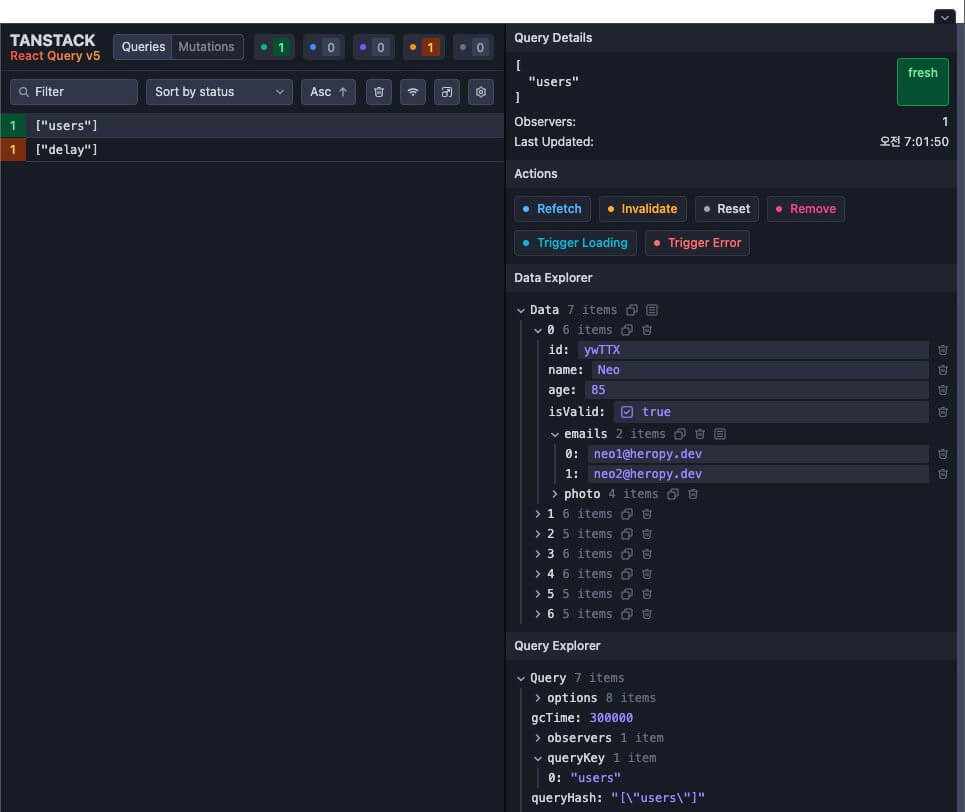
You can use devtools made specifically for TanStack Query.
They let you easily check and debug your queries' state, data, errors, cache, and more.
First, install the devtools library as follows.
1npm i @tanstack/react-query-devtools
Just use the devtools component within the scope of the query provider (<QueryClientProvider>).
1234567891011121314151617import { QueryClient, QueryClientProvider, } from '@tanstack/react-query' import { ReactQueryDevtools } from '@tanstack/react-query-devtools' import DelayedData from './components/DelayedData' const queryClient = new QueryClient() export default function App() { return ( <QueryClientProvider client={queryClient}> <DelayedData /> <ReactQueryDevtools /> </QueryClientProvider> ) }
Now, when you run the development server and check the browser, a devtools button shaped like the TanStack logo appears in the lower right corner of the screen, as in the following image.

Press the button to open and use the devtools, and you can close them by selecting the button in the upper right corner of the tool.
# With Next.js
In the Next.js App Router, you split the query provider out into a Client Component, and use a setup where Server Components prefetch data and pass it to the client.
Since the server sends the page down with the data already filled in, you can see the data from the very first screen.
# Query provider
<QueryClientProvider> uses context internally, so put it in a separate file that declares 'use client'.
Also, the query client must be created differently on the server and in the browser.
On the server, you must create a new one for every request so that data doesn't get mixed between requests.
In the browser, on the other hand, you must reuse a single one so that the query client isn't recreated even if a component suspends during the first render.
1234567891011121314151617181920212223242526272829303132'use client' import { QueryClient, QueryClientProvider, environmentManager } from '@tanstack/react-query' function makeQueryClient() { return new QueryClient({ defaultOptions: { queries: { // Set a default staleTime so the client doesn't request again right away staleTime: 60 * 1000 } } }) } let browserQueryClient: QueryClient | undefined = undefined function getQueryClient() { if (environmentManager.isServer()) { return makeQueryClient() // On the server, create a new one for every request! } if (!browserQueryClient) browserQueryClient = makeQueryClient() return browserQueryClient // In the browser, reuse a single one! } export function QueryProvider({ children }: { children: React.ReactNode }) { const queryClient = getQueryClient() return <QueryClientProvider client={queryClient}>{children}</QueryClientProvider> }
Then use the <QueryProvider> you set up in the root layout.
123456789101112131415import { QueryProvider } from '@/providers/query' export default function RootLayout({ children }: Readonly<{ children: React.ReactNode }>) { return ( <html lang="ko"> <body> <QueryProvider>{children}</QueryProvider> </body> </html> ) }
# Prefetching on the server
With the setup so far, you can use useQuery in Client Components.
However, the data starts being fetched in the browser, so the first screen the server sends is empty.
If you prefetch the data in a Server Component and attach the result to the client cache with <HydrationBoundary>, you can send the first screen with the data already filled in.
The server and the client must point to the same query, so define the options in one place with the queryOptions function and share them.
If the query key or query function doesn't match, the prefetched data can't be used, and the client requests the data again.
12345678910111213141516import { queryOptions } from '@tanstack/react-query' export interface User { id: string name: string age: number } export const usersQuery = queryOptions({ queryKey: ['users'], queryFn: async (): Promise<User[]> => { const res = await fetch('https://api.heropy.dev/v0/users') const { users } = await res.json() return users } })
In the Server Component, create the query client directly with new QueryClient(), and once the data has arrived, wrap the component with <HydrationBoundary>.
The query client created here is used only to render this request and is then thrown away, so you don't use the getQueryClient function created earlier.
12345678910111213141516import { QueryClient, dehydrate, HydrationBoundary } from '@tanstack/react-query' import { usersQuery } from '@/queries/users' import Users from '@/components/Users' export default async function UsersPage() { const queryClient = new QueryClient() // Render after all the data has arrived! await queryClient.prefetchQuery(usersQuery) return ( <HydrationBoundary state={dehydrate(queryClient)}> <Users /> </HydrationBoundary> ) }
In the Client Component, use useQuery with the same options.
The data is already in the cache, so it's displayed right away without waiting.
1234567891011121314'use client' import { useQuery } from '@tanstack/react-query' import { usersQuery } from '@/queries/users' export default function Users() { const { data } = useQuery(usersQuery) return ( <ul> {data?.map(user => ( <li key={user.id}>{user.name}</li> ))} </ul> ) }
Even with prefetched data, the type of useQuery's data includes undefined, so you need optional chaining (data?.) when displaying it.
# Without prefetching
If writing a prefetch for every route is tedious, you can also handle it with streaming.
1npm i @tanstack/react-query-next-experimental
All you need to do is wrap the children in the query provider you created earlier with <ReactQueryStreamedHydration>.
1234567891011// ... import { ReactQueryStreamedHydration } from '@tanstack/react-query-next-experimental' export function QueryProvider({ children }: { children: React.ReactNode }) { const queryClient = getQueryClient() return ( <QueryClientProvider client={queryClient}> <ReactQueryStreamedHydration>{children}</ReactQueryStreamedHydration> </QueryClientProvider> ) }
Now, even without prefetching in a Server Component, useSuspenseQuery in the Client Component fetches the data during server rendering.
Change the Users component and the page you created earlier as follows.
1234567891011121314'use client' import { useSuspenseQuery } from '@tanstack/react-query' import { usersQuery } from '@/queries/users' export default function Users() { const { data } = useSuspenseQuery(usersQuery) return ( <ul> {data.map(user => ( <li key={user.id}>{user.name}</li> ))} </ul> ) }
12345678910import { Suspense } from 'react' import Users from '@/components/Users' export default function UsersPage() { return ( <Suspense fallback={<div>Loading..</div>}> <Users /> </Suspense> ) }
Thanks for reading to the end.
Likes and kind comments help keep this blog going!